Windows XP Mode - Install and Setup

How to Install and Setup Windows XP Mode in Windows 7


   Information
Windows XP Mode is 32-bit XP Pro SP3 virtual machine.

Windows XP Mode for Windows 7 makes it easy to install and run your applications for 32-bit Windows XP directly from your Windows 7 32-bit or 64-bit based PC. It utilizes virtualization technology such as Windows Virtual PC to provide a Virtual Windows XP environment for Windows 7. Windows XP Mode provides only Windows 7 Professional, Ultimate, or Enterprise users the flexibility to run many older productivity applications in a virtual Windows XP environment on a Windows 7-based PC.

UPDATE: Windows XP Mode now accessible to more PCs | Blogging Windows

   Note
Windows Virtual PC (step 1 below) is the latest Microsoft virtualization technology for Windows 7. It is the runtime engine for Windows XP Mode to provide a virtual Windows environment for Windows 7. With Windows Virtual PC, Windows XP mode applications can be seen and accessed from a Windows 7-based PC. For more detailed information about Windows Virtual PC, see Windows Virtual PC: Documentation

To find out whether your computer's CPU is capable of hardware-assisted virtualization. To check, download and run the Hardware-Assisted Virtualization Detection Tool.
  • If you receive the message “This computer is configured with hardware-assisted virtualization,” you can run Windows Virtual PC and Windows XP Mode. See the instructions below.
  • If you receive the error message "There is no hardware-assisted virtualization support in the system," your computer's CPU doesn't support hardware-assisted virtualization. You can still use Windows XP Mode by installing an update to Windows 7. See Why am I receiving errors about hardware-assisted virtualization (HAV) when I try to use Windows XP Mode and Windows Virtual PC?. Be aware that XP Mode will run much better if hardware-assisted virtualization can be enabled.
   Tip


   Warning
Windows Virtual PC Requirements:
  • 1 GHz 32-bit / 64-bit processor required
  • Memory (RAM)
    • 1.25 GB required, 2 GB memory recommended
  • Recommended 15 GB hard disk space per virtual Windows environment
  • Supported host (your computer) operating system:
    NOTE: Windows XP Mode can only be installed on Windows 7 Professional, Windows 7 Ultimate, and Windows 7 Enterprise.
    • Windows 7 Home Premium (32-bit or 64-bit)
    • Windows 7 Professional (32-bit and 64-bit)
    • Windows 7 Ultimate (32-bit and 64-bit)
    • Windows 7 Enterprise (32-bit and 64-bit)
  • Supported guest (virtual machine) 32-bit only operating system:
    • Windows XP
      • Virtual Applications feature is supported only on Windows XP Service Pack 3 (SP3) Professional
    • Windows Vista
      • Virtual Applications feature is supported only on Windows Vista Enterprise and Windows Vista Ultimate
    • Windows 7
      • Virtual Applications feature is supported only on Windows 7 Enterprise and Windows 7 Ultimate
EXAMPLE: Windows XP Mode
Example.jpg
Here's How:
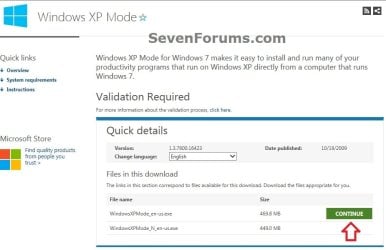
1. Go to the Windows XP Mode webpage, select your language, and click on the Continue button. (see screenshot below)
XP-Mode-1.jpg
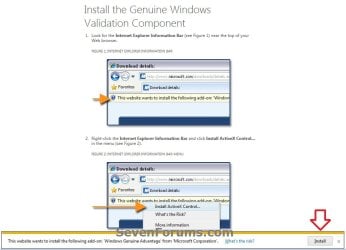
2. If you have not already, you will need to validate your Windows 7 first. Click on Install to install the Genuine Windows Validation Component, or follow on screen instructions. (see screenshot below)
NOTE: You will need to have Windows 7 activated and cookies enabled to be able to do this.
Validate-1.jpg
3. Download and Install Windows XP Mode
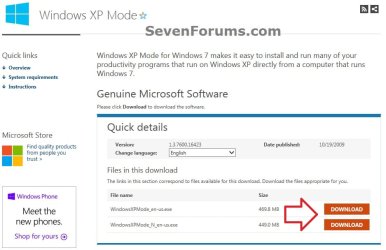
A) Select your language, and click on the Download button for the version (ex: WindowsXPMode_en-us.exe) you want to download. (see screenshot below)
NOTE: The "N" version of Windows XP is for the European version of Windows.
XP-Mode-2.jpg
B) Save the WindowsXPMode_en-us.exe file to your desktop.
C) Double click on the downloaded WindowsXPMode_en-us.exe installation file to start installing it.
NOTE: The part of the name in red will vary for you depending on what language you selected (step 1).

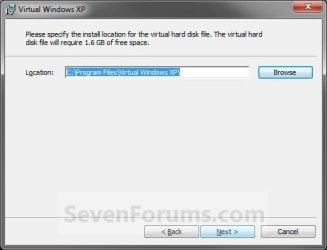
D) Click on the Next button. (see screenshot below)
NOTE: If you like, you could click on Browse and select another location to save the VHD file for XP Mode to instead of the default location in the screenshot below.
Install_VXP-1.jpg
E) Click on the Next button. (see screenshot below)
Install_VXP-UAC-2.jpg
F) If prompted by UAC, click on Yes.

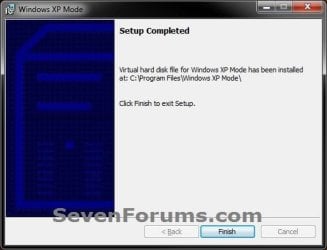
G) When Windows XP Mode is finished installing, click on the Finish button. (See screenshot below)
Install_VXP-3.jpg
4. Download and Install Windows Virtual PC
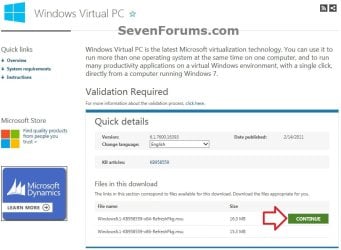
A) At the Windows Virtual PC webpage, select your language, and click on the Continue button. (see screenshot below)
Windows_Virtual-PC-1.jpg
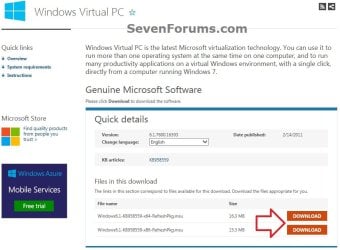
B) Select your language, and click on the Download button for either the Windows6.1-KB958559-x86-RefreshPkg.msu (32-bit) or Windows6.1-KB958559-x64-RefreshPkg.msu (64-bit) file for your same 32-bit or 64-bit Windows 7 version you have installed.

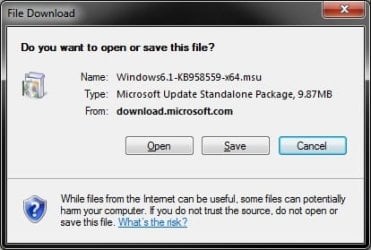
C) Save the Windows6.1-KB958559-x86-RefreshPkg.msu or Windows6.1-KB958559-x64-RefreshPkg.msu file to your desktop. (see screenshot below)
Windows_Virtual-PC-2.jpg
D) Double click on the downloaded Windows6.1-KB958559-x86-RefreshPkg.msu or Windows6.1-KB958559-x64-RefreshPkg.msu file to start installing it.

E) If prompted by UAC, click on Yes.
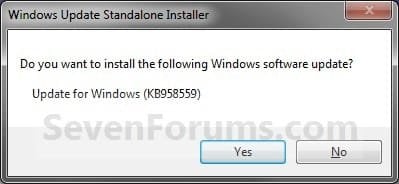
F) Click on Yes. (see screenshot below)
Install-1.jpg
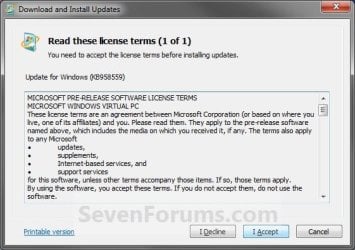
G) Click on the I Accept button. (see screenshot below)
Install-2.jpg
H) When it is finished, click on the Restart Now button. (see screenshot below)
WARNING: This will restart your computer immediately. Be sure to save and close anything that you have open first.
Install-3.jpg
I) When the computer is finished restarting, continue on to step 6 below.
5. To Open and Run Windows XP Mode
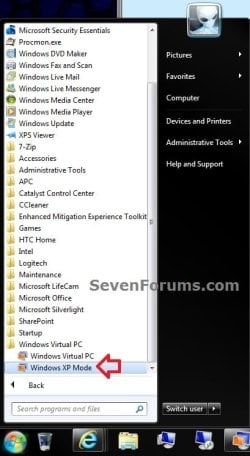
A) Open the Start Menu, then click on All Programs, expand the Windows Virtual PC folder, and double click on the Windows XP Mode shortcut. (see screenshot below)
XP-1.jpg
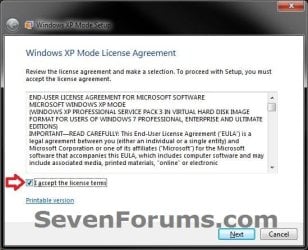
6. Check the I accept box, then click on the Next button. (see screenshot below)
Step1B.jpg
7. Type in a password and type it in again to confirm it, then click on the Next button. (see screenshot below)
NOTE: If you would like to be logged on automatically whenever you open Windows XP Mode (step 5), then check the Remember credentials box.
XP-2.jpg
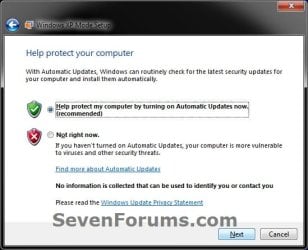
8. Select (dot) the Help protect my computer by turning on Automatic Updates now box, then click on the Next button. (see screenshot below)
XP-3.jpg
9. Click on the Start Setup button. (see screenshot below)
XP-4.jpg
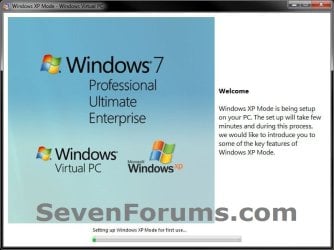
10. You will now see this for a few moments while Windows XP Mode is being setup. (see screeshot below)
Step4B.jpg
11. When setup is finished and you did not check the Remember credentials box in step 7 above, then you will need to enter your password entered and click on OK. If you did, then skip this and continue on to step 12. (see screenshot below)
XP-5.jpg
12. The Windows XP Mode - Windows Virtual PC window will now open. You are now in Windows XP Mode. (see screenshot below)
Example.jpg
13. Next, be sure to install Integration Components and enable Integration Features.
NOTE: Sometimes this will be enabled for you automatically during installation.

14. Set Windows XP Mode Settings
A) In the Windows XP Mode window, click on Tools (menu bar) and Settings. (see screenshot above)

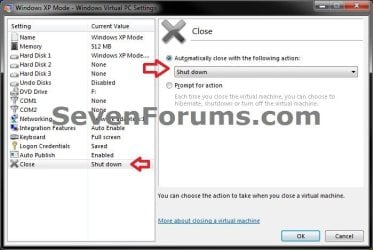
B) In the left pane, select Close/Shut Down. (see screenshot below)
Shut-Down.jpg
C) In the right pane, select (dot) Automatically close with the following action, then select Shut Down and click on OK. (see screenshot above)
15. To Close Windows XP Mode
A) Click on the X in the upper right corner of the Windows XP Mode window like you would any other window in Windows 7. (see screenshot below step 19)

OR

B) In the Windows XP Mode window, click on Action (menu bar) and Close. (see screenshot below step 16)
16. Installing a Program in Windows XP Mode
NOTE: You would install a program in Virtual Windows XP just like you would in Windows 7 with the same access to everything in Windows 7. For example, hard drives, DVD drives, USB drives, Windows 7 folders and files, etc.....
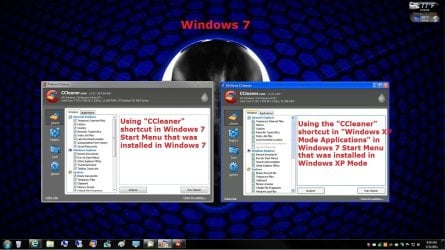
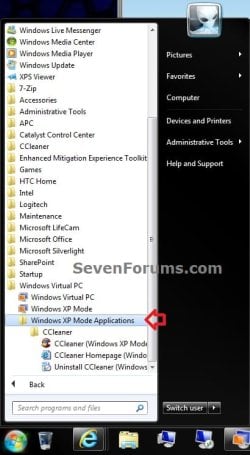
A) After you have installed any program (ex: CCleaner) in Windows XP Mode, you will notice that there will now also be a shortcut to it in the Windows 7 Start Menu in the Windows XP Mode Applications folder under Windows Virtual PC and Windows XP Mode. (see screenshot below)
NOTE: Double clicking on the program's shortcut (ex: CCleaner) in the Windows 7 Start Menu when Windows XP Mode is closed will open and run the program in Windows 7 but as if it you were running it in Windows XP Mode. You could also move or copy this Windows XP Mode Applications shortcut where you like in Windows 7 for easy use.
XP-6.jpg

Program_Example.jpg

That's it,
Shawn


Attachments

  • Virtual-PC_Save.jpg
    Virtual-PC_Save.jpg
    40 KB · Views: 2,157
Last edited:
Where can I find and download Windows XP Mode today for Windows 7?
To setup Windows XP Mode:

  1. Download & install Windows XP Mode
  2. Download & install Windows Virtual PC
Windows XP Mode
Windows XP Mode - Free download and software reviews - CNET Download

Filename: WindowsXPMode_en-us.exe | Filesize: 469 MB (492,597,008 bytes)

Windows Virtual PC (32-bit)
Windows Virtual PC (32-bit) - Free download and software reviews - CNET Download

Filename: Windows6.1-KB958559-x86-RefreshPkg.msu | Filesize: 15.3 MB (16,070,039 bytes)

Windows Virtual PC (64-bit)
Windows Virtual PC (64-bit) - Free download and software reviews - CNET Download

Filename: Windows6.1-KB958559-x64-RefreshPkg.msu | Filesize: 16.2 MB (17,091,624 bytes)
 

My Computers

System One System Two

  • Computer type
    PC/Desktop
    Computer Manufacturer/Model Number
    Custom build
    OS
    Windows 7 Home Premium 64-bits
    CPU
    AMD FX-8350
    Motherboard
    Gigabyte GA-990FXA-UD3 (AM3+)
    Memory
    GSKILL Ripjaw-X PC3 12800 8GB (2x4GB)
    Graphics Card(s)
    ASUS ROG STRIX GTX 1060 6GB
    Sound Card
    Integrated
    Monitor(s) Displays
    Asus VE228H (21.5-in)
    Screen Resolution
    1920x1080 60Hz
    Hard Drives
    SAMSUNG 870 EVO 2.5 Inch SATA SSD (1TB)
    SAMSUNG 870 EVO 2.5 Inch SATA SSD (1TB)
    SAMSUNG 870 EVO 2.5 Inch SATA SSD (1TB)
    PSU
    Corsair RM750x (750 watts)
    Case
    Corsair Carbide Series 200R
    Cooling
    Corsair Hydro Series H60 (CWCH60)
    Keyboard
    Logitech Elite
    Mouse
    Logitech M510 Wireless Mouse
    Internet Speed
    Comcast Gigabit Extra (1200Mbps down / 35Mbps up)
    Antivirus
    Malwarebytes
    Browser
    Firefox, Edge, Chrome
    Other Info
    ASUS DRW-24B1ST DVD-RW (24X) optical drive
    Seagate Expansion Desk (5TB) external SATA/USB HDD
    Comcast XB8 Internet Gateway
  • Computer type
    PC/Desktop
    System Manufacturer/Model Number
    Custom
    OS
    Windows 7 Pro (64-bit)
    CPU
    AMD Phenom II 960T X4
    Motherboard
    ASUS M4N82 Deluxe
    Memory
    Corsair XMS2 DDR2-800 8GB (4x2GB)
    Graphics Card(s)
    ASUS ENGTX560 DCII OC/2DI/1GD5 1GB
    Monitor(s) Displays
    Samsung 930B 19-inch LCD
    Screen Resolution
    1280x1024
    Hard Drives
    Samsung SSD 870 EVO 1000 GB (Windows 10)
    Seagate ST1000DM003 1000 GB (Windows 7)
    PSU
    Antec TruePower (new) TP-650
    Case
    Antec Three Hundred
    Cooling
    AMD stock cooler from FX8350
    Mouse
    Logitech M100
    Internet Speed
    Xfinity Gigabit Extra 1200/35 Mbps
I prefer VirtualBox. It works very well with Windows XP. Windows XP mode is not that good, and it is no longer available for download.
 

My Computer

Computer type
PC/Desktop
Computer Manufacturer/Model Number
BIOS: BIOS Date: 08/20/18 12:33:01 Ver: 05.0000D.
OS
Windows 7
CPU
Processor: AMD Ryzen 7 - 1800X - 8 Core Processor - 3.6GHz.
Motherboard
AMD Ryzen 7 - 1800X - 8 Core Processor.
Memory
16 GB RAM.
Graphics Card(s)
NVIDIA GeForce GTX 1060 6GB.
Sound Card
NVIDIA/Realtek High Definition Audio.
Monitor(s) Displays
Generic PnP Monitor.
Screen Resolution
1920x1080
Hard Drives
8TB Hard Drives.
PSU
Current Setting: {5C67A112-A4C9-483F-B4A7-1D473BECAFDC}.
Case
Antec.
Cooling
N/A
Keyboard
HID Keyboard Device.
Mouse
HID Compliant Mouse.
Internet Speed
Broadband 20MB.
Antivirus
Microsoft Security Essentials, Win/MS Defender, Malwarebytes
Browser
Microsoft Edge, Internet Explorer, Google Chrome, Opera.
Other Info
Since I am using Windows 7 a lot for creating .themepack theme files, I need to have access to the SevenForums to view and download cursor packs for Windows 7 when I create fully customized themes. This website has many dazzling cursor packs available for download where users can apply them to suit the good mood look for Windows 7 to make it more attractive.
No. I have not tried. I use VirtualBox and it works better. I prefer VirtualBox over anything else. It is so versatile as well.
 

My Computer

Computer type
PC/Desktop
Computer Manufacturer/Model Number
BIOS: BIOS Date: 08/20/18 12:33:01 Ver: 05.0000D.
OS
Windows 7
CPU
Processor: AMD Ryzen 7 - 1800X - 8 Core Processor - 3.6GHz.
Motherboard
AMD Ryzen 7 - 1800X - 8 Core Processor.
Memory
16 GB RAM.
Graphics Card(s)
NVIDIA GeForce GTX 1060 6GB.
Sound Card
NVIDIA/Realtek High Definition Audio.
Monitor(s) Displays
Generic PnP Monitor.
Screen Resolution
1920x1080
Hard Drives
8TB Hard Drives.
PSU
Current Setting: {5C67A112-A4C9-483F-B4A7-1D473BECAFDC}.
Case
Antec.
Cooling
N/A
Keyboard
HID Keyboard Device.
Mouse
HID Compliant Mouse.
Internet Speed
Broadband 20MB.
Antivirus
Microsoft Security Essentials, Win/MS Defender, Malwarebytes
Browser
Microsoft Edge, Internet Explorer, Google Chrome, Opera.
Other Info
Since I am using Windows 7 a lot for creating .themepack theme files, I need to have access to the SevenForums to view and download cursor packs for Windows 7 when I create fully customized themes. This website has many dazzling cursor packs available for download where users can apply them to suit the good mood look for Windows 7 to make it more attractive.
I see.

my old C/C++ was running on Windows Virtual PC which was good for my apps.


@MisterEd

Anyway to run it on Windows 11? or 10?

Just tried. no go. Windows 7 only.
 

My Computers

System One System Two

  • Computer type
    PC/Desktop
    Computer Manufacturer/Model Number
    HP Elite 800 G5
    OS
    Windows 7 Pro 64-bit
    CPU
    I7-9700
    Memory
    32 GB
  • Computer type
    Laptop
    System Manufacturer/Model Number
    ASUS UX305C
    OS
    Windows 7 Pro 64-bit
Only use the latest version of VirtualBox on Windows 10 and Windows 11 to get the very best of Windows XP running on VirtualBox.
 

My Computer

Computer type
PC/Desktop
Computer Manufacturer/Model Number
BIOS: BIOS Date: 08/20/18 12:33:01 Ver: 05.0000D.
OS
Windows 7
CPU
Processor: AMD Ryzen 7 - 1800X - 8 Core Processor - 3.6GHz.
Motherboard
AMD Ryzen 7 - 1800X - 8 Core Processor.
Memory
16 GB RAM.
Graphics Card(s)
NVIDIA GeForce GTX 1060 6GB.
Sound Card
NVIDIA/Realtek High Definition Audio.
Monitor(s) Displays
Generic PnP Monitor.
Screen Resolution
1920x1080
Hard Drives
8TB Hard Drives.
PSU
Current Setting: {5C67A112-A4C9-483F-B4A7-1D473BECAFDC}.
Case
Antec.
Cooling
N/A
Keyboard
HID Keyboard Device.
Mouse
HID Compliant Mouse.
Internet Speed
Broadband 20MB.
Antivirus
Microsoft Security Essentials, Win/MS Defender, Malwarebytes
Browser
Microsoft Edge, Internet Explorer, Google Chrome, Opera.
Other Info
Since I am using Windows 7 a lot for creating .themepack theme files, I need to have access to the SevenForums to view and download cursor packs for Windows 7 when I create fully customized themes. This website has many dazzling cursor packs available for download where users can apply them to suit the good mood look for Windows 7 to make it more attractive.
I have downloaded VirtualBox and am testing it.

Do it include XP mode? or XP needs to be installed?

no problem, I have XP CD. well, it's noticed that VirtualBox takes only *iso.

If install, anyway to let VirtualBox installs XP from my CD?


Wait,
XP install media just 4xx MB. when my trying to download from archive.org, why the ios is some 5.1 GB? :sarc:
 

My Computers

System One System Two

  • Computer type
    PC/Desktop
    Computer Manufacturer/Model Number
    HP Elite 800 G5
    OS
    Windows 7 Pro 64-bit
    CPU
    I7-9700
    Memory
    32 GB
  • Computer type
    Laptop
    System Manufacturer/Model Number
    ASUS UX305C
    OS
    Windows 7 Pro 64-bit
I am glad to hear that you have downloaded and installed VirtualBox on your computer. VirtualBox is a guest virtual machine virtualization software. It does not come with any operating system at all. All you need to do, is to create a virtual machine yourself, then download a Windows XP iso from Archive.org and mount the iso to its virtual CD disk drive and reset the virtual machine to boot from the iso image file. Follow the instruction as you would usually do on a real host XP machine to install Windows XP on your virtual machine.

Before running the installation, you will need to go to your disk drive settings within your virtual machine to create a hard disk drive. Create a virtual hard disk drive of at least 4GB in size. Bear in mind that the maximum allowed hard disk drive capacity for Windows XP is 2TB because MBR only supports up to that size.

Please note that Archive.org have many versions of Windows XP. A typical unmodified version of Windows XP - SP1 to SP3 would consist of a file size of anywhere between 488MB to 650MB in size. If the iso you are attempting to download it 1GB or more, then it has been slipstreamed with updates to the operating system files. In some cases, some Windows XP iso files are 5GB or more due to tonnes of bloatware and unnecessary software which has been slipstreamed in the modified iso file.

If you are interested in making your own custom Windows XP iso file, you can use a free program called Nlite, which allowed you to either remove or add items in your Windows XP iso file. First, you will need to extract all the files and folders of the iso onto a folder location on your hard drive before performing any slipstreaming actions.

I am just like you, a great fan of Windows XP, and I have many different installations on Windows XP on virtual machines, using VirtualBox and even on some laptops as well. Windows XP shall always remain my all-time favourite version of Windows ever.

Good luck.
 

My Computer

Computer type
PC/Desktop
Computer Manufacturer/Model Number
BIOS: BIOS Date: 08/20/18 12:33:01 Ver: 05.0000D.
OS
Windows 7
CPU
Processor: AMD Ryzen 7 - 1800X - 8 Core Processor - 3.6GHz.
Motherboard
AMD Ryzen 7 - 1800X - 8 Core Processor.
Memory
16 GB RAM.
Graphics Card(s)
NVIDIA GeForce GTX 1060 6GB.
Sound Card
NVIDIA/Realtek High Definition Audio.
Monitor(s) Displays
Generic PnP Monitor.
Screen Resolution
1920x1080
Hard Drives
8TB Hard Drives.
PSU
Current Setting: {5C67A112-A4C9-483F-B4A7-1D473BECAFDC}.
Case
Antec.
Cooling
N/A
Keyboard
HID Keyboard Device.
Mouse
HID Compliant Mouse.
Internet Speed
Broadband 20MB.
Antivirus
Microsoft Security Essentials, Win/MS Defender, Malwarebytes
Browser
Microsoft Edge, Internet Explorer, Google Chrome, Opera.
Other Info
Since I am using Windows 7 a lot for creating .themepack theme files, I need to have access to the SevenForums to view and download cursor packs for Windows 7 when I create fully customized themes. This website has many dazzling cursor packs available for download where users can apply them to suit the good mood look for Windows 7 to make it more attractive.
I see.
my old C/C++ was running on Windows Virtual PC which was good for my apps.
@MisterEd
Anyway to run it on Windows 11? or 10?
Just tried. no go. Windows 7 only.
Windows XP Mode is a free addon to Windows 7 Pro, Ultimate, or Enterprise only. It runs as a guest OS in Windows Virtual PC.
You can install Windows XP Mode in a Windows 7 Pro or Ultimate virtual machine on Windows 10 or Windows 11.

Note the download links for XP Mode still work. The only gotcha is you have to learn to work around the popup adds.

I have VMware Workstation Pro on my laptop with Windows 11 Pro. I created Windows 7 Pro virtual machine with it. In the Windows 7 virtual machine I installed XP Mode as seen in the screenshot below.

XP_Mode.jpg

If you only want Windows XP you can create a virtual machine for it. Here is a Windows XP Pro virtual machine created in VMware Workstation Pro.

Windows XP Pro.jpg
 

My Computers

System One System Two

  • Computer type
    PC/Desktop
    Computer Manufacturer/Model Number
    Custom build
    OS
    Windows 7 Home Premium 64-bits
    CPU
    AMD FX-8350
    Motherboard
    Gigabyte GA-990FXA-UD3 (AM3+)
    Memory
    GSKILL Ripjaw-X PC3 12800 8GB (2x4GB)
    Graphics Card(s)
    ASUS ROG STRIX GTX 1060 6GB
    Sound Card
    Integrated
    Monitor(s) Displays
    Asus VE228H (21.5-in)
    Screen Resolution
    1920x1080 60Hz
    Hard Drives
    SAMSUNG 870 EVO 2.5 Inch SATA SSD (1TB)
    SAMSUNG 870 EVO 2.5 Inch SATA SSD (1TB)
    SAMSUNG 870 EVO 2.5 Inch SATA SSD (1TB)
    PSU
    Corsair RM750x (750 watts)
    Case
    Corsair Carbide Series 200R
    Cooling
    Corsair Hydro Series H60 (CWCH60)
    Keyboard
    Logitech Elite
    Mouse
    Logitech M510 Wireless Mouse
    Internet Speed
    Comcast Gigabit Extra (1200Mbps down / 35Mbps up)
    Antivirus
    Malwarebytes
    Browser
    Firefox, Edge, Chrome
    Other Info
    ASUS DRW-24B1ST DVD-RW (24X) optical drive
    Seagate Expansion Desk (5TB) external SATA/USB HDD
    Comcast XB8 Internet Gateway
  • Computer type
    PC/Desktop
    System Manufacturer/Model Number
    Custom
    OS
    Windows 7 Pro (64-bit)
    CPU
    AMD Phenom II 960T X4
    Motherboard
    ASUS M4N82 Deluxe
    Memory
    Corsair XMS2 DDR2-800 8GB (4x2GB)
    Graphics Card(s)
    ASUS ENGTX560 DCII OC/2DI/1GD5 1GB
    Monitor(s) Displays
    Samsung 930B 19-inch LCD
    Screen Resolution
    1280x1024
    Hard Drives
    Samsung SSD 870 EVO 1000 GB (Windows 10)
    Seagate ST1000DM003 1000 GB (Windows 7)
    PSU
    Antec TruePower (new) TP-650
    Case
    Antec Three Hundred
    Cooling
    AMD stock cooler from FX8350
    Mouse
    Logitech M100
    Internet Speed
    Xfinity Gigabit Extra 1200/35 Mbps
I see. I like the screenshots, but I prefer to use Windows XP on VirtualBox. What is the maximum possible resolution that you can obtain in Windows XP Mode?

In VirtualBox I can obtain a maximum resolution of 1600x1200.
 

My Computer

Computer type
PC/Desktop
Computer Manufacturer/Model Number
BIOS: BIOS Date: 08/20/18 12:33:01 Ver: 05.0000D.
OS
Windows 7
CPU
Processor: AMD Ryzen 7 - 1800X - 8 Core Processor - 3.6GHz.
Motherboard
AMD Ryzen 7 - 1800X - 8 Core Processor.
Memory
16 GB RAM.
Graphics Card(s)
NVIDIA GeForce GTX 1060 6GB.
Sound Card
NVIDIA/Realtek High Definition Audio.
Monitor(s) Displays
Generic PnP Monitor.
Screen Resolution
1920x1080
Hard Drives
8TB Hard Drives.
PSU
Current Setting: {5C67A112-A4C9-483F-B4A7-1D473BECAFDC}.
Case
Antec.
Cooling
N/A
Keyboard
HID Keyboard Device.
Mouse
HID Compliant Mouse.
Internet Speed
Broadband 20MB.
Antivirus
Microsoft Security Essentials, Win/MS Defender, Malwarebytes
Browser
Microsoft Edge, Internet Explorer, Google Chrome, Opera.
Other Info
Since I am using Windows 7 a lot for creating .themepack theme files, I need to have access to the SevenForums to view and download cursor packs for Windows 7 when I create fully customized themes. This website has many dazzling cursor packs available for download where users can apply them to suit the good mood look for Windows 7 to make it more attractive.
hmm, hitting a barrier

no way to activate XP CD-key (its server non-existing any more) :p

WINXPSP3install.png


I made iso using my XP CD, NOT the copy from archive.org.
 

My Computers

System One System Two

  • Computer type
    PC/Desktop
    Computer Manufacturer/Model Number
    HP Elite 800 G5
    OS
    Windows 7 Pro 64-bit
    CPU
    I7-9700
    Memory
    32 GB
  • Computer type
    Laptop
    System Manufacturer/Model Number
    ASUS UX305C
    OS
    Windows 7 Pro 64-bit
You are wrong. It is possible to active Windows XP. For that, you need to download another valid iso image. When iso images are modified, you can get this error due to the registry keys being corrupt.
 

My Computer

Computer type
PC/Desktop
Computer Manufacturer/Model Number
BIOS: BIOS Date: 08/20/18 12:33:01 Ver: 05.0000D.
OS
Windows 7
CPU
Processor: AMD Ryzen 7 - 1800X - 8 Core Processor - 3.6GHz.
Motherboard
AMD Ryzen 7 - 1800X - 8 Core Processor.
Memory
16 GB RAM.
Graphics Card(s)
NVIDIA GeForce GTX 1060 6GB.
Sound Card
NVIDIA/Realtek High Definition Audio.
Monitor(s) Displays
Generic PnP Monitor.
Screen Resolution
1920x1080
Hard Drives
8TB Hard Drives.
PSU
Current Setting: {5C67A112-A4C9-483F-B4A7-1D473BECAFDC}.
Case
Antec.
Cooling
N/A
Keyboard
HID Keyboard Device.
Mouse
HID Compliant Mouse.
Internet Speed
Broadband 20MB.
Antivirus
Microsoft Security Essentials, Win/MS Defender, Malwarebytes
Browser
Microsoft Edge, Internet Explorer, Google Chrome, Opera.
Other Info
Since I am using Windows 7 a lot for creating .themepack theme files, I need to have access to the SevenForums to view and download cursor packs for Windows 7 when I create fully customized themes. This website has many dazzling cursor packs available for download where users can apply them to suit the good mood look for Windows 7 to make it more attractive.
So, my home-made iso is "corrupted" :D (I was thinking cleaner)
 
Last edited:

My Computers

System One System Two

  • Computer type
    PC/Desktop
    Computer Manufacturer/Model Number
    HP Elite 800 G5
    OS
    Windows 7 Pro 64-bit
    CPU
    I7-9700
    Memory
    32 GB
  • Computer type
    Laptop
    System Manufacturer/Model Number
    ASUS UX305C
    OS
    Windows 7 Pro 64-bit
If you got a corrupt iso, then download another iso from Archive.org. There are plenty of Windows XP iso images there. Keep trying them until you find one that works.
 

My Computer

Computer type
PC/Desktop
Computer Manufacturer/Model Number
BIOS: BIOS Date: 08/20/18 12:33:01 Ver: 05.0000D.
OS
Windows 7
CPU
Processor: AMD Ryzen 7 - 1800X - 8 Core Processor - 3.6GHz.
Motherboard
AMD Ryzen 7 - 1800X - 8 Core Processor.
Memory
16 GB RAM.
Graphics Card(s)
NVIDIA GeForce GTX 1060 6GB.
Sound Card
NVIDIA/Realtek High Definition Audio.
Monitor(s) Displays
Generic PnP Monitor.
Screen Resolution
1920x1080
Hard Drives
8TB Hard Drives.
PSU
Current Setting: {5C67A112-A4C9-483F-B4A7-1D473BECAFDC}.
Case
Antec.
Cooling
N/A
Keyboard
HID Keyboard Device.
Mouse
HID Compliant Mouse.
Internet Speed
Broadband 20MB.
Antivirus
Microsoft Security Essentials, Win/MS Defender, Malwarebytes
Browser
Microsoft Edge, Internet Explorer, Google Chrome, Opera.
Other Info
Since I am using Windows 7 a lot for creating .themepack theme files, I need to have access to the SevenForums to view and download cursor packs for Windows 7 when I create fully customized themes. This website has many dazzling cursor packs available for download where users can apply them to suit the good mood look for Windows 7 to make it more attractive.
I see. I like the screenshots, but I prefer to use Windows XP on VirtualBox. What is the maximum possible resolution that you can obtain in Windows XP Mode?
In VirtualBox I can obtain a maximum resolution of 1600x1200.
Windows 11 laptop resolution: 1920x1080
VMware Workstation Pro
Windows 7 : Resolution: 1920x1080 (or 2048x1536) Windows XP Mode: Available Resolutions: 1440x837

I also have Windows 7 Pro in VirtualBox. XP Mode installed OK but it always crashes every time I try to run it.

- - - Updated - - -

You are wrong. It is possible to active Windows XP. For that, you need to download another valid iso image. When iso images are modified, you can get this error due to the registry keys being corrupt.
I installed Windows XP Pro on two computers a couple years ago. Online and phone activation did not work. I had to call Microsoft support and have an agent help me activate both computers.

The problem with Windows XP is that unless you activate it within 30 days you can't log in anymore. Whenever you try to log in there is a popup that wants you to activate it. If you cancel that you are logged off.

The problem with Windows XP and Windows 7 is that you can't buy keys anymore. I would buy a few more if they were available. I have given up on that and use a workaround I found on XPForums. I know that purists will object to that and insist on official activations from Microsoft. However, when I last did that the agent seemed either annoyed or bored. I bet Microsoft really doesn't care about Microsoft XP anymore.
 

My Computers

System One System Two

  • Computer type
    PC/Desktop
    Computer Manufacturer/Model Number
    Custom build
    OS
    Windows 7 Home Premium 64-bits
    CPU
    AMD FX-8350
    Motherboard
    Gigabyte GA-990FXA-UD3 (AM3+)
    Memory
    GSKILL Ripjaw-X PC3 12800 8GB (2x4GB)
    Graphics Card(s)
    ASUS ROG STRIX GTX 1060 6GB
    Sound Card
    Integrated
    Monitor(s) Displays
    Asus VE228H (21.5-in)
    Screen Resolution
    1920x1080 60Hz
    Hard Drives
    SAMSUNG 870 EVO 2.5 Inch SATA SSD (1TB)
    SAMSUNG 870 EVO 2.5 Inch SATA SSD (1TB)
    SAMSUNG 870 EVO 2.5 Inch SATA SSD (1TB)
    PSU
    Corsair RM750x (750 watts)
    Case
    Corsair Carbide Series 200R
    Cooling
    Corsair Hydro Series H60 (CWCH60)
    Keyboard
    Logitech Elite
    Mouse
    Logitech M510 Wireless Mouse
    Internet Speed
    Comcast Gigabit Extra (1200Mbps down / 35Mbps up)
    Antivirus
    Malwarebytes
    Browser
    Firefox, Edge, Chrome
    Other Info
    ASUS DRW-24B1ST DVD-RW (24X) optical drive
    Seagate Expansion Desk (5TB) external SATA/USB HDD
    Comcast XB8 Internet Gateway
  • Computer type
    PC/Desktop
    System Manufacturer/Model Number
    Custom
    OS
    Windows 7 Pro (64-bit)
    CPU
    AMD Phenom II 960T X4
    Motherboard
    ASUS M4N82 Deluxe
    Memory
    Corsair XMS2 DDR2-800 8GB (4x2GB)
    Graphics Card(s)
    ASUS ENGTX560 DCII OC/2DI/1GD5 1GB
    Monitor(s) Displays
    Samsung 930B 19-inch LCD
    Screen Resolution
    1280x1024
    Hard Drives
    Samsung SSD 870 EVO 1000 GB (Windows 10)
    Seagate ST1000DM003 1000 GB (Windows 7)
    PSU
    Antec TruePower (new) TP-650
    Case
    Antec Three Hundred
    Cooling
    AMD stock cooler from FX8350
    Mouse
    Logitech M100
    Internet Speed
    Xfinity Gigabit Extra 1200/35 Mbps
I was at MDL to search a solution of XP activation on VB. finally got it.

my VB test has been completed, with Office 97 SR2 installation. (I have a suite of XP SP3, Office97 SR2, all with CD-key. but never get a chance to test on a "modern" computer). my HP no CD/DVD-ROM. Dell does. hence this test has to run on Dell.

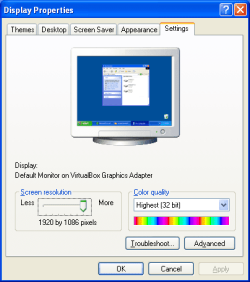
For good performance, need to install VirtualBox Extension Pack (to take advantage of large screen and high resolution)

1920 x 1086

image.png

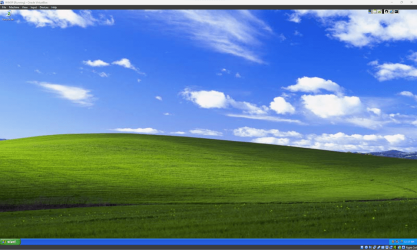
Full screen with Office 97 SR2 installation

image.png
 

My Computers

System One System Two

  • Computer type
    PC/Desktop
    Computer Manufacturer/Model Number
    HP Elite 800 G5
    OS
    Windows 7 Pro 64-bit
    CPU
    I7-9700
    Memory
    32 GB
  • Computer type
    Laptop
    System Manufacturer/Model Number
    ASUS UX305C
    OS
    Windows 7 Pro 64-bit
They're still a gem, they're still Windows, but with improvements and changes. We're still TEAM Windows. Even if it's on 11.
 

My Computer

Computer type
Laptop
Computer Manufacturer/Model Number
HP
OS
Windows 7 Ultimate x64
CPU
AMD E-450 APU with Raedon(tm) HD Graphics (2 CPUs), ~1.6GHz
Motherboard
Hewlett-Packard
Memory
6 GB
Graphics Card(s)
AMD Raedon HD 6320 Graphics
Sound Card
High Definition Audio
Monitor(s) Displays
Monitor PnP Generic
Screen Resolution
1024 x 728 (32 bit) (60Hz)
Keyboard
HP Key
Mouse
Perfect Choice
Internet Speed
1 MB/S
Antivirus
Windows Defender
Browser
Google Chrome
After all those years that Windows XP is out of support, it is very impressive and seeing those screenshots makes me want to use it. That Bliss wallpaper brings such nostalgia and love to this unforgettable experience that me and other users had using Windows XP. I still use it today on VirtualBox and on my old computers at home.
 

My Computer

Computer type
PC/Desktop
Computer Manufacturer/Model Number
BIOS: BIOS Date: 08/20/18 12:33:01 Ver: 05.0000D.
OS
Windows 7
CPU
Processor: AMD Ryzen 7 - 1800X - 8 Core Processor - 3.6GHz.
Motherboard
AMD Ryzen 7 - 1800X - 8 Core Processor.
Memory
16 GB RAM.
Graphics Card(s)
NVIDIA GeForce GTX 1060 6GB.
Sound Card
NVIDIA/Realtek High Definition Audio.
Monitor(s) Displays
Generic PnP Monitor.
Screen Resolution
1920x1080
Hard Drives
8TB Hard Drives.
PSU
Current Setting: {5C67A112-A4C9-483F-B4A7-1D473BECAFDC}.
Case
Antec.
Cooling
N/A
Keyboard
HID Keyboard Device.
Mouse
HID Compliant Mouse.
Internet Speed
Broadband 20MB.
Antivirus
Microsoft Security Essentials, Win/MS Defender, Malwarebytes
Browser
Microsoft Edge, Internet Explorer, Google Chrome, Opera.
Other Info
Since I am using Windows 7 a lot for creating .themepack theme files, I need to have access to the SevenForums to view and download cursor packs for Windows 7 when I create fully customized themes. This website has many dazzling cursor packs available for download where users can apply them to suit the good mood look for Windows 7 to make it more attractive.
Back
Top