
When I first established my Windows7 vpn Connection to our corporate Network I was on a WWAN-Connection through my providers HSDPA-Modem. Now when I try to reuse this vpn-Connection in a local Network or Wifi-Network its stuck to using the WWAN-Modem (which is not present at that time!) even if I try to establish a NEW vpn-Connection through Network Management Center this also gets stuck to the WWAN-Modem as you might see on the 1st screenshot.
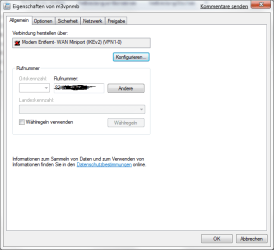
Where it is actually frightening enough that the IP4-Adress (marked unredable on the screenshot) of the corporate vpn-Gateway is called a "dialing number" in the very dialogue.
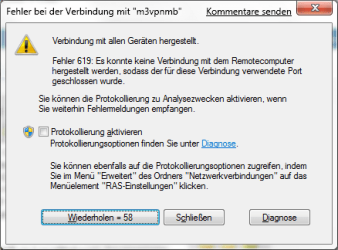
If i'm now trying to conect t the vpn in a Wifi or LocalNetwork Environment I get only an error message, that the modem is not present as you might see on the 2nd screenshot.
On Vista the same procedure for establishing and reusing a vpn-Connection worked 100% percent well. Why did those change a thing that was working in Vista to a thing that is rubbish in the succesor?
Anyone who found a solution until today for that ?
Any coments welcome.
reagards
Michael
Where it is actually frightening enough that the IP4-Adress (marked unredable on the screenshot) of the corporate vpn-Gateway is called a "dialing number" in the very dialogue.
If i'm now trying to conect t the vpn in a Wifi or LocalNetwork Environment I get only an error message, that the modem is not present as you might see on the 2nd screenshot.
On Vista the same procedure for establishing and reusing a vpn-Connection worked 100% percent well. Why did those
change a thing that was working in Vista to a thing that is rubbish in the succesor?Anyone who found a solution until today for that ?
Any coments welcome.
reagards
Michael
My Computer
At a glance
Windows7
- OS
- Windows7
