Windows's 7 memory

Dj Aligator

New member
Local time
5:51 PM
Messages
42
I have 3.5GB ram and with hard i can maintain 1.5gb free. If i play a game or do something that process a little the pc i get just 400mb free ram and that slow my pc the graphic of a game start to mess up.

Is there a way to have a good memory on x32 or i must upgrade it to x64?

CPU E8600
3.5GB RAM
 

My Computer

OS
Windows 7
There are a couple of things that you can do... Open up msconfig from a command prompt and check the startup tab .... disable everything that you dont need...I only run my antivirus and firewall ... Open up your task manager and check what process are running...some of these can also be ended, and free up more memory... Hope this helps ;)
 

My Computer

Computer type
PC/Desktop
Computer Manufacturer/Model Number
LENOVO K450 @3.0GHZ
OS
64-bit Windows 8.1 Pro
CPU
Core(TM) i5 CPU 4330 Haswell @ 3.20GHz
Motherboard
LENOVO
Memory
12.00 GB
Graphics Card(s)
Intel(R) HD Graphics
Sound Card
Intel HD integtrated
Monitor(s) Displays
HP 25' ISP Monitor
Screen Resolution
1900/1020
Hard Drives
(1) ST1000DM003-1CH162 (2) Generic STORAGE DEVICE USB Device (3) Generic STORAGE DEVICE USB Device
Internet Speed
100mb down/10mb up
the problem is that i need that programs to run. Some of them are for windows and some are for other application that i use.
 

My Computer

OS
Windows 7
the problem is that i need that programs to run. Some of them are for windows and some are for other application that i use.

This is always a compromise - what you have to do is be very harsh and think about each entry - "do I need this running all the time or can I load it only when I need it". A lot of programs we use will automatically add a "helper App" to the start-up, these are rarely actually needed to run the full app but they do take up memory.

One thing I have seen done before is to set up a special user that does not have any unneeded start-up programs, just for gaming, if you are not playing online games then you can even do without your AV and Firewall - but this will take a lot of thought and quite a bit of tinkering with start-ups so is not for the feint hearted
 

My Computers

System One System Two

  • Computer type
    PC/Desktop
    Computer Manufacturer/Model Number
    ChillBlast - Custom to my design
    OS
    Windows 11 Pro x64 [Latest Release and Release Preview]
    CPU
    Ryzen 9 5950X, 3.8 - 5.2 MHz
    Motherboard
    Asus Prime X570-Pro
    Memory
    64GB [2 x 32GB] DDR4 3200MHz
    Graphics Card(s)
    4GB NVIDIA GEFORCE GTX 1650 Ti
    Sound Card
    On-board SPDIF to 5.1 System + HDMI [5.1 system]
    Monitor(s) Displays
    32" UHD 32 Bit HDR Monitor + 43" UHD 4K 32Bit HDR TV
    Screen Resolution
    2 x 3840 x 2160 @60Hz
    Hard Drives
    1TB M2 SSD OS, 500GB Fast Access SSD, 2 x 8TB Data + Various Externals from 1TB to 4TB, 10TB NAS
    PSU
    NZXT C750 80 PLUS Gold 750W Modular PSU
    Case
    Workstation Case [Matt Black]
    Cooling
    NZXT Kraken X63 280mm CPU Cooler +2x Quiet Case fans
    Keyboard
    Logitech Wireless MX Keys & K400 + others
    Mouse
    Logitech Wireless MX Master 3S
    Internet Speed
    920 MB Down 50 MB Up
    Antivirus
    BitDefender Total Security Pro
    Browser
    Chrome (always run latest Non-Beta)
    Other Info
    Also run ...
    Laptop - Quad 8GB - Windows 10 Pro x64
    Nexus 7 Android tablet x2
    Samsung 10.2" tablet
    Blackview TAB 8 4G Android Tablet c/w Keyboard
    Wacom Intuos Pro Medium Pen Pad
    Wacom Intuos Pro Small Pen Pad
    Wacom Expresskeys Remote
    Loopdeck+ Graphics Controller
    Shuttle Pro v2 Control
  • Computer type
    Laptop
    System Manufacturer/Model Number
    Dell XPS 17 10750H
    OS
    Windows 11 Pro x64 Latest RP
    CPU
    Intel I7 10750H 5.0GHz
    Motherboard
    Dell XPS
    Memory
    32GB [2x16GB] DDR4 2933 MHz
    Graphics Card(s)
    nVidia GTX1650Ti 4 GB GDDR6
    Sound Card
    Stock [Realtek] 4 Speaker
    Monitor(s) Displays
    17" IPS UHD+ Infinity Edge Touchscreen
    Screen Resolution
    3840 x 2400
    Hard Drives
    2TB M2 NVMe, 4TB External + various 500GB & 1TB External NVMe (also have access to spinner HDD from
    PSU
    Stock
    Case
    Stock XPS Aluminium & Carbon Fibre
    Cooling
    Stock - Active Fan Control
    Keyboard
    Backlit + Various Logitech
    Mouse
    Stock Track Pad + Logitech MX Trackball
    Internet Speed
    72 MB Down 18MB Up
    Browser
    Chrome
    Other Info
    Also run ...
    Laptop - Quad 8GB - Windows 10 Pro x64
    Nexus 7 Android tablet x2
    10.2" tablet
    Sony Z3 Android Smartphone
    Wacom Intuos Pro Medium Pen Pad
    Wacom Intuos Pro Small Pen Pad
    Wacom Expresskeys Remote
    Loopdeck+ Graphics Controller
    Shuttle Pro v2 Control Pad
    10TB NAS
if i upgrade it to x64 i will still have that problem or not anymore?

If right now it use 2GB RAM when i will have it on x64 it will still use just 2GB ram on idle?
 

My Computer

OS
Windows 7
I have 3.5GB ram and with hard i can maintain 1.5gb free. If i play a game or do something that process a little the pc i get just 400mb free ram and that slow my pc the graphic of a game start to mess up.

Is there a way to have a good memory on x32 or i must upgrade it to x64?

CPU E8600
3.5GB RAM
That should not have any real issue on the graphics performance of your games...unless you are running a system with integrated graphics, in which case game performance will not be great at any rate.

I am guessing that you mean that you have 4gb ram on a machine running Win 7 32 bit, right? Most games are still 32bit anyways, and will run no better in Win 7 64bit than they will in Win 7 32bit, which is their "native" environment anyways.

Do not be fooled by "available memory"...Win 7, as Vista before that, does a good job freeing up memory when an active application calls for it. With the amount of ram in your system, "free memory" should NOT be an issue. You may have a bottleneck somewhere else in your system, but I doubt this is a memory issue.

There are a number of good reasons to run a 64 bit OS, but for most folks, game play performance is not one of them.

P.S. Although Tews is correct in that you can free up system resources by not running features/functions, that really should not be necassary, and as you correctly noted, only prevents you from accessing needed functions and programs. You should only disable start up options that you truly will not need or miss!

 

My Computer

OS
Windows 7 Home Premium 64 bit
i disabled some programs and seems diferent now.
Now i want to know what is with this start up thing to know wich to disable more. When it start the pc that programs where are in start up will automatic run and if i disable them will not automatic run anymore just when i choose them to run?


PeteC
The were problems after like 30min when it runs out of memory like 200mb and then game crash.
I don't have integrated video card.
 

My Computer

OS
Windows 7
I only have 3 apps running on startup.

1. Microsoft Security Essentials
2. Malwarebytes
3. Desktop Gadgets
 

My Computer

Computer Manufacturer/Model Number
Myself
OS
Windows 7 Ultimate 64Bit
CPU
C2D E8200
Motherboard
XFX 750i
Memory
8GB PNY PC2-6400
Graphics Card(s)
BFG 9600GT x 2
Sound Card
Stock XFX Optical
Monitor(s) Displays
Gateway 22" HD Display
Hard Drives
C: 1 TB G: 500 GB H: 500 GB
PSU
Ultra LSP 550 Pro Lifetime Series
Case
Xion2
Cooling
ThermalTake
i disabled some programs and seems diferent now.
Now i want to know what is with this start up thing to know wich to disable more. When it start the pc that programs where are in start up will automatic run and if i disable them will not automatic run anymore just when i choose them to run?


PeteC
The were problems after like 30min when it runs out of memory like 200mb and then game crash.
I don't have integrated video card.

So your saying you DO NOT have a video card installed and you are using the motherboard for graphics ?
 

My Computer

Computer Manufacturer/Model Number
Myself
OS
Windows 7 Ultimate 64Bit
CPU
C2D E8200
Motherboard
XFX 750i
Memory
8GB PNY PC2-6400
Graphics Card(s)
BFG 9600GT x 2
Sound Card
Stock XFX Optical
Monitor(s) Displays
Gateway 22" HD Display
Hard Drives
C: 1 TB G: 500 GB H: 500 GB
PSU
Ultra LSP 550 Pro Lifetime Series
Case
Xion2
Cooling
ThermalTake
I have a video card installed.
But when the pc run a memory it start to mess up some things dosen't matter that you have cpu or video card hight. On game is graphics crashes on programs crashes bugs no results.
 

My Computer

OS
Windows 7
1) Post a screenshot of HWInfo32's summary screen.

2) Run Memtest86+ for a couple of passes.

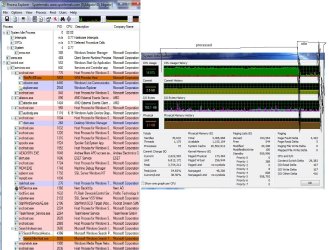
3) Post a screenshot of Process Explorer organized by CPU usage.
 

My Computer

Computer Manufacturer/Model Number
Sony Vaio Z46GDU
OS
Windows 7 Ultimate x86-64
CPU
[email protected] 1066MHz FSB
Motherboard
Sony branded
Memory
6GB DDR3 1066MHz
Graphics Card(s)
9300M GS 256MB Dedicated (Speed) + Intel4500MHD (Stamina)
Sound Card
Realtek HD Audio
Monitor(s) Displays
13.1' WXGA
Screen Resolution
1600x900
Hard Drives
320GB 7200RPM w/ 16MB cache
Internet Speed
1MB/s
here it is.
 

Attachments

  • untitled.JPG
    untitled.JPG
    95.5 KB · Views: 28
  • Untitle2d.jpg
    Untitle2d.jpg
    219 KB · Views: 32

My Computer

OS
Windows 7
One more think.
When i upload a file it use a lot of memory too. If that file is 600mb+ it make visible. I didn't have the ocasion to upload more than 1GB to see if it give error on upload or something crash.
How can i fix and that thing?
 

My Computer

OS
Windows 7
Clearly you are running a few dozen things...Andrea, ESET, Machine Debug, SQL Server, MySQL, Nero Backitup, Starwind, Teamviewer, WMP Network Service, probably a lot more. Your computer is anything but idle.
 

My Computer

Computer type
PC/Desktop
Computer Manufacturer/Model Number
Alienware Aurora ALX R4
OS
Windows 10 Pro (x64)
CPU
Intel Core i7-3930K (3.2GHz - 4.5GHz)
Motherboard
Alienware Aurora-R4 x79
Memory
4x Samsung 4GB PC3-12800 DDR3 (16GB 1600MHz)
Graphics Card(s)
Nvidia Geforce GTX 690
Sound Card
SteelSeries Siberia Elite
Monitor(s) Displays
Dell UltraSharp U3011
Screen Resolution
2560x1600
Hard Drives
Samsung 850 Pro 256 GB, Seagate 1TB Desktop Hybrid HDD, 2x Western Digital 4TB Green HDD
PSU
875W Some Dell PSU <.<
Case
Alienware Aurora ALX
Cooling
Custom Liquid Cooling (EK CPU & GPU blocks) dual EK 480RAD
Keyboard
Logitech G710+ Mechanical
Mouse
Logitech G700s
Internet Speed
Verizon Fios (50 mbps average)
Other Info
Server: Intel NUC D54250WYK: i5-4250U, 16GB, 256 GB mSATA, Windows Server 2012 R2
You can delete everything from your startups - absolutely everything - except Eset. But that will not solve your problem at hand. Your problem is someplace else.
 

My Computer

Computer Manufacturer/Model Number
HP, Dell, Gateway, Toshiba - 4 laptops and 2 desktops
OS
Vista, Windows7, Mint Mate, Zorin, Windows 8
CPU
from 1.6GHz Duo to i7
Monitor(s) Displays
2x HP w2207
Hard Drives
5x HDD, 7x SSD, 12x Externals
Keyboard
with trackball - no mices
Mouse
Trackball mice
Internet Speed
DSL 6000
Double the RAM to 8GB and clean install x86-64 7 - that will do it.
 

My Computer

Computer Manufacturer/Model Number
Sony Vaio Z46GDU
OS
Windows 7 Ultimate x86-64
CPU
[email protected] 1066MHz FSB
Motherboard
Sony branded
Memory
6GB DDR3 1066MHz
Graphics Card(s)
9300M GS 256MB Dedicated (Speed) + Intel4500MHD (Stamina)
Sound Card
Realtek HD Audio
Monitor(s) Displays
13.1' WXGA
Screen Resolution
1600x900
Hard Drives
320GB 7200RPM w/ 16MB cache
Internet Speed
1MB/s
yes, i think that's the only way, I have a lot of programs installed and more things runing eveytime when i start the pc. Even if i remove everything still don't solve a lot. I just removed some things i got some space but now it's low again.
 

My Computer

OS
Windows 7
yes, i think that's the only way, I have a lot of programs installed and more things runing eveytime when i start the pc. Even if i remove everything still don't solve a lot. I just removed some things i got some space but now it's low again.
What are you actually running. With over 3GB of RAM, you should not run out of RAM with normal programs. Your situation really puzzles me. There must be a big RAM hog in your system. Did you ever identify it?
 

My Computer

Computer Manufacturer/Model Number
HP, Dell, Gateway, Toshiba - 4 laptops and 2 desktops
OS
Vista, Windows7, Mint Mate, Zorin, Windows 8
CPU
from 1.6GHz Duo to i7
Monitor(s) Displays
2x HP w2207
Hard Drives
5x HDD, 7x SSD, 12x Externals
Keyboard
with trackball - no mices
Mouse
Trackball mice
Internet Speed
DSL 6000
Is it JUST the game running the system out of memory?

Try to find out who is using al the memory in the task manager (you can sort the task list by memory usage).

Maybe post a screenshot here. If the game is leaking memory, you can get a little more time on it if you switch to 64 bit and get your full 4 gig available but really that's not a solution. The solution is to find out who or what is actually sucking up so much ram.
 

My Computer

Computer Manufacturer/Model Number
Scratch built
OS
Windows 7 x64 Ultimate
CPU
i7 960
Motherboard
Asus P6X58D
Memory
12 Gig Corsair Dominator
Graphics Card(s)
Nvidia 480
Sound Card
Maudio Delta 44 + breakout box
Monitor(s) Displays
Dell UltraSharp U2410 24in and Samsung 21 dual monitors
Screen Resolution
1920x1200 and 1280x1024
Hard Drives
Primary: Intel X-25M G2 160G SSD
Secondary: Segate baracuda 1.0 TB
HDs in AHCI mode.
PSU
Corasair TX850
Case
Cooler Master HAF
Cooling
Corsair H50
Keyboard
Logitech G15 + N52 game pad
Mouse
Logitech MX518
Internet Speed
15kbs down 4.5kbps up
Other Info
WEI 7.6
CPU & RAM 7.6
Graphics 7.9
Hard disk 7.7
fseal. +1, I think we are saying the same thing. He has to find the culprit.
 

My Computer

Computer Manufacturer/Model Number
HP, Dell, Gateway, Toshiba - 4 laptops and 2 desktops
OS
Vista, Windows7, Mint Mate, Zorin, Windows 8
CPU
from 1.6GHz Duo to i7
Monitor(s) Displays
2x HP w2207
Hard Drives
5x HDD, 7x SSD, 12x Externals
Keyboard
with trackball - no mices
Mouse
Trackball mice
Internet Speed
DSL 6000
Back
Top