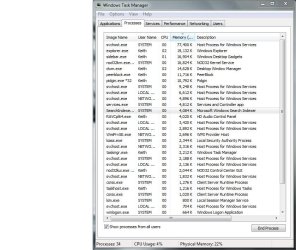
Windows's 7 memory

I told that, tha ti removed every application from there just let eset on start but no use. I gain a little memory but when i start that programs all memory that i gain were gone.
Pagefile i used in many differences. I insert even 40k on space but it dosen't appear any effect from it.

First time was selected on Automatically manage paging file size for all drivers.
Now i select it on Custom size
 

My Computer

OS
Windows 7
How many processes do you have running?
 

My Computer

Computer Manufacturer/Model Number
Toshiba L505
OS
Windows 7 64x
CPU
AMD Turion II Dual-Core Mobile M520 2.30 GHz
Memory
4GB
Graphics Card(s)
ATI Radeon HD 4200
Page file should be atleast 50% of your memory.

In fact you should put it on auto and let it do it's job. By disabling it or making it a rediculously small you are FORCING windows to keep stuff in memory it doesn't really need there, wasting memory!

Put the page file back on auto. If you STILL run out of ram then you are simply loading too many programs for the amount of ram you have installed, end of story. Stop running so many things at once or get a new machine with 8 gig. :/
 

My Computer

Computer Manufacturer/Model Number
Scratch built
OS
Windows 7 x64 Ultimate
CPU
i7 960
Motherboard
Asus P6X58D
Memory
12 Gig Corsair Dominator
Graphics Card(s)
Nvidia 480
Sound Card
Maudio Delta 44 + breakout box
Monitor(s) Displays
Dell UltraSharp U2410 24in and Samsung 21 dual monitors
Screen Resolution
1920x1200 and 1280x1024
Hard Drives
Primary: Intel X-25M G2 160G SSD
Secondary: Segate baracuda 1.0 TB
HDs in AHCI mode.
PSU
Corasair TX850
Case
Cooler Master HAF
Cooling
Corsair H50
Keyboard
Logitech G15 + N52 game pad
Mouse
Logitech MX518
Internet Speed
15kbs down 4.5kbps up
Other Info
WEI 7.6
CPU & RAM 7.6
Graphics 7.9
Hard disk 7.7
69 right now.


Too bad that and w7 is fail on x32. It use a lot of ram to make it faster but slow on more things.
If it will resist on x32 more i will let it if not i'll put x64. I have right now 6GB 1 ram is broken i will fix it and when i will need x64 it will be in use a lot of time.
 

My Computer

OS
Windows 7
I guess I am having difficulties understanding why you would need all those processes running at the same time.
 

My Computer

Computer Manufacturer/Model Number
Toshiba L505
OS
Windows 7 64x
CPU
AMD Turion II Dual-Core Mobile M520 2.30 GHz
Memory
4GB
Graphics Card(s)
ATI Radeon HD 4200
This is a lot of stuff. Unfortunately you did not order your picture by Memory usage, so it is a little hard to compare. But there is absolutely no need to have all those programs open on your system. Here are my heavy RAM consumers. But they are a lot less than yours.

2010-03-09_162020-1.png

My processes look a lot like yours.
 

Attachments

  • Capture.JPG
    Capture.JPG
    96.6 KB · Views: 8

My Computer

Computer Manufacturer/Model Number
Toshiba L505
OS
Windows 7 64x
CPU
AMD Turion II Dual-Core Mobile M520 2.30 GHz
Memory
4GB
Graphics Card(s)
ATI Radeon HD 4200
it runs automatic when i start the pc. I let on start up what i use always to open because if i close them i still open them and same amount of ram it will be used. Rest of them are from system local network .... I can't remove that because it need to run the system and network.
 

My Computer

OS
Windows 7
Memory Cleaner what you say about this? It's a good program or it could make to mess up your system?
 

My Computer

OS
Windows 7
Back
Top