Solved Winsxs Folder

townsbg

тσωηsвg
Guru
Gold Member
VIP
Local time
7:15 PM
Messages
2,091
On my 7 VM the winsxs folder is taking up ~15 gb of space which is way too much for a 40 gb drive. Is there a way to shrink it? I have less than 10 gb free, the windows folder is taking up 85% of that and winsxs is taking up 52% of that according to WinDirStat. I don't have many programs installed and the largest of which is Office. I cleaned up restore points and ran ccleaner both of which made very little difference. I don't keep much on the VM at all.
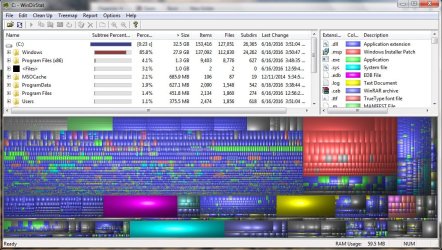
Windirstat_win7.jpg

Windirstat_win7_windowsExpanded.jpg
 

My Computers

System One System Two

My Computer

Computer type
Laptop
Computer Manufacturer/Model Number
ASUS
OS
Microsoft Windows 7 Home Premium 64-bit 7601 Multiprocessor Free Service Pack 1
CPU
AMD C-60 APU with Radeon(tm) HD Graphics
Motherboard
ASUSTeK COMPUTER INC. X501U
Memory
4.00 GB
Graphics Card(s)
AMD Radeon HD 6290 Graphics
Sound Card
(1) AMD High Definition Audio Device (2) Realtek High Defi
Screen Resolution
1366 x 768 x 32 bits (4294967296 colors) @ 60 Hz
Hard Drives
Hitachi HTS545050A7E380 SATA Disk Device
Antivirus
Comodo CIS & FW, SecureAplus App Whitelisting, Threatfire
Browser
Cyberfox 64bit, Opera 64bit, Airfox
Other Info
Spy-The-Spy, HitmanPro.Alert, Norton Connect Safe, MJRegWatcher, BitDefender TrafficLight, Voodoo Shield, Zemana AntiMalware
What from that menu am I suppose to select to shrink winsxs? The folder size didn't change at all.
 

My Computers

System One System Two

To explain more clearly:

Make sure that this update is installed:

Download Update for Windows 7 for x64-based Systems (KB2852386) from Official Microsoft Download Center

If it's not installed - install then reboot.

Then from an Elevated Command Prompt type:

cleanmgr.exe sageset10

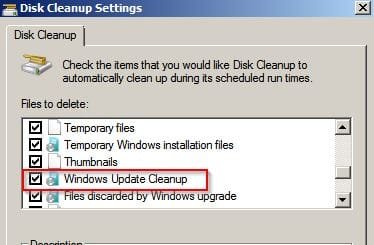
Choose your settings for advanced disc cleanup in the window that opens.

Disk Cleanup Settings.jpg

Include Windows Update Cleanup

Once you've applied the settings from Elevated Command Prompt type:

cleanmgr.exe sagerun10

The cleanup will start. Watch the progress window. If you don't see a message like "Cleaning Windows Updates" then there was nothing to remove.

Note: The cleanup requires a reboot to complete. You can only compare the WINSXS folder size (before/ after) once you have rebooted.

EDIT: BarefootKid's tutorial that I posted earlier is a way to run Advanced Disc Cleanup Settings followed by the actual cleanup in one go.
 

My Computer

Computer type
Laptop
Computer Manufacturer/Model Number
ASUS
OS
Microsoft Windows 7 Home Premium 64-bit 7601 Multiprocessor Free Service Pack 1
CPU
AMD C-60 APU with Radeon(tm) HD Graphics
Motherboard
ASUSTeK COMPUTER INC. X501U
Memory
4.00 GB
Graphics Card(s)
AMD Radeon HD 6290 Graphics
Sound Card
(1) AMD High Definition Audio Device (2) Realtek High Defi
Screen Resolution
1366 x 768 x 32 bits (4294967296 colors) @ 60 Hz
Hard Drives
Hitachi HTS545050A7E380 SATA Disk Device
Antivirus
Comodo CIS & FW, SecureAplus App Whitelisting, Threatfire
Browser
Cyberfox 64bit, Opera 64bit, Airfox
Other Info
Spy-The-Spy, HitmanPro.Alert, Norton Connect Safe, MJRegWatcher, BitDefender TrafficLight, Voodoo Shield, Zemana AntiMalware
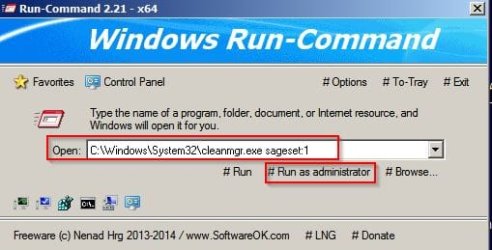
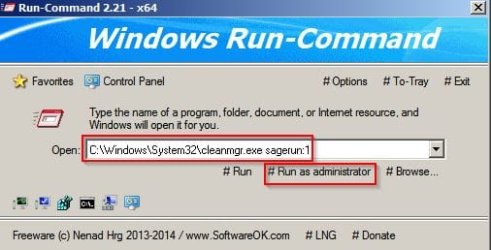
The above should work. Actually the way I do it personally is by using some third party software:

Disk Cleanup 1.jpg

Disk Cleanup 2.jpg

The command line shown is different because that's the command line needed when not using Elevated Command Prompt.

RE: sageset10 & sagerun10

The number 10 after each word is to remember and run the settings that you applied. They are stored and remembered for next time using that number.

So for example you could use sageset11 & sagerun11 to store and run totally different cleanup options.
 

My Computer

Computer type
Laptop
Computer Manufacturer/Model Number
ASUS
OS
Microsoft Windows 7 Home Premium 64-bit 7601 Multiprocessor Free Service Pack 1
CPU
AMD C-60 APU with Radeon(tm) HD Graphics
Motherboard
ASUSTeK COMPUTER INC. X501U
Memory
4.00 GB
Graphics Card(s)
AMD Radeon HD 6290 Graphics
Sound Card
(1) AMD High Definition Audio Device (2) Realtek High Defi
Screen Resolution
1366 x 768 x 32 bits (4294967296 colors) @ 60 Hz
Hard Drives
Hitachi HTS545050A7E380 SATA Disk Device
Antivirus
Comodo CIS & FW, SecureAplus App Whitelisting, Threatfire
Browser
Cyberfox 64bit, Opera 64bit, Airfox
Other Info
Spy-The-Spy, HitmanPro.Alert, Norton Connect Safe, MJRegWatcher, BitDefender TrafficLight, Voodoo Shield, Zemana AntiMalware
Yes that update is installed and I ran your commands from an elevated command prompt. I'll try your suggestions on what to check.
 

My Computers

System One System Two

Ok the cleanup saved a gig in winsxs. ccleaner saved over a gig because I ran it as administrator. I still have only 11.2 gig free. How can I get more from winsxs?
 

My Computers

System One System Two

Best to leave it alone. That update that allows you to clean it up is the only official microsoft recommended way.
 

My Computer

Computer type
Laptop
Computer Manufacturer/Model Number
ASUS
OS
Microsoft Windows 7 Home Premium 64-bit 7601 Multiprocessor Free Service Pack 1
CPU
AMD C-60 APU with Radeon(tm) HD Graphics
Motherboard
ASUSTeK COMPUTER INC. X501U
Memory
4.00 GB
Graphics Card(s)
AMD Radeon HD 6290 Graphics
Sound Card
(1) AMD High Definition Audio Device (2) Realtek High Defi
Screen Resolution
1366 x 768 x 32 bits (4294967296 colors) @ 60 Hz
Hard Drives
Hitachi HTS545050A7E380 SATA Disk Device
Antivirus
Comodo CIS & FW, SecureAplus App Whitelisting, Threatfire
Browser
Cyberfox 64bit, Opera 64bit, Airfox
Other Info
Spy-The-Spy, HitmanPro.Alert, Norton Connect Safe, MJRegWatcher, BitDefender TrafficLight, Voodoo Shield, Zemana AntiMalware
I know that we don't like to direct users off this site for help but this might help. Have a read.

Tutorial: Reclaim disk space in Windows Seven, Windows 7 SP1 and Windows Server 2008 R2 – GabSoftware

Recommend reading section 7.4 in particular.

RE: Section 7.3. I delete on a regular basis but not without a system image backup.

RE: Section 7.1 There's a tool for that.

Windows Installer Cleanup Utility. Read more here: https://www.raymond.cc/blog/safely-delete-unused-msi-and-mst-files-from-windows-installer-folder/

You can read about another utility "Patch Cleaner" posted in this thread:

http://www.sevenforums.com/general-discussion/378532-patch-cleaner-installer-folder.html

Neither of those reduces the size of WINSXS after running the official cleanup method.
 

My Computer

Computer type
Laptop
Computer Manufacturer/Model Number
ASUS
OS
Microsoft Windows 7 Home Premium 64-bit 7601 Multiprocessor Free Service Pack 1
CPU
AMD C-60 APU with Radeon(tm) HD Graphics
Motherboard
ASUSTeK COMPUTER INC. X501U
Memory
4.00 GB
Graphics Card(s)
AMD Radeon HD 6290 Graphics
Sound Card
(1) AMD High Definition Audio Device (2) Realtek High Defi
Screen Resolution
1366 x 768 x 32 bits (4294967296 colors) @ 60 Hz
Hard Drives
Hitachi HTS545050A7E380 SATA Disk Device
Antivirus
Comodo CIS & FW, SecureAplus App Whitelisting, Threatfire
Browser
Cyberfox 64bit, Opera 64bit, Airfox
Other Info
Spy-The-Spy, HitmanPro.Alert, Norton Connect Safe, MJRegWatcher, BitDefender TrafficLight, Voodoo Shield, Zemana AntiMalware
On my 7 VM the winsxs folder is taking up ~15 gb of space which is way too much for a 40 gb drive.

Can you increase the size of the VM drive so you have more the 40 GB ?
Your specs show an Apple iMac and a WD 1 TB HD.
I don't know anything about VM's on an Apple, or what can be done to change a VM drive size.
 

My Computer

Computer type
PC/Desktop
Computer Manufacturer/Model Number
home built
OS
Multi-Boot W7_Pro_x64 W8.1_Pro_x64 W10_Pro_x64 +Linux_VMs +Chromium_VM
CPU
AMD Athlon II x4 620
Motherboard
Gigabyte GA-MA785G-UD3H
Memory
6GB GSkill DDR2 800
Graphics Card(s)
AMD 4670 GPU + AMD 4200 IGP
Sound Card
on board Realtek ALC889A
Monitor(s) Displays
RCA 40" LCD TV, Insignia 32" LCD TV, HP 15" LCD monitor
Screen Resolution
1680 x 1050
Hard Drives
OCZ Vertex 3 120GB,
Samsung F3 1TB (3),
Several others - WD, Seagate, Hitachi, ...
PSU
Corsair 500 W
Case
Rosewill mid tower
Cooling
CM 90mm rifle
Keyboard
Gyration wireless, Logitech wireless, Dell USB wired
Mouse
Gyration wireless, Logitech wireless, V7 USB wired
Internet Speed
Spectrum - 100Mbps D / 10Mbps U
Antivirus
Avast, MBAM3, EMET, WinPatrol
Browser
Pale Moon, Firefox, IE
Other Info
2 multi-boot PC's
Mainly HTPC/Office/Gen purpose (no gaming).
Trendnet USB KVM.
LG DVD burner/Blue Ray Player.
Tray system for removable SATA backup drives.

Not currently OCd, under-volted.
I use Hybrid sleep, rarely re-boot or shutdown.

Hauppauge HD-PVR, Avermedia PCIe TV Tuner, Hauppauge PCI TV Tuner.
Thanks callender I'll look at that. I did back up the VM and created a snapshot before starting this. David I can increase the size but I'd rather decrease it and save room. 30 gb used with almost nothing on it is ridiculous.
 

My Computers

System One System Two

Just a follow up to say that I cleared a further 7.5 Gb from WINSXS using Dism++

Basics:

Use checkboxes to select what you want to scan and then run a scan. When the scan finishes highlight each item in the middle pane and then for each item inspect details in the right pane. Don't clean anything unless you are sure.

Regarding WINXS - it's best to have a system image backup. In any case it would be a good idea to inspect the list and try to backup those files to an external drive. Personally I just rely on system image backup.

If you remove the detected files it will leave you unable to uninstall some updates so you need to make sure that you have no buggy or unwanted updates installed.

Winsxs Folder.jpg
 

My Computer

Computer type
Laptop
Computer Manufacturer/Model Number
ASUS
OS
Microsoft Windows 7 Home Premium 64-bit 7601 Multiprocessor Free Service Pack 1
CPU
AMD C-60 APU with Radeon(tm) HD Graphics
Motherboard
ASUSTeK COMPUTER INC. X501U
Memory
4.00 GB
Graphics Card(s)
AMD Radeon HD 6290 Graphics
Sound Card
(1) AMD High Definition Audio Device (2) Realtek High Defi
Screen Resolution
1366 x 768 x 32 bits (4294967296 colors) @ 60 Hz
Hard Drives
Hitachi HTS545050A7E380 SATA Disk Device
Antivirus
Comodo CIS & FW, SecureAplus App Whitelisting, Threatfire
Browser
Cyberfox 64bit, Opera 64bit, Airfox
Other Info
Spy-The-Spy, HitmanPro.Alert, Norton Connect Safe, MJRegWatcher, BitDefender TrafficLight, Voodoo Shield, Zemana AntiMalware
Hi Callendar,
interesting piece of software.

MS built-in diskcleaner does remove some of the older stuff.
I just use the 1 click event cleaner listed in the tutorials section.

But beware in the latest CBS logs ive been going thru on my system MS have been uninstalling KB's in it
NOT seen that before.

Roy
 

My Computer

Computer type
PC/Desktop
Computer Manufacturer/Model Number
medionl/Aspire 6930G/acer x55a
OS
W7 home premium 32bit/W7HP 64bit/w10 tp insider ring
CPU
E5300 dual core
Motherboard
medion MS7366
Memory
3gb
Graphics Card(s)
Nvidia Geforce 7100 Nforce 630i
Monitor(s) Displays
avixc
Internet Speed
n (isp resticted to 72)
Antivirus
mse/pands
Browser
palemoon
Other Info
Belkin Fd7050 n USB using Railink RT2870 drivers, more upto date
I have a 20GB winsys, maybe an inflated total, but it's still big enough to slow down malware scans and file searches, isn't it?
 

My Computer

Computer type
PC/Desktop
Computer Manufacturer/Model Number
HP p6-2020t
OS
Win 7 Ult 64-bit
CPU
G620 2.6GHZ Pentium R
Memory
6 GB
Monitor(s) Displays
25" HPLV2311
Screen Resolution
1920 x 1200
Hard Drives
1 SATA, 1 exterior SATA
Case
HP
Cooling
PSU
Antivirus
Glasswire
Browser
Waterfox; Firefox; Chrome for work
Other Info
Firewall--Glasswire
Similar specs in Gateway DX4200
Verizon FIOS Wired network

1 other Win7 computer-- has SSD
Back
Top