Solved Wired Connection - Strange Behavior

boweasel

New member
Power User
Local time
4:54 AM
Messages
678
A friend has a 64 bit W7 desktop computer that had not been used in years. I checked it out briefly and told her I'd have to take it home to fully investigate it's problems. When I brought it home and hooked it up to my modem there seemed to be no problems with establishing a solid internet connection.

Nonetheless I ran all the Windows updates, ran a full Malwarebytes scan, cleaned up her msconfig startup and checked it again. It seemed to be fine, connecting effortlessly, so I took it back to her place. It turned back into a pumpkin. Her home page (Google) came up, and she could enter search items and receive suggestions. But she was unable to bring up any pages from the Google results - it would just show a blank page with the little blue circle. We called her ISP and they gave her a free speed upgrade that would take effect on the 1st of June.

June 2nd she called me and told me that nothing had changed. I went back to her place today with an old XP laptop with about a half GB of memory. I used her Ethernet cable and the old laptop worked better than ever. Her tower continued to non-perform bringing up Google results, but not letting her click on them. Her Verizon page would never display.

I brought it back to my house, ran JRT, Adwcleaner, RKill, TDSSKiller and a full MSE scan. Nothing of substance was found, so I have no confidence that it will work any better back at her house.

Any ideas?
 

My Computer

Computer type
Laptop
OS
Windows 7 home premium 64 bit
CPU
AMD K10
Motherboard
Hewlett-Packard 1444 (Socket S1G4)
Memory
3.00GB Dual-Channel DDR3 @ 532MHz
Graphics Card(s)
ATI AMD M880G with ATI Mobility Radeon HD 4250 (HP)
Sound Card
Realtek
Screen Resolution
1366 x 768
Hard Drives
465GB Western Digital
Antivirus
MSE
Is she behind a NAT?
 

My Computer

Computer type
Laptop
Computer Manufacturer/Model Number
Employer provided Dell Latitude
OS
W7 Pro SP1 64bit
CPU
i7
Memory
8GB
Graphics Card(s)
Intel HD Graphics
Hard Drives
crappy SSD
Antivirus
Employer mandated Symantec Endpoint Protection
Browser
Pale Moon 64bit, IE11 64bit & Chrome 64bit
Is she behind a NAT?
Network Address Translation? I don't know exactly what that is, how to check for it, or how to fix it if she is. I somehow thought that NAT had something to do with a router. She has no router - just a modem.

If it means anything, I looked at the properties for ipv4 and v6 and they both said to obtain an ip address automatically.
 

My Computer

Computer type
Laptop
OS
Windows 7 home premium 64 bit
CPU
AMD K10
Motherboard
Hewlett-Packard 1444 (Socket S1G4)
Memory
3.00GB Dual-Channel DDR3 @ 532MHz
Graphics Card(s)
ATI AMD M880G with ATI Mobility Radeon HD 4250 (HP)
Sound Card
Realtek
Screen Resolution
1366 x 768
Hard Drives
465GB Western Digital
Antivirus
MSE
I had written out several questions and things to check - but then it dawned on me that it all hinged on her being behind a NAT (Network Address Translation). So, I wrote over my ramblings with that all to brief question. Sorry.

Here is a link that talks a bit about NATs without going too deep:
Network Address Translation

Here is simple way to tell what your internet facing IP address is:
Address test
(No adverts of junk to infect you.)

I'll post a bit more later.
 

My Computer

Computer type
Laptop
Computer Manufacturer/Model Number
Employer provided Dell Latitude
OS
W7 Pro SP1 64bit
CPU
i7
Memory
8GB
Graphics Card(s)
Intel HD Graphics
Hard Drives
crappy SSD
Antivirus
Employer mandated Symantec Endpoint Protection
Browser
Pale Moon 64bit, IE11 64bit & Chrome 64bit
So....., since she does not have a router she cannot be running behind a NAT. I'm supposed to drop her PC off today and I just wondered if anybody else has any thoughts on the problem. As I said, it's running beautifully here. I've since run a chkdsk, sfc /scannow, Rogue Killer, ESET Online Scanner, a full Windows All-in-one repair and a custom Malwarebytes scan, checking for rootkits. No errors, viruses, integrity violations, etc. I've also installed Firefox and reset Internet Explorer.
 

My Computer

Computer type
Laptop
OS
Windows 7 home premium 64 bit
CPU
AMD K10
Motherboard
Hewlett-Packard 1444 (Socket S1G4)
Memory
3.00GB Dual-Channel DDR3 @ 532MHz
Graphics Card(s)
ATI AMD M880G with ATI Mobility Radeon HD 4250 (HP)
Sound Card
Realtek
Screen Resolution
1366 x 768
Hard Drives
465GB Western Digital
Antivirus
MSE
I would first compare the ipconfig /all from the two machines to see if there is an apparent change in the defaults for dns and gateway. Try killing the power to the modem and the pc, start up the modem with no connection to the pc, when all the lights have stopped flashing and it shows connected to isp, then connect a cable and start the pc, it should auto configure if the wlan service starts without problems. You could manually set the dns for the adapter to 8.8.4.4 or 8.8.8.8 these are Google public dns also if no default gateway shows in the ipv4 adapter properties, try inserting the modem address. After a couple reboots it could straighten itself out... strange that it is only her modem, I suspect it could be dns related... :cool:
 

My Computer

Computer type
Laptop
Computer Manufacturer/Model Number
HP 17-ak0xx, dv7 3173nr
OS
Win7 Home Premium x64 W10Pro&Home
CPU
A12 9720p 4+8 TurionII M520
Motherboard
HP 3839
Memory
6GB 8GB
Graphics Card(s)
R7
Monitor(s) Displays
24" sa550
Screen Resolution
1600x900 1920x1080
Mouse
Logitechx2
Internet Speed
120Mb/s down 12up
I would first compare the ipconfig /all from the two machines to see if there is an apparent change in the defaults for dns and gateway. Try killing the power to the modem and the pc, start up the modem with no connection to the pc, when all the lights have stopped flashing and it shows connected to isp, then connect a cable and start the pc, it should auto configure if the wlan service starts without problems. You could manually set the dns for the adapter to 8.8.4.4 or 8.8.8.8 these are Google public dns also if no default gateway shows in the ipv4 adapter properties, try inserting the modem address. After a couple reboots it could straighten itself out... strange that it is only her modem, I suspect it could be dns related... :cool:
Thanks for the reply. When you say 'it should auto configure if the wlan service starts without problems'...., what does the wlan service have to do with a wired connection? She has no router - just a straight connection between her tower an her modem. And it's not like her connection doesn't work at all. It sort of works.
 

My Computer

Computer type
Laptop
OS
Windows 7 home premium 64 bit
CPU
AMD K10
Motherboard
Hewlett-Packard 1444 (Socket S1G4)
Memory
3.00GB Dual-Channel DDR3 @ 532MHz
Graphics Card(s)
ATI AMD M880G with ATI Mobility Radeon HD 4250 (HP)
Sound Card
Realtek
Screen Resolution
1366 x 768
Hard Drives
465GB Western Digital
Antivirus
MSE
...my bad, I meant the wired auto configuration service. Did you look at the dns in the advanced properties of ipv4?
 

My Computer

Computer type
Laptop
Computer Manufacturer/Model Number
HP 17-ak0xx, dv7 3173nr
OS
Win7 Home Premium x64 W10Pro&Home
CPU
A12 9720p 4+8 TurionII M520
Motherboard
HP 3839
Memory
6GB 8GB
Graphics Card(s)
R7
Monitor(s) Displays
24" sa550
Screen Resolution
1600x900 1920x1080
Mouse
Logitechx2
Internet Speed
120Mb/s down 12up
...my bad, I meant the wired auto configuration service. Did you look at the dns in the advanced properties of ipv4?
No. You'd asked me to compare the ipconfig /all results obtained using her modem/her tower against the results obtained using her modem/my laptop. When I took her tower back and tested, those results were negligible. Yet once again my laptop (this time a 64 bit Windows 7 Dell) connected flawlessly, while her tower would usually bring up a blank page with the msg 'waiting for verizon.com'. You never said anything to me about going into the connection properties and looking at the ipv4 settings. And I've returned the tower, so I can no longer check.

Verizon IS sending out a new modem - an upgrade from her old Westell, which must be 10 years old. We'll see, but I doubt a new modem will change a thing.
 

My Computer

Computer type
Laptop
OS
Windows 7 home premium 64 bit
CPU
AMD K10
Motherboard
Hewlett-Packard 1444 (Socket S1G4)
Memory
3.00GB Dual-Channel DDR3 @ 532MHz
Graphics Card(s)
ATI AMD M880G with ATI Mobility Radeon HD 4250 (HP)
Sound Card
Realtek
Screen Resolution
1366 x 768
Hard Drives
465GB Western Digital
Antivirus
MSE
So....., since she does not have a router she cannot be running behind a NAT.
~~~
It is possible to have a NAT in a modem and the new one probably does.

If you get the chance, please write down the new modem's brand/model info.


While you are there:
You might also want to install TeamViewer
(Run the installer from a USB stick - if need be.)

If the new modem allows multiple computers to connect at the same time, test you ability to connect to her computer via TeamViewer. Even if she can not surf to websites beyond Google's search returns, there is a good chance that TeamViewer will still connect.

See my ramblings about TeamViewer in this post.
 

My Computer

Computer type
Laptop
Computer Manufacturer/Model Number
Employer provided Dell Latitude
OS
W7 Pro SP1 64bit
CPU
i7
Memory
8GB
Graphics Card(s)
Intel HD Graphics
Hard Drives
crappy SSD
Antivirus
Employer mandated Symantec Endpoint Protection
Browser
Pale Moon 64bit, IE11 64bit & Chrome 64bit
The new modem promised from Verizon will be a modem/router, so it may have NAT configuration. When she gets it, I'll set it up for her along with TeamViewer. Who knows, maybe this new modem will be the solution for her. Could it be that her old modem is experiencing some slight power fluctuations, and her tower is sensitive to it, while my laptops are not?
 

My Computer

Computer type
Laptop
OS
Windows 7 home premium 64 bit
CPU
AMD K10
Motherboard
Hewlett-Packard 1444 (Socket S1G4)
Memory
3.00GB Dual-Channel DDR3 @ 532MHz
Graphics Card(s)
ATI AMD M880G with ATI Mobility Radeon HD 4250 (HP)
Sound Card
Realtek
Screen Resolution
1366 x 768
Hard Drives
465GB Western Digital
Antivirus
MSE
I would not expect power issues to manifest themselves that way.

When you took the computer back to her home the first time, did it turn into a pumpkin right away or hours later?
 
Last edited:

My Computer

Computer type
Laptop
Computer Manufacturer/Model Number
Employer provided Dell Latitude
OS
W7 Pro SP1 64bit
CPU
i7
Memory
8GB
Graphics Card(s)
Intel HD Graphics
Hard Drives
crappy SSD
Antivirus
Employer mandated Symantec Endpoint Protection
Browser
Pale Moon 64bit, IE11 64bit & Chrome 64bit
I would not expect power issues to manifest themselves that way.

When you took the computer back to her home the first time, did it turn into a pumpkin right away or hours later?
Immediate pumpkin. While it was a greyhound with my equipment, it turned into a snail at her house. (I couldn't make the fruit analogy work any more). My Windows 7 laptop was a greyhound with both modems. And no, I would not expect power issues to exact that type of behavior either, but I have no alternate explanation.
 

My Computer

Computer type
Laptop
OS
Windows 7 home premium 64 bit
CPU
AMD K10
Motherboard
Hewlett-Packard 1444 (Socket S1G4)
Memory
3.00GB Dual-Channel DDR3 @ 532MHz
Graphics Card(s)
ATI AMD M880G with ATI Mobility Radeon HD 4250 (HP)
Sound Card
Realtek
Screen Resolution
1366 x 768
Hard Drives
465GB Western Digital
Antivirus
MSE
When I asked if her computer was behind a NAT - I was grasping at the very unlikely possibility that someone on the internet broke into her old modem and setup a filter that only allows traffic to/from Google. If there is a NAT, then there is often filtering by MAC address and/or IP address. Your laptop would not be impacted by such a filter.

Or maybe she has a prankster in her life that setup a filter while visiting her...
...all just to get you over there more often
...and to watch you pull your hair out :-)


I've heard about comparing apples and oranges, but pumpkins and greyhounds is a new one :-)
 
Last edited:

My Computer

Computer type
Laptop
Computer Manufacturer/Model Number
Employer provided Dell Latitude
OS
W7 Pro SP1 64bit
CPU
i7
Memory
8GB
Graphics Card(s)
Intel HD Graphics
Hard Drives
crappy SSD
Antivirus
Employer mandated Symantec Endpoint Protection
Browser
Pale Moon 64bit, IE11 64bit & Chrome 64bit
I'm sorry, but if someone broke into her old modem and set up a filter that only allows Google traffic, then both of my laptops should have experienced the same connection problems when connected to her modem. They did not.

And yeah, I could think of no fruit analogy that was the opposite of turning into a pumpkin.
 

My Computer

Computer type
Laptop
OS
Windows 7 home premium 64 bit
CPU
AMD K10
Motherboard
Hewlett-Packard 1444 (Socket S1G4)
Memory
3.00GB Dual-Channel DDR3 @ 532MHz
Graphics Card(s)
ATI AMD M880G with ATI Mobility Radeon HD 4250 (HP)
Sound Card
Realtek
Screen Resolution
1366 x 768
Hard Drives
465GB Western Digital
Antivirus
MSE
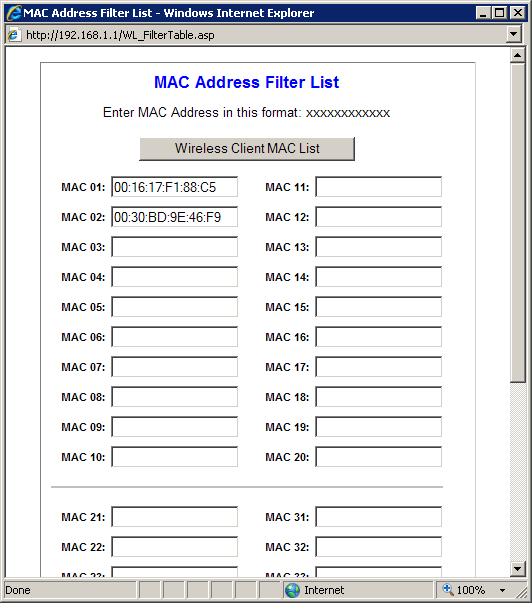
No - the filters are MAC address specific.

Your laptop has a different MAC address and thus would not be filtered.

macfilter.gif
 

My Computer

Computer type
Laptop
Computer Manufacturer/Model Number
Employer provided Dell Latitude
OS
W7 Pro SP1 64bit
CPU
i7
Memory
8GB
Graphics Card(s)
Intel HD Graphics
Hard Drives
crappy SSD
Antivirus
Employer mandated Symantec Endpoint Protection
Browser
Pale Moon 64bit, IE11 64bit & Chrome 64bit
Well, you've obviously exceeded my level of knowledge with that one. Am I correct in assuming that a new modem should resolve any such issues?
 

My Computer

Computer type
Laptop
OS
Windows 7 home premium 64 bit
CPU
AMD K10
Motherboard
Hewlett-Packard 1444 (Socket S1G4)
Memory
3.00GB Dual-Channel DDR3 @ 532MHz
Graphics Card(s)
ATI AMD M880G with ATI Mobility Radeon HD 4250 (HP)
Sound Card
Realtek
Screen Resolution
1366 x 768
Hard Drives
465GB Western Digital
Antivirus
MSE
Yes - a new modem would remove any filtering that was setup inside of the old modem. Time well tell.

MAC or IP filtering is very unlikely to be the cause - but it fits the symptoms - so I had to go there. It is possible (but again, unlikely) to have this filtering caused by software installed on the desktop computer. I've seen security related products that identify each network. It could have one set of rules for her home's network and a different set of rules for your home's network. But, when you had the computer in your home, you should have seen some sort of popup indicating that the software detected a new network - then the security software would ask you how you wanted to setup restrictions for this newly discovered network.

If a new modem does not fix the problem, then we move on to these steps: http://www.sevenforums.com/tutorial...ation-conflicts-performing-clean-startup.html
 

My Computer

Computer type
Laptop
Computer Manufacturer/Model Number
Employer provided Dell Latitude
OS
W7 Pro SP1 64bit
CPU
i7
Memory
8GB
Graphics Card(s)
Intel HD Graphics
Hard Drives
crappy SSD
Antivirus
Employer mandated Symantec Endpoint Protection
Browser
Pale Moon 64bit, IE11 64bit & Chrome 64bit
Thanks for your replies. If it makes any difference, when I had her PC at my house it was never connected to a stand alone modem. A few years ago after my modem died I was sent a new combination modem & router unit from my ISP, so I was forced to disconnect my personal router. And when I connected my friend's PC to my modem/router I never received any indication that a new network had been detected.

How or if any of this ties into the connection problems at her house is a question I cannot answer...

I am also not computer savvy enough to have a clear understanding of MAC address filtering. In my mind it had something to do with wireless security, and it was an additional protocol you could set up through your router. Since my friend has no router, I fail to grasp the significance of this whole filtering issue.

She'll probably get her new modem early in the week and I'll report back to you good folk after I hook it up for her. Since Verizon doesn't want her old modem back, maybe I'll bring it to my house.
 
Last edited:

My Computer

Computer type
Laptop
OS
Windows 7 home premium 64 bit
CPU
AMD K10
Motherboard
Hewlett-Packard 1444 (Socket S1G4)
Memory
3.00GB Dual-Channel DDR3 @ 532MHz
Graphics Card(s)
ATI AMD M880G with ATI Mobility Radeon HD 4250 (HP)
Sound Card
Realtek
Screen Resolution
1366 x 768
Hard Drives
465GB Western Digital
Antivirus
MSE
Problem resolved - the new modem / router took care of the problems.
 

My Computer

Computer type
Laptop
OS
Windows 7 home premium 64 bit
CPU
AMD K10
Motherboard
Hewlett-Packard 1444 (Socket S1G4)
Memory
3.00GB Dual-Channel DDR3 @ 532MHz
Graphics Card(s)
ATI AMD M880G with ATI Mobility Radeon HD 4250 (HP)
Sound Card
Realtek
Screen Resolution
1366 x 768
Hard Drives
465GB Western Digital
Antivirus
MSE
Back
Top