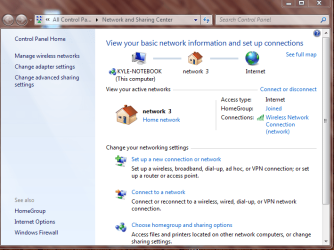
Wired works. Wireless cannot see other devices.

kingrampks

New member
Local time
5:27 AM
Messages
3
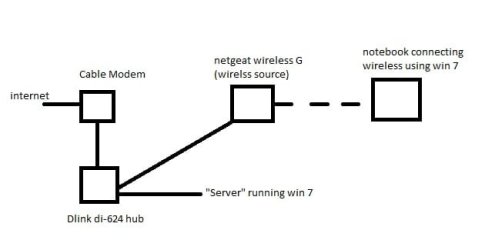
Ok so first here is a diagram of my current network which is attached.

The main problem I am having is being able to view the Server that is on the wired network from the netbook when using a wireless connection.
However, when I plug the notebook into the wired network I can then view the server.

Both machines are running windows 7.

So far I have tried:

unjoining both homegroups and rejoining.
resetting all of my equipment: modem, hub, and wireless router
renaming the SSID of the wireless to be the same name of the network that the server is connected to.

any help would be greatly appreciated!

PS - I call it a server but it is just a computer with lots of media
 

Attachments
  • network 2.jpg
    network 2.jpg
    10.9 KB · Views: 41

My Computer My Computer

At a glance

windows 7
OS
windows 7
Can you provide ipconfig /all details of the notebook, when it is wired to the Netgear (??) and when it is on wireless. I gather you cannot ping the service when using wireless?
 

My Computer My Computer

At a glance

Windows 7 Ultimate 64BitGenuineIntel Intel(R) Core(TM) DuoCore T2400 ...2.00 GBMobile Intel(R) 945 Express Chipset
Computer Manufacturer/Model Number
Lenovo ThinkPad T60
OS
Windows 7 Ultimate 64Bit
CPU
GenuineIntel Intel(R) Core(TM) DuoCore T2400 @ 1.83GHz
Motherboard
Intel(R) 82801G (ICH7 Family)
Memory
2.00 GB
Graphics Card(s)
Mobile Intel(R) 945 Express Chipset
Sound Card
SoundMAX Integrated Digital HD Audio
Monitor(s) Displays
ThinkPad Display
Screen Resolution
1400x1050
Hard Drives
100Gb SATA
Keyboard
Standard Keyboard
Mouse
HID-compliant Mouse
Internet Speed
Cable Broadband - 54Mbps
Other Info
Intel(R) PRO/1000 PL Network Connection
11a/b/g Wireless LAN Mini PCI Express Adapter
aem,

I plugged the notebook into the D-link just to test if I could see the server. the notebook will always be using wireless otherwise.

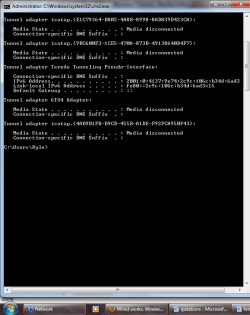
the first attachment is the ipconfig when wired to the d-link hub
the second is when wireless to the netgear
 

Attachments

  • wired to di624.png
    wired to di624.png
    22.9 KB · Views: 36
  • wireless to netgear.png
    wireless to netgear.png
    22.7 KB · Views: 23

My Computer My Computer

At a glance

windows 7
OS
windows 7
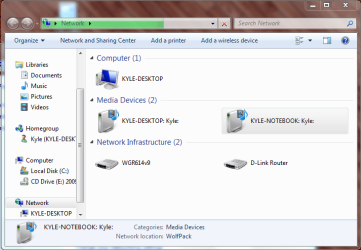
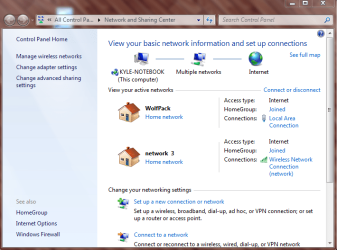
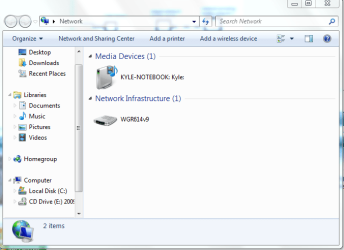
heres some more images that might help a little more.

the first two are wired to the d-link
the second two are while wireless connected to the netgear
 

Attachments

  • wired.PNG
    wired.PNG
    38.4 KB · Views: 15
  • wired status.PNG
    wired status.PNG
    46.5 KB · Views: 18
  • wireless.PNG
    wireless.PNG
    26.8 KB · Views: 13
  • wireless status.PNG
    wireless status.PNG
    45.3 KB · Views: 16

My Computer My Computer

At a glance

windows 7
OS
windows 7
Oh so you are not cabling to the Netgear? As the hub is a dumb device, anything attached to it will almost always connet to each other. The issue here is how the router broadcasts the network given through the hub (why not link the server to the router?) to your notebook.

Anyway can you re-supply the ipconfig tails, important details are chopped off.
 

My Computer My Computer

At a glance

Windows 7 Ultimate 64BitGenuineIntel Intel(R) Core(TM) DuoCore T2400 ...2.00 GBMobile Intel(R) 945 Express Chipset
Computer Manufacturer/Model Number
Lenovo ThinkPad T60
OS
Windows 7 Ultimate 64Bit
CPU
GenuineIntel Intel(R) Core(TM) DuoCore T2400 @ 1.83GHz
Motherboard
Intel(R) 82801G (ICH7 Family)
Memory
2.00 GB
Graphics Card(s)
Mobile Intel(R) 945 Express Chipset
Sound Card
SoundMAX Integrated Digital HD Audio
Monitor(s) Displays
ThinkPad Display
Screen Resolution
1400x1050
Hard Drives
100Gb SATA
Keyboard
Standard Keyboard
Mouse
HID-compliant Mouse
Internet Speed
Cable Broadband - 54Mbps
Other Info
Intel(R) PRO/1000 PL Network Connection
11a/b/g Wireless LAN Mini PCI Express Adapter
Is the Netgear wireless a router or a wireless access point? If it's a router than this configuration won't work, it needs to be a wireless access point "wireless switch".

The D-Link DI-624 isn't a hub it's a router, there can only be one router in this network if you want everything to work correctly. :)
 
Last edited:

My Computer My Computer

At a glance

Windows 7 Ult, Windows 8.1 Pro,Q9650-4.275GHz, E8600 4.5GHz, E6750-3.8GHzG.Skill PC2 9600 1200Mhz 5 5 5 15 2TGTX480
Computer type
PC/Desktop
Computer Manufacturer/Model Number
Home built
OS
Windows 7 Ult, Windows 8.1 Pro,
CPU
Q9650-4.275GHz, E8600 4.5GHz, E6750-3.8GHz
Motherboard
Evga 780i FTW
Memory
G.Skill PC2 9600 1200Mhz 5 5 5 15 2T
Graphics Card(s)
GTX480
Sound Card
Asus Xonar D2
Monitor(s) Displays
HannsG
Screen Resolution
1680X1050
Hard Drives
GSkill Phoenix Pro 120GB SSD
PSU
ThermalTake Toughpower 1000Watt modular
Case
ThermalTake XaserV
Cooling
Xigmatek S1283
Keyboard
Logitech G15
Mouse
Logitech G9
Internet Speed
T1
Back
Top