Wireless connection problem

hacku

New member
Member
Local time
7:02 AM
Messages
53
Location
Arizona
Ok, so this is my first post/thread but I've been doing a bit of research but couldn't find a definitive answer on my problem.

I have a desktop PC running Windows 7 RC (64bit) with a Netgear USB adapter, and a Dell laptop with an Intel wireless adapter running Windows 7 RC (32bit) and I'm experiencing the same problem with both systems.

The problem I'm having is that sometimes when I try to connect to my wireless router (Netgear), it states that it cannot connect to my network and it gives me the dreaded orange asterisk.

I have removed and re-installed the wireless driver on both systems numerous times but that doesn't seem to fix the problem. The only way I can connect to the router is by power cycling the router, and then they can both connect without a problem.

When you ask Windows to diagnose the connection problem, it reboots the wireless adapter but it still won't connect. Then it recommends to restart the router and that's what fixes the problem. So at first I thought that maybe I need to buy a new router even though I NEVER had any problems connecting with XP before.

I then remembered that my brothers laptop is still running XP on it, so I have tested the connection problem with his laptop every time I can't connect with either of my machines, and his XP laptop connects to the router without a problem.

I have determined that this is a problem with the OS or the drivers, but l have already tried un-installing and re-installing the drivers and that doesn't help.

Does anyone have any ideas as to what I can do to fix the problem? The biggest annoyance with this is that the router is in my brothers room, and since I work until 10pm every day, sometimes when I get home I'm not able to connect and he's already sleeping so I can't go in there to reboot the router.

Someone please help!!!!

Thanks
 

My Computer

Computer Manufacturer/Model Number
Custom
OS
Windows 7 RC 64bit
CPU
AMD Athlon 7750 Dual-Core Processor 2.70Ghz
Motherboard
Gigabyte GA-MA78GPM-UD2H
Memory
4GB
Graphics Card(s)
On-board Graphics ATI Radeon HD 3200
Sound Card
On-board Sound Realtek ALC889A
Monitor(s) Displays
42" Westinghouse 1080P Monitor (LVM-42w2)
Screen Resolution
1920x1080
what model of Netgear router is it? Maybe you can try putting dd-wrt firmware on it to solve this problem.

also, just for the heck of it. Try to disable IPv6 on your network adapters.
 

My Computer

Computer Manufacturer/Model Number
Too many to list.
OS
XP, Seven, 2008R2
CPU
AMD, Intel, VIA
Motherboard
Various
Memory
Corsair, Kingston, etc.
Graphics Card(s)
ATI, NVIDIA
Monitor(s) Displays
Samsung
Hard Drives
Maxtor, Western Digital
Keyboard
qwerty
Internet Speed
22 Mb/s @ home, 1 Gb/s @ server
Other Info
All of my systems still run fastest on XP 32-bit for the most part. Win7 is fun to play with, but I still prefer XP for raw speed, security, and functionality.
Thanks for the response. I've gone ahead and disabled IPv6 on both of my systems and so far so good. If it continues to do it I will post again.
 

My Computer

Computer Manufacturer/Model Number
Custom
OS
Windows 7 RC 64bit
CPU
AMD Athlon 7750 Dual-Core Processor 2.70Ghz
Motherboard
Gigabyte GA-MA78GPM-UD2H
Memory
4GB
Graphics Card(s)
On-board Graphics ATI Radeon HD 3200
Sound Card
On-board Sound Realtek ALC889A
Monitor(s) Displays
42" Westinghouse 1080P Monitor (LVM-42w2)
Screen Resolution
1920x1080
Ok, so after a couple of days of not having this problem I thought the issue had been fixed by simply disabling IPv6 in Windows 7.

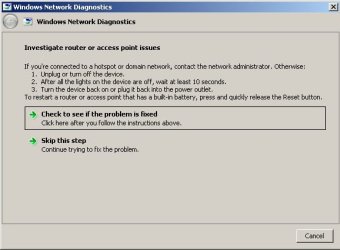
Today I booted up my laptop and what do you know... the dreaded orange asterisk popped up again. This time I took a screenshot of what Windows has determined the problem is, and of course it's telling me it's my router although my desktop running Windows 7 is able to connect just fine as well as the other laptop that is running XP.

The wireless driver on my laptop is:

Broadcom 802.11g Network Adapter
Driver Provider: Microsoft
Driver Date: 10/1/2008
Driver Version: 4.176.75.23

I have already tried updating the driver but it's got the latest (according to Microsoft).

The wireless router I'm using is a:

Netgear 54mbps Wireless Router WGR614 v6

I have already installed the latest firmware from the Netgear website on it (V2.0.19_1.0.19), and since the laptop running XP hasn't had any problems connecting I know it's not the router.

Does anyone else have any other suggestions as to what I can do to fix my problem?
 

Attachments

  • wireless.jpg
    wireless.jpg
    28.3 KB · Views: 69

My Computer

Computer Manufacturer/Model Number
Custom
OS
Windows 7 RC 64bit
CPU
AMD Athlon 7750 Dual-Core Processor 2.70Ghz
Motherboard
Gigabyte GA-MA78GPM-UD2H
Memory
4GB
Graphics Card(s)
On-board Graphics ATI Radeon HD 3200
Sound Card
On-board Sound Realtek ALC889A
Monitor(s) Displays
42" Westinghouse 1080P Monitor (LVM-42w2)
Screen Resolution
1920x1080
Ok, so after a couple of days of not having this problem I thought the issue had been fixed by simply disabling IPv6 in Windows 7.

Today I booted up my laptop and what do you know... the dreaded orange asterisk popped up again. This time I took a screenshot of what Windows has determined the problem is, and of course it's telling me it's my router although my desktop running Windows 7 is able to connect just fine as well as the other laptop that is running XP.

The wireless driver on my laptop is:

Broadcom 802.11g Network Adapter
Driver Provider: Microsoft
Driver Date: 10/1/2008
Driver Version: 4.176.75.23

I have already tried updating the driver but it's got the latest (according to Microsoft).

The wireless router I'm using is a:

Netgear 54mbps Wireless Router WGR614 v6

I have already installed the latest firmware from the Netgear website on it, and since the laptop running XP hasn't had any problems connecting I know it's not the router.

Does anyone else have any other suggestions as to what I can do to fix my problem?

Hi,

A suggestion.

Set fixed IP addresses on your computers.

Chose IP's outside the DCHP range, usually DCHP range is 192.168.1.10 to 192.168.1.50, but make sure by checking your router.

See if that solves your problem.

By the way, fixed IP's are preferable in a home network situation, because it is easier to do forwarding, and RDP.

Good luck
 

My Computer

OS
Win7 Build 7600 x86
CPU
Pentium II 300MHz
Motherboard
Asus
Memory
32mb EDO RAM
Graphics Card(s)
Diamond Viper
Sound Card
Soundblaster 16
Monitor(s) Displays
14" AOC CRT 16K color
Screen Resolution
800x600
Hard Drives
300mb Quantum fireball
PSU
110 Watts
Cooling
Passive
Keyboard
Trust Ergonomic
Mouse
Generic
Internet Speed
256K u 128K d
I'll give that a try, thanks.
 

My Computer

Computer Manufacturer/Model Number
Custom
OS
Windows 7 RC 64bit
CPU
AMD Athlon 7750 Dual-Core Processor 2.70Ghz
Motherboard
Gigabyte GA-MA78GPM-UD2H
Memory
4GB
Graphics Card(s)
On-board Graphics ATI Radeon HD 3200
Sound Card
On-board Sound Realtek ALC889A
Monitor(s) Displays
42" Westinghouse 1080P Monitor (LVM-42w2)
Screen Resolution
1920x1080
Well I setup static IP's on both my laptop running Windows 7 and my desktop running Windows 7.

The thing about my router though is that it won't let me assign static IP addresses outside of the DHCP address pool for some reason.

Anyway, after reserving the static IP's in the router I went ahead and assigned each one of them to my laptop and my desktop. I was able to connect just fine, the router shows them both as being connected, but I'm not able to get out to the internet now. From both machines I can ping the router, they can ping each other, and they can even ping the other 2 machines on the network but I just can't ping out to the internet.

I went ahead and removed the reserved addresses and set them both back up to grab dynamic IP's for the moment. This whole Windows 7 wireless issue is really starting to get on my nerves. If Microsoft doesn't get this sorted out by the time the trial on the RC version comes to an end, I'm afraid I will have to go back to using XP where at least I know everything works the way it's supposed to.

Anyone else have any other ideas?
 

My Computer

Computer Manufacturer/Model Number
Custom
OS
Windows 7 RC 64bit
CPU
AMD Athlon 7750 Dual-Core Processor 2.70Ghz
Motherboard
Gigabyte GA-MA78GPM-UD2H
Memory
4GB
Graphics Card(s)
On-board Graphics ATI Radeon HD 3200
Sound Card
On-board Sound Realtek ALC889A
Monitor(s) Displays
42" Westinghouse 1080P Monitor (LVM-42w2)
Screen Resolution
1920x1080
Well I setup static IP's on both my laptop running Windows 7 and my desktop running Windows 7.

The thing about my router though is that it won't let me assign static IP addresses outside of the DHCP address pool for some reason.

Anyway, after reserving the static IP's in the router I went ahead and assigned each one of them to my laptop and my desktop. I was able to connect just fine, the router shows them both as being connected, but I'm not able to get out to the internet now. From both machines I can ping the router, they can ping each other, and they can even ping the other 2 machines on the network but I just can't ping out to the internet.

I went ahead and removed the reserved addresses and set them both back up to grab dynamic IP's for the moment. This whole Windows 7 wireless issue is really starting to get on my nerves. If Microsoft doesn't get this sorted out by the time the trial on the RC version comes to an end, I'm afraid I will have to go back to using XP where at least I know everything works the way it's supposed to.

Anyone else have any other ideas?

When you set static IP's, you also have to set the gateway in that box to the router's address (like 192.168.1.1) , and the first dns also to that same address.

I your DCHP set to the full range by any chance? 192.168.1.10 to 192.168.1.255 ?
Can you change DCHP range in the router? I yes set it to .50

good luck
leave second dns open.
 

My Computer

OS
Win7 Build 7600 x86
CPU
Pentium II 300MHz
Motherboard
Asus
Memory
32mb EDO RAM
Graphics Card(s)
Diamond Viper
Sound Card
Soundblaster 16
Monitor(s) Displays
14" AOC CRT 16K color
Screen Resolution
800x600
Hard Drives
300mb Quantum fireball
PSU
110 Watts
Cooling
Passive
Keyboard
Trust Ergonomic
Mouse
Generic
Internet Speed
256K u 128K d
PM me your MSN, it's easier helping you when we can communicate directly.

Greetz
 

My Computer

OS
Win7 Build 7600 x86
CPU
Pentium II 300MHz
Motherboard
Asus
Memory
32mb EDO RAM
Graphics Card(s)
Diamond Viper
Sound Card
Soundblaster 16
Monitor(s) Displays
14" AOC CRT 16K color
Screen Resolution
800x600
Hard Drives
300mb Quantum fireball
PSU
110 Watts
Cooling
Passive
Keyboard
Trust Ergonomic
Mouse
Generic
Internet Speed
256K u 128K d
I'm so dumb! Thanks for clearing things up man...

I was doing an address allocation on the router which is why it wasn't allowing me to input an address outside of the dhcp range.

I went ahead and assigned both of my machines static IP's now and they're working. Hopefully I won't get the dumb orange asterisk anymore. I'll post again if it does...
 

My Computer

Computer Manufacturer/Model Number
Custom
OS
Windows 7 RC 64bit
CPU
AMD Athlon 7750 Dual-Core Processor 2.70Ghz
Motherboard
Gigabyte GA-MA78GPM-UD2H
Memory
4GB
Graphics Card(s)
On-board Graphics ATI Radeon HD 3200
Sound Card
On-board Sound Realtek ALC889A
Monitor(s) Displays
42" Westinghouse 1080P Monitor (LVM-42w2)
Screen Resolution
1920x1080
Well, I just thought I would chime in with an update on my problem.

Assigning static IP's to each one of my wireless systems seems to have done the trick. Haven't had any orange asterisks on my network icon since doing that.

So if anyone else is having wireless connection issues, I would recommend assigning static IP's before doing anything else.

Thanks to everyone here that chimed in and helped out... :D
 

My Computer

Computer Manufacturer/Model Number
Custom
OS
Windows 7 RC 64bit
CPU
AMD Athlon 7750 Dual-Core Processor 2.70Ghz
Motherboard
Gigabyte GA-MA78GPM-UD2H
Memory
4GB
Graphics Card(s)
On-board Graphics ATI Radeon HD 3200
Sound Card
On-board Sound Realtek ALC889A
Monitor(s) Displays
42" Westinghouse 1080P Monitor (LVM-42w2)
Screen Resolution
1920x1080
Is IPv6 still on or off?

Are you using HomeGroup?

Silly question, but how do you assign a static IP??

Thank you.
 

My Computer

Computer Manufacturer/Model Number
Dell Dimension E510
OS
Windows 7 Home Premium 64 Bit
Memory
3GB
Is IPv6 still on or off?

Disabled IPv6

Are you using HomeGroup?

Yes

Silly question, but how do you assign a static IP??

Start>Control Panel>Network & Sharing Center>Change Adapter settings

And btw, this actually still hasn't fixed my issu 100%. I still randomly have to reset my router but only happens maybe once a week instead of a few times a day.
 

My Computer

Computer Manufacturer/Model Number
Custom
OS
Windows 7 RC 64bit
CPU
AMD Athlon 7750 Dual-Core Processor 2.70Ghz
Motherboard
Gigabyte GA-MA78GPM-UD2H
Memory
4GB
Graphics Card(s)
On-board Graphics ATI Radeon HD 3200
Sound Card
On-board Sound Realtek ALC889A
Monitor(s) Displays
42" Westinghouse 1080P Monitor (LVM-42w2)
Screen Resolution
1920x1080
Back
Top