Hey there,
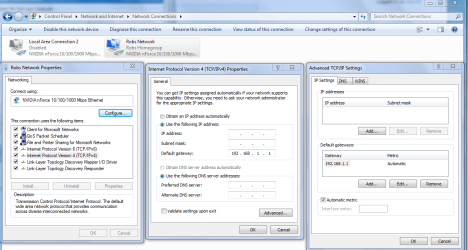
I've recently got a new PC and installed a Wireless card that was previously running on my very old PC with no problems. Ok so my network has other stations (wired and wireless) running perfectly fine, connecting both to the router and the internet. My new machine however can see and connect to the router, but it says that I have no internet access.
The devices on the network that work with no problems are as follows:
PC (7 years old) - Wired Connection - Windows XP
MacBook - Wireless Connection
XBox 360 - Wireless Connection
Now I have tried a Wired connection with my new PC and it works fine, unfortunately this is not practical and I hope to get the wireless working.
Below is the IPConfig from my new PC. It is Windows 7 and has the latest Service Pack. My router also has the latest firmware and the latest drivers are on the Wireless Card. I have also tried rolling back the Drivers, but to no avail. I have tried various combinations of resetting the router, the modem and PC and have reset the network and started a fresh, but still the same problem appears.
Previously in my struggles the problem seemed to be with the Default Gateway (After Diagnosing, the system replies that "The Default Gateway Is Not Available" has now been fixed.)
I am obviously frustrated and have poured over various help sites. I have been able to gain an internet connection, after Diagnosing, the machine seemed to connect fine, for about ten seconds, then it was almost like something had been reset or switched off. To my un-computer literate brain, it seems like the problem most probably lies with some settings on my new PC or a problem with the Wireless Card. The Router and connection work fine with other machines and even the problem machine when it is wired.
In the IPConfig I have included both the Wired and the Wireless connections. The net works on the Wired regardless of whether the Wireless is enabled or not. I figured it may provide some insight as to why the Wired works and the Wireless doesn't.
...here is my system information.
POWER SUPPLY - 500W RECON BRONZE PSU
MOTHERBOARD - P7P55D LE MOTHERBOARD
PROCESSOR - INTEL i5-750 QUAD CORE
CPU COOLER - AKASA X4 CPU COOLER
MEMORY - 4GB DDR3 - 1333Mhz MEMORY
HARD DRIVE - 500GB SATAII
OPTICAL DRIVER - DVD REWRITER
GRAPHICS CARD - XFX RADEON HD 5770 XXX 1GB GDDR5 PCI-E 2.0x16
WINDOWS 7 HP (64 bit)
Many advanced thanks for any help received.
Josh.
Microsoft Windows [Version 6.1.7600]
Copyright (c) 2009 Microsoft Corporation. All rights reserved.
C:\Users\Usewr>ipconfig/all
Windows IP Configuration
Host Name . . . . . . . . . . . . : Usewr-PC
Primary Dns Suffix . . . . . . . :
Node Type . . . . . . . . . . . . : Hybrid
IP Routing Enabled. . . . . . . . : No
WINS Proxy Enabled. . . . . . . . : No
Wireless LAN adapter Wireless Network Connection 2:
Connection-specific DNS Suffix . :
Description . . . . . . . . . . . : Realtek 8185 Extensible 802.11b/g Wireles
s Device
Physical Address. . . . . . . . . : 00-11-3B-0F-84-09
DHCP Enabled. . . . . . . . . . . : Yes
Autoconfiguration Enabled . . . . : Yes
Link-local IPv6 Address . . . . . : fe80::5c37:33b7:e49b:797f%14(Preferred)
IPv4 Address. . . . . . . . . . . : 192.168.7.3(Preferred)
Subnet Mask . . . . . . . . . . . : 255.255.255.0
Lease Obtained. . . . . . . . . . : 01 June 2010 21:32:54
Lease Expires . . . . . . . . . . : 02 June 2010 21:32:54
Default Gateway . . . . . . . . . : 192.168.7.1
DHCP Server . . . . . . . . . . . : 192.168.7.1
DHCPv6 IAID . . . . . . . . . . . : 419434811
DHCPv6 Client DUID. . . . . . . . : 00-01-00-01-13-8D-9F-CE-48-5B-39-A9-F3-C9
DNS Servers . . . . . . . . . . . : 192.168.7.1
NetBIOS over Tcpip. . . . . . . . : Enabled
Ethernet adapter Local Area Connection:
Connection-specific DNS Suffix . :
Description . . . . . . . . . . . : Realtek PCIe GBE Family Controller
Physical Address. . . . . . . . . : 48-5B-39-A9-F3-C9
DHCP Enabled. . . . . . . . . . . : Yes
Autoconfiguration Enabled . . . . : Yes
Link-local IPv6 Address . . . . . : fe80::e024:c7c3:c3f2:809b%11(Preferred)
IPv4 Address. . . . . . . . . . . : 192.168.7.2(Preferred)
Subnet Mask . . . . . . . . . . . : 255.255.255.0
Lease Obtained. . . . . . . . . . : 01 June 2010 22:14:09
Lease Expires . . . . . . . . . . : 02 June 2010 22:14:09
Default Gateway . . . . . . . . . : 192.168.7.1
DHCP Server . . . . . . . . . . . : 192.168.7.1
DHCPv6 IAID . . . . . . . . . . . : 239622969
DHCPv6 Client DUID. . . . . . . . : 00-01-00-01-13-8D-9F-CE-48-5B-39-A9-F3-C9
DNS Servers . . . . . . . . . . . : 192.168.7.1
NetBIOS over Tcpip. . . . . . . . : Enabled
Tunnel adapter isatap.{164CC753-2235-4BA5-A5BA-7139A2F58FE1}:
Media State . . . . . . . . . . . : Media disconnected
Connection-specific DNS Suffix . :
Description . . . . . . . . . . . : Microsoft ISATAP Adapter
Physical Address. . . . . . . . . : 00-00-00-00-00-00-00-E0
DHCP Enabled. . . . . . . . . . . : No
Autoconfiguration Enabled . . . . : Yes
Tunnel adapter Teredo Tunneling Pseudo-Interface:
Connection-specific DNS Suffix . :
Description . . . . . . . . . . . : Teredo Tunneling Pseudo-Interface
Physical Address. . . . . . . . . : 00-00-00-00-00-00-00-E0
DHCP Enabled. . . . . . . . . . . : No
Autoconfiguration Enabled . . . . : Yes
IPv6 Address. . . . . . . . . . . : 2001:0:5ef5:73ba:2c12:31fb:addc:835d(Pref
erred)
Link-local IPv6 Address . . . . . : fe80::2c12:31fb:addc:835d%12(Preferred)
Default Gateway . . . . . . . . . : ::
NetBIOS over Tcpip. . . . . . . . : Disabled
Tunnel adapter Reusable ISATAP Interface {6DAA1030-78CC-4B7C-8C14-9C0306DF187E}:
Media State . . . . . . . . . . . : Media disconnected
Connection-specific DNS Suffix . :
Description . . . . . . . . . . . : Microsoft ISATAP Adapter #2
Physical Address. . . . . . . . . : 00-00-00-00-00-00-00-E0
DHCP Enabled. . . . . . . . . . . : No
Autoconfiguration Enabled . . . . : Yes
Tunnel adapter isatap.{80F910B9-B715-4956-B49E-ED4BEE8F645A}:
Media State . . . . . . . . . . . : Media disconnected
Connection-specific DNS Suffix . :
Description . . . . . . . . . . . : Microsoft ISATAP Adapter #3
Physical Address. . . . . . . . . : 00-00-00-00-00-00-00-E0
DHCP Enabled. . . . . . . . . . . : No
Autoconfiguration Enabled . . . . : Yes
I've recently got a new PC and installed a Wireless card that was previously running on my very old PC with no problems. Ok so my network has other stations (wired and wireless) running perfectly fine, connecting both to the router and the internet. My new machine however can see and connect to the router, but it says that I have no internet access.
The devices on the network that work with no problems are as follows:
PC (7 years old) - Wired Connection - Windows XP
MacBook - Wireless Connection
XBox 360 - Wireless Connection
Now I have tried a Wired connection with my new PC and it works fine, unfortunately this is not practical and I hope to get the wireless working.
Below is the IPConfig from my new PC. It is Windows 7 and has the latest Service Pack. My router also has the latest firmware and the latest drivers are on the Wireless Card. I have also tried rolling back the Drivers, but to no avail. I have tried various combinations of resetting the router, the modem and PC and have reset the network and started a fresh, but still the same problem appears.
Previously in my struggles the problem seemed to be with the Default Gateway (After Diagnosing, the system replies that "The Default Gateway Is Not Available" has now been fixed.)
I am obviously frustrated and have poured over various help sites. I have been able to gain an internet connection, after Diagnosing, the machine seemed to connect fine, for about ten seconds, then it was almost like something had been reset or switched off. To my un-computer literate brain, it seems like the problem most probably lies with some settings on my new PC or a problem with the Wireless Card. The Router and connection work fine with other machines and even the problem machine when it is wired.
In the IPConfig I have included both the Wired and the Wireless connections. The net works on the Wired regardless of whether the Wireless is enabled or not. I figured it may provide some insight as to why the Wired works and the Wireless doesn't.
...here is my system information.
POWER SUPPLY - 500W RECON BRONZE PSU
MOTHERBOARD - P7P55D LE MOTHERBOARD
PROCESSOR - INTEL i5-750 QUAD CORE
CPU COOLER - AKASA X4 CPU COOLER
MEMORY - 4GB DDR3 - 1333Mhz MEMORY
HARD DRIVE - 500GB SATAII
OPTICAL DRIVER - DVD REWRITER
GRAPHICS CARD - XFX RADEON HD 5770 XXX 1GB GDDR5 PCI-E 2.0x16
WINDOWS 7 HP (64 bit)
Many advanced thanks for any help received.
Josh.
Microsoft Windows [Version 6.1.7600]
Copyright (c) 2009 Microsoft Corporation. All rights reserved.
C:\Users\Usewr>ipconfig/all
Windows IP Configuration
Host Name . . . . . . . . . . . . : Usewr-PC
Primary Dns Suffix . . . . . . . :
Node Type . . . . . . . . . . . . : Hybrid
IP Routing Enabled. . . . . . . . : No
WINS Proxy Enabled. . . . . . . . : No
Wireless LAN adapter Wireless Network Connection 2:
Connection-specific DNS Suffix . :
Description . . . . . . . . . . . : Realtek 8185 Extensible 802.11b/g Wireles
s Device
Physical Address. . . . . . . . . : 00-11-3B-0F-84-09
DHCP Enabled. . . . . . . . . . . : Yes
Autoconfiguration Enabled . . . . : Yes
Link-local IPv6 Address . . . . . : fe80::5c37:33b7:e49b:797f%14(Preferred)
IPv4 Address. . . . . . . . . . . : 192.168.7.3(Preferred)
Subnet Mask . . . . . . . . . . . : 255.255.255.0
Lease Obtained. . . . . . . . . . : 01 June 2010 21:32:54
Lease Expires . . . . . . . . . . : 02 June 2010 21:32:54
Default Gateway . . . . . . . . . : 192.168.7.1
DHCP Server . . . . . . . . . . . : 192.168.7.1
DHCPv6 IAID . . . . . . . . . . . : 419434811
DHCPv6 Client DUID. . . . . . . . : 00-01-00-01-13-8D-9F-CE-48-5B-39-A9-F3-C9
DNS Servers . . . . . . . . . . . : 192.168.7.1
NetBIOS over Tcpip. . . . . . . . : Enabled
Ethernet adapter Local Area Connection:
Connection-specific DNS Suffix . :
Description . . . . . . . . . . . : Realtek PCIe GBE Family Controller
Physical Address. . . . . . . . . : 48-5B-39-A9-F3-C9
DHCP Enabled. . . . . . . . . . . : Yes
Autoconfiguration Enabled . . . . : Yes
Link-local IPv6 Address . . . . . : fe80::e024:c7c3:c3f2:809b%11(Preferred)
IPv4 Address. . . . . . . . . . . : 192.168.7.2(Preferred)
Subnet Mask . . . . . . . . . . . : 255.255.255.0
Lease Obtained. . . . . . . . . . : 01 June 2010 22:14:09
Lease Expires . . . . . . . . . . : 02 June 2010 22:14:09
Default Gateway . . . . . . . . . : 192.168.7.1
DHCP Server . . . . . . . . . . . : 192.168.7.1
DHCPv6 IAID . . . . . . . . . . . : 239622969
DHCPv6 Client DUID. . . . . . . . : 00-01-00-01-13-8D-9F-CE-48-5B-39-A9-F3-C9
DNS Servers . . . . . . . . . . . : 192.168.7.1
NetBIOS over Tcpip. . . . . . . . : Enabled
Tunnel adapter isatap.{164CC753-2235-4BA5-A5BA-7139A2F58FE1}:
Media State . . . . . . . . . . . : Media disconnected
Connection-specific DNS Suffix . :
Description . . . . . . . . . . . : Microsoft ISATAP Adapter
Physical Address. . . . . . . . . : 00-00-00-00-00-00-00-E0
DHCP Enabled. . . . . . . . . . . : No
Autoconfiguration Enabled . . . . : Yes
Tunnel adapter Teredo Tunneling Pseudo-Interface:
Connection-specific DNS Suffix . :
Description . . . . . . . . . . . : Teredo Tunneling Pseudo-Interface
Physical Address. . . . . . . . . : 00-00-00-00-00-00-00-E0
DHCP Enabled. . . . . . . . . . . : No
Autoconfiguration Enabled . . . . : Yes
IPv6 Address. . . . . . . . . . . : 2001:0:5ef5:73ba:2c12:31fb:addc:835d(Pref
erred)
Link-local IPv6 Address . . . . . : fe80::2c12:31fb:addc:835d%12(Preferred)
Default Gateway . . . . . . . . . : ::
NetBIOS over Tcpip. . . . . . . . : Disabled
Tunnel adapter Reusable ISATAP Interface {6DAA1030-78CC-4B7C-8C14-9C0306DF187E}:
Media State . . . . . . . . . . . : Media disconnected
Connection-specific DNS Suffix . :
Description . . . . . . . . . . . : Microsoft ISATAP Adapter #2
Physical Address. . . . . . . . . : 00-00-00-00-00-00-00-E0
DHCP Enabled. . . . . . . . . . . : No
Autoconfiguration Enabled . . . . : Yes
Tunnel adapter isatap.{80F910B9-B715-4956-B49E-ED4BEE8F645A}:
Media State . . . . . . . . . . . : Media disconnected
Connection-specific DNS Suffix . :
Description . . . . . . . . . . . : Microsoft ISATAP Adapter #3
Physical Address. . . . . . . . . : 00-00-00-00-00-00-00-E0
DHCP Enabled. . . . . . . . . . . : No
Autoconfiguration Enabled . . . . : Yes
My Computer
- OS
- Windows 7
- CPU
- INTEL i5-750 QUAD CORE
- Motherboard
- ASUS P7P55D LE MOTHERBOARD
- Memory
- 4GB DDR3 - 1333Mhz MEMORY
- Graphics Card(s)
- XFX Radeon
- Hard Drives
- 500GB SATAII