Wireless devices not installing

benjacobs101

New member
Local time
6:24 PM
Messages
11
Hi

I have tried two different wireless N devices with my desktop pc, but neither of them will connect.

The first was a Belkin USB wireless N adapter. I tried two of these and the same thing happened. The device was recognised by the pc and I installed the latest driver. After rebooting the pc the adapter was recognised but it said it wasn't connected to the computer.

Then I got a PCI-e x1 wireless adapter - Asus PCE-N10. This was detected and installed with the latest driver, but again it shows that it isn't connected to the computer.

Both times, the computer detected the device before it was installed.

I am currently using a linksys wireless G usb adapter but it's old and slow.

My PC is a HP s5202uk. Please help! I'm going mad!
 

My Computer

OS
Windows 7 Home Premium (64bit)
Hello benjacobs101. Welcome to the forum.

Are you removing the old Linksys adapter from Device Manager and/or uninstalling all of it's software and rebooting before you attempt to install the new adapters?
 

My Computer

Computer type
PC/Desktop
Computer Manufacturer/Model Number
Home Built - Jan 2013
OS
Windows 7 64 Bit Home Premium SP1
CPU
i7-3820
Motherboard
Asus P9X79-PRO - Bios 4608
Memory
GSkill F3-14900CL9Q - 16GB
Graphics Card(s)
EVGA GeForce GTX660 - Driver 352.86
Sound Card
On board Realtek ALC898
Monitor(s) Displays
Acer S271HL
Screen Resolution
1920 x 1080
Hard Drives
#1- Samsung 840 Pro Series
#2- Western Digital WD1002FAEX Sata3 Black
#3- Western Digital WD1002FAEX Sata3 Black
PSU
Corsair CMPSU-850TX-V2 - 850 watt (by Seasonic)
Case
Corsair Obsidian 550D
Cooling
Standard 3 120mm case fans, Cooler Master Hyper 212 EVO
Keyboard
MS KC-0405
Mouse
Intellimouse 5-button
Internet Speed
56 Mbits/Sec (on a good day)
Antivirus
Avast & Malwarebytes
Browser
Firefox
Other Info
Asus DVD - DRW-24B1ST 24X
No. I didnt want to risk losing connectivity, but Ill give it a go now.
 

My Computer

OS
Windows 7 Home Premium (64bit)
I deleted both devices and drivers. Then re-booted and installed the asus utility and driver. Then I shut down, installed the card and then powered up. The card was detected and the driver installed again. But again the utility and the adapter settings windo both say that the card is not connected. I am just re-booting to see if there is any change.
 

My Computer

OS
Windows 7 Home Premium (64bit)
Where does the system say the card is not connected?
In the Device Manager? On the Taskbar? Or in the Network & Sharing Center?
 

My Computer

Computer type
PC/Desktop
Computer Manufacturer/Model Number
Home Built - Jan 2013
OS
Windows 7 64 Bit Home Premium SP1
CPU
i7-3820
Motherboard
Asus P9X79-PRO - Bios 4608
Memory
GSkill F3-14900CL9Q - 16GB
Graphics Card(s)
EVGA GeForce GTX660 - Driver 352.86
Sound Card
On board Realtek ALC898
Monitor(s) Displays
Acer S271HL
Screen Resolution
1920 x 1080
Hard Drives
#1- Samsung 840 Pro Series
#2- Western Digital WD1002FAEX Sata3 Black
#3- Western Digital WD1002FAEX Sata3 Black
PSU
Corsair CMPSU-850TX-V2 - 850 watt (by Seasonic)
Case
Corsair Obsidian 550D
Cooling
Standard 3 120mm case fans, Cooler Master Hyper 212 EVO
Keyboard
MS KC-0405
Mouse
Intellimouse 5-button
Internet Speed
56 Mbits/Sec (on a good day)
Antivirus
Avast & Malwarebytes
Browser
Firefox
Other Info
Asus DVD - DRW-24B1ST 24X
In network connections and the taskbar.
 

My Computer

OS
Windows 7 Home Premium (64bit)
OK. A little bit of misdirection there. When you said the "card" was not connected that meant (to me) that it was a system/hardware/driver problem.

Yours is a Network Connectivity problem. Have you configured your wireless connection yet?
 

My Computer

Computer type
PC/Desktop
Computer Manufacturer/Model Number
Home Built - Jan 2013
OS
Windows 7 64 Bit Home Premium SP1
CPU
i7-3820
Motherboard
Asus P9X79-PRO - Bios 4608
Memory
GSkill F3-14900CL9Q - 16GB
Graphics Card(s)
EVGA GeForce GTX660 - Driver 352.86
Sound Card
On board Realtek ALC898
Monitor(s) Displays
Acer S271HL
Screen Resolution
1920 x 1080
Hard Drives
#1- Samsung 840 Pro Series
#2- Western Digital WD1002FAEX Sata3 Black
#3- Western Digital WD1002FAEX Sata3 Black
PSU
Corsair CMPSU-850TX-V2 - 850 watt (by Seasonic)
Case
Corsair Obsidian 550D
Cooling
Standard 3 120mm case fans, Cooler Master Hyper 212 EVO
Keyboard
MS KC-0405
Mouse
Intellimouse 5-button
Internet Speed
56 Mbits/Sec (on a good day)
Antivirus
Avast & Malwarebytes
Browser
Firefox
Other Info
Asus DVD - DRW-24B1ST 24X
Not yet. I was trying to use the asus utility software, but it wont communicate with the card - it's saying its not there. If it's a software problem, how can I configure it?
 

My Computer

OS
Windows 7 Home Premium (64bit)
First, please check in the Device Manager and let me know if the wireless card is there, that there are no warning icons over it, and it says "This device is working properly".

Next you will look in the Task Bar and find the Network Icon. This may have a red X on it, or yellow ! . What does it look like?

If you right click on the icon, you should get a list of wireless networks you could connect to (it could be a list of one). What do you see?
 

My Computer

Computer type
PC/Desktop
Computer Manufacturer/Model Number
Home Built - Jan 2013
OS
Windows 7 64 Bit Home Premium SP1
CPU
i7-3820
Motherboard
Asus P9X79-PRO - Bios 4608
Memory
GSkill F3-14900CL9Q - 16GB
Graphics Card(s)
EVGA GeForce GTX660 - Driver 352.86
Sound Card
On board Realtek ALC898
Monitor(s) Displays
Acer S271HL
Screen Resolution
1920 x 1080
Hard Drives
#1- Samsung 840 Pro Series
#2- Western Digital WD1002FAEX Sata3 Black
#3- Western Digital WD1002FAEX Sata3 Black
PSU
Corsair CMPSU-850TX-V2 - 850 watt (by Seasonic)
Case
Corsair Obsidian 550D
Cooling
Standard 3 120mm case fans, Cooler Master Hyper 212 EVO
Keyboard
MS KC-0405
Mouse
Intellimouse 5-button
Internet Speed
56 Mbits/Sec (on a good day)
Antivirus
Avast & Malwarebytes
Browser
Firefox
Other Info
Asus DVD - DRW-24B1ST 24X
Card is there, no warnings and working properly. In the task bar the icon is the wireless one with a red x through it. There aren't any wireless networks available in the window. The router is on and working and the pc is about 7 metres away (through the wall).
 

My Computer

OS
Windows 7 Home Premium (64bit)
Is your router transmitting its SSID? Some routers can be set so they don't broadcast it and it can still work wirelessly but can be troublesome, especially for the initial connection.

Then check to ensure the adapter is enabled:

picture.php


You can right click the adapter name to bring up a context menu with an option to enable it.
 
Last edited:

My Computer

OS
Windows 7 Ultimate x64
Rightclick on the wireless icon in SysTray to Troubleshoot.

Do you have HP Wireless Manager also running in System Tray. You need to set it to Allow Independent Wireless manager before disabling it, or it will often block the signal or disallow use of just the device without the HP bloatware. Turn off any other wireless software in msconfig>Startup. Troubleshooting Steps for Windows 7

This brings up whether this is still an HP bloatware preinstall? HP has the worst load of bloatware and useless factory utilties with better version built into Win7. Most tech enthusiasts will not run such a corrupted install but instead Clean Reinstall - Factory OEM Windows 7.

The latest HP's have a Minimal Factory Recovery that is very close to a Clean Reinstall however keeps the HP Wireless manager. Again, you need to disable it in the Preferences.

You can also Clean Up Factory Bloatware
 
Last edited:
Even if you're not ready to do the recommended clean install without all the bloat, I would at least disable any OEM software that tries to manage network connections. Windows handles network connections quite well.

If you find you cannot enable or otherwise manipulate properties of the network adapter via Network Connections it is likely due to OEM software interfering.
 

My Computer

OS
Windows 7 Ultimate x64
Im now thinking that is is a Windows issue. I have set up a 2nd router as a repeater. This is working with other computers in my house, but not with my desktop. I have deleted all of the connection software and adapters, so that only the ethernet connection remains, then rebooted the computer. But it won´t connect. It says that an unidentified network is connected and it won´t connect to the internet.

Both routers transmit SSID and both work wirelessly and wired with other computers running Windows 7.

Any ideas?
 

My Computer

OS
Windows 7 Home Premium (64bit)
I have the repeater working - the IPv4 was not set to auto detect. However the taskbar icon still has a red X through it. I have internet though. I'm going to try the wireless card again and see if I had the settings wrong.
 

My Computer

OS
Windows 7 Home Premium (64bit)
Red X gone now and internet working. Now I want to focus on trying to get this card working as I would like 802.11n rather than b/g. I have checked all the settings and they appear to be normal. It says "Not Connected" rather than "Disconnected" - not sure if that makes a difference?
 

My Computer

OS
Windows 7 Home Premium (64bit)
In Network and SHaring Center, choose Network Adapters, disable all others than the one you want and Enable it.

If it won't connect to a Network, run it's Troubleshooter.
 
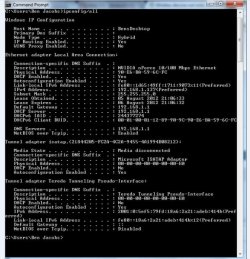
Can you post some screenshots of the settings you're looking at? Also post a screenshot of ipconfig /all output.
 

My Computer

OS
Windows 7 Ultimate x64
Attached screenshots. The IPv4 and IPv6 are both set to auto detect in the properties.

Thanks!
 

Attachments

  • ipconfig_all.jpg
    ipconfig_all.jpg
    111.2 KB · Views: 3
  • settings.jpg
    settings.jpg
    119.9 KB · Views: 6

My Computer

OS
Windows 7 Home Premium (64bit)
Back
Top