
Wireless Internet Connection Randomly Lost.

Kokines

New member
Member
Local time
2:16 PM
Messages
40
Hey, so I just recently built this PC with built in WiFi and I have been experienceing some trouble. I will randomly lose internet connection while on my PC, sometimes while gaming and other times while just browsing the internet. I have updated all my drivers for the router and built in wireless. Any help would be appreciated.

1. Is this a wired or wireless connection issue? WIRELESS

2. Who is your Internet Service Provider (ISP)? COX COMMUNICATIONS

3. What type of Broadband connection are you using? CABLE

4. What is the exact Make and Model of your Modem, Router or Modem/Router Combo -
MODEM: MOTOROLA SB5101N ROUTER: APPLE AIRPORT EXTREME

5. What is the Name of the Anti-Virus, Security or Firewall Software installed from the problematic computer - AVG
 

Attachments
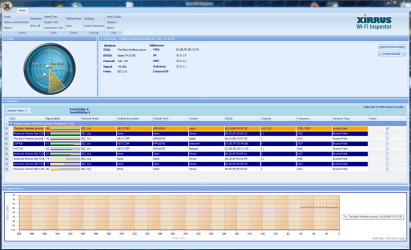
  • ipconfig.txt
    ipconfig.txt
    4.5 KB · Views: 3
  • Wireless.PNG
    Wireless.PNG
    341.9 KB · Views: 7

My Computer

Computer type
PC/Desktop
Computer Manufacturer/Model Number
Custom Build
OS
Windows 7 64 bit
CPU
i5 4760k
Motherboard
MSI Mini ITX Gaming AC
Memory
8GB DDR3-2000MHz
Graphics Card(s)
EVGA 760TI
Hard Drives
C: Transcend 256GB Internal Solid State Drive - 2.5" Form Factor, SATA3, 6Gb/s

Extra Drives: WD Black cav 2tb, WD Blue cav 1.5tb
Antivirus
AVG
Browser
Chrome
Hi there,

Thanks for all the info that you've provided quite helpful. The ipconfig/all output and Xirrus snip looks good.

Are there any other heavy data users in your household? Perhaps heavy gamers or video streamers? How about any small electronic devices (i.e. cell phones, stereo speakers, etc.) near your computer that might be causing interference?

Can you please post your Speedtest?
 

My Computer

Computer Manufacturer/Model Number
Lenovo Desktop/Samsung Laptop
OS
Win7 & Win8 64bit
CPU
Intel i5
Internet Speed
Charter-20 Mbps
Antivirus
Avast
Browser
FF, IE9 and Chrome
Hi there,

Thanks for all the info that you've provided quite helpful. The ipconfig/all output and Xirrus snip looks good.

Are there any other heavy data users in your household? Perhaps heavy gamers or video streamers? How about any small electronic devices (i.e. cell phones, stereo speakers, etc.) near your computer that might be causing interference?

Can you please post your Speedtest?


Thanks for the reply, The most devices on the network at one time is 4 (2 computers and 2 phones). Seems weird that I did the same stuff 2 weeks ago on my old PC and never had this problem. So you think maybe there is a freq, that is interfering with my signal which causes it to lose connection? Here's my speedtest results:
 

Attachments

  • speed.PNG
    speed.PNG
    300 KB · Views: 3

My Computer

Computer type
PC/Desktop
Computer Manufacturer/Model Number
Custom Build
OS
Windows 7 64 bit
CPU
i5 4760k
Motherboard
MSI Mini ITX Gaming AC
Memory
8GB DDR3-2000MHz
Graphics Card(s)
EVGA 760TI
Hard Drives
C: Transcend 256GB Internal Solid State Drive - 2.5" Form Factor, SATA3, 6Gb/s

Extra Drives: WD Black cav 2tb, WD Blue cav 1.5tb
Antivirus
AVG
Browser
Chrome
Sorry for the delay of the respond. It might be some type of interference causing your disconnection, not so sure. But are there any small appliances/electronics near your PC that might be interfering?
 

My Computer

Computer Manufacturer/Model Number
Lenovo Desktop/Samsung Laptop
OS
Win7 & Win8 64bit
CPU
Intel i5
Internet Speed
Charter-20 Mbps
Antivirus
Avast
Browser
FF, IE9 and Chrome
Sorry for the delay of the respond. It might be some type of interference causing your disconnection, not so sure. But are there any small appliances/electronics near your PC that might be interfering?

No problem, I took awhile to get back also...The problem is still happening here is what I get after I troubleshoot:
 

Attachments

  • problem.PNG
    problem.PNG
    75.8 KB · Views: 7

My Computer

Computer type
PC/Desktop
Computer Manufacturer/Model Number
Custom Build
OS
Windows 7 64 bit
CPU
i5 4760k
Motherboard
MSI Mini ITX Gaming AC
Memory
8GB DDR3-2000MHz
Graphics Card(s)
EVGA 760TI
Hard Drives
C: Transcend 256GB Internal Solid State Drive - 2.5" Form Factor, SATA3, 6Gb/s

Extra Drives: WD Black cav 2tb, WD Blue cav 1.5tb
Antivirus
AVG
Browser
Chrome
I have a usb wireless adapter that I know doesnt mess up but I dont know how to designate it primary over my built in WiFi adapter, you know how I could make it primary?
 

My Computer

Computer type
PC/Desktop
Computer Manufacturer/Model Number
Custom Build
OS
Windows 7 64 bit
CPU
i5 4760k
Motherboard
MSI Mini ITX Gaming AC
Memory
8GB DDR3-2000MHz
Graphics Card(s)
EVGA 760TI
Hard Drives
C: Transcend 256GB Internal Solid State Drive - 2.5" Form Factor, SATA3, 6Gb/s

Extra Drives: WD Black cav 2tb, WD Blue cav 1.5tb
Antivirus
AVG
Browser
Chrome
You may definitely try using your USB Wi-Fi Adapter and see if that helps. Try disabling the integrated Wi-Fi adapter from Device Manager. How Do I Enable My Disabled Wireless Adapter? | eHow
I have a usb wireless adapter that I know doesnt mess up but I dont know how to designate it primary over my built in WiFi adapter, you know how I could make it primary?
By any chance are you using a wireless utility (program) manager for your Wi-Fi adapter other than the built-in Windows wireless (WLAN Autoconfig)?
 

My Computer

Computer Manufacturer/Model Number
Lenovo Desktop/Samsung Laptop
OS
Win7 & Win8 64bit
CPU
Intel i5
Internet Speed
Charter-20 Mbps
Antivirus
Avast
Browser
FF, IE9 and Chrome
Back
Top