"Wireless network connection" doesnt have a valid IP configuration...

samman64

New member
"Wireless network connection" doesnt have a valid IP configuration...

hello all,

my internet has previously worked without any problems. two days ago, it said i was connected with limited connectivity. i tried disabling/enabling my wireless, unplugging the wireless router, and running troubleshoot. the computer said that my wireless network connection doesnt have a valid IP configuration. neither of my roomates had this issue (they can still get to the internet fine). i was worried that it was something with my internet, so i went to a friends house and it worked there. i then ran system restore to a period when internet worked, thinking it could have been a bad update, but still no change. i went into my IP address configuration, and it is all set to automatically find. not sure where to go from here. any help?

i have an asus computer, windows 7 ultimate (32bit).
 

My Computer

Computer Manufacturer/Model Number
asus
OS
windows 7 ultimate 32 (i believe)
If you can type ipconfig/all into an http://www.sevenforums.com/tutorials/783-elevated-command-prompt.html then post a screen shot of the results it would be very helpful. :)

It sounds like the wireless profile for your home connection was somehow corrupted or changed.

You can usually straighten that out by going into the Wireless Connection Manager in the Network and Sharing Center and making sure that the settings match the ones in your router.

The Bonjour service which installs with iTunes and Adobe Photo shop is also famous for causing this problem.

To fix ...
Run MsConfig

Under the Services tab uncheck the service called "##Id_String1.6844[... and then a bunch of numbers]" by Apple

Reboot and problem solved

To delete the Bonjour service.
1. Navigate to C:\Program Files\Bonjour
2. Rename the mdnsNSP.dll file in that folder to mdnsNSP.old
3. Restart your computer
4. Delete the Program Files\Bonjour folder
 
Last edited:

My Computer

Computer type
PC/Desktop
Computer Manufacturer/Model Number
Home built
OS
Windows 7 Ult, Windows 8.1 Pro,
CPU
Q9650-4.275GHz, E8600 4.5GHz, E6750-3.8GHz
Motherboard
Evga 780i FTW
Memory
G.Skill PC2 9600 1200Mhz 5 5 5 15 2T
Graphics Card(s)
GTX480
Sound Card
Asus Xonar D2
Monitor(s) Displays
HannsG
Screen Resolution
1680X1050
Hard Drives
GSkill Phoenix Pro 120GB SSD
PSU
ThermalTake Toughpower 1000Watt modular
Case
ThermalTake XaserV
Cooling
Xigmatek S1283
Keyboard
Logitech G15
Mouse
Logitech G9
Internet Speed
T1
Welcome to Windows Seven Forums... :)

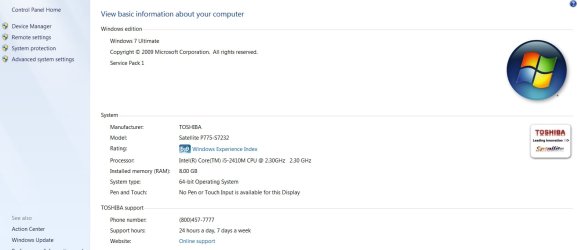
To know your windows OS type, right click on Computer (either on desktop or inside start button) and select properties. A window will open and will give you information about your system (see attached image).

About internet connectivity, limited connectivity means the wireless connection between the wireless router and your computer is OK but there is no internet connection from your service provider.

This could be due to an outage in internet or some misconfiguration in the router. Please check the router configuration or check with your service provider.
 

Attachments

  • Windows Info.jpg
    Windows Info.jpg
    195 KB · Views: 166

My Computer

Computer Manufacturer/Model Number
Toshiba Satellite P775-S7232
OS
MS Windows 7 Ultimate 64-bit SP1
CPU
i5-2410M 2.3GHz (2.9GHz Turbo-Boost) Sandy Bridge 32nm
Motherboard
Toshiba PHRAA ver. PSBY1U-00F003
Memory
4GB+4GB Samsung DDR3 PC3-10700 (1333 MHz)
Graphics Card(s)
Video Intel(R) HD Graphics Family, 1696MB available memory
Sound Card
Realtek High Definition Audio version=6.0.1.6323
Monitor(s) Displays
17.3 " Trubrite TFT LCD, LED Backlit
Screen Resolution
1600x900 32 bit, Native support for 720P content
Hard Drives
TOSHIBA MK6476GSXN
580.614 [GB] partitioned C: 80GB and D: 500GB with hidden recovery partitons.

Spare bay for 2nd HDD but no SATA connector :-(
PSU
Toshiba AC/DC Adapter
Case
Notebook
Cooling
Built-in Fan
Keyboard
Premium Raised Tile keyboard
Mouse
Logitech M215 wireless mouse
Internet Speed
Not fast enough
Other Info
Built-in Harman Kardon speakers with Dolby Advanced Audio, Waves MaxxAudio® 3. HDMI, 1xUSB3+3xUSB2 ports, WebCam, Battery life 4hrs 11mins, 4GB Readyboost SDHC card, WD My Book Essential Ext HDDs 2 TB, 2x1TB, My Passport SE 1TB and WDTV 1st Gen for Multimedia playing on a Sony Wega 32" LCD.
Recent addition to my toys are Asus Transformer Pad TF300T with 32GB onboard sd card + 32GB microsd card.
Thank you for your response. Chev I couldn't find any of those numbers under the tab but I will include screen shots.

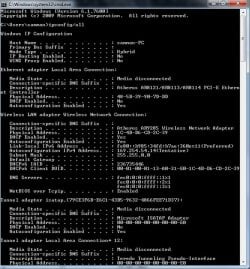
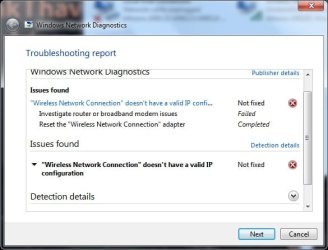
below are the screen shots of my elevated command prompt, the error message, and what it shows as my connection to the internet

thanks all for your help!

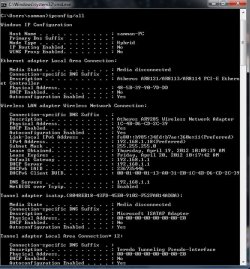
i am also posting a screen shot of my ipconfig when my internet is working.
 

Attachments

  • command.jpg
    command.jpg
    170 KB · Views: 124
  • troubleshooting report.jpg
    troubleshooting report.jpg
    68.7 KB · Views: 74
  • internet.jpg
    internet.jpg
    34.8 KB · Views: 42
  • working command.jpg
    working command.jpg
    174.4 KB · Views: 76
Last edited by a moderator:

My Computer

Computer Manufacturer/Model Number
asus
OS
windows 7 ultimate 32 (i believe)
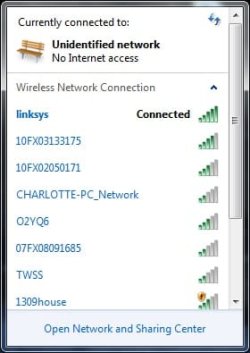
First one shows no connection to the router, second one looks good.

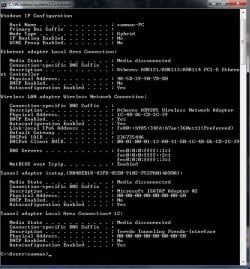
If you can expand the ipconfig to show how many of those tunnel adaptors you have it would be helpful. :)
 

My Computer

Computer type
PC/Desktop
Computer Manufacturer/Model Number
Home built
OS
Windows 7 Ult, Windows 8.1 Pro,
CPU
Q9650-4.275GHz, E8600 4.5GHz, E6750-3.8GHz
Motherboard
Evga 780i FTW
Memory
G.Skill PC2 9600 1200Mhz 5 5 5 15 2T
Graphics Card(s)
GTX480
Sound Card
Asus Xonar D2
Monitor(s) Displays
HannsG
Screen Resolution
1680X1050
Hard Drives
GSkill Phoenix Pro 120GB SSD
PSU
ThermalTake Toughpower 1000Watt modular
Case
ThermalTake XaserV
Cooling
Xigmatek S1283
Keyboard
Logitech G15
Mouse
Logitech G9
Internet Speed
T1
hello chev...thank you for taking the time to help. i have attached the picture of my tunnell adapters for my internet when it is not working. hope this helps.
 

Attachments

  • tunnel adopters nonworking.jpg
    tunnel adopters nonworking.jpg
    160.4 KB · Views: 66

My Computer

Computer Manufacturer/Model Number
asus
OS
windows 7 ultimate 32 (i believe)
"Wireless network connection" doesnt have a valid IP configuration...

hello all,

my internet has previously worked without any problems. two days ago, it said i was connected with limited connectivity. i tried disabling/enabling my wireless, unplugging the wireless router, and running troubleshoot. the computer said that my wireless network connection doesnt have a valid IP configuration. neither of my roomates had this issue (they can still get to the internet fine). i was worried that it was something with my internet, so i went to a friends house and it worked there. i then ran system restore to a period when internet worked, thinking it could have been a bad update, but still no change. i went into my IP address configuration, and it is all set to automatically find. not sure where to go from here. any help?

i have an asus computer, windows 7 ultimate (32bit).


i am reposting this in hopes of someone being able to solve my problem (as my older post is now a few days old).

any help would be appreciated!
 
Last edited by a moderator:

My Computer

Computer Manufacturer/Model Number
asus
OS
windows 7 ultimate 32 (i believe)
hi have you tried to flush the dns cache to see if this helps


How to Flush DNS in Windows Using the Command Prompt

DNS Resolver Cache - Vista Forums

Step 1 – Close all open web browsers and applications on your computer.

Step 2 – Open the Windows command prompt by selecting the “Start” menu and entering “cmd” in the search text field box followed by clicking the “enter” key. or pressing windows key + r and enter "cmd"

Step 3 – At the command prompt, enter “ipconfig /flushdns” followed by pressing the “enter” key. After a moment, Windows will display a message similar to: “Successfully flushed the DNS Resolver Cache.” Once the message is displayed, the DNS will be flushed removing all incorrect entries.
 

My Computer

Computer Manufacturer/Model Number
packard bell IXTREME M5722
OS
Operating System : Windows 7 Home Premium Edition 6.01.7600 SP1 (x64)
CPU
Processor : Intel Core 2 Quad Q8300 @ 2500 MHz
Motherboard
Mainboard : Packard Bell (Acer EG43M )
Memory
Physical Memory :8GB Corsair4x 2GB 800MHz C5 DDR2
Graphics Card(s)
Video Card : XFX 6700 AMD
Monitor(s) Displays
Maestro 234DL - BenQ V2220 - BenQ VW2420H
Screen Resolution
Current Display :1920x1080p pixels at 60 Hz in HD LED
Hard Drives
Hard Disks : WDC (1000 GB)
Drive C: (Hard Disk) : 428 GB available on 491 GB
Drive D: (Hard Disk) : 426 GB available on 492 GB
SAMSUNG spinpoint HD103SJ 1000.2 GB
(X 2) KINGSTON SSD NOW V 30GB
PSU
XFX ProSeries 550W PSU
Case
PACKARD BELL IXTREME
Cooling
System Blower Current: 150mA Air Flow16CFM ;Akasa 90mm rear
Keyboard
Gigabyte Aivia K8100
Mouse
TRUST-Wireless Laser Mouse - Carbon edition MI-7770C
Internet Speed
TP-LINK > TL-WN951N / AV500 Gigabit Powerline Adapters
Browser
chrome dev
Other Info
EXTRA COOLING>(FAN CONTROLLER) PC Bay Cooler 3 x 40mm fans; Akasa AK-HD-BL Blue hard drive cooler 2 x 40 mm fan 4500 rpm 29.7 dBA
Bios> American Megatrends Inc.
Version : P01-A1
Date : 08/31/2009
Hello,

Just flushed it but still doesn't work...
 

My Computer

Computer Manufacturer/Model Number
asus
OS
windows 7 ultimate 32 (i believe)
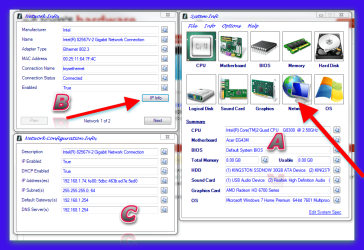
hi well there are a few steps you can follow and i will try to cover most of them from my memory. first would you be so kind to fill out your system specs please this will help the forum with any diagnostic study for your problem/s please read this link >> How to See Your System Specs with "System Info" System Info - See Your System Specs - Windows 7 Forums system spec >> http://goo.gl/0BMqt
 

My Computer

Computer Manufacturer/Model Number
packard bell IXTREME M5722
OS
Operating System : Windows 7 Home Premium Edition 6.01.7600 SP1 (x64)
CPU
Processor : Intel Core 2 Quad Q8300 @ 2500 MHz
Motherboard
Mainboard : Packard Bell (Acer EG43M )
Memory
Physical Memory :8GB Corsair4x 2GB 800MHz C5 DDR2
Graphics Card(s)
Video Card : XFX 6700 AMD
Monitor(s) Displays
Maestro 234DL - BenQ V2220 - BenQ VW2420H
Screen Resolution
Current Display :1920x1080p pixels at 60 Hz in HD LED
Hard Drives
Hard Disks : WDC (1000 GB)
Drive C: (Hard Disk) : 428 GB available on 491 GB
Drive D: (Hard Disk) : 426 GB available on 492 GB
SAMSUNG spinpoint HD103SJ 1000.2 GB
(X 2) KINGSTON SSD NOW V 30GB
PSU
XFX ProSeries 550W PSU
Case
PACKARD BELL IXTREME
Cooling
System Blower Current: 150mA Air Flow16CFM ;Akasa 90mm rear
Keyboard
Gigabyte Aivia K8100
Mouse
TRUST-Wireless Laser Mouse - Carbon edition MI-7770C
Internet Speed
TP-LINK > TL-WN951N / AV500 Gigabit Powerline Adapters
Browser
chrome dev
Other Info
EXTRA COOLING>(FAN CONTROLLER) PC Bay Cooler 3 x 40mm fans; Akasa AK-HD-BL Blue hard drive cooler 2 x 40 mm fan 4500 rpm 29.7 dBA
Bios> American Megatrends Inc.
Version : P01-A1
Date : 08/31/2009
with the system info program running click on network then click on the ip info box tab drag the network configuration info box to view with network info and post a screenshot of the results please
 

Attachments

  • Brys Snap 01  ?24 ?April ?2012 .png
    Brys Snap 01 ?24 ?April ?2012 .png
    188.2 KB · Views: 18
Last edited:

My Computer

Computer Manufacturer/Model Number
packard bell IXTREME M5722
OS
Operating System : Windows 7 Home Premium Edition 6.01.7600 SP1 (x64)
CPU
Processor : Intel Core 2 Quad Q8300 @ 2500 MHz
Motherboard
Mainboard : Packard Bell (Acer EG43M )
Memory
Physical Memory :8GB Corsair4x 2GB 800MHz C5 DDR2
Graphics Card(s)
Video Card : XFX 6700 AMD
Monitor(s) Displays
Maestro 234DL - BenQ V2220 - BenQ VW2420H
Screen Resolution
Current Display :1920x1080p pixels at 60 Hz in HD LED
Hard Drives
Hard Disks : WDC (1000 GB)
Drive C: (Hard Disk) : 428 GB available on 491 GB
Drive D: (Hard Disk) : 426 GB available on 492 GB
SAMSUNG spinpoint HD103SJ 1000.2 GB
(X 2) KINGSTON SSD NOW V 30GB
PSU
XFX ProSeries 550W PSU
Case
PACKARD BELL IXTREME
Cooling
System Blower Current: 150mA Air Flow16CFM ;Akasa 90mm rear
Keyboard
Gigabyte Aivia K8100
Mouse
TRUST-Wireless Laser Mouse - Carbon edition MI-7770C
Internet Speed
TP-LINK > TL-WN951N / AV500 Gigabit Powerline Adapters
Browser
chrome dev
Other Info
EXTRA COOLING>(FAN CONTROLLER) PC Bay Cooler 3 x 40mm fans; Akasa AK-HD-BL Blue hard drive cooler 2 x 40 mm fan 4500 rpm 29.7 dBA
Bios> American Megatrends Inc.
Version : P01-A1
Date : 08/31/2009
what type/make/model of router and wireless adapter are you using to connect to the internet? on the router there should be a little hole with "reset" button use a paperclip and reset it and reboot your pc at same time .
 

My Computer

Computer Manufacturer/Model Number
packard bell IXTREME M5722
OS
Operating System : Windows 7 Home Premium Edition 6.01.7600 SP1 (x64)
CPU
Processor : Intel Core 2 Quad Q8300 @ 2500 MHz
Motherboard
Mainboard : Packard Bell (Acer EG43M )
Memory
Physical Memory :8GB Corsair4x 2GB 800MHz C5 DDR2
Graphics Card(s)
Video Card : XFX 6700 AMD
Monitor(s) Displays
Maestro 234DL - BenQ V2220 - BenQ VW2420H
Screen Resolution
Current Display :1920x1080p pixels at 60 Hz in HD LED
Hard Drives
Hard Disks : WDC (1000 GB)
Drive C: (Hard Disk) : 428 GB available on 491 GB
Drive D: (Hard Disk) : 426 GB available on 492 GB
SAMSUNG spinpoint HD103SJ 1000.2 GB
(X 2) KINGSTON SSD NOW V 30GB
PSU
XFX ProSeries 550W PSU
Case
PACKARD BELL IXTREME
Cooling
System Blower Current: 150mA Air Flow16CFM ;Akasa 90mm rear
Keyboard
Gigabyte Aivia K8100
Mouse
TRUST-Wireless Laser Mouse - Carbon edition MI-7770C
Internet Speed
TP-LINK > TL-WN951N / AV500 Gigabit Powerline Adapters
Browser
chrome dev
Other Info
EXTRA COOLING>(FAN CONTROLLER) PC Bay Cooler 3 x 40mm fans; Akasa AK-HD-BL Blue hard drive cooler 2 x 40 mm fan 4500 rpm 29.7 dBA
Bios> American Megatrends Inc.
Version : P01-A1
Date : 08/31/2009
hello chev...thank you for taking the time to help. i have attached the picture of my tunnell adapters for my internet when it is not working. hope this helps.

Try running the file below, you just need to save file then unzip and click on it, your system will reboot itself when it's done. After that post your ipconfig again for me please. :)
 

Attachments

My Computer

Computer type
PC/Desktop
Computer Manufacturer/Model Number
Home built
OS
Windows 7 Ult, Windows 8.1 Pro,
CPU
Q9650-4.275GHz, E8600 4.5GHz, E6750-3.8GHz
Motherboard
Evga 780i FTW
Memory
G.Skill PC2 9600 1200Mhz 5 5 5 15 2T
Graphics Card(s)
GTX480
Sound Card
Asus Xonar D2
Monitor(s) Displays
HannsG
Screen Resolution
1680X1050
Hard Drives
GSkill Phoenix Pro 120GB SSD
PSU
ThermalTake Toughpower 1000Watt modular
Case
ThermalTake XaserV
Cooling
Xigmatek S1283
Keyboard
Logitech G15
Mouse
Logitech G9
Internet Speed
T1
Back
Top