Wireless network disconnects, then fails to see the wireless network

ShaneLJ

New member
Local time
7:52 AM
Messages
17
Every so often, my WiFi on my PC will just stop working. It will disconnect from my wireless network, and then when I try to manually connect, it's not listed. Sometimes a restart works, sometimes it doesn't. This last time I had to restart twice. I know the WiFi router is not having problems, because my phone and AppleTV stay connected and stream just fine. The first times I noticed this, I was actually browsing the web and talking on Steam when it occurred. The last two times however, I left my computer on to finish up some downloads, came back in the morning, and it had disconnected and corrupted my downloads. Any help is greatly appreciated, so thank you in advance.
 

My Computer My Computer

At a glance

Windows 7 Ultimate 64 bitIntel Core2 Duo e67504 GB DDR2NVIDIA GeForce GT620
Computer type
PC/Desktop
Computer Manufacturer/Model Number
Custom Build
OS
Windows 7 Ultimate 64 bit
CPU
Intel Core2 Duo e6750
Motherboard
Asus P5ke
Memory
4 GB DDR2
Graphics Card(s)
NVIDIA GeForce GT620
Hard Drives
120 GB Kingston SSD,
320 GB Western Digital HDD,
3TB Seagate HDD
Case
NZXT Phantom
Keyboard
Logitech G19s
Antivirus
avast! Antivirus
Browser
Google Chrome
Hello and welcome to 7 Forums ShaneLj.

Is this wifi adapter plugged into your PCi or PCIe slot in the desktop or a USB type adapter?
Would be helpful to also know what brand and model the wifi adapter is in order to Identify any issues that a manufacturer might already have a fix for.
 

My Computer My Computer

At a glance

Windows 7 Professional x64AMD Athlon II x4 3.00 GHz16GB Kingston DDR3Nvidia 8600 (dual DVI out for 2 monitors)
Computer type
PC/Desktop
Computer Manufacturer/Model Number
Custom Build MPCBS AMII
OS
Windows 7 Professional x64
CPU
AMD Athlon II x4 3.00 GHz
Motherboard
MSI GF615M-p33
Memory
16GB Kingston DDR3
Graphics Card(s)
Nvidia 8600 (dual DVI out for 2 monitors)
Sound Card
Onboard
Monitor(s) Displays
Acer H233H 23", ASUS 23"
Screen Resolution
1366 x 768
Hard Drives
(2) WD Blue 1 TB 3 partitions, (1) Seagate 7200 500GB with 2 partitions for useless and frequently deleted data Looking forward do an ssd for os soon.
PSU
Corsair 1100Watt
Case
Apevia HAF
Cooling
HAF AMD High Profile Heat sink and fan
Keyboard
wireless Logitech
Mouse
wireless Logitech
Internet Speed
16 mbps
Antivirus
eSet, AVG, Clam and Clamwin (depends on machine)
Browser
Firefox
Other Info
(9) Win 7 machines all x64 (POS Updated to Windows 7 pro YEA), (4) Linux machines x64 and x86 including a v3000 compaq lappy brought back to life with Mint 9 used to scan drives, (1) Linux Machine dual boot XP Pro (for testing and destroying), (1) Win 7 pro x64/Win 8.1 Lenovo Laptop Dual Boot.
Hello and welcome to 7 Forums ShaneLj.

Is this wifi adapter plugged into your PCi or PCIe slot in the desktop or a USB type adapter?
Would be helpful to also know what brand and model the wifi adapter is in order to Identify any issues that a manufacturer might already have a fix for.

Thank you very much! I'm not sure the exact wireless adapter I'm using. It's some sort of "Encore" adapter, but it's just an antenna for my Motherboards onboard WiFi card.
 

My Computer My Computer

At a glance

Windows 7 Ultimate 64 bitIntel Core2 Duo e67504 GB DDR2NVIDIA GeForce GT620
Computer type
PC/Desktop
Computer Manufacturer/Model Number
Custom Build
OS
Windows 7 Ultimate 64 bit
CPU
Intel Core2 Duo e6750
Motherboard
Asus P5ke
Memory
4 GB DDR2
Graphics Card(s)
NVIDIA GeForce GT620
Hard Drives
120 GB Kingston SSD,
320 GB Western Digital HDD,
3TB Seagate HDD
Case
NZXT Phantom
Keyboard
Logitech G19s
Antivirus
avast! Antivirus
Browser
Google Chrome
Ok with that info I need to know the full model of your motherboard. I pulled up the specs for the board listed in your specs and Asus does not show the onboard wifi. Is this a Slot type adapter (similar to a notebook adapter) on the mobo?
 

My Computer My Computer

At a glance

Windows 7 Professional x64AMD Athlon II x4 3.00 GHz16GB Kingston DDR3Nvidia 8600 (dual DVI out for 2 monitors)
Computer type
PC/Desktop
Computer Manufacturer/Model Number
Custom Build MPCBS AMII
OS
Windows 7 Professional x64
CPU
AMD Athlon II x4 3.00 GHz
Motherboard
MSI GF615M-p33
Memory
16GB Kingston DDR3
Graphics Card(s)
Nvidia 8600 (dual DVI out for 2 monitors)
Sound Card
Onboard
Monitor(s) Displays
Acer H233H 23", ASUS 23"
Screen Resolution
1366 x 768
Hard Drives
(2) WD Blue 1 TB 3 partitions, (1) Seagate 7200 500GB with 2 partitions for useless and frequently deleted data Looking forward do an ssd for os soon.
PSU
Corsair 1100Watt
Case
Apevia HAF
Cooling
HAF AMD High Profile Heat sink and fan
Keyboard
wireless Logitech
Mouse
wireless Logitech
Internet Speed
16 mbps
Antivirus
eSet, AVG, Clam and Clamwin (depends on machine)
Browser
Firefox
Other Info
(9) Win 7 machines all x64 (POS Updated to Windows 7 pro YEA), (4) Linux machines x64 and x86 including a v3000 compaq lappy brought back to life with Mint 9 used to scan drives, (1) Linux Machine dual boot XP Pro (for testing and destroying), (1) Win 7 pro x64/Win 8.1 Lenovo Laptop Dual Boot.
I believe this might be the board you have here
First thing I would check is to make sure you have the latest driver for the wifi adapter installed.

Also check that the adapter properties that allows the system to turn off power to the adapter when idle is unchecked.

Go in the Device Manager, Network Adapters, right click on the adapter and select properties, Power Management, uncheck the box that says, "Allow the Computer to turn off this device to save power"
 

My Computer My Computer

At a glance

Windows 7 Professional x64AMD Athlon II x4 3.00 GHz16GB Kingston DDR3Nvidia 8600 (dual DVI out for 2 monitors)
Computer type
PC/Desktop
Computer Manufacturer/Model Number
Custom Build MPCBS AMII
OS
Windows 7 Professional x64
CPU
AMD Athlon II x4 3.00 GHz
Motherboard
MSI GF615M-p33
Memory
16GB Kingston DDR3
Graphics Card(s)
Nvidia 8600 (dual DVI out for 2 monitors)
Sound Card
Onboard
Monitor(s) Displays
Acer H233H 23", ASUS 23"
Screen Resolution
1366 x 768
Hard Drives
(2) WD Blue 1 TB 3 partitions, (1) Seagate 7200 500GB with 2 partitions for useless and frequently deleted data Looking forward do an ssd for os soon.
PSU
Corsair 1100Watt
Case
Apevia HAF
Cooling
HAF AMD High Profile Heat sink and fan
Keyboard
wireless Logitech
Mouse
wireless Logitech
Internet Speed
16 mbps
Antivirus
eSet, AVG, Clam and Clamwin (depends on machine)
Browser
Firefox
Other Info
(9) Win 7 machines all x64 (POS Updated to Windows 7 pro YEA), (4) Linux machines x64 and x86 including a v3000 compaq lappy brought back to life with Mint 9 used to scan drives, (1) Linux Machine dual boot XP Pro (for testing and destroying), (1) Win 7 pro x64/Win 8.1 Lenovo Laptop Dual Boot.
I have done both. If the problem reoccurs, I'll post again. If not within a couple days, I'll mark as solved. Thank you for the help!

P.S. I saw you're a Whovian. The Doctor is awesome. Which one is your favorite?
 

My Computer My Computer

At a glance

Windows 7 Ultimate 64 bitIntel Core2 Duo e67504 GB DDR2NVIDIA GeForce GT620
Computer type
PC/Desktop
Computer Manufacturer/Model Number
Custom Build
OS
Windows 7 Ultimate 64 bit
CPU
Intel Core2 Duo e6750
Motherboard
Asus P5ke
Memory
4 GB DDR2
Graphics Card(s)
NVIDIA GeForce GT620
Hard Drives
120 GB Kingston SSD,
320 GB Western Digital HDD,
3TB Seagate HDD
Case
NZXT Phantom
Keyboard
Logitech G19s
Antivirus
avast! Antivirus
Browser
Google Chrome
Please keep us informed.

I would have to say my Favorite Doctor would be Tom Baker as that's when I started watching, followed closely by David Tennant. (Broadstreet is good too).
We shall see how Capaldi does, He's a good actor.
 

My Computer My Computer

At a glance

Windows 7 Professional x64AMD Athlon II x4 3.00 GHz16GB Kingston DDR3Nvidia 8600 (dual DVI out for 2 monitors)
Computer type
PC/Desktop
Computer Manufacturer/Model Number
Custom Build MPCBS AMII
OS
Windows 7 Professional x64
CPU
AMD Athlon II x4 3.00 GHz
Motherboard
MSI GF615M-p33
Memory
16GB Kingston DDR3
Graphics Card(s)
Nvidia 8600 (dual DVI out for 2 monitors)
Sound Card
Onboard
Monitor(s) Displays
Acer H233H 23", ASUS 23"
Screen Resolution
1366 x 768
Hard Drives
(2) WD Blue 1 TB 3 partitions, (1) Seagate 7200 500GB with 2 partitions for useless and frequently deleted data Looking forward do an ssd for os soon.
PSU
Corsair 1100Watt
Case
Apevia HAF
Cooling
HAF AMD High Profile Heat sink and fan
Keyboard
wireless Logitech
Mouse
wireless Logitech
Internet Speed
16 mbps
Antivirus
eSet, AVG, Clam and Clamwin (depends on machine)
Browser
Firefox
Other Info
(9) Win 7 machines all x64 (POS Updated to Windows 7 pro YEA), (4) Linux machines x64 and x86 including a v3000 compaq lappy brought back to life with Mint 9 used to scan drives, (1) Linux Machine dual boot XP Pro (for testing and destroying), (1) Win 7 pro x64/Win 8.1 Lenovo Laptop Dual Boot.

My Computer My Computer

At a glance

Windows 7 Ultimate x64AMD turion 64x2 TL-64 2.2GhzSodimm DDR2 4GBATI Radeon 1250 128MB IGP
Computer Manufacturer/Model Number
HP Compaq 6715B
OS
Windows 7 Ultimate x64
CPU
AMD turion 64x2 TL-64 2.2Ghz
Motherboard
HC030
Memory
Sodimm DDR2 4GB
Graphics Card(s)
ATI Radeon 1250 128MB IGP
Hard Drives
Fujitsu Siemens 500GB sata 3.0 Gb/s
Please keep us informed.

I would have to say my Favorite Doctor would be Tom Baker as that's when I started watching, followed closely by David Tennant. (Broadstreet is good too).
We shall see how Capaldi does, He's a good actor.

Will do!

Yeah, Tennant is my favorite. I started watching around Eccleston, and haven't seen the earlier ones. I probably should go back and watch them all.
 

My Computer My Computer

At a glance

Windows 7 Ultimate 64 bitIntel Core2 Duo e67504 GB DDR2NVIDIA GeForce GT620
Computer type
PC/Desktop
Computer Manufacturer/Model Number
Custom Build
OS
Windows 7 Ultimate 64 bit
CPU
Intel Core2 Duo e6750
Motherboard
Asus P5ke
Memory
4 GB DDR2
Graphics Card(s)
NVIDIA GeForce GT620
Hard Drives
120 GB Kingston SSD,
320 GB Western Digital HDD,
3TB Seagate HDD
Case
NZXT Phantom
Keyboard
Logitech G19s
Antivirus
avast! Antivirus
Browser
Google Chrome

My Computer My Computer

At a glance

Windows 7 Ultimate 64 bitIntel Core2 Duo e67504 GB DDR2NVIDIA GeForce GT620
Computer type
PC/Desktop
Computer Manufacturer/Model Number
Custom Build
OS
Windows 7 Ultimate 64 bit
CPU
Intel Core2 Duo e6750
Motherboard
Asus P5ke
Memory
4 GB DDR2
Graphics Card(s)
NVIDIA GeForce GT620
Hard Drives
120 GB Kingston SSD,
320 GB Western Digital HDD,
3TB Seagate HDD
Case
NZXT Phantom
Keyboard
Logitech G19s
Antivirus
avast! Antivirus
Browser
Google Chrome
No worries will be here.
 

My Computer My Computer

At a glance

Windows 7 Ultimate x64AMD turion 64x2 TL-64 2.2GhzSodimm DDR2 4GBATI Radeon 1250 128MB IGP
Computer Manufacturer/Model Number
HP Compaq 6715B
OS
Windows 7 Ultimate x64
CPU
AMD turion 64x2 TL-64 2.2Ghz
Motherboard
HC030
Memory
Sodimm DDR2 4GB
Graphics Card(s)
ATI Radeon 1250 128MB IGP
Hard Drives
Fujitsu Siemens 500GB sata 3.0 Gb/s

Wireless issue
ISP - Comcast
Cable
Cisco Aironet
AVG Antivirus
IPConfig readout

Windows IP Configuration

Host Name . . . . . . . . . . . . : Shane-PC
Primary Dns Suffix . . . . . . . :
Node Type . . . . . . . . . . . . : Hybrid
IP Routing Enabled. . . . . . . . : No
WINS Proxy Enabled. . . . . . . . : No
DNS Suffix Search List. . . . . . : hsd1.fl.comcast.net.

Wireless LAN adapter Wireless Network Connection:

Connection-specific DNS Suffix . : hsd1.fl.comcast.net.
Description . . . . . . . . . . . : Realtek RTL8187 Wireless 802.11b/g 54Mbps USB 2.0 Network Adapter
Physical Address. . . . . . . . . : 00-15-AF-64-28-AE
DHCP Enabled. . . . . . . . . . . : Yes
Autoconfiguration Enabled . . . . : Yes
Link-local IPv6 Address . . . . . : fe80::9198:5150:3556:4acd%12(Preferred)
IPv4 Address. . . . . . . . . . . : 192.168.1.25(Preferred)
Subnet Mask . . . . . . . . . . . : 255.255.255.0
Lease Obtained. . . . . . . . . . : Thursday, May 22, 2014 17:27:30
Lease Expires . . . . . . . . . . : Thursday, May 22, 2014 18:27:30
Default Gateway . . . . . . . . . : 192.168.1.1
DHCP Server . . . . . . . . . . . : 192.168.1.1
DHCPv6 IAID . . . . . . . . . . . : 218109359
DHCPv6 Client DUID. . . . . . . . : 00-01-00-01-19-D6-70-AD-00-1E-8C-8E-CB-9E
DNS Servers . . . . . . . . . . . : 8.8.8.8
75.75.75.75
NetBIOS over Tcpip. . . . . . . . : Enabled

Ethernet adapter Local Area Connection:

Media State . . . . . . . . . . . : Media disconnected
Connection-specific DNS Suffix . : home.network
Description . . . . . . . . . . . : Marvell Yukon 88E8056 PCI-E Gigabit Ethernet Controller
Physical Address. . . . . . . . . : 00-1E-8C-8E-CB-9E
DHCP Enabled. . . . . . . . . . . : Yes
Autoconfiguration Enabled . . . . : Yes

Ethernet adapter Hamachi:

Connection-specific DNS Suffix . :
Description . . . . . . . . . . . : Hamachi Network Interface
Physical Address. . . . . . . . . : 7A-79-19-15-0D-0B
DHCP Enabled. . . . . . . . . . . : Yes
Autoconfiguration Enabled . . . . : Yes
IPv6 Address. . . . . . . . . . . : 2620:9b::1915:d0b(Preferred)
Link-local IPv6 Address . . . . . : fe80::75be:c2a3:a8ae:4788%14(Preferred)
IPv4 Address. . . . . . . . . . . : 25.21.13.11(Preferred)
Subnet Mask . . . . . . . . . . . : 255.0.0.0
Lease Obtained. . . . . . . . . . : Thursday, May 22, 2014 10:54:24
Lease Expires . . . . . . . . . . : Thursday, May 22, 2014 17:34:35
Default Gateway . . . . . . . . . : 2620:9b::1900:1
25.0.0.1
DHCP Server . . . . . . . . . . . : 25.0.0.1
DHCPv6 IAID . . . . . . . . . . . : 360347915
DHCPv6 Client DUID. . . . . . . . : 00-01-00-01-19-D6-70-AD-00-1E-8C-8E-CB-9E
DNS Servers . . . . . . . . . . . : fec0:0:0:ffff::1%1
fec0:0:0:ffff::2%1
fec0:0:0:ffff::3%1
NetBIOS over Tcpip. . . . . . . . : Enabled

Tunnel adapter isatap.home.network:

Media State . . . . . . . . . . . : Media disconnected
Connection-specific DNS Suffix . :
Description . . . . . . . . . . . : Microsoft ISATAP Adapter
Physical Address. . . . . . . . . : 00-00-00-00-00-00-00-E0
DHCP Enabled. . . . . . . . . . . : No
Autoconfiguration Enabled . . . . : Yes

Tunnel adapter Teredo Tunneling Pseudo-Interface:

Connection-specific DNS Suffix . :
Description . . . . . . . . . . . : Teredo Tunneling Pseudo-Interface
Physical Address. . . . . . . . . : 00-00-00-00-00-00-00-E0
DHCP Enabled. . . . . . . . . . . : No
Autoconfiguration Enabled . . . . : Yes
IPv6 Address. . . . . . . . . . . : 2001:0:9d38:90d7:14b8:8be:3f57:fee6(Preferred)
Link-local IPv6 Address . . . . . : fe80::14b8:8be:3f57:fee6%13(Preferred)
Default Gateway . . . . . . . . . :
NetBIOS over Tcpip. . . . . . . . : Disabled

Tunnel adapter isatap.{0641E714-F933-4CA3-B898-AD8B565D0A3F}:

Media State . . . . . . . . . . . : Media disconnected
Connection-specific DNS Suffix . :
Description . . . . . . . . . . . : Microsoft ISATAP Adapter #2
Physical Address. . . . . . . . . : 00-00-00-00-00-00-00-E0
DHCP Enabled. . . . . . . . . . . : No
Autoconfiguration Enabled . . . . : Yes

Tunnel adapter isatap.hsd1.fl.comcast.net.:

Media State . . . . . . . . . . . : Media disconnected
Connection-specific DNS Suffix . :
Description . . . . . . . . . . . : Microsoft ISATAP Adapter #3
Physical Address. . . . . . . . . : 00-00-00-00-00-00-00-E0
DHCP Enabled. . . . . . . . . . . : No
Autoconfiguration Enabled . . . . : Yes


The thing is this - I realized it's not a restart, but I have to disable and re-enable the wireless adapter. It just happened again while I was browsing, then ~ two minutes after I fixed it. Thanks again for the help.

P.S. Nice profile. Love the Cybermen.. Evil, but awesome

 

My Computer My Computer

At a glance

Windows 7 Ultimate 64 bitIntel Core2 Duo e67504 GB DDR2NVIDIA GeForce GT620
Computer type
PC/Desktop
Computer Manufacturer/Model Number
Custom Build
OS
Windows 7 Ultimate 64 bit
CPU
Intel Core2 Duo e6750
Motherboard
Asus P5ke
Memory
4 GB DDR2
Graphics Card(s)
NVIDIA GeForce GT620
Hard Drives
120 GB Kingston SSD,
320 GB Western Digital HDD,
3TB Seagate HDD
Case
NZXT Phantom
Keyboard
Logitech G19s
Antivirus
avast! Antivirus
Browser
Google Chrome
Ca?n you post xirrus and let us know what firewall you are running
 

My Computer My Computer

At a glance

Windows 7 Ultimate x64AMD turion 64x2 TL-64 2.2GhzSodimm DDR2 4GBATI Radeon 1250 128MB IGP
Computer Manufacturer/Model Number
HP Compaq 6715B
OS
Windows 7 Ultimate x64
CPU
AMD turion 64x2 TL-64 2.2Ghz
Motherboard
HC030
Memory
Sodimm DDR2 4GB
Graphics Card(s)
ATI Radeon 1250 128MB IGP
Hard Drives
Fujitsu Siemens 500GB sata 3.0 Gb/s

My Computer My Computer

At a glance

Windows 7 Ultimate 64 bitIntel Core2 Duo e67504 GB DDR2NVIDIA GeForce GT620
Computer type
PC/Desktop
Computer Manufacturer/Model Number
Custom Build
OS
Windows 7 Ultimate 64 bit
CPU
Intel Core2 Duo e6750
Motherboard
Asus P5ke
Memory
4 GB DDR2
Graphics Card(s)
NVIDIA GeForce GT620
Hard Drives
120 GB Kingston SSD,
320 GB Western Digital HDD,
3TB Seagate HDD
Case
NZXT Phantom
Keyboard
Logitech G19s
Antivirus
avast! Antivirus
Browser
Google Chrome
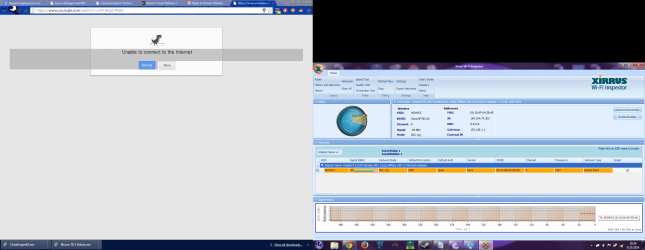
That is ok the xirrus shows you have a decent signal and no-one else is on. Take screenshot and post please when your internet does not connect.

Your ipconfig /all shows no problems.

A long shot turn off the Windows firewall and restart computer. Check for internet access and let us know.

P.S Yes i am a Dr who fan did you like their traditional enemy The Daleks and Davros Half man half machine. THre daleks as I remember looked like green slime inside long while ago.
 

My Computer My Computer

At a glance

Windows 7 Ultimate x64AMD turion 64x2 TL-64 2.2GhzSodimm DDR2 4GBATI Radeon 1250 128MB IGP
Computer Manufacturer/Model Number
HP Compaq 6715B
OS
Windows 7 Ultimate x64
CPU
AMD turion 64x2 TL-64 2.2Ghz
Motherboard
HC030
Memory
Sodimm DDR2 4GB
Graphics Card(s)
ATI Radeon 1250 128MB IGP
Hard Drives
Fujitsu Siemens 500GB sata 3.0 Gb/s
That is ok the xirrus shows you have a decent signal and no-one else is on. Take screenshot and post please when your internet does not connect.

Your ipconfig /all shows no problems.

A long shot turn off the Windows firewall and restart computer. Check for internet access and let us know.

P.S Yes i am a Dr who fan did you like their traditional enemy The Daleks and Davros Half man half machine. THre daleks as I remember looked like green slime inside long while ago.

Will do. It seems to be a problem with either Windows or my adapter, though. It just disconnects and refuses to see the wireless network. I know the router is fine because both my phone and my Dad's AppleTV continue to stay connected and can still stream video with no interruptions.

P.S. The Daleks have always been my favorite. I thought they were blue? Maybe I don't remember right.. I'll have to look again. Exterminate.
 

My Computer My Computer

At a glance

Windows 7 Ultimate 64 bitIntel Core2 Duo e67504 GB DDR2NVIDIA GeForce GT620
Computer type
PC/Desktop
Computer Manufacturer/Model Number
Custom Build
OS
Windows 7 Ultimate 64 bit
CPU
Intel Core2 Duo e6750
Motherboard
Asus P5ke
Memory
4 GB DDR2
Graphics Card(s)
NVIDIA GeForce GT620
Hard Drives
120 GB Kingston SSD,
320 GB Western Digital HDD,
3TB Seagate HDD
Case
NZXT Phantom
Keyboard
Logitech G19s
Antivirus
avast! Antivirus
Browser
Google Chrome
I don't think it is network.

You can update the drivers for your wireless adapter as well, either from the computer manufacturer's website or the wireless adapter website.

PS The Daleks were my favorite as well i used to talk like them when I was a kid lol..
 

My Computer My Computer

At a glance

Windows 7 Ultimate x64AMD turion 64x2 TL-64 2.2GhzSodimm DDR2 4GBATI Radeon 1250 128MB IGP
Computer Manufacturer/Model Number
HP Compaq 6715B
OS
Windows 7 Ultimate x64
CPU
AMD turion 64x2 TL-64 2.2Ghz
Motherboard
HC030
Memory
Sodimm DDR2 4GB
Graphics Card(s)
ATI Radeon 1250 128MB IGP
Hard Drives
Fujitsu Siemens 500GB sata 3.0 Gb/s
I don't think it is network.

You can update the drivers for your wireless adapter as well, either from the computer manufacturer's website or the wireless adapter website.

PS The Daleks were my favorite as well i used to talk like them when I was a kid lol..

http://puu.sh/8YeAc.png

It had a different result this time - it still saw the network but had no connection. I disabled and re-enabled the wireless adapter, and boom. Everything is connected again. The drivers are updated to the newest version.. Just checked them last night
 

Attachments

  • No connection.png
    No connection.png
    98.8 KB · Views: 4

My Computer My Computer

At a glance

Windows 7 Ultimate 64 bitIntel Core2 Duo e67504 GB DDR2NVIDIA GeForce GT620
Computer type
PC/Desktop
Computer Manufacturer/Model Number
Custom Build
OS
Windows 7 Ultimate 64 bit
CPU
Intel Core2 Duo e6750
Motherboard
Asus P5ke
Memory
4 GB DDR2
Graphics Card(s)
NVIDIA GeForce GT620
Hard Drives
120 GB Kingston SSD,
320 GB Western Digital HDD,
3TB Seagate HDD
Case
NZXT Phantom
Keyboard
Logitech G19s
Antivirus
avast! Antivirus
Browser
Google Chrome
Monitor the connection you have a -56 which is a liitle better a week or so, then let us know if your internet goes down with a xirrus when it is down, before a week if it goes down
 

My Computer My Computer

At a glance

Windows 7 Ultimate x64AMD turion 64x2 TL-64 2.2GhzSodimm DDR2 4GBATI Radeon 1250 128MB IGP
Computer Manufacturer/Model Number
HP Compaq 6715B
OS
Windows 7 Ultimate x64
CPU
AMD turion 64x2 TL-64 2.2Ghz
Motherboard
HC030
Memory
Sodimm DDR2 4GB
Graphics Card(s)
ATI Radeon 1250 128MB IGP
Hard Drives
Fujitsu Siemens 500GB sata 3.0 Gb/s
Monitor the connection you have a -56 which is a liitle better a week or so, then let us know if your internet goes down with a xirrus when it is down, before a week if it goes down

Will do. Thanks again for the help!
 

My Computer My Computer

At a glance

Windows 7 Ultimate 64 bitIntel Core2 Duo e67504 GB DDR2NVIDIA GeForce GT620
Computer type
PC/Desktop
Computer Manufacturer/Model Number
Custom Build
OS
Windows 7 Ultimate 64 bit
CPU
Intel Core2 Duo e6750
Motherboard
Asus P5ke
Memory
4 GB DDR2
Graphics Card(s)
NVIDIA GeForce GT620
Hard Drives
120 GB Kingston SSD,
320 GB Western Digital HDD,
3TB Seagate HDD
Case
NZXT Phantom
Keyboard
Logitech G19s
Antivirus
avast! Antivirus
Browser
Google Chrome
Back
Top