
Mechatherium
New member
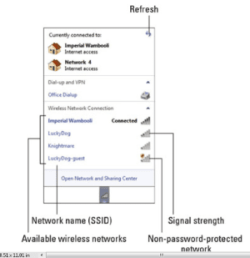
The easiest way to explain what's wrong, is that I don't have this:
<attachment: available_wireless_networks.png>
Particulars:
This is a wireless connection problem.
My internet provider is AT&T U-Verse.
I use Windows Firewall and Avast Free Antivirus.
IPCONFIG output attached for review: <ipconfig.txt>
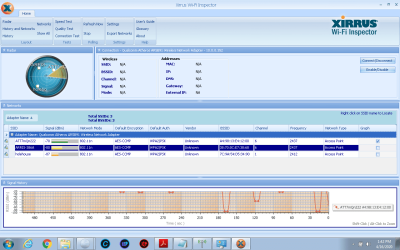
Xirrus screenshot attached <xirrus_screenshot.png>
Adapter: Qualcomm Atheros AR5B91 Wireless Network Adapter - 10.0.0.352
Problem:
Normally, when connecting to a new Wi-Fi network a little list pops up above the taskbar that shows which wireless access points are in range. I haven't had that in some time and I'd like to get that back.
My Atheros Wi-Fi adapter works; I can set up a connection manually, if I know all the details. I just got a new modem from AT&T U-Verse with Wi-Fi. The modem's access point--ATT7mQn222--works and I can sign in with other wireless devices.
Long story short, my wi-fi modem works, if I set up the connection manually; I used Xirrus and WirelessNetView and both found the access point quickly. I just wish they had a wizard to walk me thorough setting up the wi-fi connection like my Windows used to. For some reason, I don't get the settings right doing it manually, so I'd like to have that wizard (picture at top) back.
I am sure the problem is with something I did with Windows--I "broke" something--but I have no idea what, how, or how to get that function back.
Any help?
Thank you,
Tony
<attachment: available_wireless_networks.png>
Particulars:
This is a wireless connection problem.
My internet provider is AT&T U-Verse.
I use Windows Firewall and Avast Free Antivirus.
IPCONFIG output attached for review: <ipconfig.txt>
Xirrus screenshot attached <xirrus_screenshot.png>
Adapter: Qualcomm Atheros AR5B91 Wireless Network Adapter - 10.0.0.352
Problem:
Normally, when connecting to a new Wi-Fi network a little list pops up above the taskbar that shows which wireless access points are in range. I haven't had that in some time and I'd like to get that back.
My Atheros Wi-Fi adapter works; I can set up a connection manually, if I know all the details. I just got a new modem from AT&T U-Verse with Wi-Fi. The modem's access point--ATT7mQn222--works and I can sign in with other wireless devices.
Long story short, my wi-fi modem works, if I set up the connection manually; I used Xirrus and WirelessNetView and both found the access point quickly. I just wish they had a wizard to walk me thorough setting up the wi-fi connection like my Windows used to. For some reason, I don't get the settings right doing it manually, so I'd like to have that wizard (picture at top) back.
I am sure the problem is with something I did with Windows--I "broke" something--but I have no idea what, how, or how to get that function back.
Any help?
Thank you,
Tony
Attachments
My Computer
At a glance
Windows 7 64-bit4GB
- Computer type
- Laptop
- Computer Manufacturer/Model Number
- Gateway M-Series
- OS
- Windows 7 64-bit
- Memory
- 4GB
- Antivirus
- Avast Free Antivirus
- Browser
- Pale Moon (Mozilla)

