Wireless Problems

stubbyhs

New member
Power User
Local time
12:06 AM
Messages
139
Location
Northern Ireland
Hi there,

I am currently trying to fix an HP G6000 running Vista HP 32bit.

I cannot get the wireless to work and was wondering if I could get some help.

I think the service is not starting, it's not showing up in the network connections. Also there is a switch for it on the front of the laptop which should go blue when the WLAN is on, but instead is showing red whether it is switched on or not.

I will attach the DxDiag, any suggestions welcome! Also I have checked the services and it is set to starting.

Thanks a lot,
Stubbyhs
 

Attachments

My Computer

Computer Manufacturer/Model Number
HP Envy H8
OS
Windows 7 Ultimate 64 bit
CPU
Intel Core i7-3770
Motherboard
Intel (Laptop)
Memory
16 GB DDR3
Graphics Card(s)
NVIDIA GeForce GTX 660
Screen Resolution
1920x1080
Hard Drives
SSD 120GB
HDD 3TB
"Services on the computer can be brought up by typing "Services.msc" in the run box. The service in question is called WLAN AutoConfig, make sure that service is set to automatic startup and the service is started. Let us know if that fixes the issue."

I have been looking at other posts and this was popular, but it hasn't solved my problem.
 

My Computer

Computer Manufacturer/Model Number
HP Envy H8
OS
Windows 7 Ultimate 64 bit
CPU
Intel Core i7-3770
Motherboard
Intel (Laptop)
Memory
16 GB DDR3
Graphics Card(s)
NVIDIA GeForce GTX 660
Screen Resolution
1920x1080
Hard Drives
SSD 120GB
HDD 3TB
Have you checked in Device Manager to see whether there is a problem with the wireless adapter?

Have you checked to see if your Internet service is working? If you haven't already done so just connect an ethernet cable from your computer to your wireless router.
 

My Computer

Computer Manufacturer/Model Number
HP Pavilion Elite 495UK
OS
Windows 7 Ultimate SP1 64-Bit
CPU
Intel Core i7 870 @ 2.93GHz
Motherboard
MSI 2A9C (CPU1)
Memory
8Gb Dual-Channel DDR3 @ 664MHz
Graphics Card(s)
nVidia GeForce GTX 460 1024MB dedicated RAM
Sound Card
Realtek HD Audio
Monitor(s) Displays
HP2310i
Screen Resolution
1920 x 1080
Hard Drives
1x1954GB Hitachi HDS22020ALA 330 (RAID), 1x1954GB Hitachi External for backup and storage
PSU
460W
Case
HP Elite
Cooling
Air cooled
Keyboard
Logitech K750 solar-powered keyboard
Mouse
Logitech Wireless M180 mouse
Internet Speed
2Mb
Other Info
Pure Avanti Flow Internet Radio with iPod Dock, 64Gb iPod, HP USB Speakers, Sony MDR-V500 Headphones, Sony Vaio F-Series Laptop
Yes I have, I cannot find it there at all:/

And yes, I am using it connected through Ethernet at the moment.
 

My Computer

Computer Manufacturer/Model Number
HP Envy H8
OS
Windows 7 Ultimate 64 bit
CPU
Intel Core i7-3770
Motherboard
Intel (Laptop)
Memory
16 GB DDR3
Graphics Card(s)
NVIDIA GeForce GTX 660
Screen Resolution
1920x1080
Hard Drives
SSD 120GB
HDD 3TB
Yes I have, I cannot find it there at all:/

And yes, I am using it connected through Ethernet at the moment.

If the wireless adapter is not showing in Device Manager you'll need to install a driver for it.

If you have a driver disc that came with computer you can use that. If not, you'll need to go to HP's support site and download a driver from there.
 

My Computer

Computer Manufacturer/Model Number
HP Pavilion Elite 495UK
OS
Windows 7 Ultimate SP1 64-Bit
CPU
Intel Core i7 870 @ 2.93GHz
Motherboard
MSI 2A9C (CPU1)
Memory
8Gb Dual-Channel DDR3 @ 664MHz
Graphics Card(s)
nVidia GeForce GTX 460 1024MB dedicated RAM
Sound Card
Realtek HD Audio
Monitor(s) Displays
HP2310i
Screen Resolution
1920 x 1080
Hard Drives
1x1954GB Hitachi HDS22020ALA 330 (RAID), 1x1954GB Hitachi External for backup and storage
PSU
460W
Case
HP Elite
Cooling
Air cooled
Keyboard
Logitech K750 solar-powered keyboard
Mouse
Logitech Wireless M180 mouse
Internet Speed
2Mb
Other Info
Pure Avanti Flow Internet Radio with iPod Dock, 64Gb iPod, HP USB Speakers, Sony MDR-V500 Headphones, Sony Vaio F-Series Laptop
I have uninstalled and reinstalled both the Wireless and Ethernet connections at least once. No dice. Any other suggestions?
 

My Computer

Computer Manufacturer/Model Number
HP Envy H8
OS
Windows 7 Ultimate 64 bit
CPU
Intel Core i7-3770
Motherboard
Intel (Laptop)
Memory
16 GB DDR3
Graphics Card(s)
NVIDIA GeForce GTX 660
Screen Resolution
1920x1080
Hard Drives
SSD 120GB
HDD 3TB
Have you checked to see whether you can either add a wireless device, set up a wireless network or connect to a wireless network in the Network & Sharing Center?
 

My Computer

Computer Manufacturer/Model Number
HP Pavilion Elite 495UK
OS
Windows 7 Ultimate SP1 64-Bit
CPU
Intel Core i7 870 @ 2.93GHz
Motherboard
MSI 2A9C (CPU1)
Memory
8Gb Dual-Channel DDR3 @ 664MHz
Graphics Card(s)
nVidia GeForce GTX 460 1024MB dedicated RAM
Sound Card
Realtek HD Audio
Monitor(s) Displays
HP2310i
Screen Resolution
1920 x 1080
Hard Drives
1x1954GB Hitachi HDS22020ALA 330 (RAID), 1x1954GB Hitachi External for backup and storage
PSU
460W
Case
HP Elite
Cooling
Air cooled
Keyboard
Logitech K750 solar-powered keyboard
Mouse
Logitech Wireless M180 mouse
Internet Speed
2Mb
Other Info
Pure Avanti Flow Internet Radio with iPod Dock, 64Gb iPod, HP USB Speakers, Sony MDR-V500 Headphones, Sony Vaio F-Series Laptop
stubbyhs, try this: Reboot your pc, Press F2 to get into your Bios. Look through the settings to see if your Wireless is turned off if yes turn it back on, save the settings and you should be able to get on the wireless.

#2. Goto www.dell.com/support or www.support.dell.com Click the Support tab, input your service tag no#, Go to Drivers, you want to get your drivers from Dell not the manufacturer. Dell's are funny that way. Let us know what happens!

BW
 

My Computer

OS
Windows Ultimate 64 bit
@SeaVixen

Yes I have tried that, I can do nothing to do with wireless. It's as if the Wireless Card isn't there at all. Could the hardware be broken? Is there any way of testing it?

@BW

I will check that now. Also I am using an HP, not a Dell. :)

Thanks,
Stubbyhs
 

My Computer

Computer Manufacturer/Model Number
HP Envy H8
OS
Windows 7 Ultimate 64 bit
CPU
Intel Core i7-3770
Motherboard
Intel (Laptop)
Memory
16 GB DDR3
Graphics Card(s)
NVIDIA GeForce GTX 660
Screen Resolution
1920x1080
Hard Drives
SSD 120GB
HDD 3TB
@SeaVixen

Yes I have tried that, I can do nothing to do with wireless. It's as if the Wireless Card isn't there at all. Could the hardware be broken? Is there any way of testing it?

@BW

I will check that now. Also I am using an HP, not a Dell. :)

Thanks,
Stubbyhs

To check your wireless adapter, go to Start and type in cmd, right-click cmd under Programs and choose Run as Administrator and accept the UAC prompt.

At the command prompt window type ipconfig /all and press Enter to run the command. Now type C:\results.txt then press Enter to run this command.

This will open Notepad with a list of the results for your wireless adapter, which you can save and post on here for our network experts to have a look at.
 

My Computer

Computer Manufacturer/Model Number
HP Pavilion Elite 495UK
OS
Windows 7 Ultimate SP1 64-Bit
CPU
Intel Core i7 870 @ 2.93GHz
Motherboard
MSI 2A9C (CPU1)
Memory
8Gb Dual-Channel DDR3 @ 664MHz
Graphics Card(s)
nVidia GeForce GTX 460 1024MB dedicated RAM
Sound Card
Realtek HD Audio
Monitor(s) Displays
HP2310i
Screen Resolution
1920 x 1080
Hard Drives
1x1954GB Hitachi HDS22020ALA 330 (RAID), 1x1954GB Hitachi External for backup and storage
PSU
460W
Case
HP Elite
Cooling
Air cooled
Keyboard
Logitech K750 solar-powered keyboard
Mouse
Logitech Wireless M180 mouse
Internet Speed
2Mb
Other Info
Pure Avanti Flow Internet Radio with iPod Dock, 64Gb iPod, HP USB Speakers, Sony MDR-V500 Headphones, Sony Vaio F-Series Laptop
@SeaVixen

Yes I have tried that, I can do nothing to do with wireless. It's as if the Wireless Card isn't there at all. Could the hardware be broken? Is there any way of testing it?

@BW

I will check that now. Also I am using an HP, not a Dell. :)

Thanks,
Stubbyhs

To check your wireless adapter, go to Start and type in cmd, right-click cmd under Programs and choose Run as Administrator and accept the UAC prompt.

At the command prompt window type ipconfig /all and press Enter to run the command. Now type C:\results.txt then press Enter to run this command.

This will open Notepad with a list of the results for your wireless adapter, which you can save and post on here for our network experts to have a look at.

Okay, I'm doing this over the phone with someone atm, so this is getting a bit more difficult. Also, she's not the most computer literate:/

So I got her to do this, and watched her do it over screen share on skype, and I got her to type in the commands like you suggested.

The C:\results.txt didn't seem to work as a command to be typed in, sorry if this is wrong, I'm not good with cmd at all:/
The wireless adaptor didn't seem to show up though, only the LAN and the tunnel adaptors.

I also told her to restart the computer and do as BW suggested earlier by checking thorugh BIOS. However, she couldn't seem to find anything to do with the adaptors by herself so it's something I can look at when I get back.

Anyways, when the computer restarted it worked fine again. It's been out of service since Xmas but it worked fine now:/ Any idea what could have kicked it into action?

I grew wary of this random fix so I asked her to restart the computer again and it's down again.

Sorry this is a long post, there's just a lot of new info:/ So....any theories?

Thanks a lot,
Stubbyhs.
 

My Computer

Computer Manufacturer/Model Number
HP Envy H8
OS
Windows 7 Ultimate 64 bit
CPU
Intel Core i7-3770
Motherboard
Intel (Laptop)
Memory
16 GB DDR3
Graphics Card(s)
NVIDIA GeForce GTX 660
Screen Resolution
1920x1080
Hard Drives
SSD 120GB
HDD 3TB
I'm coming to the conclusion your wireless adapter may be faulty.

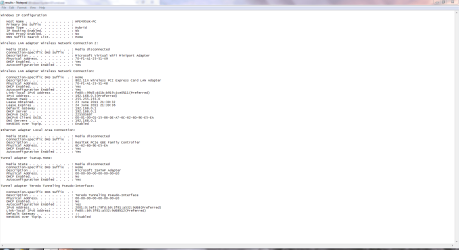
I ran the check on my computer and the readout looked like this:

Text.PNG

As you can see, everything looks good.

The WLAN2 is my wireless printer, which was disconnected.

WLAN is my wireless network connection, which is fine.

The Ethernet adapter is disconnected as I don't use it.

Is there any way you could get hold of another wireless adapter to see whether that works?
 

My Computer

Computer Manufacturer/Model Number
HP Pavilion Elite 495UK
OS
Windows 7 Ultimate SP1 64-Bit
CPU
Intel Core i7 870 @ 2.93GHz
Motherboard
MSI 2A9C (CPU1)
Memory
8Gb Dual-Channel DDR3 @ 664MHz
Graphics Card(s)
nVidia GeForce GTX 460 1024MB dedicated RAM
Sound Card
Realtek HD Audio
Monitor(s) Displays
HP2310i
Screen Resolution
1920 x 1080
Hard Drives
1x1954GB Hitachi HDS22020ALA 330 (RAID), 1x1954GB Hitachi External for backup and storage
PSU
460W
Case
HP Elite
Cooling
Air cooled
Keyboard
Logitech K750 solar-powered keyboard
Mouse
Logitech Wireless M180 mouse
Internet Speed
2Mb
Other Info
Pure Avanti Flow Internet Radio with iPod Dock, 64Gb iPod, HP USB Speakers, Sony MDR-V500 Headphones, Sony Vaio F-Series Laptop
Okay, as I thought, the WLAN isn't showing up.

I will try and get hold of another card and install it, or I could try using USB Adaptor.

If that doesn't work I will get back to you.

Thanks alot for your help.
 

My Computer

Computer Manufacturer/Model Number
HP Envy H8
OS
Windows 7 Ultimate 64 bit
CPU
Intel Core i7-3770
Motherboard
Intel (Laptop)
Memory
16 GB DDR3
Graphics Card(s)
NVIDIA GeForce GTX 660
Screen Resolution
1920x1080
Hard Drives
SSD 120GB
HDD 3TB
You're more than welcome.

If you can let us know how things go it may be helpful for anyone who has a similar problem in the future.

I hope you get a result.
 

My Computer

Computer Manufacturer/Model Number
HP Pavilion Elite 495UK
OS
Windows 7 Ultimate SP1 64-Bit
CPU
Intel Core i7 870 @ 2.93GHz
Motherboard
MSI 2A9C (CPU1)
Memory
8Gb Dual-Channel DDR3 @ 664MHz
Graphics Card(s)
nVidia GeForce GTX 460 1024MB dedicated RAM
Sound Card
Realtek HD Audio
Monitor(s) Displays
HP2310i
Screen Resolution
1920 x 1080
Hard Drives
1x1954GB Hitachi HDS22020ALA 330 (RAID), 1x1954GB Hitachi External for backup and storage
PSU
460W
Case
HP Elite
Cooling
Air cooled
Keyboard
Logitech K750 solar-powered keyboard
Mouse
Logitech Wireless M180 mouse
Internet Speed
2Mb
Other Info
Pure Avanti Flow Internet Radio with iPod Dock, 64Gb iPod, HP USB Speakers, Sony MDR-V500 Headphones, Sony Vaio F-Series Laptop
Back
Top