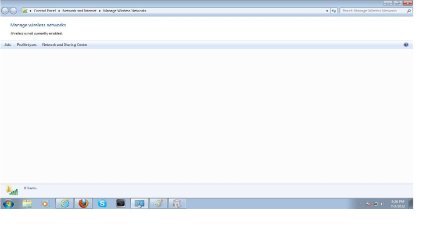
Wireless service Not enabled

64BitWiz

New member
Local time
3:01 PM
Messages
8
Recently i bought a cisco valet.

But i found out that my wireless service is not enabled.

I went to services and wlan auto config was started and automatic

How do you enable it, its stopping me from managing wireless networks.
 

Attachments

  • Wireless disabled.jpg
    Wireless disabled.jpg
    82.6 KB · Views: 33

My Computer

OS
Windows 7 Home Premuim 64bit
Did you follow all the instructions on the cisco to set it up?

If so, then the problem would lie with the computer. Can the computer find the network, and can you enter the password to connect? How is it stopping you from managing wireless networks?
 

My Computer

Computer type
PC/Desktop
Computer Manufacturer/Model Number
Custom Asus Build
OS
Microsoft Windows 8.1 Pro 64-bit
CPU
Intel(R) Core(TM) i3-4130 CPU @ 3.40GHz
Motherboard
B85M-E
Memory
8.00 GB
Graphics Card(s)
None
Sound Card
Realtek High Definition Audio
Monitor(s) Displays
Asus 23.6" Monitor
Screen Resolution
1920 x 1080 x 32 bits (4294967296 colors) @ 60 Hz
Hard Drives
INTEL SSDSC2BW180A4
Samsung SSD 840 PRO Series
PSU
Seasonic S12II-380Bronze
Case
Lian Li
Cooling
Fan, Passive
Keyboard
Logitech K120
Mouse
Microsoft Touch Mouse
Internet Speed
4ms Ping, 19.0 Mbps Download, 19.0 Mbps Upload
Antivirus
Eset Endpoint
Browser
Internet Explorer, Chrome
Did you follow all the instructions on the cisco to set it up?

If so, then the problem would lie with the computer. Can the computer find the network, and can you enter the password to connect? How is it stopping you from managing wireless networks?

Hows it stoping me from managing? As long as it is disabled i cant search for any access points, or manually connect to a wireless network:cry:
 

My Computer

OS
Windows 7 Home Premuim 64bit
I should have asked you this before, but I need your specs on your computer. At the bottom of your post, you will see "My System Specs V" - Click it, and click Update your System Spec". I need all that information. It is a lot easier if your computer was pre-built by a company, such as dell, hp, etc. because the specs are easier to find.

Let me know once you update all the info. Also, you will want to do these tutorials:
http://www.sevenforums.com/tutorials/1538-sfc-scannow-command-system-file-checker.html - by Brink
http://www.sevenforums.com/tutorials/18203-internet-troubleshooting-guide.html - by Dinesh
:info: *The last one might help your situation, but I doubt it even applies to you. Check it out yourself to determine that.

You will want to make sure network discovery is on: http://www.sevenforums.com/tutorials/185237-network-discovery-turn-off-windows-7-a.html - by Brink

Get back to me with those specs if you can, let me know if you encounter any trouble. After that, we can troubleshoot further...
 

My Computer

Computer type
PC/Desktop
Computer Manufacturer/Model Number
Custom Asus Build
OS
Microsoft Windows 8.1 Pro 64-bit
CPU
Intel(R) Core(TM) i3-4130 CPU @ 3.40GHz
Motherboard
B85M-E
Memory
8.00 GB
Graphics Card(s)
None
Sound Card
Realtek High Definition Audio
Monitor(s) Displays
Asus 23.6" Monitor
Screen Resolution
1920 x 1080 x 32 bits (4294967296 colors) @ 60 Hz
Hard Drives
INTEL SSDSC2BW180A4
Samsung SSD 840 PRO Series
PSU
Seasonic S12II-380Bronze
Case
Lian Li
Cooling
Fan, Passive
Keyboard
Logitech K120
Mouse
Microsoft Touch Mouse
Internet Speed
4ms Ping, 19.0 Mbps Download, 19.0 Mbps Upload
Antivirus
Eset Endpoint
Browser
Internet Explorer, Chrome
I should have asked you this before, but I need your specs on your computer. At the bottom of your post, you will see "My System Specs V" - Click it, and click Update your System Spec". I need all that information. It is a lot easier if your computer was pre-built by a company, such as dell, hp, etc. because the specs are easier to find.

Let me know once you update all the info. Also, you will want to do these tutorials:
http://www.sevenforums.com/tutorials/1538-sfc-scannow-command-system-file-checker.html - by Brink
http://www.sevenforums.com/tutorials/18203-internet-troubleshooting-guide.html - by Dinesh
:info: *The last one might help your situation, but I doubt it even applies to you. Check it out yourself to determine that.

You will want to make sure network discovery is on: http://www.sevenforums.com/tutorials/185237-network-discovery-turn-off-windows-7-a.html - by Brink

Get back to me with those specs if you can, let me know if you encounter any trouble. After that, we can troubleshoot further...


oo Thats alot but ill tell u wat i know from cpu properties...

Manufacturer: Dell

Model: Inspiron one_19

Processer: Pentium(R) Dual Core CPU ES400 @ 2.70GHz 2.69 GHz

System type: 64-Bit

Oh yea i got g41 express chipset as my display adapter


and my Network Adapter is a realtek PCIe GBI family controller..


Oh yea to narrow it down basically if the Wireless service is not enabled WiFi doesnt exist
 

My Computer

OS
Windows 7 Home Premuim 64bit
My pc is not domain either its in workgroup
 

My Computer

OS
Windows 7 Home Premuim 64bit
Sounds like a piece of software is managing your wireless connections! If wlan auto config is already enabled then have a look in the programs list for anything to do with wireless managers and disable it!
 

My Computer

Computer Manufacturer/Model Number
Packard Bell MH36-U300
OS
Windows 7 Ultimate 64-Bit
CPU
Intel(R) Pentium(R) Dual CPU T3400 @ 2.16GHz
Memory
2GB DDR2
Graphics Card(s)
Mobile Intel(R) 4 Series Express Chipset
Sound Card
Realtek High Definition Audio
Monitor(s) Displays
15" LCD
Screen Resolution
1280 x 800
Hard Drives
320GB Western Digital
Case
Notebook
Internet Speed
10Mbps

My Computer

Computer type
PC/Desktop
Computer Manufacturer/Model Number
Custom Asus Build
OS
Microsoft Windows 8.1 Pro 64-bit
CPU
Intel(R) Core(TM) i3-4130 CPU @ 3.40GHz
Motherboard
B85M-E
Memory
8.00 GB
Graphics Card(s)
None
Sound Card
Realtek High Definition Audio
Monitor(s) Displays
Asus 23.6" Monitor
Screen Resolution
1920 x 1080 x 32 bits (4294967296 colors) @ 60 Hz
Hard Drives
INTEL SSDSC2BW180A4
Samsung SSD 840 PRO Series
PSU
Seasonic S12II-380Bronze
Case
Lian Li
Cooling
Fan, Passive
Keyboard
Logitech K120
Mouse
Microsoft Touch Mouse
Internet Speed
4ms Ping, 19.0 Mbps Download, 19.0 Mbps Upload
Antivirus
Eset Endpoint
Browser
Internet Explorer, Chrome
Ugh i installed the driver, deleted any wireless related programs, but Wireless service is still not enabled..

Any of you guys got skype/teamviewer
 

My Computer

OS
Windows 7 Home Premuim 64bit
I haven't installed those programs. Just make sure you haven't changed any services, and if you have, change them back.

Make sure a WIRED connection works. If it does, you might try searching for updates that way. Before you do, turn ON automatic driver installation: http://www.sevenforums.com/tutorials/82137-drivers-turn-off-automatic-driver-installation.html - after this, install all updates and drivers offered.

Did you follow all the tutorials I gave previously?

Restart your computer

Did you set your computer up to discover networks? http://www.sevenforums.com/tutorials/185237-network-discovery-turn-off-windows-7-a.html

Did you look inside the case to 1. make sure you have a wireless network adapter (hardware) installed, and 2. that it isn't loose.

Can you search for a network now? *See below V*

Go to network and sharing center, click "connect to network". If yours isn't listed, perhaps it wasn't set up yet? Click "Set up a new connection or network" and follow the wizard.

Go to the action center and click troubleshoot, also found here:
Control Panel\All Control Panel Items\Troubleshooting . With the computer plugged in via the WIRED connection (if it works), troubleshoot network and internet problems.
 

My Computer

Computer type
PC/Desktop
Computer Manufacturer/Model Number
Custom Asus Build
OS
Microsoft Windows 8.1 Pro 64-bit
CPU
Intel(R) Core(TM) i3-4130 CPU @ 3.40GHz
Motherboard
B85M-E
Memory
8.00 GB
Graphics Card(s)
None
Sound Card
Realtek High Definition Audio
Monitor(s) Displays
Asus 23.6" Monitor
Screen Resolution
1920 x 1080 x 32 bits (4294967296 colors) @ 60 Hz
Hard Drives
INTEL SSDSC2BW180A4
Samsung SSD 840 PRO Series
PSU
Seasonic S12II-380Bronze
Case
Lian Li
Cooling
Fan, Passive
Keyboard
Logitech K120
Mouse
Microsoft Touch Mouse
Internet Speed
4ms Ping, 19.0 Mbps Download, 19.0 Mbps Upload
Antivirus
Eset Endpoint
Browser
Internet Explorer, Chrome
I haven't installed those programs. Just make sure you haven't changed any services, and if you have, change them back.

Make sure a WIRED connection works. If it does, you might try searching for updates that way. Before you do, turn ON automatic driver installation: http://www.sevenforums.com/tutorials/82137-drivers-turn-off-automatic-driver-installation.html - after this, install all updates and drivers offered.

Did you follow all the tutorials I gave previously?

Restart your computer

Did you set your computer up to discover networks? http://www.sevenforums.com/tutorials/185237-network-discovery-turn-off-windows-7-a.html

Did you look inside the case to 1. make sure you have a wireless network adapter (hardware) installed, and 2. that it isn't loose.

Can you search for a network now? *See below V*

Go to network and sharing center, click "connect to network". If yours isn't listed, perhaps it wasn't set up yet? Click "Set up a new connection or network" and follow the wizard.

Go to the action center and click troubleshoot, also found here:
Control Panel\All Control Panel Items\Troubleshooting . With the computer plugged in via the WIRED connection (if it works), troubleshoot network and internet problems.

My wired connection does work.

Auto driver installation is on.

Network Discovery is on.

Sorry but Wireless service is still not enabled.
 

My Computer

OS
Windows 7 Home Premuim 64bit
Well mate, try a repair install: http://www.sevenforums.com/tutorials/3413-repair-install.html
It will keep your programs. Follow all that it says to do.

I'm not sure what is going on. It sounds like you said you've done all the tutorials I've given, including troubleshooting yourself on your computer with the windows troubleshooter.

It sounds like you've not touched the Services.msc section, right? Have you scanned for malware using your fully updated antivirus software through a full scan?

I'd go with the repair install. failing that, i'd do a complete reinstall.

Before you do anyhting else, you might throw up a snip of your installed programs so I can check it out to see if anything is potentially interfering with the normal operation.

2 things you do not want to have: a registry cleaner/optimizer or a computer optimizer. Always increases the chance of mesing up a program, driver, or system file.
 

My Computer

Computer type
PC/Desktop
Computer Manufacturer/Model Number
Custom Asus Build
OS
Microsoft Windows 8.1 Pro 64-bit
CPU
Intel(R) Core(TM) i3-4130 CPU @ 3.40GHz
Motherboard
B85M-E
Memory
8.00 GB
Graphics Card(s)
None
Sound Card
Realtek High Definition Audio
Monitor(s) Displays
Asus 23.6" Monitor
Screen Resolution
1920 x 1080 x 32 bits (4294967296 colors) @ 60 Hz
Hard Drives
INTEL SSDSC2BW180A4
Samsung SSD 840 PRO Series
PSU
Seasonic S12II-380Bronze
Case
Lian Li
Cooling
Fan, Passive
Keyboard
Logitech K120
Mouse
Microsoft Touch Mouse
Internet Speed
4ms Ping, 19.0 Mbps Download, 19.0 Mbps Upload
Antivirus
Eset Endpoint
Browser
Internet Explorer, Chrome
never mind the wireless router, etc.

Do you know how to turn the wireless service on?

search/manage wireless networks
 

My Computer

OS
Windows 7 Home Premuim 64bit
oh yea my svchost.exe has a virus, i removed it with security essentials but it keeps coming back when i restart my pc
 

My Computer

OS
Windows 7 Home Premuim 64bit

My Computer

Computer type
PC/Desktop
Computer Manufacturer/Model Number
Custom Asus Build
OS
Microsoft Windows 8.1 Pro 64-bit
CPU
Intel(R) Core(TM) i3-4130 CPU @ 3.40GHz
Motherboard
B85M-E
Memory
8.00 GB
Graphics Card(s)
None
Sound Card
Realtek High Definition Audio
Monitor(s) Displays
Asus 23.6" Monitor
Screen Resolution
1920 x 1080 x 32 bits (4294967296 colors) @ 60 Hz
Hard Drives
INTEL SSDSC2BW180A4
Samsung SSD 840 PRO Series
PSU
Seasonic S12II-380Bronze
Case
Lian Li
Cooling
Fan, Passive
Keyboard
Logitech K120
Mouse
Microsoft Touch Mouse
Internet Speed
4ms Ping, 19.0 Mbps Download, 19.0 Mbps Upload
Antivirus
Eset Endpoint
Browser
Internet Explorer, Chrome
Back
Top
