Wireless utility isn't working

MJZ

New member
Local time
5:02 PM
Messages
11
I have a new Toshiba satellite L500 laptop with windows 7 64-bit home premium OS, I found an issue with the wireless utility where it works fine when i open the laptop, but after sometime (about an hour) it stop working, i tried to use windows troubleshooter, it help me fixing the problem sometimes (saying that the solution is to enable the wireless network connection adapter) but only for a short time (5 minutes).

The problem isn't from the router since my other devices are working fine.

Any help?
 

My Computer

OS
Windows 7 home premium 64-bit OS
I have a new Toshiba satellite L500 laptop with windows 7 64-bit home premium OS, I found an issue with the wireless utility where it works fine when i open the laptop, but after sometime (about an hour) it stop working, i tried to use windows troubleshooter, it help me fixing the problem sometimes (saying that the solution is to enable the wireless network connection adapter) but only for a short time (5 minutes).

The problem isn't from the router since my other devices are working fine.

Any help?

If the wireless utility isn't working right you should just uninstall it from add/remove programs and let Windows handle the connection. :)
 

My Computer

Computer type
PC/Desktop
Computer Manufacturer/Model Number
Home built
OS
Windows 7 Ult, Windows 8.1 Pro,
CPU
Q9650-4.275GHz, E8600 4.5GHz, E6750-3.8GHz
Motherboard
Evga 780i FTW
Memory
G.Skill PC2 9600 1200Mhz 5 5 5 15 2T
Graphics Card(s)
GTX480
Sound Card
Asus Xonar D2
Monitor(s) Displays
HannsG
Screen Resolution
1680X1050
Hard Drives
GSkill Phoenix Pro 120GB SSD
PSU
ThermalTake Toughpower 1000Watt modular
Case
ThermalTake XaserV
Cooling
Xigmatek S1283
Keyboard
Logitech G15
Mouse
Logitech G9
Internet Speed
T1
I will try this
 

My Computer

OS
Windows 7 home premium 64-bit OS
I have all of those programs pre-installed, which of them should i uninstall?
 

Attachments

  • Capture.PNG
    Capture.PNG
    23.4 KB · Views: 6

My Computer

OS
Windows 7 home premium 64-bit OS
I have all of those programs pre-installed, which of them should i uninstall?

I can't tell which one is the wireless connection software but that is an awful lot of bloat ware from what I can see. If there is a preinstalled anti virus software that should be the first one to go.

I would remove every last one of them unless you need one for a specific reason.

You should also go to Windows update if you haven't done so yet.
 

My Computer

Computer type
PC/Desktop
Computer Manufacturer/Model Number
Home built
OS
Windows 7 Ult, Windows 8.1 Pro,
CPU
Q9650-4.275GHz, E8600 4.5GHz, E6750-3.8GHz
Motherboard
Evga 780i FTW
Memory
G.Skill PC2 9600 1200Mhz 5 5 5 15 2T
Graphics Card(s)
GTX480
Sound Card
Asus Xonar D2
Monitor(s) Displays
HannsG
Screen Resolution
1680X1050
Hard Drives
GSkill Phoenix Pro 120GB SSD
PSU
ThermalTake Toughpower 1000Watt modular
Case
ThermalTake XaserV
Cooling
Xigmatek S1283
Keyboard
Logitech G15
Mouse
Logitech G9
Internet Speed
T1
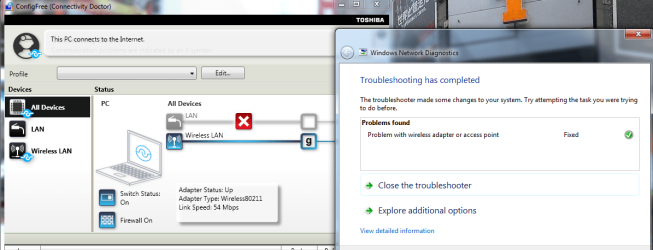
This screenshot after repairing the problem, sadly the wireless works only a couple of minutes then it stops
 

Attachments

  • Capture.PNG
    Capture.PNG
    63.7 KB · Views: 8

My Computer

OS
Windows 7 home premium 64-bit OS
Back
Top