Wireless Wi-Fi / Internet Connection Problem

evolution83

New member
Local time
7:49 AM
Messages
42
Location
California
Hi all,

I have a Linksys AE1000 wireless-N USB adapter. I've had it for about 4 years now and it's never given me any trouble.

Where I stay, I have access to the internet only via wireless Wi-Fi. I'm renting a room and the wireless router is in the landlords room.

During the last two weeks I've noticed that my connection, computer, or some other problem has come into play that does not allow me to browse the interwebz. I sometimes use AnchorFree Hotspot Shield to download torrents and other files as I seem to have had problems in the past with a normal connection.

I noticed the last time I used hotspot shield is when my problem started to occur. First, web pages weren't loading even though I was connected to the internet as indicated by my network status. Second, I made sure to check my internet options and disable any settings (enable proxy / VPN etc) that were changed while using hotspot shield. Third, after using many command line parameters to reset any windows internet configuration, flushing the cache, etc, I was still unable to browse the web.

I've disabled and enabled my adapter; unplugged and plugged it in; did any available windows updates; tried using a different browser; a different OS (dual boot); virus scan; whatever possible method available I have done to no avail. The only thing I get is "page is unavailable" after a site tries to load for several minutes. I can ping a web site but they just won't load. If I CAN manage to browse on my home connection, it lasts for a very short period of time, anywhere from 10 sec up to maybe a 1-2 minutes, then sites will no longer load.

Here's where it gets interesting. Because of this whole problem, I've enabled a mobile hotspot on my phone and can successfully connect / browse the web with my phones connection on my PC. It really baffles my mind as to why this works. I have noticed that my PC makes more noise as if it was doing some heavy work in the background if it's connected to the home Wi-Fi, compared to using a hotspot, it actually quiets down.

Does anyone have any possible idea as to what this may be? My full system specs are in my profile. I am in the market to upgrade to a newer system if it comes down to it; more on that later.
 

My Computer

Computer Manufacturer/Model Number
HP m8277c desktop
OS
Windows 7 Ultimate (32 bit)
CPU
Core 2 Duo E6750 (C) DC 2.66 GHz, 1333 MHz front side bus
Motherboard
Manufacturer: Asus
Memory
2GB
Graphics Card(s)
nVidia GeForce 8400GS, 512MB RAM
Sound Card
Integrated High Definition audio, Realtek ALC 888S chipset
Monitor(s) Displays
w2408 24" lcd wide-screen monitor with integrated speakers
Screen Resolution
1920x1200
Hard Drives
400 GB SATA 3G (3.0 Gb/sec)
With the connection working when using the hotspot from the phone I'd suspect that the problem is with the landlords router.

If you can access the router using it's gateway IP then you can try resetting it using the firmware settings.
 

My Computer

Computer type
PC/Desktop
Computer Manufacturer/Model Number
Home built
OS
Windows 7 Ult, Windows 8.1 Pro,
CPU
Q9650-4.275GHz, E8600 4.5GHz, E6750-3.8GHz
Motherboard
Evga 780i FTW
Memory
G.Skill PC2 9600 1200Mhz 5 5 5 15 2T
Graphics Card(s)
GTX480
Sound Card
Asus Xonar D2
Monitor(s) Displays
HannsG
Screen Resolution
1680X1050
Hard Drives
GSkill Phoenix Pro 120GB SSD
PSU
ThermalTake Toughpower 1000Watt modular
Case
ThermalTake XaserV
Cooling
Xigmatek S1283
Keyboard
Logitech G15
Mouse
Logitech G9
Internet Speed
T1
Hi Chev65, thanks for the reply. One thing I forgot to mention is that I can connect to the internet's home wi-fi using my tablet and smartphone, but its just my PC having an issue. All other PCs in the house have no problem. The landlord even rebooted the router and still a no-go for me. :(
 

My Computer

Computer Manufacturer/Model Number
HP m8277c desktop
OS
Windows 7 Ultimate (32 bit)
CPU
Core 2 Duo E6750 (C) DC 2.66 GHz, 1333 MHz front side bus
Motherboard
Manufacturer: Asus
Memory
2GB
Graphics Card(s)
nVidia GeForce 8400GS, 512MB RAM
Sound Card
Integrated High Definition audio, Realtek ALC 888S chipset
Monitor(s) Displays
w2408 24" lcd wide-screen monitor with integrated speakers
Screen Resolution
1920x1200
Hard Drives
400 GB SATA 3G (3.0 Gb/sec)
I can't imagine why the same connection would work for the hotspot and not for the router.

Have you tried uninstalling the anchor free hotspot shield?

Have you tried reinstalling or updating the driver for the Linksys AE1000 ?
 

My Computer

Computer type
PC/Desktop
Computer Manufacturer/Model Number
Home built
OS
Windows 7 Ult, Windows 8.1 Pro,
CPU
Q9650-4.275GHz, E8600 4.5GHz, E6750-3.8GHz
Motherboard
Evga 780i FTW
Memory
G.Skill PC2 9600 1200Mhz 5 5 5 15 2T
Graphics Card(s)
GTX480
Sound Card
Asus Xonar D2
Monitor(s) Displays
HannsG
Screen Resolution
1680X1050
Hard Drives
GSkill Phoenix Pro 120GB SSD
PSU
ThermalTake Toughpower 1000Watt modular
Case
ThermalTake XaserV
Cooling
Xigmatek S1283
Keyboard
Logitech G15
Mouse
Logitech G9
Internet Speed
T1
yes. i've booted to a completely separate OS (Ubuntu) and have the same issue. The internet connection is there, I just can't load any web pages. I'm at a loss of what to do.
 

My Computer

Computer Manufacturer/Model Number
HP m8277c desktop
OS
Windows 7 Ultimate (32 bit)
CPU
Core 2 Duo E6750 (C) DC 2.66 GHz, 1333 MHz front side bus
Motherboard
Manufacturer: Asus
Memory
2GB
Graphics Card(s)
nVidia GeForce 8400GS, 512MB RAM
Sound Card
Integrated High Definition audio, Realtek ALC 888S chipset
Monitor(s) Displays
w2408 24" lcd wide-screen monitor with integrated speakers
Screen Resolution
1920x1200
Hard Drives
400 GB SATA 3G (3.0 Gb/sec)
yes. i've booted to a completely separate OS (Ubuntu) and have the same issue. The internet connection is there, I just can't load any web pages. I'm at a loss of what to do.

With the internet showing as connected but it won't load any pages that usually relates to either winsock or TCP/Ip being corrupted though I'm not sure how this could effect both Op systems at the same time.

Winsock entries tells Windows 7 how to access your network services. Additionally, your TCP/IP protocol can be corrupted. The TCP/IP protocol is a stack of 4 layers that includes several transport layers, but when this stack is corrupt you will constantly have connectivity issues.

To fix this run to following commands one at a time in an elevated command prompt.

Code:
netsh winsock reset catalog
(reset winsock entries)

Code:
netsh int ip reset reset.log hit
(reset TCP/IP stack)
 

My Computer

Computer type
PC/Desktop
Computer Manufacturer/Model Number
Home built
OS
Windows 7 Ult, Windows 8.1 Pro,
CPU
Q9650-4.275GHz, E8600 4.5GHz, E6750-3.8GHz
Motherboard
Evga 780i FTW
Memory
G.Skill PC2 9600 1200Mhz 5 5 5 15 2T
Graphics Card(s)
GTX480
Sound Card
Asus Xonar D2
Monitor(s) Displays
HannsG
Screen Resolution
1680X1050
Hard Drives
GSkill Phoenix Pro 120GB SSD
PSU
ThermalTake Toughpower 1000Watt modular
Case
ThermalTake XaserV
Cooling
Xigmatek S1283
Keyboard
Logitech G15
Mouse
Logitech G9
Internet Speed
T1
still not working :(
 

My Computer

Computer Manufacturer/Model Number
HP m8277c desktop
OS
Windows 7 Ultimate (32 bit)
CPU
Core 2 Duo E6750 (C) DC 2.66 GHz, 1333 MHz front side bus
Motherboard
Manufacturer: Asus
Memory
2GB
Graphics Card(s)
nVidia GeForce 8400GS, 512MB RAM
Sound Card
Integrated High Definition audio, Realtek ALC 888S chipset
Monitor(s) Displays
w2408 24" lcd wide-screen monitor with integrated speakers
Screen Resolution
1920x1200
Hard Drives
400 GB SATA 3G (3.0 Gb/sec)
You have written, that you can ping the web server. Can you try to put the ip address of a webpage to the browser instead of human readable name? May be it is DNS problem.
 

My Computer

Computer type
PC/Desktop
OS
Windows 7 Ultimate x64

My Computer

Computer type
PC/Desktop
Computer Manufacturer/Model Number
Home built
OS
Windows 7 Ult, Windows 8.1 Pro,
CPU
Q9650-4.275GHz, E8600 4.5GHz, E6750-3.8GHz
Motherboard
Evga 780i FTW
Memory
G.Skill PC2 9600 1200Mhz 5 5 5 15 2T
Graphics Card(s)
GTX480
Sound Card
Asus Xonar D2
Monitor(s) Displays
HannsG
Screen Resolution
1680X1050
Hard Drives
GSkill Phoenix Pro 120GB SSD
PSU
ThermalTake Toughpower 1000Watt modular
Case
ThermalTake XaserV
Cooling
Xigmatek S1283
Keyboard
Logitech G15
Mouse
Logitech G9
Internet Speed
T1
still not working :(

With the adaptor not connecting in both Windows and Lenox it's acting like a problem with the hardware.

well it connects, just not loading sites unless I'm using a hotspot. I'm not sure what the difference would be in why this works.

do you mean the USB adapter itself? I was thinking of testing out a new adapter and seeing if it works...
 

My Computer

Computer Manufacturer/Model Number
HP m8277c desktop
OS
Windows 7 Ultimate (32 bit)
CPU
Core 2 Duo E6750 (C) DC 2.66 GHz, 1333 MHz front side bus
Motherboard
Manufacturer: Asus
Memory
2GB
Graphics Card(s)
nVidia GeForce 8400GS, 512MB RAM
Sound Card
Integrated High Definition audio, Realtek ALC 888S chipset
Monitor(s) Displays
w2408 24" lcd wide-screen monitor with integrated speakers
Screen Resolution
1920x1200
Hard Drives
400 GB SATA 3G (3.0 Gb/sec)
still not working :(

With the adaptor not connecting in both Windows and Lenox it's acting like a problem with the hardware.

well it connects, just not loading sites unless I'm using a hotspot. I'm not sure what the difference would be in why this works.

do you mean the USB adapter itself? I was thinking of testing out a new adapter and seeing if it works...

Yes the actual USB adaptor, because it's not working on both Windows and Linux. Testing a new one would help confirm if this is true or not.
 

My Computer

Computer type
PC/Desktop
Computer Manufacturer/Model Number
Home built
OS
Windows 7 Ult, Windows 8.1 Pro,
CPU
Q9650-4.275GHz, E8600 4.5GHz, E6750-3.8GHz
Motherboard
Evga 780i FTW
Memory
G.Skill PC2 9600 1200Mhz 5 5 5 15 2T
Graphics Card(s)
GTX480
Sound Card
Asus Xonar D2
Monitor(s) Displays
HannsG
Screen Resolution
1680X1050
Hard Drives
GSkill Phoenix Pro 120GB SSD
PSU
ThermalTake Toughpower 1000Watt modular
Case
ThermalTake XaserV
Cooling
Xigmatek S1283
Keyboard
Logitech G15
Mouse
Logitech G9
Internet Speed
T1
Well, I'm at a loss. I've tested out a new adapter and it's doing the same thing. For a while I can browse and then everything just stops working again. Guess I'll just return the adapter. :-/

Is it possible that I'm able to use a mobile hotspot because of the different IP address or is it something else?

I've never experienced an issue like this that is so confusing that it seems unsolvable.
 

My Computer

Computer Manufacturer/Model Number
HP m8277c desktop
OS
Windows 7 Ultimate (32 bit)
CPU
Core 2 Duo E6750 (C) DC 2.66 GHz, 1333 MHz front side bus
Motherboard
Manufacturer: Asus
Memory
2GB
Graphics Card(s)
nVidia GeForce 8400GS, 512MB RAM
Sound Card
Integrated High Definition audio, Realtek ALC 888S chipset
Monitor(s) Displays
w2408 24" lcd wide-screen monitor with integrated speakers
Screen Resolution
1920x1200
Hard Drives
400 GB SATA 3G (3.0 Gb/sec)
Well, I'm at a loss. I've tested out a new adapter and it's doing the same thing. For a while I can browse and then everything just stops working again. Guess I'll just return the adapter. :-/

Is it possible that I'm able to use a mobile hotspot because of the different IP address or is it something else?

I've never experienced an issue like this that is so confusing that it seems unsolvable.

Have you tried running any system file integrity scan's such as the sfc /scannow command which should be run in an elevated command prompt.

If you can post the ipconfig/all from this machine when trying to connect to the landlords router it may be helpful...
 

My Computer

Computer type
PC/Desktop
Computer Manufacturer/Model Number
Home built
OS
Windows 7 Ult, Windows 8.1 Pro,
CPU
Q9650-4.275GHz, E8600 4.5GHz, E6750-3.8GHz
Motherboard
Evga 780i FTW
Memory
G.Skill PC2 9600 1200Mhz 5 5 5 15 2T
Graphics Card(s)
GTX480
Sound Card
Asus Xonar D2
Monitor(s) Displays
HannsG
Screen Resolution
1680X1050
Hard Drives
GSkill Phoenix Pro 120GB SSD
PSU
ThermalTake Toughpower 1000Watt modular
Case
ThermalTake XaserV
Cooling
Xigmatek S1283
Keyboard
Logitech G15
Mouse
Logitech G9
Internet Speed
T1
Microsoft Windows [Version 6.1.7601]
Copyright (c) 2009 Microsoft Corporation. All rights reserved.

C:\Windows\system32>sfc/scannow

Beginning system scan. This process will take some time.

Beginning verification phase of system scan.
Verification 100% complete.

Windows Resource Protection did not find any integrity violations.

C:\Windows\system32>ipconfig/all

Windows IP Configuration

Host Name . . . . . . . . . . . . : Erick-PC
Primary Dns Suffix . . . . . . . :
Node Type . . . . . . . . . . . . : Hybrid
IP Routing Enabled. . . . . . . . : No
WINS Proxy Enabled. . . . . . . . : No
DNS Suffix Search List. . . . . . : hsd1.ca.comcast.net.

Wireless LAN adapter Wireless Network Connection:

Connection-specific DNS Suffix . : hsd1.ca.comcast.net.
Description . . . . . . . . . . . : NETGEAR WNA3100 N300 Wireless USB Adapter

Physical Address. . . . . . . . . : 08-BD-43-88-17-10
DHCP Enabled. . . . . . . . . . . : Yes
Autoconfiguration Enabled . . . . : Yes
IPv6 Address. . . . . . . . . . . : 2601:9:4b00:851:d04d:b694:3aa5:83eb(Preferred)
Temporary IPv6 Address. . . . . . : 2601:9:4b00:851:f43f:508f:4f6c:94aa(Preferred)
Link-local IPv6 Address . . . . . : fe80::d04d:b694:3aa5:83eb%14(Preferred)
IPv4 Address. . . . . . . . . . . : 10.0.0.38(Preferred)
Subnet Mask . . . . . . . . . . . : 255.255.255.0
Lease Obtained. . . . . . . . . . : Wednesday, April 09, 2014 7:35:11 PM
Lease Expires . . . . . . . . . . : Wednesday, April 16, 2014 7:35:11 PM
Default Gateway . . . . . . . . . : fe80::5e57:1aff:feee:c1c1%14
10.0.0.1
DHCP Server . . . . . . . . . . . : 10.0.0.1
DHCPv6 IAID . . . . . . . . . . . : 235453763
DHCPv6 Client DUID. . . . . . . . : 00-01-00-01-18-83-90-10-00-1D-60-AB-8B-E2

DNS Servers . . . . . . . . . . . : 2001:558:feed::1
2001:558:feed::2
75.75.75.75
75.75.76.76
NetBIOS over Tcpip. . . . . . . . : Enabled

Tunnel adapter Teredo Tunneling Pseudo-Interface:

Connection-specific DNS Suffix . :
Description . . . . . . . . . . . : Microsoft Teredo Tunneling Adapter
Physical Address. . . . . . . . . : 00-00-00-00-00-00-00-E0
DHCP Enabled. . . . . . . . . . . : No
Autoconfiguration Enabled . . . . : Yes
IPv6 Address. . . . . . . . . . . : 2001:0:5ef5:79fb:2440:1272:bc5b:c214(Pref
erred)
Link-local IPv6 Address . . . . . : fe80::2440:1272:bc5b:c214%11(Preferred)
Default Gateway . . . . . . . . . :
NetBIOS over Tcpip. . . . . . . . : Disabled

Tunnel adapter isatap.hsd1.ca.comcast.net.:

Media State . . . . . . . . . . . : Media disconnected
Connection-specific DNS Suffix . : hsd1.ca.comcast.net.
Description . . . . . . . . . . . : Microsoft ISATAP Adapter #2
Physical Address. . . . . . . . . : 00-00-00-00-00-00-00-E0
DHCP Enabled. . . . . . . . . . . : No
Autoconfiguration Enabled . . . . : Yes
 

My Computer

Computer Manufacturer/Model Number
HP m8277c desktop
OS
Windows 7 Ultimate (32 bit)
CPU
Core 2 Duo E6750 (C) DC 2.66 GHz, 1333 MHz front side bus
Motherboard
Manufacturer: Asus
Memory
2GB
Graphics Card(s)
nVidia GeForce 8400GS, 512MB RAM
Sound Card
Integrated High Definition audio, Realtek ALC 888S chipset
Monitor(s) Displays
w2408 24" lcd wide-screen monitor with integrated speakers
Screen Resolution
1920x1200
Hard Drives
400 GB SATA 3G (3.0 Gb/sec)
I've been using a guide on Mozilla trying to diagnose different parts of the network. One is to try and ping Google DNS servers. I can't even do that...

Microsoft Windows [Version 6.1.7601]
Copyright (c) 2009 Microsoft Corporation. All rights reserved.

C:\Windows\system32>tracert -d 8.8.8.8

Tracing route to 8.8.8.8 over a maximum of 30 hops

1 2 ms 2 ms 2 ms 10.0.0.1
2 * * * Request timed out.
3 * * * Request timed out.
4 * * * Request timed out.
5 * * * Request timed out.
6 * * * Request timed out.
7 * * * Request timed out.
8 * * * Request timed out.
9 * * * Request timed out.
10 * * * Request timed out.
11 * * * Request timed out.
12 * * * Request timed out.
13 * * * Request timed out.
14 * * * Request timed out.
15 * * * Request timed out.
16 * * * Request timed out.
17 * * * Request timed out.
18 * * * Request timed out.
19 * * * Request timed out.
20 * * * Request timed out.
21 * * * Request timed out.
22 * * * Request timed out.
23 * * * Request timed out.
24 * * * Request timed out.
25 * * * Request timed out.
26 * * * Request timed out.
27 * * * Request timed out.
28 * * * Request timed out.
29 * * * Request timed out.
30 * * * Request timed out.
 

My Computer

Computer Manufacturer/Model Number
HP m8277c desktop
OS
Windows 7 Ultimate (32 bit)
CPU
Core 2 Duo E6750 (C) DC 2.66 GHz, 1333 MHz front side bus
Motherboard
Manufacturer: Asus
Memory
2GB
Graphics Card(s)
nVidia GeForce 8400GS, 512MB RAM
Sound Card
Integrated High Definition audio, Realtek ALC 888S chipset
Monitor(s) Displays
w2408 24" lcd wide-screen monitor with integrated speakers
Screen Resolution
1920x1200
Hard Drives
400 GB SATA 3G (3.0 Gb/sec)
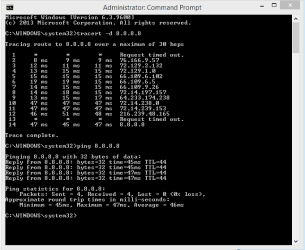
Tracert is different then pinging the IP. I get the following with Tracert and ping to Google's DNS.

How to use the Tracert command-line utility to troubleshoot TCP/IP problems in Windows

In this case I believe the Comcast modem/router is the problem, they are notorious for creating problems like this. With your connection working on the hotspot this is about the only conclusion I can come to.

No way for me to effect any type of fix on these Comcast devices but that is the problem here.
 

Attachments

  • Ping Google and Tracert.PNG
    Ping Google and Tracert.PNG
    21.8 KB · Views: 8

My Computer

Computer type
PC/Desktop
Computer Manufacturer/Model Number
Home built
OS
Windows 7 Ult, Windows 8.1 Pro,
CPU
Q9650-4.275GHz, E8600 4.5GHz, E6750-3.8GHz
Motherboard
Evga 780i FTW
Memory
G.Skill PC2 9600 1200Mhz 5 5 5 15 2T
Graphics Card(s)
GTX480
Sound Card
Asus Xonar D2
Monitor(s) Displays
HannsG
Screen Resolution
1680X1050
Hard Drives
GSkill Phoenix Pro 120GB SSD
PSU
ThermalTake Toughpower 1000Watt modular
Case
ThermalTake XaserV
Cooling
Xigmatek S1283
Keyboard
Logitech G15
Mouse
Logitech G9
Internet Speed
T1
Well, in the 3 years that I've lived here this has never happened. Is it possible I was maybe blocked from accessing the router or internet somehow?
 

My Computer

Computer Manufacturer/Model Number
HP m8277c desktop
OS
Windows 7 Ultimate (32 bit)
CPU
Core 2 Duo E6750 (C) DC 2.66 GHz, 1333 MHz front side bus
Motherboard
Manufacturer: Asus
Memory
2GB
Graphics Card(s)
nVidia GeForce 8400GS, 512MB RAM
Sound Card
Integrated High Definition audio, Realtek ALC 888S chipset
Monitor(s) Displays
w2408 24" lcd wide-screen monitor with integrated speakers
Screen Resolution
1920x1200
Hard Drives
400 GB SATA 3G (3.0 Gb/sec)
Well, in the 3 years that I've lived here this has never happened. Is it possible I was maybe blocked from accessing the router or internet somehow?

That is what's confusing me because from the ipconfig/all you are showing a valid IP so therefore should be connected to the internet so I don't see how you could be blocked from the router although it appears as if something is blocking the connection from working.

The DNS is showing kind of strange here, did you enter these DNS IP's "in bold" into the IPv4 properties?
DNS Servers . . . . . . . . . . . : 2001:558:feed::1
2001:558:feed::2
75.75.75.75
75.75.76.76


Have you tried changing the DNS to something else like Google's DNS at 8.8.8.8 and 8.8.4.4

Also try running the IPReset file, just unzip, windows may grip but it's safe, this file will reset the network stack, flush the DNS, renew the IP etc.
 

Attachments

My Computer

Computer type
PC/Desktop
Computer Manufacturer/Model Number
Home built
OS
Windows 7 Ult, Windows 8.1 Pro,
CPU
Q9650-4.275GHz, E8600 4.5GHz, E6750-3.8GHz
Motherboard
Evga 780i FTW
Memory
G.Skill PC2 9600 1200Mhz 5 5 5 15 2T
Graphics Card(s)
GTX480
Sound Card
Asus Xonar D2
Monitor(s) Displays
HannsG
Screen Resolution
1680X1050
Hard Drives
GSkill Phoenix Pro 120GB SSD
PSU
ThermalTake Toughpower 1000Watt modular
Case
ThermalTake XaserV
Cooling
Xigmatek S1283
Keyboard
Logitech G15
Mouse
Logitech G9
Internet Speed
T1
The DNS is showing kind of strange here, did you enter these DNS IP's "in bold" into the IPv4 properties?
DNS Servers . . . . . . . . . . . : 2001:558:feed::1
2001:558:feed::2
75.75.75.75
75.75.76.76


Have you tried changing the DNS to something else like Google's DNS at 8.8.8.8 and 8.8.4.4

Also try running the IPReset file, just unzip, windows may grip but it's safe, this file will reset the network stack, flush the DNS, renew the IP etc.

yes, the DNS servers were always there from what I remember. It's automatic so I don't put them there. I did try using Google's DNS servers but it's not working still.

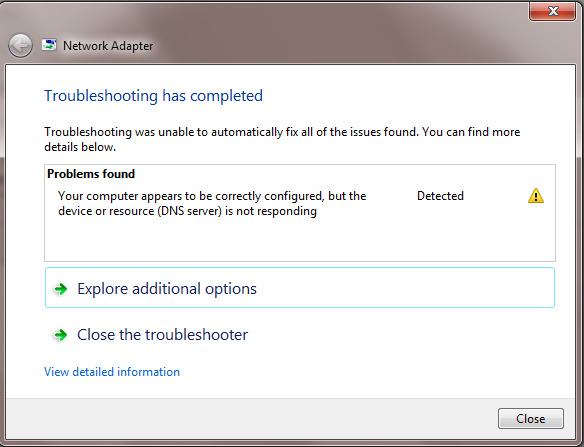
I did run some network diagnostics and came up with some info that may be helpful. Even though it says to reboot the modem, that's already been done but willing to try again.

The first pic below is BEFORE I ran that IPresetALL file you submitted.

Rcipl6S.png


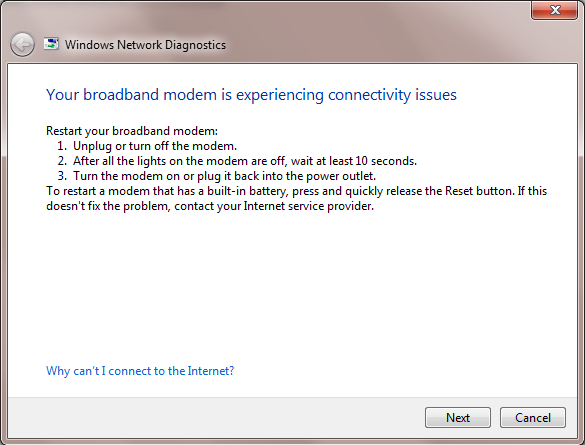
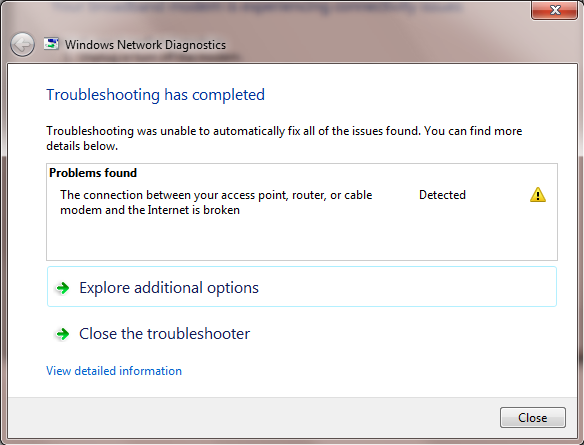
After I ran the file, I got these two messages...

garNfgU.png


V7J2Lwq.png


I gathered some detailed info from the report below.

Code:
Windows Network Diagnostics Publisher details 

Issues found 
The connection between your access point, router, or cable modem and the Internet is broken
The network gateway is accessible, but Windows couldn’t receive network traffic from the Internet.
Your broadband modem is experiencing connectivity issues Completed 
 

Issues found Detection details 

5 The connection between your access point, router, or cable modem and the Internet is broken 
 
The network gateway is accessible, but Windows couldn’t receive network traffic from the Internet. 
Your broadband modem is experiencing connectivity issues 
 
Restart your broadband modem:
1. Unplug or turn off the modem. 
2. After all the lights on the modem are off, wait at least 10 seconds. 
3. Turn the modem on or plug it back into the power outlet. To restart a modem that has a built-in battery, press and quickly release the Reset button. If this doesn't fix the problem, contact your Internet service provider. 
 

Detection details 

InformationalDiagnostics Information (Network Adapter) 
Details about network adapter diagnosis: 

Network adapter Wireless Network Connection 3 driver information:

   Description . . . . . . . . . . : Linksys AE1000
   Manufacturer  . . . . . . . . . : Cisco Consumer Products LLC
   Provider  . . . . . . . . . . . : Cisco Consumer Products LLC
   Version   . . . . . . . . . . . : 3.0.10.0
   Inf File Name . . . . . . . . . : C:\Windows\INF\oem4.inf
   Inf File Date . . . . . . . . . : Friday, June 11, 2010  6:13:54 PM
   Section Name  . . . . . . . . . : linksys_ae1000.ndi
   Hardware ID . . . . . . . . . . : usb\vid_13b1&pid_002f
   Instance Status Flags . . . . . : 0x180600a
   Device Manager Status Code  . . : 0
   IfType  . . . . . . . . . . . . : 71
   Physical Media Type . . . . . . : 9


InformationalDiagnostics Information (Wireless Connectivity) 
Details about wireless connectivity diagnosis: 

Information for connection being diagnosed
 Interface GUID: a7191420-ec53-41f3-b9a9-6e808e18b62d
 Interface name: Linksys AE1000 #2
 Interface type: Native WiFi

Connection incident diagnosed
 Auto Configuration ID: 1
 Connection ID: 1

Connection status summary
 Connection started at: 2014-04-10 18:17:35-179
 Profile match: Success
 Pre-Association: Success
 Association: Success
 Security and Authentication: Success

List of visible access point(s): 3 item(s) total, 3 item(s) displayed
        BSSID		BSS Type PHY	Signal(dB)	Chnl/freq    SSID
-------------------------------------------------------------------------
5C-57-1A-EE-C1-C0	Infra	 <unknown>	-71		6	 HAPPY
BC-EE-7B-EC-D8-D0	Infra	 <unknown>	-87		6	 greybunny
52-57-1A-EE-C1-C0	Infra	 <unknown>	-75		6	 (Unnamed Network)

Connection History

 Information for Auto Configuration ID 1

  List of visible networks: 3 item(s) total, 3 item(s) displayed
  BSS Type PHY	Security	Signal(RSSI)	Compatible	SSID
  ------------------------------------------------------------------------------
  Infra	 <unknown>	Yes		47	Yes		HAPPY
  Infra	 <unknown>	Yes		7	Yes		greybunny
  Infra	 <unknown>	Yes		37	Yes		(Unnamed Network)

  List of preferred networks: 2 item(s)
   Profile: FBI SURVEILANCE
    SSID: FBI SURVEILANCE
    SSID length: 15
    Connection mode: Infra
    Security: Yes
    Set by group policy: No
    Connect even if network is not broadcasting: No
    Connectable: No
     Reason: 0x00028002
   Profile: HAPPY
    SSID: HAPPY
    SSID length: 5
    Connection mode: Infra
    Security: Yes
    Set by group policy: No
    Connect even if network is not broadcasting: No
    Connectable: Yes

 Information for Connection ID 1
 Connection started at: 2014-04-10 18:17:35-179
  Auto Configuration ID: 1
  Profile: HAPPY
  SSID: HAPPY
  SSID length: 5
  Connection mode: Infra
  Security: Yes
  Pre-Association and Association
   Connectivity settings provided by hardware manufacturer (IHV): No
   Security settings provided by hardware manufacturer (IHV): No
   Profile matches network requirements: Success
   Pre-association status: Success
   Association status: Success
    Last AP:  5c-57-1a-ee-c1-c0
  Security and Authentication
   Configured security type: WPA2-PSK
   Configured encryption type: CCMP(AES)
   802.1X protocol: No
   Key exchange initiated: Yes
    Unicast key received: Yes
    Multicast key received: Yes
   Number of security packets received: 0
   Number of security packets sent: 0
   Security attempt status: Success
 Connectivity
   Packet statistics
    Ndis Rx: 428
    Ndis Tx: 687
    Unicast decrypt success: 0
    Multicast decrypt success: 0
    Unicast decrypt failure: 0
    Multicast decrypt failure: 0
    Rx success: 2596
    Rx failure: 0
    Tx success: 129
    Tx failure: 0
    Tx retry: 0
    Tx multiple retry: 0
    Tx max lifetime exceeded: 0
    Tx ACK failure: 0
   Roaming history: 0 item(s)


InformationalDiagnostics Information (Wireless Connectivity) 
Details about wireless connectivity diagnosis: 

For complete information about this session see the wireless connectivity information event.

Helper Class: Auto Configuration
 Initialize status: Success

Information for connection being diagnosed
 Interface GUID: a7191420-ec53-41f3-b9a9-6e808e18b62d
 Interface name: Linksys AE1000 #2
 Interface type: Native WiFi

Result of diagnosis: There may be problem
 
 
InformationalDiagnostics Information (Wireless Network Adapter) 
Details about wireless network adapter diagnosis: 

For complete information about this session see the wireless connectivity information event.

Helper Class: Native WiFi MSM
 Initialize status: Success

Information for connection being diagnosed
 Interface GUID: a7191420-ec53-41f3-b9a9-6e808e18b62d
 Interface name: Linksys AE1000 #2
 Interface type: Native WiFi
 Profile: HAPPY
 SSID: HAPPY
 SSID length: 5
 Connection mode: Infra
 Security: Yes
 Connect even if network is not broadcasting: No

Result of diagnosis: There may be problem


InformationalNetwork Diagnostics Log 
File Name:  06438DB2-7AB7-43DB-B7A8-D06E74EF1948.Diagnose.0.etl 
 
Informational Other Networking Configuration and Logs 
File Name:  NetworkConfiguration.cab 
 
Collection information 
Computer Name:  ERICK-PC 
Windows Version: 6.1 
Architecture: x86 
Time: Thursday, April 10, 2014 6:21:45 PM 

Publisher details Expand 

Windows Network Diagnostics 
Detects problems with network connectivity. 
Package Version: 1.0 
Publisher: Microsoft Windows

IDK where the two log files are located, but if you need them I can post as long as you can tell me where to find them.
 

My Computer

Computer Manufacturer/Model Number
HP m8277c desktop
OS
Windows 7 Ultimate (32 bit)
CPU
Core 2 Duo E6750 (C) DC 2.66 GHz, 1333 MHz front side bus
Motherboard
Manufacturer: Asus
Memory
2GB
Graphics Card(s)
nVidia GeForce 8400GS, 512MB RAM
Sound Card
Integrated High Definition audio, Realtek ALC 888S chipset
Monitor(s) Displays
w2408 24" lcd wide-screen monitor with integrated speakers
Screen Resolution
1920x1200
Hard Drives
400 GB SATA 3G (3.0 Gb/sec)
so, I assume everyone is just as stumped as I am on this?
 

My Computer

Computer Manufacturer/Model Number
HP m8277c desktop
OS
Windows 7 Ultimate (32 bit)
CPU
Core 2 Duo E6750 (C) DC 2.66 GHz, 1333 MHz front side bus
Motherboard
Manufacturer: Asus
Memory
2GB
Graphics Card(s)
nVidia GeForce 8400GS, 512MB RAM
Sound Card
Integrated High Definition audio, Realtek ALC 888S chipset
Monitor(s) Displays
w2408 24" lcd wide-screen monitor with integrated speakers
Screen Resolution
1920x1200
Hard Drives
400 GB SATA 3G (3.0 Gb/sec)
Back
Top