wireless won't connect on Win7 RC

hey guys, i'm bacccck!

ok, i moved the PC into my room and got a connection on Win7 with it wired into my Netgear router. going back in forth between wired/wireless, i still can't get the wireless to work. at one point it said i may need a new certificate. so i went there and there are non available or i need a UIL number?? dunno for sure cause i don't have one.

i also keep getting the login with a name/password menu. and or a network key needed. nothing works that i type in......:confused:

is this smelling like a router password change? :(
 

My Computer My Computer

At a glance

win7
OS
win7
"Try it without any encryption security.

In your router go to wireless settings and set encryption to none.

Do the same on your computer and see if it connects, and go from there.

This will tell you if it is encryption to blame or the wireless isn't working.

good luck"

found this by(??forgot his name) on another thread and will try it....
 

My Computer My Computer

At a glance

win7
OS
win7
Sounds promising
 

My Computer My Computer

At a glance

Windows 7 Professional 32-bitIntel(R) Pentium(R) D CPU 3.00 GHzKingston DDR2 3 gigs total Dual channels Symm...NVIDIA GeForce 8600 GT
Computer Manufacturer/Model Number
Custom
OS
Windows 7 Professional 32-bit
CPU
Intel(R) Pentium(R) D CPU 3.00 GHz
Motherboard
Asus P5B-VM
Memory
Kingston DDR2 3 gigs total Dual channels Symmetric
Graphics Card(s)
NVIDIA GeForce 8600 GT
Sound Card
Hi defonition Sound max
Monitor(s) Displays
CisNet
Screen Resolution
1280*1024
Hard Drives
WDC WD16000AA-00L7A0 SATA DRIVE
WDC IDE Drive 80 gigs.
PSU
Raidmax 380 watt
Case
Generic brand
Cooling
Standard fan
Keyboard
Logitech Cordless desktop EX100
Mouse
Logitech Cordless desktop EX100
Internet Speed
5.0 mbs
Other Info
MSE anti-virus
Sounds promising

yup---Wireless definitely connects choosing NONE in the router! eeek, i'm vulnerable to suburbian surfers!:shock:

now what? i guess Windows needs to make a patch already? i will have to use this connection in a hurry. although i wanted to load COD on it to play...:(
 

My Computer My Computer

At a glance

win7
OS
win7
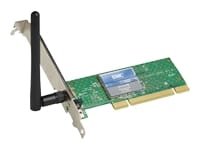
I think you may need to buy a new wireless adapter this is the one I use.
 

Attachments

  • I650235.jpg
    I650235.jpg
    3.4 KB · Views: 310

My Computer My Computer

At a glance

Windows 7 Professional 32-bitIntel(R) Pentium(R) D CPU 3.00 GHzKingston DDR2 3 gigs total Dual channels Symm...NVIDIA GeForce 8600 GT
Computer Manufacturer/Model Number
Custom
OS
Windows 7 Professional 32-bit
CPU
Intel(R) Pentium(R) D CPU 3.00 GHz
Motherboard
Asus P5B-VM
Memory
Kingston DDR2 3 gigs total Dual channels Symmetric
Graphics Card(s)
NVIDIA GeForce 8600 GT
Sound Card
Hi defonition Sound max
Monitor(s) Displays
CisNet
Screen Resolution
1280*1024
Hard Drives
WDC WD16000AA-00L7A0 SATA DRIVE
WDC IDE Drive 80 gigs.
PSU
Raidmax 380 watt
Case
Generic brand
Cooling
Standard fan
Keyboard
Logitech Cordless desktop EX100
Mouse
Logitech Cordless desktop EX100
Internet Speed
5.0 mbs
Other Info
MSE anti-virus
I think you may need to buy a new wireless adapter this is the one I use.
you may have the answer. have you tried a USB wireless adapter like i have? just wondering....;)

do you have an encryption/security issue? thx
 

My Computer My Computer

At a glance

win7
OS
win7
I'm having the same problem. I have a Dell Studio laptop that installed Windows 7 Ultimate RC. It will not connect to my wireless network. I've rebooted both router and cable modem. I've disabled encryption. I've uninstalled and reinstalled drivers for the wireless card. Nothing has worked.
 

My Computer My Computer

At a glance

Windows 7
OS
Windows 7
I'm having the same problem. I have a Dell Studio laptop that installed Windows 7 Ultimate RC. It will not connect to my wireless network. I've rebooted both router and cable modem. I've disabled encryption. I've uninstalled and reinstalled drivers for the wireless card. Nothing has worked.

Gernetti

Hi and welcome to seven forums

can you do us a favor and type the folling in search
cmd> ipconfig /all

then using the built in snipping tool make screen shots of the output and upload them to us

If you need helpe with any of this let us know

Thanks

Ken J
 

My Computer My Computer

At a glance

Win 8 Release candidate 8400[email protected]4 gigsNvidia 9600M
Computer Manufacturer/Model Number
HP Pavillion dv-7 1005 Tx
OS
Win 8 Release candidate 8400
CPU
[email protected]
Memory
4 gigs
Graphics Card(s)
Nvidia 9600M
Sound Card
HD built-in
Monitor(s) Displays
17" Wxga
Screen Resolution
1440x900
Cooling
none
Internet Speed
45Mb down 5Mb up
Here is my results. I can connect via Cat-5 (1gig), but can't connect wirelessly.

Windows IP Configuration

Host Name . . . . . . . . . . . . : Bessie-IV
Primary Dns Suffix . . . . . . . :
Node Type . . . . . . . . . . . . : Hybrid
IP Routing Enabled. . . . . . . . : Yes
WINS Proxy Enabled. . . . . . . . : No
DNS Suffix Search List. . . . . . : ph.cox.net

Wireless LAN adapter Wireless Network Connection:

Media State . . . . . . . . . . . : Media disconnected
Connection-specific DNS Suffix . :
Description . . . . . . . . . . . : Dell Wireless 1510 Wireless-N WLAN Mini-C
ard
Physical Address. . . . . . . . . : 00-23-4D-D9-80-D4
DHCP Enabled. . . . . . . . . . . : Yes
Autoconfiguration Enabled . . . . : Yes

Ethernet adapter Bluetooth Network Connection 2:

Media State . . . . . . . . . . . : Media disconnected
Connection-specific DNS Suffix . :
Description . . . . . . . . . . . : Bluetooth Device (Personal Area Network)
#2
Physical Address. . . . . . . . . : 00-26-5E-E0-18-75
DHCP Enabled. . . . . . . . . . . : Yes
Autoconfiguration Enabled . . . . : Yes

Ethernet adapter Local Area Connection:

Connection-specific DNS Suffix . : ph.cox.net
Description . . . . . . . . . . . : Broadcom NetLink (TM) Gigabit Ethernet
Physical Address. . . . . . . . . : 00-21-70-90-47-C6
DHCP Enabled. . . . . . . . . . . : Yes
Autoconfiguration Enabled . . . . : Yes
IPv6 Address. . . . . . . . . . . : 2002:18ff:261d:0:d448:43c8:ec32:91b3(Pref
erred)
Temporary IPv6 Address. . . . . . : 2002:18ff:261d:0:11ca:1caf:ab69:44ec(Pref
erred)
Link-local IPv6 Address . . . . . : fe80::d448:43c8:ec32:91b3%17(Preferred)
IPv4 Address. . . . . . . . . . . : 192.168.1.101(Preferred)
Subnet Mask . . . . . . . . . . . : 255.255.255.0
Lease Obtained. . . . . . . . . . : Tuesday, November 03, 2009 4:12:54 PM
Lease Expires . . . . . . . . . . : Friday, November 06, 2009 4:18:30 AM
Default Gateway . . . . . . . . . : fe80::21c:10ff:fef7:7c0e%17
192.168.1.1
DHCP Server . . . . . . . . . . . : 192.168.1.1
DNS Servers . . . . . . . . . . . : 68.105.28.11
68.105.29.11
68.105.28.12
NetBIOS over Tcpip. . . . . . . . : Enabled

Tunnel adapter isatap.ph.cox.net:

Media State . . . . . . . . . . . : Media disconnected
Connection-specific DNS Suffix . : ph.cox.net
Description . . . . . . . . . . . : Microsoft ISATAP Adapter
Physical Address. . . . . . . . . : 00-00-00-00-00-00-00-E0
DHCP Enabled. . . . . . . . . . . : No
Autoconfiguration Enabled . . . . : Yes

Tunnel adapter isatap.{760D9AE6-504F-4760-B87A-D096615886EC}:

Media State . . . . . . . . . . . : Media disconnected
Connection-specific DNS Suffix . :
Description . . . . . . . . . . . : Microsoft ISATAP Adapter #2
Physical Address. . . . . . . . . : 00-00-00-00-00-00-00-E0
DHCP Enabled. . . . . . . . . . . : No
Autoconfiguration Enabled . . . . : Yes

Tunnel adapter Local Area Connection* 12:

Connection-specific DNS Suffix . :
Description . . . . . . . . . . . : Teredo Tunneling Pseudo-Interface
Physical Address. . . . . . . . . : 00-00-00-00-00-00-00-E0
DHCP Enabled. . . . . . . . . . . : No
Autoconfiguration Enabled . . . . : Yes
IPv6 Address. . . . . . . . . . . : 2001:0:4137:9e50:188b:b7c:e700:d9e2(Prefe
rred)
Link-local IPv6 Address . . . . . : fe80::188b:b7c:e700:d9e2%21(Preferred)
Default Gateway . . . . . . . . . :
NetBIOS over Tcpip. . . . . . . . : Disabled

Tunnel adapter isatap.{C0BFBEA6-FF0A-4100-82EE-FBA18D9BEF9C}:

Media State . . . . . . . . . . . : Media disconnected
Connection-specific DNS Suffix . :
Description . . . . . . . . . . . : Microsoft ISATAP Adapter #3
Physical Address. . . . . . . . . : 00-00-00-00-00-00-00-E0
DHCP Enabled. . . . . . . . . . . : No
Autoconfiguration Enabled . . . . : Yes
 

My Computer My Computer

At a glance

Windows 7
OS
Windows 7
I think you may need to buy a new wireless adapter this is the one I use.
you may have the answer. have you tried a USB wireless adapter like i have? just wondering....;)

do you have an encryption/security issue? thx
I find that usb adapters are too slow
 

My Computer My Computer

At a glance

Windows 7 Professional 32-bitIntel(R) Pentium(R) D CPU 3.00 GHzKingston DDR2 3 gigs total Dual channels Symm...NVIDIA GeForce 8600 GT
Computer Manufacturer/Model Number
Custom
OS
Windows 7 Professional 32-bit
CPU
Intel(R) Pentium(R) D CPU 3.00 GHz
Motherboard
Asus P5B-VM
Memory
Kingston DDR2 3 gigs total Dual channels Symmetric
Graphics Card(s)
NVIDIA GeForce 8600 GT
Sound Card
Hi defonition Sound max
Monitor(s) Displays
CisNet
Screen Resolution
1280*1024
Hard Drives
WDC WD16000AA-00L7A0 SATA DRIVE
WDC IDE Drive 80 gigs.
PSU
Raidmax 380 watt
Case
Generic brand
Cooling
Standard fan
Keyboard
Logitech Cordless desktop EX100
Mouse
Logitech Cordless desktop EX100
Internet Speed
5.0 mbs
Other Info
MSE anti-virus
I've found out it's the driver that Windows 7 RC uses. I've installed the final version and have no problem connecting.
 

My Computer My Computer

At a glance

Windows 7
OS
Windows 7
I've found out it's the driver that Windows 7 RC uses. I've installed the final version and have no problem connecting.

Where did you find the driver?
 

My Computer My Computer

At a glance

Windows 7 Home Premium (64bit)
OS
Windows 7 Home Premium (64bit)
Windows 7 RC won't connect to wireless network.

I didn't find the driver. I installed the final version of Windows 7 Ultimate. I was intending to do that anyway.
 

My Computer My Computer

At a glance

Windows 7
OS
Windows 7
Back
Top