Solved WLM 2011 - 'sent' emails not delivered

kingsland

New member
Local time
7:18 AM
Messages
7
Using windows live mail 2011 many of my ‘sent’ emails failto be delivered, even though they appear in the ‘sent’ box. I can receive,forward and reply; the problem seems to be with emails which I originate. Thereis no error message.

A test email sent to myself doesn’t arrive, but if I thenforward the same email to myself it does arrive.

My ISP is TalkTalk and I can use the TT webmail service toaccess and use the same email account without problem.

I much prefer the format of WLM so rarely use TT webmail,but used it recently over several days to access my WLM on an Ipad.Perhaps this disrupted some settings.

I do hope someone can help me. I regret that technically I’mnot very proficient.
 

My Computer My Computer

Computer type
Laptop
Computer Manufacturer/Model Number
HP G61
OS
Windows 7 (Home Premium 32 bit - I believe)
Antivirus
Kaspersky
Browser
IE 11
Hello and welcome kingsland mate sound slike your machine needs some decluttering - I don't know what you use for cleaning up either but CCleaner is good https://www.piriform.com/ccleaner/download the free version is good.

But before we embark on that I have to say 2011 is an old verison of WLM whicj I use myself and find 2012 much better but the choice is yours.

First up though run these in safe mode

http://www.sevenforums.com/tutorials/1538-sfc-scannow-command-system-file-checker.html

http://www.sevenforums.com/tutorials/433-disk-check.html< if necessary include the /f and /r in the command line as per Option2

if no go then run these if you haven't already

http://www.superantispyware.com/

http://www.malwarebytes.org/products/malwarebytes_free/

http://www.bleepingcomputer.com/download/adwcleaner/

ADW download frombleeping computer delete any rubbish found with the malware scans
(Anyone running Kaspersky internet security will find it rants about ADW - ignore it or disable Kaspersky while running ADW)

Do these and post back

PS Meant to mention my brother in Wiltshire uses Talk Talk and is always grumbling about it.
 

My Computer My Computer

Computer type
PC/Desktop
Computer Manufacturer/Model Number
Own build (new) Desk1 / Asus ROG Win 7 / Desk2 1st build
OS
Desk1 7 Home Prem / Desk2 10 Pro / Main lap Asus ROG 10 Pro 2 laptop Toshiba 7 Pro Asus P2520 7 & 10
CPU
Desk1 i5 3750K / Laptop i7 GTX 860M / Desk2 i5 2500
Motherboard
Desk1 Asus P877-V / Desk2 Gigabyte H67 UD3H / Laptop ?
Memory
Desk1 8GB (1866) / Desk2 16GB (1333) / Laptop 8Gb DDR3
Graphics Card(s)
Desk 1& 2NVidia GTX 650 & Laptops on board Intel
Sound Card
Desk 1 & 2 -XONAR DG Realtek High Def audio Laptop
Monitor(s) Displays
Desk 1 Benq HD 2450 / Desk2 Philips 24" / Laptop 17.5"
Screen Resolution
1920x1080 D1 & D2 & Laptop 1
Hard Drives
Desk1 Samsung 120GB 830 SSD
Asus ROG 256GB 850 Pro SSD
Desk2 Samsung 840 256 SSD
Toshiba 120GB EVO
PSU
Desk 1 Corsair HX 1050/ Laptop ? / Desk 2 Corsair HX 650
Case
Desk 1 Cooler HAF XM ? Toshiba laptop / Desk2 Coolermaster
Cooling
Fans on all Desk1 -2 Desk2 - all Coolermasters 5 Laptop ?
Keyboard
Desk 1 MS Sidewinder X6 Desk 2 MS Sidewinder X 4
Mouse
Desk 1&2 - Gigabyte MS 900 gamer - laptop - Logitec wireless
Internet Speed
ADSL2+
Other Info
One other Desktop (tester) and spare Toshba laptop both with SSD's
Running Kaspersky 2016 ISS on all machines config'd identically
Logitec audio stereo systems on each machine (x3)
Canon MG5250MFC
Router/modem TP-Link running WPA2SK
Hi, and thanks for taking the time to reply. Unfortunately when in Safe mode I had no internet access, so I reverted to Normal mode and used the free CCleaner which you suggested; it felt therapeutic and my laptop seems faster.

However, I've since emailed myself using WLM and again nothing arrives, though it works fine using TalkTalk webmail. I've just Forwarded the same message to myself using WLM and it's arrived!

So, the problem's still there. I can Receive, Reply and Forward, but emails which I originate and Send do not arrive. Any other suggestions?
 

My Computer My Computer

Computer type
Laptop
Computer Manufacturer/Model Number
HP G61
OS
Windows 7 (Home Premium 32 bit - I believe)
Antivirus
Kaspersky
Browser
IE 11
Hmm have you checked the in and out settings for your email or has this just happened out of the blue?


Now just out of interest do you know the settings for your in and a outgoing mail? see this How To Setup POP3 or IMAP in Windows Live Mail - Webvault Help Centre

If you do then would you be willing to uninstall 2011 and install 2012? Personally I have set mine up a few time now and prefer the 12 over the 11 version.

Let me know because I do know a good networking member who might be able to help with your problem.
 

My Computer My Computer

Computer type
PC/Desktop
Computer Manufacturer/Model Number
Own build (new) Desk1 / Asus ROG Win 7 / Desk2 1st build
OS
Desk1 7 Home Prem / Desk2 10 Pro / Main lap Asus ROG 10 Pro 2 laptop Toshiba 7 Pro Asus P2520 7 & 10
CPU
Desk1 i5 3750K / Laptop i7 GTX 860M / Desk2 i5 2500
Motherboard
Desk1 Asus P877-V / Desk2 Gigabyte H67 UD3H / Laptop ?
Memory
Desk1 8GB (1866) / Desk2 16GB (1333) / Laptop 8Gb DDR3
Graphics Card(s)
Desk 1& 2NVidia GTX 650 & Laptops on board Intel
Sound Card
Desk 1 & 2 -XONAR DG Realtek High Def audio Laptop
Monitor(s) Displays
Desk 1 Benq HD 2450 / Desk2 Philips 24" / Laptop 17.5"
Screen Resolution
1920x1080 D1 & D2 & Laptop 1
Hard Drives
Desk1 Samsung 120GB 830 SSD
Asus ROG 256GB 850 Pro SSD
Desk2 Samsung 840 256 SSD
Toshiba 120GB EVO
PSU
Desk 1 Corsair HX 1050/ Laptop ? / Desk 2 Corsair HX 650
Case
Desk 1 Cooler HAF XM ? Toshiba laptop / Desk2 Coolermaster
Cooling
Fans on all Desk1 -2 Desk2 - all Coolermasters 5 Laptop ?
Keyboard
Desk 1 MS Sidewinder X6 Desk 2 MS Sidewinder X 4
Mouse
Desk 1&2 - Gigabyte MS 900 gamer - laptop - Logitec wireless
Internet Speed
ADSL2+
Other Info
One other Desktop (tester) and spare Toshba laptop both with SSD's
Running Kaspersky 2016 ISS on all machines config'd identically
Logitec audio stereo systems on each machine (x3)
Canon MG5250MFC
Router/modem TP-Link running WPA2SK
Hi again. The problem started a few weeks ago, out of the blue I think, but it was some time before I became aware that my sent emails weren't arriving. I'm almost at the limit of my technical capabilities, but according to Options - Email accounts - Properties - Advanced: Incoming Mail Server (POP3) 110, Outgoing (SMTP) 25. Does that sound right?

What happens to emails in my storage folders if I uninstall 2011?
 

My Computer My Computer

Computer type
Laptop
Computer Manufacturer/Model Number
HP G61
OS
Windows 7 (Home Premium 32 bit - I believe)
Antivirus
Kaspersky
Browser
IE 11
Oh misery! I looked up the settings recommended by TalkTalk for an email client. They were slightly different so I changed them on WLM. It didn't help as I got an error message each time I tried to send (something about not being recognised). I therefore changed the settings back to the original ones and now get an error message saying unable to send or receive! I didn't get error messages when the problem first started.

Any advice?
 

My Computer My Computer

Computer type
Laptop
Computer Manufacturer/Model Number
HP G61
OS
Windows 7 (Home Premium 32 bit - I believe)
Antivirus
Kaspersky
Browser
IE 11
Well we are I a bit of a pickle mate that Talk Talk I mentioned my brother is using and also not liking seems to be at the root of the problem.

Now I don't know what will happen to those messages if you uninstall as I have been using 2012 for ages now and each time I set it up via an install for example I just use my Hotmail account to sign in and the messages (cast of millions) all flood back.

Maybe I will get 2XG to have a look and see what she thinks just hang in there it could be something very simple and she is the expert.


I have left a message and we shall see what there is on offer.
 

My Computer My Computer

Computer type
PC/Desktop
Computer Manufacturer/Model Number
Own build (new) Desk1 / Asus ROG Win 7 / Desk2 1st build
OS
Desk1 7 Home Prem / Desk2 10 Pro / Main lap Asus ROG 10 Pro 2 laptop Toshiba 7 Pro Asus P2520 7 & 10
CPU
Desk1 i5 3750K / Laptop i7 GTX 860M / Desk2 i5 2500
Motherboard
Desk1 Asus P877-V / Desk2 Gigabyte H67 UD3H / Laptop ?
Memory
Desk1 8GB (1866) / Desk2 16GB (1333) / Laptop 8Gb DDR3
Graphics Card(s)
Desk 1& 2NVidia GTX 650 & Laptops on board Intel
Sound Card
Desk 1 & 2 -XONAR DG Realtek High Def audio Laptop
Monitor(s) Displays
Desk 1 Benq HD 2450 / Desk2 Philips 24" / Laptop 17.5"
Screen Resolution
1920x1080 D1 & D2 & Laptop 1
Hard Drives
Desk1 Samsung 120GB 830 SSD
Asus ROG 256GB 850 Pro SSD
Desk2 Samsung 840 256 SSD
Toshiba 120GB EVO
PSU
Desk 1 Corsair HX 1050/ Laptop ? / Desk 2 Corsair HX 650
Case
Desk 1 Cooler HAF XM ? Toshiba laptop / Desk2 Coolermaster
Cooling
Fans on all Desk1 -2 Desk2 - all Coolermasters 5 Laptop ?
Keyboard
Desk 1 MS Sidewinder X6 Desk 2 MS Sidewinder X 4
Mouse
Desk 1&2 - Gigabyte MS 900 gamer - laptop - Logitec wireless
Internet Speed
ADSL2+
Other Info
One other Desktop (tester) and spare Toshba laptop both with SSD's
Running Kaspersky 2016 ISS on all machines config'd identically
Logitec audio stereo systems on each machine (x3)
Canon MG5250MFC
Router/modem TP-Link running WPA2SK
Just spent nearly two hours on the phone to TalkTalk, who were helpful (yes, from previous experience I was very surprised) but they failed to solve the initial problem. They're adamant the problem isn't with them and can only suggest I phone Microsoft, but I haven't the strength today. TalkTalk have changed the WLM settings slightly and I'm back to where I was yesterday, i.e. I can receive, reply and forward but not send. Not a great foundation for communication.

If 2XG can help I'd be very grateful. In the meantime, thank you so much for your help and support.
 

My Computer My Computer

Computer type
Laptop
Computer Manufacturer/Model Number
HP G61
OS
Windows 7 (Home Premium 32 bit - I believe)
Antivirus
Kaspersky
Browser
IE 11
Ok mate I have left her a message already to take a look.

I was just thinking maybe you could try creating another account in the same name as your current one ie have two accounts with that address and try using the second account. From what I can see Talk Talk are not eally much help.

Now two other things you can do if you haven't already is run these in safe mode.

http://www.sevenforums.com/tutorials/1538-sfc-scannow-command-system-file-checker.html

http://www.sevenforums.com/tutorials/433-disk-check.html< if necessary include the /f and /r in the command line as per Option2

if these do nothing then I suggest running CCleaner to clear some clutter - if you haven't got it -
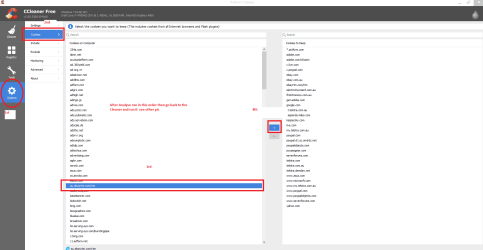
https://www.piriform.com/ccleaner/download when you run this and Analyse is finished > go to Options > Cookies > highlight the sites you know are pass worded for you and send them to the right-hand list or you will be having to login into those sites each time you visit. See pics of mine get the order right;)


if this doesn't clear up things try a run with these

http://www.superantispyware.com/

http://www.malwarebytes.org/products/malwarebytes_free/

http://www.bleepingcomputer.com/download/adwcleaner/

ADW download from bleeping computerdelete any rubbish found with the malware scans

(Anyone running Kasperskyinternet security will find it rants about ADW - ignore it or disable Kasperskywhile running ADW)


Attachments

  • CCLEANER COOKIES.PNG
    CCLEANER COOKIES.PNG
    32.4 KB · Views: 0
  • CCLEANER RUN.PNG
    CCLEANER RUN.PNG
    41.3 KB · Views: 0

My Computer My Computer

Computer type
PC/Desktop
Computer Manufacturer/Model Number
Own build (new) Desk1 / Asus ROG Win 7 / Desk2 1st build
OS
Desk1 7 Home Prem / Desk2 10 Pro / Main lap Asus ROG 10 Pro 2 laptop Toshiba 7 Pro Asus P2520 7 & 10
CPU
Desk1 i5 3750K / Laptop i7 GTX 860M / Desk2 i5 2500
Motherboard
Desk1 Asus P877-V / Desk2 Gigabyte H67 UD3H / Laptop ?
Memory
Desk1 8GB (1866) / Desk2 16GB (1333) / Laptop 8Gb DDR3
Graphics Card(s)
Desk 1& 2NVidia GTX 650 & Laptops on board Intel
Sound Card
Desk 1 & 2 -XONAR DG Realtek High Def audio Laptop
Monitor(s) Displays
Desk 1 Benq HD 2450 / Desk2 Philips 24" / Laptop 17.5"
Screen Resolution
1920x1080 D1 & D2 & Laptop 1
Hard Drives
Desk1 Samsung 120GB 830 SSD
Asus ROG 256GB 850 Pro SSD
Desk2 Samsung 840 256 SSD
Toshiba 120GB EVO
PSU
Desk 1 Corsair HX 1050/ Laptop ? / Desk 2 Corsair HX 650
Case
Desk 1 Cooler HAF XM ? Toshiba laptop / Desk2 Coolermaster
Cooling
Fans on all Desk1 -2 Desk2 - all Coolermasters 5 Laptop ?
Keyboard
Desk 1 MS Sidewinder X6 Desk 2 MS Sidewinder X 4
Mouse
Desk 1&2 - Gigabyte MS 900 gamer - laptop - Logitec wireless
Internet Speed
ADSL2+
Other Info
One other Desktop (tester) and spare Toshba laptop both with SSD's
Running Kaspersky 2016 ISS on all machines config'd identically
Logitec audio stereo systems on each machine (x3)
Canon MG5250MFC
Router/modem TP-Link running WPA2SK
Hi, I didn't get round to phoning Microsoft about the WLM problem (can't send, can only receive/forward/reply) as problems started with my TalkTalk Webmail service which is what I've been using to send emails. I discovered this morning that incoming mails to TT Webmail arrive then vanish completely. I'm convinced this is down to something their technical bloke did yesterday when he took remote control of my pc. After an hour or so on the phone to TT this morning the problem has been referred to their technical people and I've to allow 72 hours for a response.

I ran CCleaner but it didn't help my email problem. Not sure what else can be done until TT get back to me.
 

My Computer My Computer

Computer type
Laptop
Computer Manufacturer/Model Number
HP G61
OS
Windows 7 (Home Premium 32 bit - I believe)
Antivirus
Kaspersky
Browser
IE 11
Well! After problems for over nearly three weeks, my WLM issue seems to have corrected itself and my sent emails are now arriving. Thanks for your help.
 

My Computer My Computer

Computer type
Laptop
Computer Manufacturer/Model Number
HP G61
OS
Windows 7 (Home Premium 32 bit - I believe)
Antivirus
Kaspersky
Browser
IE 11
Yes well I reckon TT realized they had messed up on this one and set it right. Ay least it is going.

Now the other links I sent - worth while making a note of them as they are handy tools and CC is well respected and sued by just about everyone in this forum.

Another tutorial you will find handy is this
http://www.sevenforums.com/tutorials/11728-optimize-windows-7-a.html have a read through and if you don't mind losing some of the "bling" like transparency for example it will amaze you how much quicker and more efficient your machine will run. I use it on all my machines in fact it is part of any install reinstall or clean that I do. Just one example is how much faster you can get the machine to boot and shut down and Brink is the master if you want to ask any questions.
 

My Computer My Computer

Computer type
PC/Desktop
Computer Manufacturer/Model Number
Own build (new) Desk1 / Asus ROG Win 7 / Desk2 1st build
OS
Desk1 7 Home Prem / Desk2 10 Pro / Main lap Asus ROG 10 Pro 2 laptop Toshiba 7 Pro Asus P2520 7 & 10
CPU
Desk1 i5 3750K / Laptop i7 GTX 860M / Desk2 i5 2500
Motherboard
Desk1 Asus P877-V / Desk2 Gigabyte H67 UD3H / Laptop ?
Memory
Desk1 8GB (1866) / Desk2 16GB (1333) / Laptop 8Gb DDR3
Graphics Card(s)
Desk 1& 2NVidia GTX 650 & Laptops on board Intel
Sound Card
Desk 1 & 2 -XONAR DG Realtek High Def audio Laptop
Monitor(s) Displays
Desk 1 Benq HD 2450 / Desk2 Philips 24" / Laptop 17.5"
Screen Resolution
1920x1080 D1 & D2 & Laptop 1
Hard Drives
Desk1 Samsung 120GB 830 SSD
Asus ROG 256GB 850 Pro SSD
Desk2 Samsung 840 256 SSD
Toshiba 120GB EVO
PSU
Desk 1 Corsair HX 1050/ Laptop ? / Desk 2 Corsair HX 650
Case
Desk 1 Cooler HAF XM ? Toshiba laptop / Desk2 Coolermaster
Cooling
Fans on all Desk1 -2 Desk2 - all Coolermasters 5 Laptop ?
Keyboard
Desk 1 MS Sidewinder X6 Desk 2 MS Sidewinder X 4
Mouse
Desk 1&2 - Gigabyte MS 900 gamer - laptop - Logitec wireless
Internet Speed
ADSL2+
Other Info
One other Desktop (tester) and spare Toshba laptop both with SSD's
Running Kaspersky 2016 ISS on all machines config'd identically
Logitec audio stereo systems on each machine (x3)
Canon MG5250MFC
Router/modem TP-Link running WPA2SK
Back
Top