Solved WLM 2012 Started Crashing when Sending Emails

My wife was composing a new email earlier & I told her if WLM crashes when she sends it, STOP and call me. It didn't crash.

WLM knows we're watching. It's like when you have a rattle in your car and you take it in for service. That day it doesn't rattle. AARRGGHH!
 

My Computer My Computer

At a glance

Windows 7 Pro x64Intel 17-47708GBIntegrated Intel HD Graphics 4600
Computer type
PC/Desktop
Computer Manufacturer/Model Number
Lenovo M83
OS
Windows 7 Pro x64
CPU
Intel 17-4770
Motherboard
Lenovo Sharkbay 0B98401 PRO
Memory
8GB
Graphics Card(s)
Integrated Intel HD Graphics 4600
Monitor(s) Displays
acer AL2216W
Screen Resolution
1680 x 1050
Hard Drives
WD 10EZEX-08M 1TB
Case
Mini-tower
Internet Speed
25/25MB
Antivirus
Norton Internet Security
Browser
IE11 & Firefox
WLM had been running fine since my last post with email scanning in Norton Internet Security (NIS) disabled. A few days ago I did go ahead and install 3 MS updates.

This morning, I was forwarding a message and got another crash when I clicked the Send button. The only other application open was IE11. Here are the Event Viewer details:

Log Name: Application
Source: Application Error
Date: 10/03/2014 8:32:53 AM
Event ID: 1000
Task Category: (100)
Level: Error
Keywords: Classic
User: N/A
Computer: lenovoM83
Description:
Faulting application name: wlmail.exe, version: 16.4.3528.331, time stamp: 0x533a3fce
Faulting module name: MSMAIL.DLL, version: 16.4.3528.331, time stamp: 0x533a408a
Exception code: 0xc0000005
Fault offset: 0x0002f015
Faulting process id: 0x%9
Faulting application start time: 0x%10
Faulting application path: %11
Faulting module path: %12
Report Id: %13
Event Xml:
<Event xmlns="http://schemas.microsoft.com/win/2004/08/events/event">
<System>
<Provider Name="Application Error" />
<EventID Qualifiers="0">1000</EventID>
<Level>2</Level>
<Task>100</Task>
<Keywords>0x80000000000000</Keywords>
<TimeCreated SystemTime="2014-10-03T12:32:53.000000000Z" />
<EventRecordID>13668</EventRecordID>
<Channel>Application</Channel>
<Computer>lenovoM83</Computer>
<Security />
</System>
<EventData>
<Data>wlmail.exe</Data>
<Data>16.4.3528.331</Data>
<Data>533a3fce</Data>
<Data>MSMAIL.DLL</Data>
<Data>16.4.3528.331</Data>
<Data>533a408a</Data>
<Data>c0000005</Data>
<Data>0002f015</Data>
</EventData>
</Event>
 

My Computer My Computer

At a glance

Windows 7 Pro x64Intel 17-47708GBIntegrated Intel HD Graphics 4600
Computer type
PC/Desktop
Computer Manufacturer/Model Number
Lenovo M83
OS
Windows 7 Pro x64
CPU
Intel 17-4770
Motherboard
Lenovo Sharkbay 0B98401 PRO
Memory
8GB
Graphics Card(s)
Integrated Intel HD Graphics 4600
Monitor(s) Displays
acer AL2216W
Screen Resolution
1680 x 1050
Hard Drives
WD 10EZEX-08M 1TB
Case
Mini-tower
Internet Speed
25/25MB
Antivirus
Norton Internet Security
Browser
IE11 & Firefox
You must of blinked and WLM thought you weren't watching.

Can you post the event log showing the variable replacements?
%9, %10, %11, %12, %13
Faulting process id: 0x%9
Faulting application start time: 0x%10
Faulting application path: %11
Faulting module path: %12
Report Id: %13

You should have the original eMail - right click on it and select Properties
Click the Details tab
Click the message source button

Copy the entire msg to your text editor (Notepad?)
Change the eMail addresses in the new file to protect the innocent
-> do a global replace, then look though the file for any missed addresses.
-> .eml files break at 70 or 80 chars; i.e BillR @ someMail.zzz might cross a line break and a global replacement would miss it

For example; replace BillR with TomJones, then look again for Bi, Bil, Bill

The mail server isn't that important unless it's proprietary (your own domain with a mail server).

Once your happy that eMail addresses are protected by replacing the values, save the file as .txt

Put that file in a compressed folder (zip) and attach it to a new post. I'll look though it to see what I can determine as the cause.

Bill
.


lcik on
 

My Computer My Computer

At a glance

x64 (6.3.9600) Win8.1 Pro & soon dual boot x6...AMD A6-3420M APU with Radeon(tm) HD Graphics6.00 GBAMD Radeon(TM) HD 6520G
Computer type
Laptop
Computer Manufacturer/Model Number
HP Pavilion dv6-6c10us
OS
x64 (6.3.9600) Win8.1 Pro & soon dual boot x64 (6.1.7601) Win7_SP1 HomePrem
CPU
AMD A6-3420M APU with Radeon(tm) HD Graphics
Motherboard
Hewlett-Packard 1805
Memory
6.00 GB
Graphics Card(s)
AMD Radeon(TM) HD 6520G
Sound Card
(1) AMD High Definition Audio Device (2) IDT High Definiti
Monitor(s) Displays
HP W2072a 20" LCD (1600 x 900) @ 60 Hz
Screen Resolution
1366 x 768 x 32 bits (4294967296 colors) @ 60 Hz
Hard Drives
ST640LM0 00 HM641JI SATA Disk Device
Keyboard
Logitech k520 wireless KB
Mouse
Logitech m320 wireless mouse (bundled with KB)
Internet Speed
15/5 | 54 MB Wireless 'n'
Antivirus
Realtime: Defender or Avast | On-demand: Malwarebytes, ESET
Browser
IE 11 on Win8, IE 10 on win 7
Other Info
Media: [Gimp, Audacity, VLC] || Comm: [WEmail 2012, Skype] || Productivity: [OpenOffice,| Textpad] || Utils: [Sysinternals, cCleaner, Speccy, Defraggler]
How do I post the event log showing the variable replacements? The event log entry I posted came from the event viewer.

No, I do not have the original email. It wasn't anything I was going to keep so it's already been deleted and I have WLM set to clear deleted messages on exit.
 

My Computer My Computer

At a glance

Windows 7 Pro x64Intel 17-47708GBIntegrated Intel HD Graphics 4600
Computer type
PC/Desktop
Computer Manufacturer/Model Number
Lenovo M83
OS
Windows 7 Pro x64
CPU
Intel 17-4770
Motherboard
Lenovo Sharkbay 0B98401 PRO
Memory
8GB
Graphics Card(s)
Integrated Intel HD Graphics 4600
Monitor(s) Displays
acer AL2216W
Screen Resolution
1680 x 1050
Hard Drives
WD 10EZEX-08M 1TB
Case
Mini-tower
Internet Speed
25/25MB
Antivirus
Norton Internet Security
Browser
IE11 & Firefox
You had previously asked what else was in the Event log around the time of the WLM crash, so here it is.
The crash was at 8:32:53 AM. The entry just prior was about an hour before - 7:34:30 AM an Information level entry from gupdate:

The description for Event ID 0 from source gupdate cannot be found. Either the component that raises this event is not installed on your local computer or the installation is corrupted. You can install or repair the component on the local computer.
If the event originated on another computer, the display information had to be saved with the event.
The following information was included with the event:
Service stopped
There were also 2 WLM related entries right after the crash, possibly around the time WLM was checking for a solution online or restarting:

Log Name: Application
Source: Windows Error Reporting
Date: 10/03/2014 8:33:07 AM
Event ID: 1001
Task Category: None
Level: Information
Keywords: Classic
User: N/A
Computer: lenovoM83
Description:
Fault bucket , type 0
Event Name: APPCRASH
Response: Not available
Cab Id: 0
Problem signature:
P1: wlmail.exe
P2: 16.4.3528.331
P3: 533a3fce
P4: MSMAIL.DLL
P5: 16.4.3528.331
P6: 533a408a
P7: c0000005
P8: 0002f015
P9:
P10:
Attached files:
These files may be available here:
C:\Users\Gary & Linda\AppData\Local\Microsoft\Windows\WER\ReportArchive\AppCrash_wlmail.exe_49695c9619d2fff0adc2339577cef8bcbc58cd3c_0ed0e2f0
Analysis symbol:
Rechecking for solution: 0
Report Id: 64f6a609-4af9-11e4-92f9-4439c437d02a
Report Status: 0
Event Xml:
<Event xmlns="http://schemas.microsoft.com/win/2004/08/events/event">
<System>
<Provider Name="Windows Error Reporting" />
<EventID Qualifiers="0">1001</EventID>
<Level>4</Level>
<Task>0</Task>
<Keywords>0x80000000000000</Keywords>
<TimeCreated SystemTime="2014-10-03T12:33:07.000000000Z" />
<EventRecordID>13669</EventRecordID>
<Channel>Application</Channel>
<Computer>lenovoM83</Computer>
<Security />
</System>
<EventData>
<Data>
</Data>
<Data>0</Data>
<Data>APPCRASH</Data>
<Data>Not available</Data>
<Data>0</Data>
<Data>wlmail.exe</Data>
<Data>16.4.3528.331</Data>
<Data>533a3fce</Data>
<Data>MSMAIL.DLL</Data>
<Data>16.4.3528.331</Data>
<Data>533a408a</Data>
<Data>c0000005</Data>
<Data>0002f015</Data>
<Data>
</Data>
<Data>
</Data>
<Data>
</Data>
<Data>C:\Users\Gary & Linda\AppData\Local\Microsoft\Windows\WER\ReportArchive\AppCrash_wlmail.exe_49695c9619d2fff0adc2339577cef8bcbc58cd3c_0ed0e2f0</Data>
<Data>
</Data>
<Data>0</Data>
<Data>64f6a609-4af9-11e4-92f9-4439c437d02a</Data>
<Data>0</Data>
</EventData>
</Event>
And second:

Log Name: Application
Source: Windows Error Reporting
Date: 10/03/2014 8:33:36 AM
Event ID: 1001
Task Category: None
Level: Information
Keywords: Classic
User: N/A
Computer: lenovoM83
Description:
Fault bucket 306956482, type 21
Event Name: WindowsLiveWriter
Response: Not available
Cab Id: 0
Problem signature:
P1: CloseSubjectSpellcheckWordRange
P2: 182
P3: System.NullReferenceException
P4: 16.4.3528.331
P5: 2.0.50727.5485
P6: Windows Live Mail
P7:
P8:
P9:
P10:
Attached files:
C:\Users\Gary & Linda\AppData\Local\Temp\wlmail-433777574\0832F9FEE845\dwlog.txt
C:\Users\Gary & Linda\AppData\Local\Temp\wlmail-433777574\F40C8AA3F10C\dwstacktrace.txt
C:\Users\Gary & Linda\AppData\Local\Temp\wlmail-433777574\3E882E4FFE7D\dwminidump.mdmp
These files may be available here:
C:\Users\Gary & Linda\AppData\Local\Microsoft\Windows\WER\ReportArchive\Critical_CloseSubjectSpel_b0ead5886f1fd23cfa76e55369f069e4e6f14a9_14915310
Analysis symbol:
Rechecking for solution: 0
Report Id: 64fb68ca-4af9-11e4-92f9-4439c437d02a
Report Status: 0
Event Xml:
<Event xmlns="http://schemas.microsoft.com/win/2004/08/events/event">
<System>
<Provider Name="Windows Error Reporting" />
<EventID Qualifiers="0">1001</EventID>
<Level>4</Level>
<Task>0</Task>
<Keywords>0x80000000000000</Keywords>
<TimeCreated SystemTime="2014-10-03T12:33:36.000000000Z" />
<EventRecordID>13670</EventRecordID>
<Channel>Application</Channel>
<Computer>lenovoM83</Computer>
<Security />
</System>
<EventData>
<Data>306956482</Data>
<Data>21</Data>
<Data>WindowsLiveWriter</Data>
<Data>Not available</Data>
<Data>0</Data>
<Data>CloseSubjectSpellcheckWordRange</Data>
<Data>182</Data>
<Data>System.NullReferenceException</Data>
<Data>16.4.3528.331</Data>
<Data>2.0.50727.5485</Data>
<Data>Windows Live Mail</Data>
<Data>
</Data>
<Data>
</Data>
<Data>
</Data>
<Data>
</Data>
<Data>
C:\Users\Gary & Linda\AppData\Local\Temp\wlmail-433777574\0832F9FEE845\dwlog.txt
C:\Users\Gary & Linda\AppData\Local\Temp\wlmail-433777574\F40C8AA3F10C\dwstacktrace.txt
C:\Users\Gary & Linda\AppData\Local\Temp\wlmail-433777574\3E882E4FFE7D\dwminidump.mdmp</Data>
<Data>C:\Users\Gary & Linda\AppData\Local\Microsoft\Windows\WER\ReportArchive\Critical_CloseSubjectSpel_b0ead5886f1fd23cfa76e55369f069e4e6f14a9_14915310</Data>
<Data>
</Data>
<Data>0</Data>
<Data>64fb68ca-4af9-11e4-92f9-4439c437d02a</Data>
<Data>0</Data>
</EventData>
</Event>
 

My Computer My Computer

At a glance

Windows 7 Pro x64Intel 17-47708GBIntegrated Intel HD Graphics 4600
Computer type
PC/Desktop
Computer Manufacturer/Model Number
Lenovo M83
OS
Windows 7 Pro x64
CPU
Intel 17-4770
Motherboard
Lenovo Sharkbay 0B98401 PRO
Memory
8GB
Graphics Card(s)
Integrated Intel HD Graphics 4600
Monitor(s) Displays
acer AL2216W
Screen Resolution
1680 x 1050
Hard Drives
WD 10EZEX-08M 1TB
Case
Mini-tower
Internet Speed
25/25MB
Antivirus
Norton Internet Security
Browser
IE11 & Firefox
How do I post the event log showing the variable replacements? The event log entry I posted came from the event viewer.

No, I do not have the original email. It wasn't anything I was going to keep so it's already been deleted and I have WLM set to clear deleted messages on exit.

Since there seems to be a dump associated with the error, follow OPTION ONE in this tutorial to collect information pertinent to the error:
http://www.sevenforums.com/bsod-hel...ath-bsod-posting-instructions.html#post836073

A quick glace at the other events you posted seems to indicate that Live Writer might be the culprit, but I'll know more after you post the DM collector information.

Thanks, we'll keep trying to plug this whole - luckily it is not every eMail that is affected.
Next time this happens - before you delete the eMail, grab the message details. I still think it is content related to specific eMail msgs.

Bill
.
 

My Computer My Computer

At a glance

x64 (6.3.9600) Win8.1 Pro & soon dual boot x6...AMD A6-3420M APU with Radeon(tm) HD Graphics6.00 GBAMD Radeon(TM) HD 6520G
Computer type
Laptop
Computer Manufacturer/Model Number
HP Pavilion dv6-6c10us
OS
x64 (6.3.9600) Win8.1 Pro & soon dual boot x64 (6.1.7601) Win7_SP1 HomePrem
CPU
AMD A6-3420M APU with Radeon(tm) HD Graphics
Motherboard
Hewlett-Packard 1805
Memory
6.00 GB
Graphics Card(s)
AMD Radeon(TM) HD 6520G
Sound Card
(1) AMD High Definition Audio Device (2) IDT High Definiti
Monitor(s) Displays
HP W2072a 20" LCD (1600 x 900) @ 60 Hz
Screen Resolution
1366 x 768 x 32 bits (4294967296 colors) @ 60 Hz
Hard Drives
ST640LM0 00 HM641JI SATA Disk Device
Keyboard
Logitech k520 wireless KB
Mouse
Logitech m320 wireless mouse (bundled with KB)
Internet Speed
15/5 | 54 MB Wireless 'n'
Antivirus
Realtime: Defender or Avast | On-demand: Malwarebytes, ESET
Browser
IE 11 on Win8, IE 10 on win 7
Other Info
Media: [Gimp, Audacity, VLC] || Comm: [WEmail 2012, Skype] || Productivity: [OpenOffice,| Textpad] || Utils: [Sysinternals, cCleaner, Speccy, Defraggler]
Let's see if I uploaded the zip file correctly.

Oh good, looks like I did.
 

Attachments

My Computer My Computer

At a glance

Windows 7 Pro x64Intel 17-47708GBIntegrated Intel HD Graphics 4600
Computer type
PC/Desktop
Computer Manufacturer/Model Number
Lenovo M83
OS
Windows 7 Pro x64
CPU
Intel 17-4770
Motherboard
Lenovo Sharkbay 0B98401 PRO
Memory
8GB
Graphics Card(s)
Integrated Intel HD Graphics 4600
Monitor(s) Displays
acer AL2216W
Screen Resolution
1680 x 1050
Hard Drives
WD 10EZEX-08M 1TB
Case
Mini-tower
Internet Speed
25/25MB
Antivirus
Norton Internet Security
Browser
IE11 & Firefox
Nothing really jumped out in the files ... The two events you referenced are applications events - it looks like the DM utility only collected system events - there wasn't a dump in the collection either, so I'm batting 1,000 on that front.

The one WER report is related to spell check (WLM checks mail before sending no doubt), this brings me back to content specific to some msgs.

I'm going to hold off on any suggestions until you can get me an eMail that causes the issue - I'll need the original as I described before - a forwarded or replied to copy might have been 'corrected' in the process of sending.

Hang in there,

Bill
.
 

My Computer My Computer

At a glance

x64 (6.3.9600) Win8.1 Pro & soon dual boot x6...AMD A6-3420M APU with Radeon(tm) HD Graphics6.00 GBAMD Radeon(TM) HD 6520G
Computer type
Laptop
Computer Manufacturer/Model Number
HP Pavilion dv6-6c10us
OS
x64 (6.3.9600) Win8.1 Pro & soon dual boot x64 (6.1.7601) Win7_SP1 HomePrem
CPU
AMD A6-3420M APU with Radeon(tm) HD Graphics
Motherboard
Hewlett-Packard 1805
Memory
6.00 GB
Graphics Card(s)
AMD Radeon(TM) HD 6520G
Sound Card
(1) AMD High Definition Audio Device (2) IDT High Definiti
Monitor(s) Displays
HP W2072a 20" LCD (1600 x 900) @ 60 Hz
Screen Resolution
1366 x 768 x 32 bits (4294967296 colors) @ 60 Hz
Hard Drives
ST640LM0 00 HM641JI SATA Disk Device
Keyboard
Logitech k520 wireless KB
Mouse
Logitech m320 wireless mouse (bundled with KB)
Internet Speed
15/5 | 54 MB Wireless 'n'
Antivirus
Realtime: Defender or Avast | On-demand: Malwarebytes, ESET
Browser
IE 11 on Win8, IE 10 on win 7
Other Info
Media: [Gimp, Audacity, VLC] || Comm: [WEmail 2012, Skype] || Productivity: [OpenOffice,| Textpad] || Utils: [Sysinternals, cCleaner, Speccy, Defraggler]
Thanks for taking the time to look through the files. I will keep an eye out and the next time WLM crashes, I'll save the specific email data you're looking for.

Have a great weekend, what's left of it.
 

My Computer My Computer

At a glance

Windows 7 Pro x64Intel 17-47708GBIntegrated Intel HD Graphics 4600
Computer type
PC/Desktop
Computer Manufacturer/Model Number
Lenovo M83
OS
Windows 7 Pro x64
CPU
Intel 17-4770
Motherboard
Lenovo Sharkbay 0B98401 PRO
Memory
8GB
Graphics Card(s)
Integrated Intel HD Graphics 4600
Monitor(s) Displays
acer AL2216W
Screen Resolution
1680 x 1050
Hard Drives
WD 10EZEX-08M 1TB
Case
Mini-tower
Internet Speed
25/25MB
Antivirus
Norton Internet Security
Browser
IE11 & Firefox
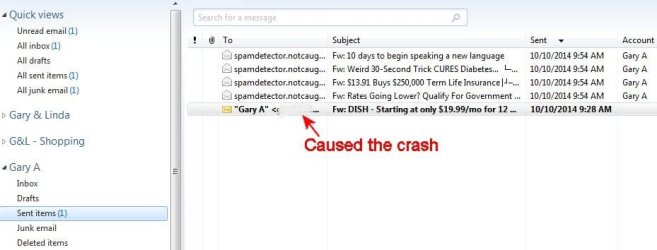
Another crash this morning. It was a spam message that gets by my ISP's spam filter and gets downloaded to WLM. WLM detects it as spam and puts it into the Junk Email folder. I was trying to forward it to Verizon ([email protected]) in hopes of them updating their spam filter. After WLM recovered from the crash, the forwarded message shows up in the Sent folder, but corrupted in some manner.

Here is the original message as received:


Return-path: <[email protected]>
Received: from hisparad.net ([unknown] [103.23.183.98])
by vms172101.mailsrvcs.net
(Sun Java(tm) System Messaging Server 7u2-7.02 32bit (built Apr 16 2009))
with ESMTP id <[email protected]>; Fri,
10 Oct 2014 04:57:22 -0500 (CDT)
Date: Fri, 10 Oct 2014 04:57:22 -0500 (CDT)
Date-warning: Date header was inserted by vms172101.mailsrvcs.net
From: "=?ISO-8859-1?B?RElTSCBBdXRob3JpemVkIFJldGFpbGVyBgQCBgcBCAMDBA==?="
<[email protected]>
Subject:
=?ISO-8859-1?B?RElTSCAtIFN0YXJ0aW5nIGF0IG9ubHkgJDE5Ljk5L21vIGZvciAxMiBtb250aHMuCAgCAwIDCAYCAQ==?=
X-Originating-IP: [103.23.183.98]
Message-id: <[email protected]>
MIME-version: 1.0
Content-type: text/html
Content-transfer-encoding: 7BIT
<a href="http://hisparad.net/a/BQAAAAAtAAAAqXEAAAAAEslo8LELw9skJtoZhlkFb2CA07ctV2GX2OX5NiXztgrVnmpZ38_d4_2E7jSuXQ983w,,"><img src="http://hisparad.net/a/DwAAAAAWAAAAqVUAAAAAtw8Hy9ql_qV_E-stt9Ztp5nILKS9vEGO97sMfLspc0m9"></a><br />
<a href="http://hisparad.net/a/LgAAAACGAAAAqfkAAAAA_ursK83IfXbEDKNI_M8ArLOXOlEUeclwLwsUUxcLGrgWEjOHF2jpEPpw7IYCxFz-elXxnkElUPKA1TjIr4MQN8w,"><img src="http://hisparad.net/a/cAAAAAAFAAAAqSQAAAAAe4Y_KdSzREUfhfib47k_mst6SsutGwIXmk1bT9-lBeWL"></a><br />
<a href="http://hisparad.net/a/0gAAAABVAAAAqbMAAAAA8US8i2L2p5fHTnNbyU5h4NnMEL-iD_PwM8thnzi9AN5ounIM9pyZw1HVzNpr0ykmvA,,"><img src="http://hisparad.net/a/NwAAAACdAAAAqWwAAAAAr2yB_jaaf9OQZ5O2j-5dNMyiXCiv6fnXRu-a9ZZib1HF">


Here is the same message forwarded:


From: "Gary A" <[email protected]>
To: <[email protected]>
Subject: =?iso-8859-1?Q?Fw:_DISH_-_Starting_at_only_$19.99/mo_for_12_mon?=
=?iso-8859-1?Q?ths.=08=08=02=03=02=03=08=06=02=01?=
Date: Fri, 10 Oct 2014 09:28:19 -0400
MIME-Version: 1.0
Content-Type: multipart/alternative;
boundary="----=_NextPart_000_0020_01CFE46C.8740B740"
X-Priority: 3
X-MSMail-Priority: Normal
Importance: Normal
X-Mailer: Microsoft Windows Live Mail 16.4.3528.331
X-MimeOLE: Produced By Microsoft MimeOLE V16.4.3528.331
This is a multi-part message in MIME format.
------=_NextPart_000_0020_01CFE46C.8740B740
Content-Type: text/plain;
charset="iso-8859-1"
Content-Transfer-Encoding: quoted-printable

From: DISH Authorized Retailer=06=04=02=06=07=01=08=03=03=04=20
Sent: Friday, October 10, 2014 5:57 AM
Subject: DISH - Starting at only $19.99/mo for 12 =
months.=08=08=02=03=02=03=08=06=02=01


------=_NextPart_000_0020_01CFE46C.8740B740
Content-Type: text/html;
charset="iso-8859-1"
Content-Transfer-Encoding: quoted-printable
<HTML><HEAD></HEAD>
<BODY dir=3Dltr>
<DIV dir=3Dltr>
<DIV style=3D"FONT-SIZE: 10pt; FONT-FAMILY: 'Arial'; COLOR: #000000">
<DIV> </DIV>
<DIV=20
style=3D'FONT-SIZE: small; TEXT-DECORATION: none; FONT-FAMILY: =
"Calibri"; FONT-WEIGHT: normal; COLOR: #000000; FONT-STYLE: normal; =
DISPLAY: inline'>
<DIV style=3D"FONT: 10pt tahoma">
<DIV> </DIV>
<DIV style=3D"BACKGROUND: #f5f5f5">
<DIV style=3D"font-color: black"><B>From:</B> <A =
[email protected]=20
href=3D"mailto:p[email protected]">DISH Authorized =
Retailer=06=04=02=06=07=01=08=03=03=04</A>=20
</DIV>
<DIV><B>Sent:</B> Friday, October 10, 2014 5:57 AM</DIV>
<DIV><B>Subject:</B> DISH - Starting at only $19.99/mo for 12=20
months.=08=08=02=03=02=03=08=06=02=01</DIV></DIV></DIV>
<DIV> </DIV></DIV>
<DIV=20
style=3D'FONT-SIZE: small; TEXT-DECORATION: none; FONT-FAMILY: =
"Calibri"; FONT-WEIGHT: normal; COLOR: #000000; FONT-STYLE: normal; =
DISPLAY: inline'><A=20
href=3D"http://hisparad.net/a/BQAAAAAtAAAAqXEAAAAAEslo8LELw9skJtoZhlkFb2C=
A07ctV2GX2OX5NiXztgrVnmpZ38_d4_2E7jSuXQ983w,,"><IMG=20
src=3D"http://hisparad.net/a/DwAAAAAWAAAAqVUAAAAAtw8Hy9ql_qV_E-stt9Ztp5nI=
LKS9vEGO97sMfLspc0m9"></A><BR><A=20
href=3D"http://hisparad.net/a/LgAAAACGAAAAqfkAAAAA_ursK83IfXbEDKNI_M8ArLO=
XOlEUeclwLwsUUxcLGrgWEjOHF2jpEPpw7IYCxFz-elXxnkElUPKA1TjIr4MQN8w,"><IMG=20
src=3D"http://hisparad.net/a/cAAAAAAFAAAAqSQAAAAAe4Y_KdSzREUfhfib47k_mst6=
SsutGwIXmk1bT9-lBeWL"></A><BR><A=20
href=3D"http://hisparad.net/a/0gAAAABVAAAAqbMAAAAA8US8i2L2p5fHTnNbyU5h4Nn=
MEL-iD_PwM8thnzi9AN5ounIM9pyZw1HVzNpr0ykmvA,,"><IMG=20
src=3D"http://hisparad.net/a/NwAAAACdAAAAqWwAAAAAr2yB_jaaf9OQZ5O2j-5dNMyi=
XCiv6fnXRu-a9ZZib1HF"></A></DIV></DIV></DIV></BODY></HTML>
------=_NextPart_000_0020_01CFE46C.8740B740--


Here are the Event Viewer entries:

Code:
Log Name:      Application
Source:        Application Error
Date:          10/10/2014 9:28:22 AM
Event ID:      1000
Task Category: (100)
Level:         Error
Keywords:      Classic
User:          N/A
Computer:      lenovoM83
Description:
Faulting application name: wlmail.exe, version: 16.4.3528.331, time stamp: 0x533a3fce
Faulting module name: unknown, version: 0.0.0.0, time stamp: 0x00000000
Exception code: 0xc0000005
Fault offset: 0x5d000000
Faulting process id: 0x%9
Faulting application start time: 0x%10
Faulting application path: %11
Faulting module path: %12
Report Id: %13
Event Xml:
<Event xmlns="[URL]http://schemas.microsoft.com/win/2004/08/events/event[/URL]">
  <System>
    <Provider Name="Application Error" />
    <EventID Qualifiers="0">1000</EventID>
    <Level>2</Level>
    <Task>100</Task>
    <Keywords>0x80000000000000</Keywords>
    <TimeCreated SystemTime="2014-10-10T13:28:22.000000000Z" />
    <EventRecordID>14273</EventRecordID>
    <Channel>Application</Channel>
    <Computer>lenovoM83</Computer>
    <Security />
  </System>
  <EventData>
    <Data>wlmail.exe</Data>
    <Data>16.4.3528.331</Data>
    <Data>533a3fce</Data>
    <Data>unknown</Data>
    <Data>0.0.0.0</Data>
    <Data>00000000</Data>
    <Data>c0000005</Data>
    <Data>5d000000</Data>
  </EventData>
</Event>

Code:
Log Name:      Application
Source:        Windows Error Reporting
Date:          10/10/2014 9:28:41 AM
Event ID:      1001
Task Category: None
Level:         Information
Keywords:      Classic
User:          N/A
Computer:      lenovoM83
Description:
Fault bucket 207432689, type 17
Event Name: APPCRASH
Response: Not available
Cab Id: 0
Problem signature:
P1: wlmail.exe
P2: 16.4.3528.331
P3: 533a3fce
P4: unknown
P5: 0.0.0.0
P6: 00000000
P7: c0000005
P8: 5d000000
P9: 
P10: 
Attached files:
C:\Users\Gary & Linda\AppData\Local\Temp\WER1892.tmp.WERInternalMetadata.xml
These files may be available here:
C:\Users\Gary & Linda\AppData\Local\Microsoft\Windows\WER\ReportArchive\AppCrash_wlmail.exe_9c708515f32a198d769c79f584cac95b5e617a5_19853b4e
Analysis symbol: 
Rechecking for solution: 0
Report Id: 4dae8643-5081-11e4-a773-4439c437d02a
Report Status: 0
Event Xml:
<Event xmlns="[URL]http://schemas.microsoft.com/win/2004/08/events/event[/URL]">
  <System>
    <Provider Name="Windows Error Reporting" />
    <EventID Qualifiers="0">1001</EventID>
    <Level>4</Level>
    <Task>0</Task>
    <Keywords>0x80000000000000</Keywords>
    <TimeCreated SystemTime="2014-10-10T13:28:41.000000000Z" />
    <EventRecordID>14274</EventRecordID>
    <Channel>Application</Channel>
    <Computer>lenovoM83</Computer>
    <Security />
  </System>
  <EventData>
    <Data>207432689</Data>
    <Data>17</Data>
    <Data>APPCRASH</Data>
    <Data>Not available</Data>
    <Data>0</Data>
    <Data>wlmail.exe</Data>
    <Data>16.4.3528.331</Data>
    <Data>533a3fce</Data>
    <Data>unknown</Data>
    <Data>0.0.0.0</Data>
    <Data>00000000</Data>
    <Data>c0000005</Data>
    <Data>5d000000</Data>
    <Data>
    </Data>
    <Data>
    </Data>
    <Data>
C:\Users\Gary & Linda\AppData\Local\Temp\WER1892.tmp.WERInternalMetadata.xml</Data>
    <Data>C:\Users\Gary & Linda\AppData\Local\Microsoft\Windows\WER\ReportArchive\AppCrash_wlmail.exe_9c708515f32a198d769c79f584cac95b5e617a5_19853b4e</Data>
    <Data>
    </Data>
    <Data>0</Data>
    <Data>4dae8643-5081-11e4-a773-4439c437d02a</Data>
    <Data>0</Data>
  </EventData>
</Event>

 
Last edited:

My Computer My Computer

At a glance

Windows 7 Pro x64Intel 17-47708GBIntegrated Intel HD Graphics 4600
Computer type
PC/Desktop
Computer Manufacturer/Model Number
Lenovo M83
OS
Windows 7 Pro x64
CPU
Intel 17-4770
Motherboard
Lenovo Sharkbay 0B98401 PRO
Memory
8GB
Graphics Card(s)
Integrated Intel HD Graphics 4600
Monitor(s) Displays
acer AL2216W
Screen Resolution
1680 x 1050
Hard Drives
WD 10EZEX-08M 1TB
Case
Mini-tower
Internet Speed
25/25MB
Antivirus
Norton Internet Security
Browser
IE11 & Firefox
This is what the Sent folder looks like after the crash. After WLM automatically restarted, I was able to forward 4 other spam messages with no problem.
 

Attachments

  • Image1.jpg
    Image1.jpg
    38.3 KB · Views: 1

My Computer My Computer

At a glance

Windows 7 Pro x64Intel 17-47708GBIntegrated Intel HD Graphics 4600
Computer type
PC/Desktop
Computer Manufacturer/Model Number
Lenovo M83
OS
Windows 7 Pro x64
CPU
Intel 17-4770
Motherboard
Lenovo Sharkbay 0B98401 PRO
Memory
8GB
Graphics Card(s)
Integrated Intel HD Graphics 4600
Monitor(s) Displays
acer AL2216W
Screen Resolution
1680 x 1050
Hard Drives
WD 10EZEX-08M 1TB
Case
Mini-tower
Internet Speed
25/25MB
Antivirus
Norton Internet Security
Browser
IE11 & Firefox
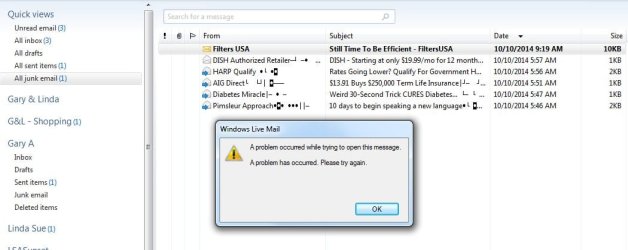
There also seems to be a domino effect of problems. Filters USA is a legit company I do business with. A message from them this morning ended up in the WLM Junk folder but I get an error when I try to open it. I was going to mark it as not junk and add their domain to the safe senders list, but I can't even look at the message properties to do that. Grrr

I compacted the WLM database, I did a repair of Windows Essential 2012 from Control Panel and finally a reboot of the PC, trying to open that Filters USA email in between each step without success.
 

Attachments

  • Image2.jpg
    Image2.jpg
    50.7 KB · Views: 1
Last edited:

My Computer My Computer

At a glance

Windows 7 Pro x64Intel 17-47708GBIntegrated Intel HD Graphics 4600
Computer type
PC/Desktop
Computer Manufacturer/Model Number
Lenovo M83
OS
Windows 7 Pro x64
CPU
Intel 17-4770
Motherboard
Lenovo Sharkbay 0B98401 PRO
Memory
8GB
Graphics Card(s)
Integrated Intel HD Graphics 4600
Monitor(s) Displays
acer AL2216W
Screen Resolution
1680 x 1050
Hard Drives
WD 10EZEX-08M 1TB
Case
Mini-tower
Internet Speed
25/25MB
Antivirus
Norton Internet Security
Browser
IE11 & Firefox
Thanks - I'll look at the bad msg - both the original and the forwarded
I'll post what I find. Hang in there.

I'm not sure why the Filters USA mail ended up in the junk folder.

Let me look at the first msg, then I might be able to help with Filters USA

Do me a favor and edit the post with the spam msg and delete the code boxes. The event viewer boxes can stay.
:arrow: The spam address is shown and someone might accidentally click on the link.
I did while I was trying to copy the msg for analysis - my mouse slipped while I was grabbing the text :(
No harm, no foul I quickly closed the window that opened.

+edit
I just noticed the special characters in the display name/addresses of msgs in your junk folder. Do any regular msgs show up with special characters in the display name?

Have I already asked you to run a few malware scanners? I'll look back through the thread, but you might know right off the bat - thanks.​
-edit

Bill
.
 

My Computer My Computer

At a glance

x64 (6.3.9600) Win8.1 Pro & soon dual boot x6...AMD A6-3420M APU with Radeon(tm) HD Graphics6.00 GBAMD Radeon(TM) HD 6520G
Computer type
Laptop
Computer Manufacturer/Model Number
HP Pavilion dv6-6c10us
OS
x64 (6.3.9600) Win8.1 Pro & soon dual boot x64 (6.1.7601) Win7_SP1 HomePrem
CPU
AMD A6-3420M APU with Radeon(tm) HD Graphics
Motherboard
Hewlett-Packard 1805
Memory
6.00 GB
Graphics Card(s)
AMD Radeon(TM) HD 6520G
Sound Card
(1) AMD High Definition Audio Device (2) IDT High Definiti
Monitor(s) Displays
HP W2072a 20" LCD (1600 x 900) @ 60 Hz
Screen Resolution
1366 x 768 x 32 bits (4294967296 colors) @ 60 Hz
Hard Drives
ST640LM0 00 HM641JI SATA Disk Device
Keyboard
Logitech k520 wireless KB
Mouse
Logitech m320 wireless mouse (bundled with KB)
Internet Speed
15/5 | 54 MB Wireless 'n'
Antivirus
Realtime: Defender or Avast | On-demand: Malwarebytes, ESET
Browser
IE 11 on Win8, IE 10 on win 7
Other Info
Media: [Gimp, Audacity, VLC] || Comm: [WEmail 2012, Skype] || Productivity: [OpenOffice,| Textpad] || Utils: [Sysinternals, cCleaner, Speccy, Defraggler]
Code boxes removed.

I just noticed the special characters in the display name/addresses of msgs in your junk folder. Do any regular msgs show up with special characters in the display name?
No. That's part of what makes them spam messages - ?ISO-8859

I've been unable to block them by creating any kind of filter. Here is some of what I've Googled over the past year or so:

Spammers are using ISO encoding, in Subject and From, to evade spam filters | Wiz's Computer and Website Security Blog

ISO-8859-x encoded subject lines - Spam Filter ISP Forums

Google ?ISO-8859 spam email yourself and see what results you get. Do some reading and you'll find it's not an uncommon problem.

Have I already asked you to run a few malware scanners? I'll look back through the thread, but you might know right off the bat - thanks.
You didn't ask about malware scanners, but I have used the free on-demand versions (so they don't conflict with Norton) of SAS & MBAM for years. I ran full scans with both this past weekend - neither picked up any problems.

This is a new desktop system I just bought it in July to replace my wife's old WinXP system. On that old system, I ran the only older version of WLM that was compatible with WinXP - Windows Essentials 2009. I was getting these spam messages on that old system and WLM 2009 never crashed.

If it turns out that a message formatted in a certain way can cause WLM 2012 to crash, then MS has taken a giant step backwards.

+EDIT

I even posted this spam email problem over on DSL Reports back in May. That was before I had this current Win7 PC. On the old WinXP PC running WLM 2009, I was forwarding these spam messages and WLM 2009 never crashed.

https://secure.dslreports.com/forum...am-Detector-Not-Catching-ISO-Encoded-Messages
 

My Computer My Computer

At a glance

Windows 7 Pro x64Intel 17-47708GBIntegrated Intel HD Graphics 4600
Computer type
PC/Desktop
Computer Manufacturer/Model Number
Lenovo M83
OS
Windows 7 Pro x64
CPU
Intel 17-4770
Motherboard
Lenovo Sharkbay 0B98401 PRO
Memory
8GB
Graphics Card(s)
Integrated Intel HD Graphics 4600
Monitor(s) Displays
acer AL2216W
Screen Resolution
1680 x 1050
Hard Drives
WD 10EZEX-08M 1TB
Case
Mini-tower
Internet Speed
25/25MB
Antivirus
Norton Internet Security
Browser
IE11 & Firefox
I had 6 more of those ?ISO-8859 formatted emails this morning and they all forwarded with no problem. We may be barking up the wrong tree thinking these are the cause of the WLM crashes. Especially since I was forwarding these all the time using WinXP & WLM 2009.
 

My Computer My Computer

At a glance

Windows 7 Pro x64Intel 17-47708GBIntegrated Intel HD Graphics 4600
Computer type
PC/Desktop
Computer Manufacturer/Model Number
Lenovo M83
OS
Windows 7 Pro x64
CPU
Intel 17-4770
Motherboard
Lenovo Sharkbay 0B98401 PRO
Memory
8GB
Graphics Card(s)
Integrated Intel HD Graphics 4600
Monitor(s) Displays
acer AL2216W
Screen Resolution
1680 x 1050
Hard Drives
WD 10EZEX-08M 1TB
Case
Mini-tower
Internet Speed
25/25MB
Antivirus
Norton Internet Security
Browser
IE11 & Firefox
Sorry for the delay and thanks for the detailed updates.

I tested the eMail you placed in your post (thanks for removing the code box) and I was able to forward it without incident. Looking under the covers of the msg, I saw nothing that might give WLM the fits. I began to think that the copy/paste operation might have "cleaned" up the msg (all it takes is one bit/byte difference) and was going to ask you to drag the errant msg to your Downloads folder. That would preserve the msg in it's original format (Filename.eml). The forum won't allow you to upload a file type .eml, so you'd hae to pack it in a zip folder.

How did you migrate from the earlier version of WLM? 2009 was a fairly good release, 2011 was quite buggy - upgrading from 2011-> 2012 caused more problems. But essentially WLM 2012 is a solid release if ... if you do a clean install and by clean I mean all remnants of WLM are removed and then the offline installer is used.

Importing accounts and eMail, rather than moving the DB to the new folders is advised.

I could not find my notes from two years ago, so if you want to go that route, I'd be willing to work up the procedure again, with your help. Every system is different and I'd base it on what's on my machine - you'd have to verify what's on your machine.

Basically, you would export the email account(s) information (not the eMails) and export your contacts, and record any filtering.
I'd write a batch file to rename the existing WLM folders (essentially a backup).
I'd find the current offline WLM installer for you to use and you would install it.
Launch the new install to initialize it, but don't do any configuration.
Add the account exported file to the new WLM tree and launch WLM again to complete the import
import the contacts from the export
import the eMail from the renamed folder
move the imported eMail from the recovery folders to where you want them

It sounds like a lot, but it takes less than 30 minutes if everything goes well - it always has for me and the members I helped before. The only confusion has been regarding the imports (account is almost magic) and eMail can't be located (under Storage Recovery folders). It's comical now, but one member imported the eMail 5 or 6 times and then wondered why there were so many eMail msgs.

You could also drag and drop the eMail into WLM folders directly, but I think that's more work. The real trick is to work INSIDE WLM - trying to move objects using Cmd or Explorer will not work. WLM has to maintain the DBs.

Sorry for the shorthand above, I'll be much more precise if you decide to go the new install route.

Bill
.
 

My Computer My Computer

At a glance

x64 (6.3.9600) Win8.1 Pro & soon dual boot x6...AMD A6-3420M APU with Radeon(tm) HD Graphics6.00 GBAMD Radeon(TM) HD 6520G
Computer type
Laptop
Computer Manufacturer/Model Number
HP Pavilion dv6-6c10us
OS
x64 (6.3.9600) Win8.1 Pro & soon dual boot x64 (6.1.7601) Win7_SP1 HomePrem
CPU
AMD A6-3420M APU with Radeon(tm) HD Graphics
Motherboard
Hewlett-Packard 1805
Memory
6.00 GB
Graphics Card(s)
AMD Radeon(TM) HD 6520G
Sound Card
(1) AMD High Definition Audio Device (2) IDT High Definiti
Monitor(s) Displays
HP W2072a 20" LCD (1600 x 900) @ 60 Hz
Screen Resolution
1366 x 768 x 32 bits (4294967296 colors) @ 60 Hz
Hard Drives
ST640LM0 00 HM641JI SATA Disk Device
Keyboard
Logitech k520 wireless KB
Mouse
Logitech m320 wireless mouse (bundled with KB)
Internet Speed
15/5 | 54 MB Wireless 'n'
Antivirus
Realtime: Defender or Avast | On-demand: Malwarebytes, ESET
Browser
IE 11 on Win8, IE 10 on win 7
Other Info
Media: [Gimp, Audacity, VLC] || Comm: [WEmail 2012, Skype] || Productivity: [OpenOffice,| Textpad] || Utils: [Sysinternals, cCleaner, Speccy, Defraggler]
If it turns out that a message formatted in a certain way can cause WLM 2012 to crash, then MS has taken a giant step backwards.

Just wanted to say that any program has the potential to crash given garbage input or when it relies on libraries and the library crashes. It's not the way it is formatted (ISO 8859 or another standard) it is specific content - that's why most of the msgs do not crash.

Last year we spent a month or more tackling a similar error - only two members had the issue and it was intermittent. When one member finally provided the source file, endeavor was able to reproduce the error. He and I traced the issue back to MSHTML.dll which was updated shortly before the errors began. Note that other applications using MSHTML.dll did not exhibit the issue, only mail - also note that MSHTML is not part of mail, but it is a library called by many applications having to process HTML objects.

The resolution was to report the issue to MS and wait for another update - it was delivered about two weeks later through Windows Update.

Needless to say, these are not easy issues to solve.

Bill
.
 

My Computer My Computer

At a glance

x64 (6.3.9600) Win8.1 Pro & soon dual boot x6...AMD A6-3420M APU with Radeon(tm) HD Graphics6.00 GBAMD Radeon(TM) HD 6520G
Computer type
Laptop
Computer Manufacturer/Model Number
HP Pavilion dv6-6c10us
OS
x64 (6.3.9600) Win8.1 Pro & soon dual boot x64 (6.1.7601) Win7_SP1 HomePrem
CPU
AMD A6-3420M APU with Radeon(tm) HD Graphics
Motherboard
Hewlett-Packard 1805
Memory
6.00 GB
Graphics Card(s)
AMD Radeon(TM) HD 6520G
Sound Card
(1) AMD High Definition Audio Device (2) IDT High Definiti
Monitor(s) Displays
HP W2072a 20" LCD (1600 x 900) @ 60 Hz
Screen Resolution
1366 x 768 x 32 bits (4294967296 colors) @ 60 Hz
Hard Drives
ST640LM0 00 HM641JI SATA Disk Device
Keyboard
Logitech k520 wireless KB
Mouse
Logitech m320 wireless mouse (bundled with KB)
Internet Speed
15/5 | 54 MB Wireless 'n'
Antivirus
Realtime: Defender or Avast | On-demand: Malwarebytes, ESET
Browser
IE 11 on Win8, IE 10 on win 7
Other Info
Media: [Gimp, Audacity, VLC] || Comm: [WEmail 2012, Skype] || Productivity: [OpenOffice,| Textpad] || Utils: [Sysinternals, cCleaner, Speccy, Defraggler]
How did you migrate from the earlier version of WLM? 2009 was a fairly good release, 2011 was quite buggy - upgrading from 2011-> 2012 caused more problems. But essentially WLM 2012 is a solid release if ... if you do a clean install and by clean I mean all remnants of WLM are removed and then the offline installer is used.

Importing accounts and eMail, rather than moving the DB to the new folders is advised.

When I migrated the WLM messages & accounts from the old WinXP PC to this new Win7 PC back in July, I knew the Extensible Storage Engine (ESE) File extension EDB - Open .edb files version and therefore file structure were different, so I knew better than to just copy the DB folders/files to the new machine.

I exported the email messages and accounts on the old WinXP machine to an external USB hard drive, moved the hard drive to the new Win7 machine and imported the email messages and accounts into a newly downloaded and installed version of MS Essentials (WLM) on the Win7 machine. This way I knew the DB would be built correctly.

In the days since the last crash, I have forwarded dozens of spam messages to Verizon with no problem. I actually seem to be getting an increased amount of spam lately (maybe from the many data breaches) and it is disappointing that the Verizon spam filter is so poor. WLM correctly identifies them as spam and puts them in the Junk Folder. Sure would be nice if Verizon caught them first. I should probably stop forwarding them and just delete them. Verizon doesn't seem to be doing anything to improve their spam filter anyway.

The next time it happens, I'll drag the message to another folder as a .eml file, zip it and upload it.
 

My Computer My Computer

At a glance

Windows 7 Pro x64Intel 17-47708GBIntegrated Intel HD Graphics 4600
Computer type
PC/Desktop
Computer Manufacturer/Model Number
Lenovo M83
OS
Windows 7 Pro x64
CPU
Intel 17-4770
Motherboard
Lenovo Sharkbay 0B98401 PRO
Memory
8GB
Graphics Card(s)
Integrated Intel HD Graphics 4600
Monitor(s) Displays
acer AL2216W
Screen Resolution
1680 x 1050
Hard Drives
WD 10EZEX-08M 1TB
Case
Mini-tower
Internet Speed
25/25MB
Antivirus
Norton Internet Security
Browser
IE11 & Firefox
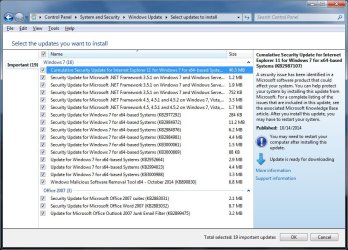
In the spirit of full disclosure ;) I'm installing these latest MS critical updates right now, in case my symptoms change:
 

Attachments

  • Updates.jpg
    Updates.jpg
    116.7 KB · Views: 2

My Computer My Computer

At a glance

Windows 7 Pro x64Intel 17-47708GBIntegrated Intel HD Graphics 4600
Computer type
PC/Desktop
Computer Manufacturer/Model Number
Lenovo M83
OS
Windows 7 Pro x64
CPU
Intel 17-4770
Motherboard
Lenovo Sharkbay 0B98401 PRO
Memory
8GB
Graphics Card(s)
Integrated Intel HD Graphics 4600
Monitor(s) Displays
acer AL2216W
Screen Resolution
1680 x 1050
Hard Drives
WD 10EZEX-08M 1TB
Case
Mini-tower
Internet Speed
25/25MB
Antivirus
Norton Internet Security
Browser
IE11 & Firefox
Thanks, exporting and importing into a fresh WLM install rules out a big question.

It's always good to keep your system up-to-date with all Windows updates - I'm not confident these updates will have any effect on the issue.

See if WLM troubleshooting provides any additional information:
Click the blue WLM File menu
Select Options -> Mail -> Advanced tab
Click the Maintenance... button
Under Troubleshooting
Tick
picture.php
General
Tick
picture.php
E-mail
Click Close

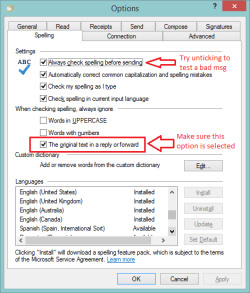
Review the spelling options, this is how I have WLM spelling setup.
WLM spelling.png
Click OK to exit options

If Filters USA is in your contacts, the address should be considered as a safe sender. You could manually enter their address into the safe senders list:
Click the blue WLM File menu
Select Options -> Safety options -> Safe Senders tab
Click the Add button and enter their address

I suggest these settings fro the other options
Tick
picture.php
Also trust email from my Contacts
Clear
picture.php
Automatically add people I email to the Safe Senders list
 

My Computer My Computer

At a glance

x64 (6.3.9600) Win8.1 Pro & soon dual boot x6...AMD A6-3420M APU with Radeon(tm) HD Graphics6.00 GBAMD Radeon(TM) HD 6520G
Computer type
Laptop
Computer Manufacturer/Model Number
HP Pavilion dv6-6c10us
OS
x64 (6.3.9600) Win8.1 Pro & soon dual boot x64 (6.1.7601) Win7_SP1 HomePrem
CPU
AMD A6-3420M APU with Radeon(tm) HD Graphics
Motherboard
Hewlett-Packard 1805
Memory
6.00 GB
Graphics Card(s)
AMD Radeon(TM) HD 6520G
Sound Card
(1) AMD High Definition Audio Device (2) IDT High Definiti
Monitor(s) Displays
HP W2072a 20" LCD (1600 x 900) @ 60 Hz
Screen Resolution
1366 x 768 x 32 bits (4294967296 colors) @ 60 Hz
Hard Drives
ST640LM0 00 HM641JI SATA Disk Device
Keyboard
Logitech k520 wireless KB
Mouse
Logitech m320 wireless mouse (bundled with KB)
Internet Speed
15/5 | 54 MB Wireless 'n'
Antivirus
Realtime: Defender or Avast | On-demand: Malwarebytes, ESET
Browser
IE 11 on Win8, IE 10 on win 7
Other Info
Media: [Gimp, Audacity, VLC] || Comm: [WEmail 2012, Skype] || Productivity: [OpenOffice,| Textpad] || Utils: [Sysinternals, cCleaner, Speccy, Defraggler]
Back
Top