
Solved WLM 2012 Started Crashing when Sending Emails

It's all good - I am rarely offended by anyone's comments.

c++ redists get installed when a program is installed that relies on that version; the install package carries the c++ lib it needs and if it's not installed, the pkg will install it. This is one way a 4 month old system can become unstable - some program has a bad or outdated lib. It's rare.

I took the shotgun approach and gave you every single c+ redist lib - both the 32 and 64 bit versions. Without doing a full analysis of the software on your machine (that's not going to happen;)) this is the best way to ensure a program has the correct lib. Some pgm might need the 32 bit version while another might need the 64 bit version.

It isn't clear if SP1 versions are where you want to start - some say they need a base install others don't mention it. I'm cautious that way, start at the ground and let Windows Update offer what it knows is needed.

msvcrt 2013 is fairly new, it's doubtful that many pgms are using it. I don't see any list of redists other than your laptop (I think it's on your laptop anyway). If 2013 isn't on the desktop now, don't worry about it, many system don't have 2012 on them. Go ahead and clean up the msvcrt installs - install all the versions I referenced - if they're not needed, they won't be called. If a pgm is installed later that needs it, then that version is already on your system. At least for these versions, you know they cam from MS and should be golden.

Many of the versions predate Windows 7, so that cannot be a pre-req for them.

Regarding the reinstall option ... I mentioned a clean install, which is slightly different from using the OEM recovery partition.
Take a read of these tutorials:
http://www.sevenforums.com/tutorials/219487-clean-reinstall-factory-oem-windows-7-a.html
http://www.sevenforums.com/tutorials/1649-clean-install-windows-7-a.html

I hesitated providing the links before because some people do more than just read - they act even though I state that it's for reference only.

Either path has it's drawbacks, neither is guaranteed. Both require a good amount of time.

I offered a reinstall because when trouble shooting my own systems I have to make the same decision - keep plugging along, or restart fresh. With an issue like the one on your machine, you have to protect the fresh install as much as possible - that means pre-emptively install core tech (.NET, msvcrt ...) and NOT installing anything non-essential for a while. It's a hard discipline - I've been running Win8 f0r 5 months now and I'm just beginning to apply changes that require manual modifications of the registry or files.

Almost forgot, running anything before all msvcrt versions are installed, might force that application to install the version in it's pkg. Worse, the pgm might just crash. Don't run other apps until you get c++ libs up to date (Windows Update is ok to run).

MS has tied .NET to the OS, but depending on the OS, versions can be uninstalled and re-installed. I don't want to get into the details because it's hard to understand and even harder to explain. I cut my teeth on Vista and .NET 3.0 - what a mess!

Bill
.
 

My Computer My Computer

At a glance

x64 (6.3.9600) Win8.1 Pro & soon dual boot x6...AMD A6-3420M APU with Radeon(tm) HD Graphics6.00 GBAMD Radeon(TM) HD 6520G
Computer type
Laptop
Computer Manufacturer/Model Number
HP Pavilion dv6-6c10us
OS
x64 (6.3.9600) Win8.1 Pro & soon dual boot x64 (6.1.7601) Win7_SP1 HomePrem
CPU
AMD A6-3420M APU with Radeon(tm) HD Graphics
Motherboard
Hewlett-Packard 1805
Memory
6.00 GB
Graphics Card(s)
AMD Radeon(TM) HD 6520G
Sound Card
(1) AMD High Definition Audio Device (2) IDT High Definiti
Monitor(s) Displays
HP W2072a 20" LCD (1600 x 900) @ 60 Hz
Screen Resolution
1366 x 768 x 32 bits (4294967296 colors) @ 60 Hz
Hard Drives
ST640LM0 00 HM641JI SATA Disk Device
Keyboard
Logitech k520 wireless KB
Mouse
Logitech m320 wireless mouse (bundled with KB)
Internet Speed
15/5 | 54 MB Wireless 'n'
Antivirus
Realtime: Defender or Avast | On-demand: Malwarebytes, ESET
Browser
IE 11 on Win8, IE 10 on win 7
Other Info
Media: [Gimp, Audacity, VLC] || Comm: [WEmail 2012, Skype] || Productivity: [OpenOffice,| Textpad] || Utils: [Sysinternals, cCleaner, Speccy, Defraggler]
OK. I'll start tomorrow since it's late already today. I'm going to do my laptop first, as "practice." It's not as critical as the desktop so if I get stuck or something goes wrong, it won't be as big a deal.

Thanks for taking the time to explain how the c++ redists get installed. I also understand answering the difficult question - is it going to take me longer to troubleshoot & fix this problem or would it be faster to just reload it from scratch? That was what I went through back in August with this laptop when I decided to reload it.

I'll post back my results tomorrow.
 

My Computer My Computer

At a glance

Windows 7 Pro x64Intel 17-47708GBIntegrated Intel HD Graphics 4600
Computer type
PC/Desktop
Computer Manufacturer/Model Number
Lenovo M83
OS
Windows 7 Pro x64
CPU
Intel 17-4770
Motherboard
Lenovo Sharkbay 0B98401 PRO
Memory
8GB
Graphics Card(s)
Integrated Intel HD Graphics 4600
Monitor(s) Displays
acer AL2216W
Screen Resolution
1680 x 1050
Hard Drives
WD 10EZEX-08M 1TB
Case
Mini-tower
Internet Speed
25/25MB
Antivirus
Norton Internet Security
Browser
IE11 & Firefox
The good news is that the issue is intermittent and doesn't impact day-to-day operations all that much. It's a nuisance not mission critical.
 

My Computer My Computer

At a glance

x64 (6.3.9600) Win8.1 Pro & soon dual boot x6...AMD A6-3420M APU with Radeon(tm) HD Graphics6.00 GBAMD Radeon(TM) HD 6520G
Computer type
Laptop
Computer Manufacturer/Model Number
HP Pavilion dv6-6c10us
OS
x64 (6.3.9600) Win8.1 Pro & soon dual boot x64 (6.1.7601) Win7_SP1 HomePrem
CPU
AMD A6-3420M APU with Radeon(tm) HD Graphics
Motherboard
Hewlett-Packard 1805
Memory
6.00 GB
Graphics Card(s)
AMD Radeon(TM) HD 6520G
Sound Card
(1) AMD High Definition Audio Device (2) IDT High Definiti
Monitor(s) Displays
HP W2072a 20" LCD (1600 x 900) @ 60 Hz
Screen Resolution
1366 x 768 x 32 bits (4294967296 colors) @ 60 Hz
Hard Drives
ST640LM0 00 HM641JI SATA Disk Device
Keyboard
Logitech k520 wireless KB
Mouse
Logitech m320 wireless mouse (bundled with KB)
Internet Speed
15/5 | 54 MB Wireless 'n'
Antivirus
Realtime: Defender or Avast | On-demand: Malwarebytes, ESET
Browser
IE 11 on Win8, IE 10 on win 7
Other Info
Media: [Gimp, Audacity, VLC] || Comm: [WEmail 2012, Skype] || Productivity: [OpenOffice,| Textpad] || Utils: [Sysinternals, cCleaner, Speccy, Defraggler]
The good news is that the issue is intermittent and doesn't impact day-to-day operations all that much. It's a nuisance not mission critical.

Exactly! Which is why I'm hesitant to do a clean install of the OS. At this point I'd rather continue to try and fix it. I may change my mind later if this continues to drag on.
 
Last edited:

My Computer My Computer

At a glance

Windows 7 Pro x64Intel 17-47708GBIntegrated Intel HD Graphics 4600
Computer type
PC/Desktop
Computer Manufacturer/Model Number
Lenovo M83
OS
Windows 7 Pro x64
CPU
Intel 17-4770
Motherboard
Lenovo Sharkbay 0B98401 PRO
Memory
8GB
Graphics Card(s)
Integrated Intel HD Graphics 4600
Monitor(s) Displays
acer AL2216W
Screen Resolution
1680 x 1050
Hard Drives
WD 10EZEX-08M 1TB
Case
Mini-tower
Internet Speed
25/25MB
Antivirus
Norton Internet Security
Browser
IE11 & Firefox
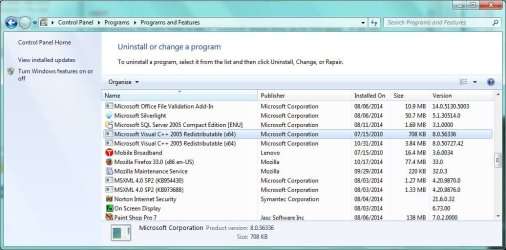
So I started my practice run on my laptop and ran into the first snag. I've uninstalled all the redists except one. When I select Microsoft Visual C++ 2005 Redistributable (x64) in Control Panel-->Uninstall a Program, there is no "Uninstall" button displayed to click on. I'm searching the net now, but if you can tell me how to manually uninstall it, that would be great.

+EDIT

I tried booting in Safe Mode to see if I got the "Uninstall" button. I did not.

I then did a normal boot and installed the same redist from your link. I was hoping it would overwrite the existing install and give me back the "Uninstall" button. That's not what happened. It installed a different version.

Here is a screen shot showing both installs. How do I uninstall the old version from 2010?
 

Attachments

  • NoUninstall.jpg
    NoUninstall.jpg
    79.2 KB · Views: 1
Last edited:

My Computer My Computer

At a glance

Windows 7 Pro x64Intel 17-47708GBIntegrated Intel HD Graphics 4600
Computer type
PC/Desktop
Computer Manufacturer/Model Number
Lenovo M83
OS
Windows 7 Pro x64
CPU
Intel 17-4770
Motherboard
Lenovo Sharkbay 0B98401 PRO
Memory
8GB
Graphics Card(s)
Integrated Intel HD Graphics 4600
Monitor(s) Displays
acer AL2216W
Screen Resolution
1680 x 1050
Hard Drives
WD 10EZEX-08M 1TB
Case
Mini-tower
Internet Speed
25/25MB
Antivirus
Norton Internet Security
Browser
IE11 & Firefox
(continued from post above) I also found the Uninstall entry for v8.0.56336 in the Registry. I assume something else must be corrupted if Windows Control Panel is not displaying the Uninstall button for it.

Note also that the msdia80.dll file is installed in the root of C:\ as described here: The Msdia80.dll file is installed in the root folder of the boot drive when you install the Visual C++ 2005 Redistributable Package by using the Vcredist_x64.exe file or the Vcredist_ia64.exe file

5dphzq.jpg
 

My Computer My Computer

At a glance

Windows 7 Pro x64Intel 17-47708GBIntegrated Intel HD Graphics 4600
Computer type
PC/Desktop
Computer Manufacturer/Model Number
Lenovo M83
OS
Windows 7 Pro x64
CPU
Intel 17-4770
Motherboard
Lenovo Sharkbay 0B98401 PRO
Memory
8GB
Graphics Card(s)
Integrated Intel HD Graphics 4600
Monitor(s) Displays
acer AL2216W
Screen Resolution
1680 x 1050
Hard Drives
WD 10EZEX-08M 1TB
Case
Mini-tower
Internet Speed
25/25MB
Antivirus
Norton Internet Security
Browser
IE11 & Firefox
FIXED! I was using some different search terms this morning and came across this Microsoft FixIt.

Fix problems that programs cannot be installed or uninstalled

I ran it, selected the redist that wouldn't uninstall and voila! The FixIt says it fixed it and I no longer see any redists listed in Control Panel and also, the msdia80.dll file is gone from C:\

I will now start installing the redists according to your previous instructions. Once I see how it works on the laptop, assuming no more problems, I'll move over to the desktop system.

The uninstall key is also gone from the Registry.
 
Last edited:

My Computer My Computer

At a glance

Windows 7 Pro x64Intel 17-47708GBIntegrated Intel HD Graphics 4600
Computer type
PC/Desktop
Computer Manufacturer/Model Number
Lenovo M83
OS
Windows 7 Pro x64
CPU
Intel 17-4770
Motherboard
Lenovo Sharkbay 0B98401 PRO
Memory
8GB
Graphics Card(s)
Integrated Intel HD Graphics 4600
Monitor(s) Displays
acer AL2216W
Screen Resolution
1680 x 1050
Hard Drives
WD 10EZEX-08M 1TB
Case
Mini-tower
Internet Speed
25/25MB
Antivirus
Norton Internet Security
Browser
IE11 & Firefox
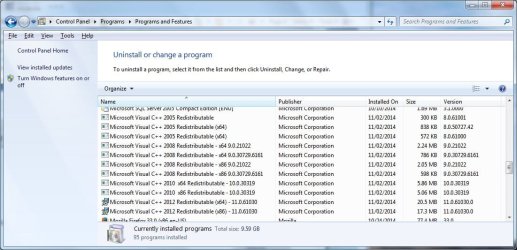
Following your instructions I was able to reinstall all the redists on the laptop so I moved to the desktop.

Here are the results:

2005 x86
2005 x64
KB2538242

2008 x86
2008 x64
KB2538243

2010 x86
2010 x64
KB2467173

2012 x86
2012 x64
The file vcredist_arm.exe was also downloaded but I didn't install it since I don't have ARM hardware.
No updates were found.

This is what it looks like now:
 

Attachments

  • DST2.jpg
    DST2.jpg
    94.1 KB · Views: 2
Last edited:

My Computer My Computer

At a glance

Windows 7 Pro x64Intel 17-47708GBIntegrated Intel HD Graphics 4600
Computer type
PC/Desktop
Computer Manufacturer/Model Number
Lenovo M83
OS
Windows 7 Pro x64
CPU
Intel 17-4770
Motherboard
Lenovo Sharkbay 0B98401 PRO
Memory
8GB
Graphics Card(s)
Integrated Intel HD Graphics 4600
Monitor(s) Displays
acer AL2216W
Screen Resolution
1680 x 1050
Hard Drives
WD 10EZEX-08M 1TB
Case
Mini-tower
Internet Speed
25/25MB
Antivirus
Norton Internet Security
Browser
IE11 & Firefox
I checked C:\ on both systems after the installations were complete and noticed that a lot of files were placed there by the installer process. Many .dll & .txt files as well as the msdia80.dll file and a few others. I'm assuming that's normal - yes/no?
 

My Computer My Computer

At a glance

Windows 7 Pro x64Intel 17-47708GBIntegrated Intel HD Graphics 4600
Computer type
PC/Desktop
Computer Manufacturer/Model Number
Lenovo M83
OS
Windows 7 Pro x64
CPU
Intel 17-4770
Motherboard
Lenovo Sharkbay 0B98401 PRO
Memory
8GB
Graphics Card(s)
Integrated Intel HD Graphics 4600
Monitor(s) Displays
acer AL2216W
Screen Resolution
1680 x 1050
Hard Drives
WD 10EZEX-08M 1TB
Case
Mini-tower
Internet Speed
25/25MB
Antivirus
Norton Internet Security
Browser
IE11 & Firefox
Good work Gary, glad you found the MS Fixit.

You didn't mention it, but I'm guessing you ran Windows Update between msvcrt version (year, not bit depth) installs.

Are the files directly under \ (C:\msdia80.dll) or is there some folder (C:\VC\msdia80.dll)? I used VC as an example, it could be anything - everything I read seems to indicate the files are not in a folder, but I figured I should ask.

See this for an explanation of the mscrt 2005 (x64) files on root
The Msdia80.dll file is installed in the root folder of the boot drive
when you install the Visual C++ 2005 Redistributable Package by
using the Vcredist_x64.exe file or the Vcredist_ia64.exe file


MS said:
You have a computer that is running a 64-bit operating system. You install the Microsoft Visual C++ 2005 Redistributable Package on this computer by using the Vcredist_x64.exe file or the Vcredist_ia64.exe file. When you do this, the Msdia80.dll file is installed in the root folder of the boot drive.

Note The correct path of the Msdia80.dll file is
DriveLetter:\Program Files\Common Files\Microsoft Shared\VC.​
If the files are not in the path above or the path doesn't exist, let me know before proceeding.
Please provide a list of the files on root and also a list of msdia80.dl?

Open an elevated command prompt
cd \
dir /a > \ListRedist.txt
dir /a /s msdia80.dl? >> \ListRedist.txt
exit

Please attach C:\ListRedist.txt to the next post.

If the files are located in the correct path and match the table:
x64-based version of Visual C++ 2005 Service Pack 1 Redistributable Package
in Description of the security update for Microsoft Visual C++ 2005 Service Pack 1 Redistributable Package: July 28, 2009
then you should be ok.

It might be easier to install the ATL version from here:
Download Microsoft Visual C++ 2005 Service Pack 1 Redistributable Package ATL Security Update from Official Microsoft Download Center
--> isn't clear if this will remove the errant files, but it should put them in the correct location.

Note: I only looked for information re: msdia80.dll
The list you'll provide will post information on the other files (you said there were many)
 
Last edited:

My Computer My Computer

At a glance

x64 (6.3.9600) Win8.1 Pro & soon dual boot x6...AMD A6-3420M APU with Radeon(tm) HD Graphics6.00 GBAMD Radeon(TM) HD 6520G
Computer type
Laptop
Computer Manufacturer/Model Number
HP Pavilion dv6-6c10us
OS
x64 (6.3.9600) Win8.1 Pro & soon dual boot x64 (6.1.7601) Win7_SP1 HomePrem
CPU
AMD A6-3420M APU with Radeon(tm) HD Graphics
Motherboard
Hewlett-Packard 1805
Memory
6.00 GB
Graphics Card(s)
AMD Radeon(TM) HD 6520G
Sound Card
(1) AMD High Definition Audio Device (2) IDT High Definiti
Monitor(s) Displays
HP W2072a 20" LCD (1600 x 900) @ 60 Hz
Screen Resolution
1366 x 768 x 32 bits (4294967296 colors) @ 60 Hz
Hard Drives
ST640LM0 00 HM641JI SATA Disk Device
Keyboard
Logitech k520 wireless KB
Mouse
Logitech m320 wireless mouse (bundled with KB)
Internet Speed
15/5 | 54 MB Wireless 'n'
Antivirus
Realtime: Defender or Avast | On-demand: Malwarebytes, ESET
Browser
IE 11 on Win8, IE 10 on win 7
Other Info
Media: [Gimp, Audacity, VLC] || Comm: [WEmail 2012, Skype] || Productivity: [OpenOffice,| Textpad] || Utils: [Sysinternals, cCleaner, Speccy, Defraggler]
Good work Gary, glad you found the MS Fixit.

You didn't mention it, but I'm guessing you ran Windows Update between msvcrt version (year, not bit depth) installs.

Yes, that's what the KBxxxxxxx numbers represent. For example, I installed 2005 x86, then installed 2005 x64 then checked for Windows Updates. It found only KB2538242 so I installed it. Repeat with other redists...

Are the files directly under \ (C:\msdia80.dll) or is there some folder (C:\VC\msdia80.dll)? I used VC as an example, it could be anything - everything I read seems to indicate the files are not in a folder, but I figured I should ask.

Yes, directly in the root of C:\ - here is a screen shot. I've highlighted the files that were newly placed there after installing the redists, but I may have missed a couple:

34o3kt0.jpg


There are 2 files in the C:\Program Files\Common Files\Microsoft Shared\VC folder:

1znl8jo.jpg


The file in question is msdia80.dll but your instructions reference msdiag80.dl? with a 'g' added. There is no such file on the C: drive.

I searched for msdia80.dll and found 3 instances:

C:\
C:\Program Files (x86)\Common Files\microsoft shared\VC
C:\Program Files (x86)\Common Files\microsoft shared\VC\amd64

I'll let you take a look at this before doing anything else.
 

My Computer My Computer

At a glance

Windows 7 Pro x64Intel 17-47708GBIntegrated Intel HD Graphics 4600
Computer type
PC/Desktop
Computer Manufacturer/Model Number
Lenovo M83
OS
Windows 7 Pro x64
CPU
Intel 17-4770
Motherboard
Lenovo Sharkbay 0B98401 PRO
Memory
8GB
Graphics Card(s)
Integrated Intel HD Graphics 4600
Monitor(s) Displays
acer AL2216W
Screen Resolution
1680 x 1050
Hard Drives
WD 10EZEX-08M 1TB
Case
Mini-tower
Internet Speed
25/25MB
Antivirus
Norton Internet Security
Browser
IE11 & Firefox
You have very good eyes! Habit on my part to abbreviate diagnostic as diag I suppose - thanks for catching my typo. I fixed my post (msdia is correct, msdiag was incorrect)

The VC\amd64 subfolder throws a tiny wrinkle into getting past this. The documentation states that the correct location is
C:\Program Files\Common Files\microsoft shared\VC​
This is the 'common' x64 location ... the redist is so old that who knows what MS decided back in 2004.
The VC\amd64 subfolder is not mentioned at all (or I missed it) - it makes sense in a way, but it almost appears to be an install tree, not the tree resulting from an install. In reality, the location isn't important as long as the service is registered correctly. That's what I expect the ATL fix does - puts the msdia80.dll in a location and registers the dll from that location.

Did you run the ATL download for x86 and x64? If not, please do for both (x86 first, then x64). See if Windows Update offers anything - I doubt that it will, but please check.

Also please run the two dir commands in post #90 and attach the output file. It's easier for me to grab the text file and search or sort to analyze (dates, location, size, etc).

This is a minor distraction - few programs were 64-bit back in 2005 and few, if any used the 64-bit redist. Newer applications used newer redists, but I have a few open source pgms that do carry the 2005 x86 redist. If you recall, this was a blanket approach - put all possible redists on the machine, getting them directly from Microsoft to eliminate a possibly bad c++ library installed by an application.

Early .NET can be troubling as well - so I really hope that you don't have to go through this exercise with .NET. There is a repair tool, but I'll have to look that up. Don't worry about .NET until you know that the work you've done with c++ has or has not resolved the issue.

Let me know if WLM or IE chokes again - or have they since the msvcrt redist changes?

Thanks,

Bill
.
 

My Computer My Computer

At a glance

x64 (6.3.9600) Win8.1 Pro & soon dual boot x6...AMD A6-3420M APU with Radeon(tm) HD Graphics6.00 GBAMD Radeon(TM) HD 6520G
Computer type
Laptop
Computer Manufacturer/Model Number
HP Pavilion dv6-6c10us
OS
x64 (6.3.9600) Win8.1 Pro & soon dual boot x64 (6.1.7601) Win7_SP1 HomePrem
CPU
AMD A6-3420M APU with Radeon(tm) HD Graphics
Motherboard
Hewlett-Packard 1805
Memory
6.00 GB
Graphics Card(s)
AMD Radeon(TM) HD 6520G
Sound Card
(1) AMD High Definition Audio Device (2) IDT High Definiti
Monitor(s) Displays
HP W2072a 20" LCD (1600 x 900) @ 60 Hz
Screen Resolution
1366 x 768 x 32 bits (4294967296 colors) @ 60 Hz
Hard Drives
ST640LM0 00 HM641JI SATA Disk Device
Keyboard
Logitech k520 wireless KB
Mouse
Logitech m320 wireless mouse (bundled with KB)
Internet Speed
15/5 | 54 MB Wireless 'n'
Antivirus
Realtime: Defender or Avast | On-demand: Malwarebytes, ESET
Browser
IE 11 on Win8, IE 10 on win 7
Other Info
Media: [Gimp, Audacity, VLC] || Comm: [WEmail 2012, Skype] || Productivity: [OpenOffice,| Textpad] || Utils: [Sysinternals, cCleaner, Speccy, Defraggler]
I was waiting to run the ATL download until I heard back from you so I just ran it. A file called vcredist_IA64.exe was also offered, but since you didn't specifically mention it, I did not run it. I did check for Windows Updates after installing the other two files, but there were no updates.

I then ran the dir commands from Post #90 as requested and attached the TXT file.

Just a couple questions to help me understand the steps you've had me take the past few days:

1. Was it the last IE crash that started you thinking about reinstalling the redists?
2. What about the last WLM crash where my wife was replying to her sister's email. Do you think the WLM crashes are possibly related to the redists or are a separate issue?
Neither IE or WLM have had any additional crashes, but then I didn't get the redists reinstalled until Sunday.
 

Attachments

My Computer My Computer

At a glance

Windows 7 Pro x64Intel 17-47708GBIntegrated Intel HD Graphics 4600
Computer type
PC/Desktop
Computer Manufacturer/Model Number
Lenovo M83
OS
Windows 7 Pro x64
CPU
Intel 17-4770
Motherboard
Lenovo Sharkbay 0B98401 PRO
Memory
8GB
Graphics Card(s)
Integrated Intel HD Graphics 4600
Monitor(s) Displays
acer AL2216W
Screen Resolution
1680 x 1050
Hard Drives
WD 10EZEX-08M 1TB
Case
Mini-tower
Internet Speed
25/25MB
Antivirus
Norton Internet Security
Browser
IE11 & Firefox
Hmmmm, I lost a post somehow - I probably closed the window before I hit the post button.

I won't retype it - but basically, the WLM log and the WER information solidified the early suspicion of msvcrt redist. I just didn't want to put either of us through this exercise without exhausting other possible solutions.

I looked at the output file and msdia80.dll is in the ...(x86)...\VC\adm64 sub-folder and it has the correct size.

Please download and run the attached RedistQry.bat file and attach the resulting output: UserProfile\Downloads\RedistQry.txt.

This will tell me what Windows thinks are the shared dlls for the c++ redists and give me a list of both 32 and 64 bit folder locations and a full directory list of C:\midia*
View attachment RedistQry.bat

I've also attached RedistMv.bat that will clean up the files on C:\. It creates the folder: badInstall under
the ...(x86)...\VC\amd64 subfolder and moves the files from the root to the new folder. You could do this by hand if you want; same procedure, create a folder and move the files. Why move? I'm cautious, but I have fat fingers, so please take a look at the batch file if you decide to use it. I didn't redirect the output to a file, so there's no file to attach after running it.
View attachment RedistMv.bat

Bill
.
 

My Computer My Computer

At a glance

x64 (6.3.9600) Win8.1 Pro & soon dual boot x6...AMD A6-3420M APU with Radeon(tm) HD Graphics6.00 GBAMD Radeon(TM) HD 6520G
Computer type
Laptop
Computer Manufacturer/Model Number
HP Pavilion dv6-6c10us
OS
x64 (6.3.9600) Win8.1 Pro & soon dual boot x64 (6.1.7601) Win7_SP1 HomePrem
CPU
AMD A6-3420M APU with Radeon(tm) HD Graphics
Motherboard
Hewlett-Packard 1805
Memory
6.00 GB
Graphics Card(s)
AMD Radeon(TM) HD 6520G
Sound Card
(1) AMD High Definition Audio Device (2) IDT High Definiti
Monitor(s) Displays
HP W2072a 20" LCD (1600 x 900) @ 60 Hz
Screen Resolution
1366 x 768 x 32 bits (4294967296 colors) @ 60 Hz
Hard Drives
ST640LM0 00 HM641JI SATA Disk Device
Keyboard
Logitech k520 wireless KB
Mouse
Logitech m320 wireless mouse (bundled with KB)
Internet Speed
15/5 | 54 MB Wireless 'n'
Antivirus
Realtime: Defender or Avast | On-demand: Malwarebytes, ESET
Browser
IE 11 on Win8, IE 10 on win 7
Other Info
Media: [Gimp, Audacity, VLC] || Comm: [WEmail 2012, Skype] || Productivity: [OpenOffice,| Textpad] || Utils: [Sysinternals, cCleaner, Speccy, Defraggler]
I downloaded the RedistQry.bat file and tried to run it, but no output file was created. I even tried Run As Administrator. I am logged in at the administrator level.
 

My Computer My Computer

At a glance

Windows 7 Pro x64Intel 17-47708GBIntegrated Intel HD Graphics 4600
Computer type
PC/Desktop
Computer Manufacturer/Model Number
Lenovo M83
OS
Windows 7 Pro x64
CPU
Intel 17-4770
Motherboard
Lenovo Sharkbay 0B98401 PRO
Memory
8GB
Graphics Card(s)
Integrated Intel HD Graphics 4600
Monitor(s) Displays
acer AL2216W
Screen Resolution
1680 x 1050
Hard Drives
WD 10EZEX-08M 1TB
Case
Mini-tower
Internet Speed
25/25MB
Antivirus
Norton Internet Security
Browser
IE11 & Firefox
I just downloaded the batch file and ran it in a standard Command Prompt. I thought that might be the difference. But the output is created on my machine whether I run a Standard or an elevated Command Prompt.

In case my notation wasn't clear, the output file name is RedistQry.txt and should be in your Downloads folder.

Win7 might have an issue because the batch file was downloaded from another computer. Try unblocking RedistQry.bat (right click the file, select properties, click the unblock button).

If all else fails you can just execute the commands by hand in a command prompt.
These are the commands that produce the output I'd like to see
Code:
reg query HKLM\SOFTWARE\Microsoft\Windows\CurrentVersion\SharedDLLs /f msdia80

reg query HKLM\SOFTWARE\Microsoft\Windows\CurrentVersion\SharedDLLs /f msdia

dir /s /a "C:\Program Files\Common Files\microsoft shared\VC\"

dir /s /a "C:\Program Files (x86)\Common Files\microsoft shared\VC\"

C:
cd \
dir /s /a msdia*.dll

The echo lines in the batch file only helped identify the output. IF you run the commands by hand, the output goes to the screen.
Use the command prompt editor (right click the title bar) to select all and then copy. Paste the screen capture into a text file and attach that.

And I thought I was making it easier. :eek:

This is just a way for you to check that the msdia80.dll is registered from it's location ...(x86)...\VC\amd64
If doing this 'check' becomes tedious, you can skip this step; it isn't crucial to solving the issue.

If my abbreviations or shorthand isn't clear, let me know and I'll type things longhand.

Since this process wasn't as successful as I had hoped, don't try the move batch file (RedistMv.bat). The file are small enough and won't hurt anything sitting on the C: drive.

We can come back to both of these after it is determined that the redists helped or not.

Recap:
1) you can try the query batch file again as described above or forget about it for now.
2) forget about the move batch file - don't try to run it.
You might revisit this later to clean up, but it isn't necessary - just good housekeeping

Back in the wait for WLM to crash (or not crash)
Bill
.
 

My Computer My Computer

At a glance

x64 (6.3.9600) Win8.1 Pro & soon dual boot x6...AMD A6-3420M APU with Radeon(tm) HD Graphics6.00 GBAMD Radeon(TM) HD 6520G
Computer type
Laptop
Computer Manufacturer/Model Number
HP Pavilion dv6-6c10us
OS
x64 (6.3.9600) Win8.1 Pro & soon dual boot x64 (6.1.7601) Win7_SP1 HomePrem
CPU
AMD A6-3420M APU with Radeon(tm) HD Graphics
Motherboard
Hewlett-Packard 1805
Memory
6.00 GB
Graphics Card(s)
AMD Radeon(TM) HD 6520G
Sound Card
(1) AMD High Definition Audio Device (2) IDT High Definiti
Monitor(s) Displays
HP W2072a 20" LCD (1600 x 900) @ 60 Hz
Screen Resolution
1366 x 768 x 32 bits (4294967296 colors) @ 60 Hz
Hard Drives
ST640LM0 00 HM641JI SATA Disk Device
Keyboard
Logitech k520 wireless KB
Mouse
Logitech m320 wireless mouse (bundled with KB)
Internet Speed
15/5 | 54 MB Wireless 'n'
Antivirus
Realtime: Defender or Avast | On-demand: Malwarebytes, ESET
Browser
IE 11 on Win8, IE 10 on win 7
Other Info
Media: [Gimp, Audacity, VLC] || Comm: [WEmail 2012, Skype] || Productivity: [OpenOffice,| Textpad] || Utils: [Sysinternals, cCleaner, Speccy, Defraggler]
I edited your bat file and got it to work. The RedistQry.txt file is attached. I had to change the output folder. The %USERPROFILE% was failing on my machine. I've had this problem before, I think because the User Name contains a ' & ' (space ampersand space).

I'll hold off on the move bat file. Like you said, the files are small and not hurting anything.

Regarding the vcredist_IA64.exe file - what is it and was I right not to install it?
 

Attachments

Last edited:

My Computer My Computer

At a glance

Windows 7 Pro x64Intel 17-47708GBIntegrated Intel HD Graphics 4600
Computer type
PC/Desktop
Computer Manufacturer/Model Number
Lenovo M83
OS
Windows 7 Pro x64
CPU
Intel 17-4770
Motherboard
Lenovo Sharkbay 0B98401 PRO
Memory
8GB
Graphics Card(s)
Integrated Intel HD Graphics 4600
Monitor(s) Displays
acer AL2216W
Screen Resolution
1680 x 1050
Hard Drives
WD 10EZEX-08M 1TB
Case
Mini-tower
Internet Speed
25/25MB
Antivirus
Norton Internet Security
Browser
IE11 & Firefox
These redists are going to drive me crazy. As I've been following your instructions on the desktop system with the WLM problem, I've mirrored the steps on my laptop. Yesterday (11/04/2014) after I installed the last redist on this machine, I did the same on the laptop.

On this machine, I can see the 2 I installed yesterday. But on the laptop, I see those 2 plus a third one installed yesterday. Can you identify it?

c++ 2008 Redistributable x86 9.0.30729.17

+EDIT

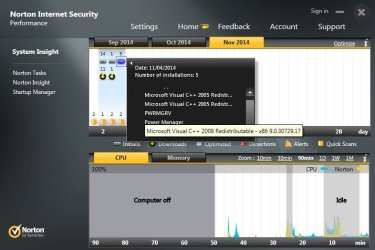
Wait a minute, I think I answered my own question. The redists I installed yesterday were 2005 not 2008. I remembered that later yesterday afternoon, I got a prompt from Lenovo that a new version of their Power Manager program was available, so I downloaded and installed it.

Norton has a neat feature that tracks downloads and installs so I looked at it. Sure enough, along with installing the Power Manager update, it also installed this 2008 redist. Here's a screen shot:

Installs1.jpg
 
Last edited:

My Computer My Computer

At a glance

Windows 7 Pro x64Intel 17-47708GBIntegrated Intel HD Graphics 4600
Computer type
PC/Desktop
Computer Manufacturer/Model Number
Lenovo M83
OS
Windows 7 Pro x64
CPU
Intel 17-4770
Motherboard
Lenovo Sharkbay 0B98401 PRO
Memory
8GB
Graphics Card(s)
Integrated Intel HD Graphics 4600
Monitor(s) Displays
acer AL2216W
Screen Resolution
1680 x 1050
Hard Drives
WD 10EZEX-08M 1TB
Case
Mini-tower
Internet Speed
25/25MB
Antivirus
Norton Internet Security
Browser
IE11 & Firefox
I edited your bat file and got it to work. The RedistQry.txt file is attached. I had to change the output folder. The %USERPROFILE% was failing on my machine. I've had this problem before, I think because the User Name contains a ' & ' (space ampersand space).

I'll hold off on the move bat file. Like you said, the files are small and not hurting anything.

Regarding the vcredist_IA64.exe file - what is it and was I right not to install it?
Thanks, I should have put quotes around the output file, but thought the environment variable would take care of the spaces - my error and my apologies. Testing on my machine worked because my user name does not contain any spaces.

The move batch file might have a similar mistake in it - yes .. hold off on that.

You were right - do not install any IA64 updates unless your machine has an IA64 chip in it. Mostly only HP servers have a chip with this architecture and that's being phased out soon (by Intel anyway - HP might keep it alive as long as they can). This was one of the things I mentioned in my 'lost' post.

I'll take a look at the 'new' 2008 redist - Windows Update should have supplied all of the redist updates, why Lenevo Power mgr needed a special redist, I do not know.

Welcome to my world! There are certain things that drive me a little closer to the funny farm (c++ redists and .NET are just two of them - I've recently added IE10 and IE11 ;))

It's always my pleasure working with a member who works hard to solve the issue on their machine. Thanks for your diligence.

Bill
.
 

My Computer My Computer

At a glance

x64 (6.3.9600) Win8.1 Pro & soon dual boot x6...AMD A6-3420M APU with Radeon(tm) HD Graphics6.00 GBAMD Radeon(TM) HD 6520G
Computer type
Laptop
Computer Manufacturer/Model Number
HP Pavilion dv6-6c10us
OS
x64 (6.3.9600) Win8.1 Pro & soon dual boot x64 (6.1.7601) Win7_SP1 HomePrem
CPU
AMD A6-3420M APU with Radeon(tm) HD Graphics
Motherboard
Hewlett-Packard 1805
Memory
6.00 GB
Graphics Card(s)
AMD Radeon(TM) HD 6520G
Sound Card
(1) AMD High Definition Audio Device (2) IDT High Definiti
Monitor(s) Displays
HP W2072a 20" LCD (1600 x 900) @ 60 Hz
Screen Resolution
1366 x 768 x 32 bits (4294967296 colors) @ 60 Hz
Hard Drives
ST640LM0 00 HM641JI SATA Disk Device
Keyboard
Logitech k520 wireless KB
Mouse
Logitech m320 wireless mouse (bundled with KB)
Internet Speed
15/5 | 54 MB Wireless 'n'
Antivirus
Realtime: Defender or Avast | On-demand: Malwarebytes, ESET
Browser
IE 11 on Win8, IE 10 on win 7
Other Info
Media: [Gimp, Audacity, VLC] || Comm: [WEmail 2012, Skype] || Productivity: [OpenOffice,| Textpad] || Utils: [Sysinternals, cCleaner, Speccy, Defraggler]
Welcome to my world! There are certain things that drive me a little closer to the funny farm (c++ redists and .NET are just two of them - I've recently added IE10 and IE11 ;))

I feel the same way about c++ redists & .NET. Over the years those have become out of control beasts. Programs like Power Manger needing it's own c++ version just adds to the mess.

So I guess we are back in wait-and-see mode to see if I get any more crashes.

[sound of Gary tapping his fingers on the desk]

I did have an IE crash on my laptop early this morning, but that's a subject for a new topic if I even decide to investigate it. It happened when I was trying to post the Norton screen shot from the laptop. Gee just think, that PC already has all new c++ redists.:roflmao:

+EDIT

Oops, never mind about the laptop crash. I just checked the Event Viewer and it points to Ad Block Plus which I still have installed on that machine.
 
Last edited:

My Computer My Computer

At a glance

Windows 7 Pro x64Intel 17-47708GBIntegrated Intel HD Graphics 4600
Computer type
PC/Desktop
Computer Manufacturer/Model Number
Lenovo M83
OS
Windows 7 Pro x64
CPU
Intel 17-4770
Motherboard
Lenovo Sharkbay 0B98401 PRO
Memory
8GB
Graphics Card(s)
Integrated Intel HD Graphics 4600
Monitor(s) Displays
acer AL2216W
Screen Resolution
1680 x 1050
Hard Drives
WD 10EZEX-08M 1TB
Case
Mini-tower
Internet Speed
25/25MB
Antivirus
Norton Internet Security
Browser
IE11 & Firefox
Back
Top