WLM blocking junk mail: question 2 of 2

Odin

New member
Member
Local time
9:02 AM
Messages
45
In Windows Live Mail, current version: My marking incoming mail as junk moves it to the junk folder. When I do this, perhaps to many successive messages from the same sender, does it have any effect on whether or not subsequent mail from this sender will be sent to the junk folder rather than the inbox?
 

My Computer My Computer

At a glance

win7 home premium
Computer type
PC/Desktop
Computer Manufacturer/Model Number
Dell Latitude D630
OS
win7 home premium
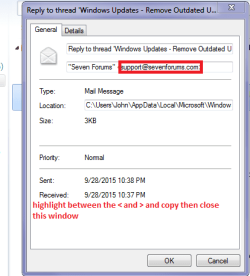
Odin a suggestion and what I do is to right click on the mail in question and go to properties and highlight the address between the < ****@Hotmail.com > and right click and copy the address - close that window.

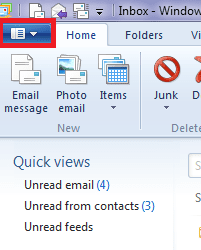
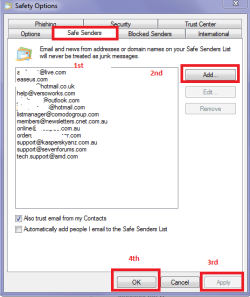
Then go to the top left hand corner of WLM - the blue tab and click on it. In the drop down list click on Options and then Safety options. You will see a few tabs and if you want to save the sender you copied in the message properties click the safe sender tab and then click Add and right click > paste it in. Hit Apply and then exit with OK
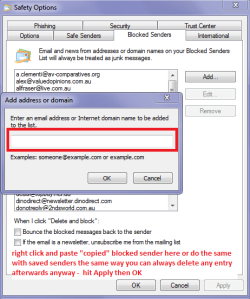
Do exactly the same with Blocked senders you will save a lot of unwanted junk senders that way.

I hope this is what you want and my pics come through in some sort of order.
 

Attachments

  • WLM 0.PNG
    WLM 0.PNG
    11.8 KB · Views: 9
  • WLM 1.PNG
    WLM 1.PNG
    7.8 KB · Views: 9
  • WLM 2.PNG
    WLM 2.PNG
    13.4 KB · Views: 9
  • WLM 4.PNG
    WLM 4.PNG
    20.4 KB · Views: 9

My Computer My Computer

At a glance

Desk1 7 Home Prem / Desk2 10 Pro / Main lap A...Desk1 i5 3750K / Laptop i7 GTX 860M / Desk2 i...Desk1 8GB (1866) / Desk2 16GB (1333) / Laptop...Desk 1& 2NVidia GTX 650 & Laptops on board Intel
Computer type
PC/Desktop
Computer Manufacturer/Model Number
Own build (new) Desk1 / Asus ROG Win 7 / Desk2 1st build
OS
Desk1 7 Home Prem / Desk2 10 Pro / Main lap Asus ROG 10 Pro 2 laptop Toshiba 7 Pro Asus P2520 7 & 10
CPU
Desk1 i5 3750K / Laptop i7 GTX 860M / Desk2 i5 2500
Motherboard
Desk1 Asus P877-V / Desk2 Gigabyte H67 UD3H / Laptop ?
Memory
Desk1 8GB (1866) / Desk2 16GB (1333) / Laptop 8Gb DDR3
Graphics Card(s)
Desk 1& 2NVidia GTX 650 & Laptops on board Intel
Sound Card
Desk 1 & 2 -XONAR DG Realtek High Def audio Laptop
Monitor(s) Displays
Desk 1 Benq HD 2450 / Desk2 Philips 24" / Laptop 17.5"
Screen Resolution
1920x1080 D1 & D2 & Laptop 1
Hard Drives
Desk1 Samsung 120GB 830 SSD
Asus ROG 256GB 850 Pro SSD
Desk2 Samsung 840 256 SSD
Toshiba 120GB EVO
PSU
Desk 1 Corsair HX 1050/ Laptop ? / Desk 2 Corsair HX 650
Case
Desk 1 Cooler HAF XM ? Toshiba laptop / Desk2 Coolermaster
Cooling
Fans on all Desk1 -2 Desk2 - all Coolermasters 5 Laptop ?
Keyboard
Desk 1 MS Sidewinder X6 Desk 2 MS Sidewinder X 4
Mouse
Desk 1&2 - Gigabyte MS 900 gamer - laptop - Logitec wireless
Internet Speed
ADSL2+
Other Info
One other Desktop (tester) and spare Toshba laptop both with SSD's
Running Kaspersky 2016 ISS on all machines config'd identically
Logitec audio stereo systems on each machine (x3)
Canon MG5250MFC
Router/modem TP-Link running WPA2SK
Thanks, ICIT2LOL, but I've been fully aware of what you relate. I'd really like, if at all possible, an answer to the question I posed.
 

My Computer My Computer

At a glance

win7 home premium
Computer type
PC/Desktop
Computer Manufacturer/Model Number
Dell Latitude D630
OS
win7 home premium
Sorry mate I misread that then. If that is the case that the mail you have set as junk or blocked is still turning up in the inbox then the very first thing I would do is run these

http://www.sevenforums.com/tutorials/1538-sfc-scannow-command-system-file-checker.html

http://www.sevenforums.com/tutorials/433-disk-check.html< if necessary include the /f and /r in the command line as per Option2 (insafe mode is a wise way to go)


then these

http://www.superantispyware.com/

https://www.malwarebytes.org/lp/sem/5/?gclid=CJTmq6iGpscCFYqCvQodbfMN1A(free version and untick the trial option when it comes up

http://www.bleepingcomputer.com/download/adwcleaner/

ADW download from bleeping computerdelete any rubbish found with the malware scans

(Anyone running Kasperskyinternet security will find it rants about ADW - ignore it or disable Kasperskywhile running ADW)

If these do not work then I would even consider reinstalling WLM by the way what WLM are you using 2011 or 2012 as I find the 2012 more stable than the older 2011.
 

My Computer My Computer

At a glance

Desk1 7 Home Prem / Desk2 10 Pro / Main lap A...Desk1 i5 3750K / Laptop i7 GTX 860M / Desk2 i...Desk1 8GB (1866) / Desk2 16GB (1333) / Laptop...Desk 1& 2NVidia GTX 650 & Laptops on board Intel
Computer type
PC/Desktop
Computer Manufacturer/Model Number
Own build (new) Desk1 / Asus ROG Win 7 / Desk2 1st build
OS
Desk1 7 Home Prem / Desk2 10 Pro / Main lap Asus ROG 10 Pro 2 laptop Toshiba 7 Pro Asus P2520 7 & 10
CPU
Desk1 i5 3750K / Laptop i7 GTX 860M / Desk2 i5 2500
Motherboard
Desk1 Asus P877-V / Desk2 Gigabyte H67 UD3H / Laptop ?
Memory
Desk1 8GB (1866) / Desk2 16GB (1333) / Laptop 8Gb DDR3
Graphics Card(s)
Desk 1& 2NVidia GTX 650 & Laptops on board Intel
Sound Card
Desk 1 & 2 -XONAR DG Realtek High Def audio Laptop
Monitor(s) Displays
Desk 1 Benq HD 2450 / Desk2 Philips 24" / Laptop 17.5"
Screen Resolution
1920x1080 D1 & D2 & Laptop 1
Hard Drives
Desk1 Samsung 120GB 830 SSD
Asus ROG 256GB 850 Pro SSD
Desk2 Samsung 840 256 SSD
Toshiba 120GB EVO
PSU
Desk 1 Corsair HX 1050/ Laptop ? / Desk 2 Corsair HX 650
Case
Desk 1 Cooler HAF XM ? Toshiba laptop / Desk2 Coolermaster
Cooling
Fans on all Desk1 -2 Desk2 - all Coolermasters 5 Laptop ?
Keyboard
Desk 1 MS Sidewinder X6 Desk 2 MS Sidewinder X 4
Mouse
Desk 1&2 - Gigabyte MS 900 gamer - laptop - Logitec wireless
Internet Speed
ADSL2+
Other Info
One other Desktop (tester) and spare Toshba laptop both with SSD's
Running Kaspersky 2016 ISS on all machines config'd identically
Logitec audio stereo systems on each machine (x3)
Canon MG5250MFC
Router/modem TP-Link running WPA2SK
Thanks again, but once more you're answering a question I don't have and didn't ask. I appreciate your wanting to help me but the help you're providing is not help I need, and you're attempting to read into my expressed question what you imagine to be my "real" question, by your assuming a hidden motivation. I simply would like an answer to my question as written, if possible.
 

My Computer My Computer

At a glance

win7 home premium
Computer type
PC/Desktop
Computer Manufacturer/Model Number
Dell Latitude D630
OS
win7 home premium
Hmm mate your question sort of answers itself because if you are referring a certain sender being sent to the junk mail and you have done everything that I do I am at a loss as to just exactly it is you are asking if you are saying that the sender still ends up in the inbox.

My marking incoming mail as junk moves it to the junk folder. When I do this, perhaps to many successive messages from the same sender, does it have any effect on whether or not subsequent mail from this sender will be sent to the junk folder rather than the inbox?

In my mind if one address for any one individual sender has been marked to go to the junk mail then any further messages would be treated in the same manner for that particular sender and if I am now reading it right you are having to keep redirecting the same individual address as it comes in and promptly lands itself in your inbox - which in my ever decreasing understanding / mind means that the blocking feature that has been set up is not working??

I see it as - for example you are blocking [email protected] and the WLM system of blocking that address is still letting it through?


That being so maybe it is worth reinstalling WLM or at very least running those scans I linked.


I am not wondering if there is any unusual motivation far from it I just thought you were stuck getting mail put into the junk mail - what you do with your set up is absolutely no business of mine and if I gave that impression I truly apologise if it has.

The truth of that statement is that if we as members suspect any member of doing , suggesting, or posting anything that is illegal, offensive or in any way deleterious or contrary to forum rules then that material will get reported.
John:)
 

My Computer My Computer

At a glance

Desk1 7 Home Prem / Desk2 10 Pro / Main lap A...Desk1 i5 3750K / Laptop i7 GTX 860M / Desk2 i...Desk1 8GB (1866) / Desk2 16GB (1333) / Laptop...Desk 1& 2NVidia GTX 650 & Laptops on board Intel
Computer type
PC/Desktop
Computer Manufacturer/Model Number
Own build (new) Desk1 / Asus ROG Win 7 / Desk2 1st build
OS
Desk1 7 Home Prem / Desk2 10 Pro / Main lap Asus ROG 10 Pro 2 laptop Toshiba 7 Pro Asus P2520 7 & 10
CPU
Desk1 i5 3750K / Laptop i7 GTX 860M / Desk2 i5 2500
Motherboard
Desk1 Asus P877-V / Desk2 Gigabyte H67 UD3H / Laptop ?
Memory
Desk1 8GB (1866) / Desk2 16GB (1333) / Laptop 8Gb DDR3
Graphics Card(s)
Desk 1& 2NVidia GTX 650 & Laptops on board Intel
Sound Card
Desk 1 & 2 -XONAR DG Realtek High Def audio Laptop
Monitor(s) Displays
Desk 1 Benq HD 2450 / Desk2 Philips 24" / Laptop 17.5"
Screen Resolution
1920x1080 D1 & D2 & Laptop 1
Hard Drives
Desk1 Samsung 120GB 830 SSD
Asus ROG 256GB 850 Pro SSD
Desk2 Samsung 840 256 SSD
Toshiba 120GB EVO
PSU
Desk 1 Corsair HX 1050/ Laptop ? / Desk 2 Corsair HX 650
Case
Desk 1 Cooler HAF XM ? Toshiba laptop / Desk2 Coolermaster
Cooling
Fans on all Desk1 -2 Desk2 - all Coolermasters 5 Laptop ?
Keyboard
Desk 1 MS Sidewinder X6 Desk 2 MS Sidewinder X 4
Mouse
Desk 1&2 - Gigabyte MS 900 gamer - laptop - Logitec wireless
Internet Speed
ADSL2+
Other Info
One other Desktop (tester) and spare Toshba laptop both with SSD's
Running Kaspersky 2016 ISS on all machines config'd identically
Logitec audio stereo systems on each machine (x3)
Canon MG5250MFC
Router/modem TP-Link running WPA2SK
Back
Top