Solved WMP 12 freezes after installing a new modem

BubbaDaCaveman

New member
Local time
5:29 PM
Messages
37
Hi, I just installed a new Digilink Digisol broadband modem. The drivers were pre Windows 7 era :eek: But since I couldn't find any new ones had to install whatever came with the package. I checked for updated drivers with driver genius. But none could be found:shock:

The internet is working fine but, Windows Media Player 12 keeps freezing almost all the time:mad: The player instantly unfreezes, when I turn the modem off.

The network and sharing window takes longer to open, previously it used to open instantly. Also, the Local Area Connection Status window, when I try to move, freezes severely, as well:cry:

The issues that I have mentioned above happens in both of my two rigs, with very different hardware configuration, with only Windows 7 x64 common between them.

Is this a junk modem:confused: Please help.

Modem Info - Digisol - DG-BG1100U

PC - Core i7, Asus Rampage II Extreme, 12 GB Kingston Memory, ATi HD 4870 Crossfire.
Core 2 Quad 9550, Asus DG41 Motherboard, 4 GB Corsair Dominator, Nvidia GTS 250.

Regards.
 
Last edited:

My Computer My Computer

At a glance

Windows 7 x64Core i7 920, Core2Quad 955012 Gigs Kingston, 4 Gigs CorsairNvidia GTX 950, Nvidia GTS 250
Computer type
PC/Desktop
Computer Manufacturer/Model Number
Self Assembled
OS
Windows 7 x64
CPU
Core i7 920, Core2Quad 9550
Motherboard
Asus Rampage II Extreme, Asus P5G something
Memory
12 Gigs Kingston, 4 Gigs Corsair
Graphics Card(s)
Nvidia GTX 950, Nvidia GTS 250
Sound Card
Onboard
Monitor(s) Displays
Viewsonic VP2250wb, BenQG2220HD
Screen Resolution
1680x1050, 1920x1080
Hard Drives
2x 500G Seagate 1x 1TB Seagate, 1 500gb WD 1 TB Seagate
PSU
Cooler Master 650W Bronze, Cooler Master 500W
Case
Thermaltake Xaser VI, HAF 922
Cooling
CM V8, Thermalright
Keyboard
Logitech G15, el cheapo Logitech Keyboard
Mouse
Logitech G5, Razer Deathadder
Internet Speed
upto 4mbps
Antivirus
KIS 2017, KIS 2017
Browser
Opera, Chrome, IE11
Hello BubbadaCaveman. Welcome to the Forum.

I've never heard of a "driver" for an external modem - I'm pretty sure you must be installing an "Easy Installation" software package. Personally I do not install any software for external broadband modems.

I would turn off the modem, disconnect it, then uninstall the software, then do a "System Restore" to a point before you installed the software.

Make sure WMP is working correctly again, then turn on the modem and connect it. You should get internet access immediately.

Make sure you are connecting in Windows networking by DHCP and not a static IP though. You would only have a static IP if you set it up. If you went by all the default setting you will be on DHCP already.

You can normally access the modems configuration using any common web browser. You just type in the IP address of the modem in the address bar and hit ENTER. (The IP is in your manual, or you can look it up now seeing as it is installed - it is usually http://192.168.100.1/info or similar).
 

My Computer My Computer

At a glance

Windows 7 64 Bit Home Premium SP1i7-3820GSkill F3-14900CL9Q - 16GBEVGA GeForce GTX660 - Driver 352.86
Computer type
PC/Desktop
Computer Manufacturer/Model Number
Home Built - Jan 2013
OS
Windows 7 64 Bit Home Premium SP1
CPU
i7-3820
Motherboard
Asus P9X79-PRO - Bios 4608
Memory
GSkill F3-14900CL9Q - 16GB
Graphics Card(s)
EVGA GeForce GTX660 - Driver 352.86
Sound Card
On board Realtek ALC898
Monitor(s) Displays
Acer S271HL
Screen Resolution
1920 x 1080
Hard Drives
#1- Samsung 840 Pro Series
#2- Western Digital WD1002FAEX Sata3 Black
#3- Western Digital WD1002FAEX Sata3 Black
PSU
Corsair CMPSU-850TX-V2 - 850 watt (by Seasonic)
Case
Corsair Obsidian 550D
Cooling
Standard 3 120mm case fans, Cooler Master Hyper 212 EVO
Keyboard
MS KC-0405
Mouse
Intellimouse 5-button
Internet Speed
56 Mbits/Sec (on a good day)
Antivirus
Avast & Malwarebytes
Browser
Firefox
Other Info
Asus DVD - DRW-24B1ST 24X
Hello BubbadaCaveman. Welcome to the Forum.

I've never heard of a "driver" for an external modem - I'm pretty sure you must be installing an "Easy Installation" software package. Personally I do not install any software for external broadband modems.

I would turn off the modem, disconnect it, then uninstall the software, then do a "System Restore" to a point before you installed the software.

Make sure WMP is working correctly again, then turn on the modem and connect it. You should get internet access immediately.

Make sure you are connecting in Windows networking by DHCP and not a static IP though. You would only have a static IP if you set it up. If you went by all the default setting you will be on DHCP already.

You can normally access the modems configuration using any common web browser. You just type in the IP address of the modem in the address bar and hit ENTER. (The IP is in your manual, or you can look it up now seeing as it is installed - it is usually http://192.168.100.1/info or similar).

Hi! TVeblen thanks for the warm welcome.

Indeed I haven't seen an external modem requiring drivers either. My previous modem that my ISP gave me just had to be connected to the Ethernet Port of the Computer and needed no other configuration at all. A new connection through Windows did the job.

But with this one I have to connect it to the USB and the Ethernet port of the Computer for the internet to work. As soon as I connect it to the USB Windows check for drivers and fails. So I am left with no other choice, and have to install the drivers from the CD. The CD also contained an "Easy Installation" software. But that I used later, after installing the drivers.

Yes, once when I didn't use the "Easy Installation" I used the modem configuration page (192.168.1.1) to setup the modem. Also for the internet to work I had to the following-

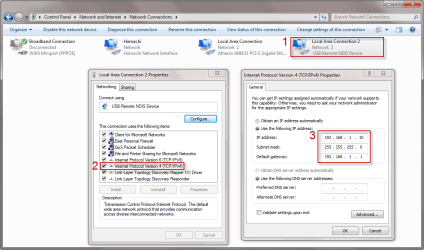
Network and Sharing > Change Adapter Settings > USB Remote NDIS Device(newly created after the driver installation) > Properties > TCP/IPv4 > Properties > IP address : 192.168.1.10, Subnet Mask : 255.255.255.0, Default Gateway : 192.168.1.1.

The above instruction were given in the manual.


Regards.
 

My Computer My Computer

At a glance

Windows 7 x64Core i7 920, Core2Quad 955012 Gigs Kingston, 4 Gigs CorsairNvidia GTX 950, Nvidia GTS 250
Computer type
PC/Desktop
Computer Manufacturer/Model Number
Self Assembled
OS
Windows 7 x64
CPU
Core i7 920, Core2Quad 9550
Motherboard
Asus Rampage II Extreme, Asus P5G something
Memory
12 Gigs Kingston, 4 Gigs Corsair
Graphics Card(s)
Nvidia GTX 950, Nvidia GTS 250
Sound Card
Onboard
Monitor(s) Displays
Viewsonic VP2250wb, BenQG2220HD
Screen Resolution
1680x1050, 1920x1080
Hard Drives
2x 500G Seagate 1x 1TB Seagate, 1 500gb WD 1 TB Seagate
PSU
Cooler Master 650W Bronze, Cooler Master 500W
Case
Thermaltake Xaser VI, HAF 922
Cooling
CM V8, Thermalright
Keyboard
Logitech G15, el cheapo Logitech Keyboard
Mouse
Logitech G5, Razer Deathadder
Internet Speed
upto 4mbps
Antivirus
KIS 2017, KIS 2017
Browser
Opera, Chrome, IE11
7-6-2011 9-31-23 AM.png

I forgot to mention one more thing, the driver was unsigned.
 
Last edited:

My Computer My Computer

At a glance

Windows 7 x64Core i7 920, Core2Quad 955012 Gigs Kingston, 4 Gigs CorsairNvidia GTX 950, Nvidia GTS 250
Computer type
PC/Desktop
Computer Manufacturer/Model Number
Self Assembled
OS
Windows 7 x64
CPU
Core i7 920, Core2Quad 9550
Motherboard
Asus Rampage II Extreme, Asus P5G something
Memory
12 Gigs Kingston, 4 Gigs Corsair
Graphics Card(s)
Nvidia GTX 950, Nvidia GTS 250
Sound Card
Onboard
Monitor(s) Displays
Viewsonic VP2250wb, BenQG2220HD
Screen Resolution
1680x1050, 1920x1080
Hard Drives
2x 500G Seagate 1x 1TB Seagate, 1 500gb WD 1 TB Seagate
PSU
Cooler Master 650W Bronze, Cooler Master 500W
Case
Thermaltake Xaser VI, HAF 922
Cooling
CM V8, Thermalright
Keyboard
Logitech G15, el cheapo Logitech Keyboard
Mouse
Logitech G5, Razer Deathadder
Internet Speed
upto 4mbps
Antivirus
KIS 2017, KIS 2017
Browser
Opera, Chrome, IE11
I'm learning something new here. I've never used a USB remote NDIS device before. I'm not wrapping my head around the need for a USB connection at all.

I took a quick look at this paper: USB Remote NDIS Devices and Windows and it makes me wonder if that modem is just old tech - a system tried and abandoned. If it is, you are left with the classic decision: work to find a driver that will work in W7, or scrap it and buy new tech.

If you decide to try and keep it you could take a look at this:
Windows 7 USB Driver for BSNL C 2110

Sorry I can't be more help. You might try posting your question in the NETWORKING forum here. You are more likely to get a networking guru who has experience with these devices to see it there.
 

My Computer My Computer

At a glance

Windows 7 64 Bit Home Premium SP1i7-3820GSkill F3-14900CL9Q - 16GBEVGA GeForce GTX660 - Driver 352.86
Computer type
PC/Desktop
Computer Manufacturer/Model Number
Home Built - Jan 2013
OS
Windows 7 64 Bit Home Premium SP1
CPU
i7-3820
Motherboard
Asus P9X79-PRO - Bios 4608
Memory
GSkill F3-14900CL9Q - 16GB
Graphics Card(s)
EVGA GeForce GTX660 - Driver 352.86
Sound Card
On board Realtek ALC898
Monitor(s) Displays
Acer S271HL
Screen Resolution
1920 x 1080
Hard Drives
#1- Samsung 840 Pro Series
#2- Western Digital WD1002FAEX Sata3 Black
#3- Western Digital WD1002FAEX Sata3 Black
PSU
Corsair CMPSU-850TX-V2 - 850 watt (by Seasonic)
Case
Corsair Obsidian 550D
Cooling
Standard 3 120mm case fans, Cooler Master Hyper 212 EVO
Keyboard
MS KC-0405
Mouse
Intellimouse 5-button
Internet Speed
56 Mbits/Sec (on a good day)
Antivirus
Avast & Malwarebytes
Browser
Firefox
Other Info
Asus DVD - DRW-24B1ST 24X
Hi! TVeblen.

I am not sure why it needs the USB, and on top of that it uses USB 1.1. I am now pretty sure the modem is from jurassic period LOL. Anyway, I choose the second option, of throwing it out the window, so much for being a cheapskate LOL.

Thanks for you replies.
 

My Computer My Computer

At a glance

Windows 7 x64Core i7 920, Core2Quad 955012 Gigs Kingston, 4 Gigs CorsairNvidia GTX 950, Nvidia GTS 250
Computer type
PC/Desktop
Computer Manufacturer/Model Number
Self Assembled
OS
Windows 7 x64
CPU
Core i7 920, Core2Quad 9550
Motherboard
Asus Rampage II Extreme, Asus P5G something
Memory
12 Gigs Kingston, 4 Gigs Corsair
Graphics Card(s)
Nvidia GTX 950, Nvidia GTS 250
Sound Card
Onboard
Monitor(s) Displays
Viewsonic VP2250wb, BenQG2220HD
Screen Resolution
1680x1050, 1920x1080
Hard Drives
2x 500G Seagate 1x 1TB Seagate, 1 500gb WD 1 TB Seagate
PSU
Cooler Master 650W Bronze, Cooler Master 500W
Case
Thermaltake Xaser VI, HAF 922
Cooling
CM V8, Thermalright
Keyboard
Logitech G15, el cheapo Logitech Keyboard
Mouse
Logitech G5, Razer Deathadder
Internet Speed
upto 4mbps
Antivirus
KIS 2017, KIS 2017
Browser
Opera, Chrome, IE11
I thought, before throwing it out, why not experiment. So in the modem configuration page, I chose something different this time. Instead of "PPPOE" I chose "Bridge" in the Connection Type. And Voila, I don't need the USB or the drivers anymore, I can connect to the internet by just creating a new internet connection from windows. And no more WMP 12 freezing. :DWoohoo.

Just thought I should share my experience with everyone.

Bye.
 

My Computer My Computer

At a glance

Windows 7 x64Core i7 920, Core2Quad 955012 Gigs Kingston, 4 Gigs CorsairNvidia GTX 950, Nvidia GTS 250
Computer type
PC/Desktop
Computer Manufacturer/Model Number
Self Assembled
OS
Windows 7 x64
CPU
Core i7 920, Core2Quad 9550
Motherboard
Asus Rampage II Extreme, Asus P5G something
Memory
12 Gigs Kingston, 4 Gigs Corsair
Graphics Card(s)
Nvidia GTX 950, Nvidia GTS 250
Sound Card
Onboard
Monitor(s) Displays
Viewsonic VP2250wb, BenQG2220HD
Screen Resolution
1680x1050, 1920x1080
Hard Drives
2x 500G Seagate 1x 1TB Seagate, 1 500gb WD 1 TB Seagate
PSU
Cooler Master 650W Bronze, Cooler Master 500W
Case
Thermaltake Xaser VI, HAF 922
Cooling
CM V8, Thermalright
Keyboard
Logitech G15, el cheapo Logitech Keyboard
Mouse
Logitech G5, Razer Deathadder
Internet Speed
upto 4mbps
Antivirus
KIS 2017, KIS 2017
Browser
Opera, Chrome, IE11
Nice work! Congrats
 

My Computer My Computer

At a glance

Windows 7 64 Bit Home Premium SP1i7-3820GSkill F3-14900CL9Q - 16GBEVGA GeForce GTX660 - Driver 352.86
Computer type
PC/Desktop
Computer Manufacturer/Model Number
Home Built - Jan 2013
OS
Windows 7 64 Bit Home Premium SP1
CPU
i7-3820
Motherboard
Asus P9X79-PRO - Bios 4608
Memory
GSkill F3-14900CL9Q - 16GB
Graphics Card(s)
EVGA GeForce GTX660 - Driver 352.86
Sound Card
On board Realtek ALC898
Monitor(s) Displays
Acer S271HL
Screen Resolution
1920 x 1080
Hard Drives
#1- Samsung 840 Pro Series
#2- Western Digital WD1002FAEX Sata3 Black
#3- Western Digital WD1002FAEX Sata3 Black
PSU
Corsair CMPSU-850TX-V2 - 850 watt (by Seasonic)
Case
Corsair Obsidian 550D
Cooling
Standard 3 120mm case fans, Cooler Master Hyper 212 EVO
Keyboard
MS KC-0405
Mouse
Intellimouse 5-button
Internet Speed
56 Mbits/Sec (on a good day)
Antivirus
Avast & Malwarebytes
Browser
Firefox
Other Info
Asus DVD - DRW-24B1ST 24X
Back
Top