Random computer freezes after installing new SSD

@whs - yes I've checked device manager and nothing is flagged. Everything is apparently working fine. At this moment I've actually just updated the bios from version F9 to Version F11 and that seems to have gone smooth. Don't know if it will make a difference but I feel like I need to try everything because I really am struggling to see what the problem may be. In addition to this I also checked Samsung magician and there was a firmware update for the ssd which I just installed. I also installed some drivers from the gigabyte disc which came with the motherboard like the intel rapid storage driver just in case, although I've never needed it in the past. I believe windows comes with its own set of drivers anyway but I'm desperate for a solution.

For the most part I have a fully functioning computer and everything runs smooth but every now and again I get the freezes I just described. It makes me quite jittery doing any real work since if I forget to save then I might suddenly lose a lot of work if the computer just decides to randomly freeze.
 

My Computer My Computer

OS
Windows 7 Ultimate 64bit
I understand that this is unpleasant. But with a freeze you have really nothing to go by. With a BSOD you can at least force a dump - but a freeze is somewhere in nowhere.

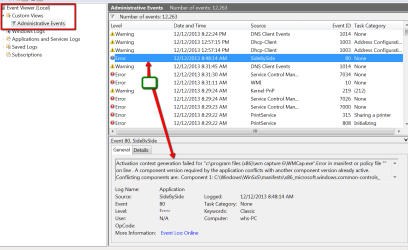
Is there anything in Event Viewer that might give us a clue. Go to

Event Viewer > Custom Views > Administrative Events

and see whether any flagged errors make sense in the context. Example:
 

Attachments

  • 2013-12-12_2104.png
    2013-12-12_2104.png
    48.8 KB · Views: 1

My Computer My Computer

Computer Manufacturer/Model Number
HP, Dell, Gateway, Toshiba - 4 laptops and 2 desktops
OS
Vista, Windows7, Mint Mate, Zorin, Windows 8
CPU
from 1.6GHz Duo to i7
Monitor(s) Displays
2x HP w2207
Hard Drives
5x HDD, 7x SSD, 12x Externals
Keyboard
with trackball - no mices
Mouse
Trackball mice
Internet Speed
DSL 6000
@whs - the only thing logged on that I can see near the critical error is:

BugCheck
The computer has rebooted from a bugcheck. The bugcheck was: 0x00000101 (0x0000000000000031, 0x0000000000000000, 0xfffff880009e8180, 0x0000000000000001). A dump was saved in: C:\Windows\Minidump\121213-9250-01.dmp. Report Id: 121213-9250-01.

No idea what the above is about, I think its related to the dump I posted up earlier

Kernel-Event Tracing
Session "Microsoft Security Client OOBE" stopped due to the following error: 0xC000000D

I think this is related to Microsoft security essentials and I get this error all the time. Don't know how to get rid of it. Hasn't seemed to cause problems before.

Kernel-PnP
The driver \Driver\WUDFRd failed to load for the device WpdBusEnumRoot\UMB\2&37c186b&0&STORAGE#VOLUME#_??_USBSTOR#DISK&VEN_GENERIC&PROD_ULTRA_HS-SD#MMC&REV_1.82#000000264001&0#.

The above is just a warning and is also something I seem to get a lot. Not sure what it is or how to get rid of it.

I get a few system failed to create a restore point errors too and that's it.
 

My Computer My Computer

OS
Windows 7 Ultimate 64bit
Those don't look like what we are looking for.

We should know which one was the one right at the freeze. Next time it freezes and you reboot, see whether you can find it. We can just sit here and wait.
 

My Computer My Computer

Computer Manufacturer/Model Number
HP, Dell, Gateway, Toshiba - 4 laptops and 2 desktops
OS
Vista, Windows7, Mint Mate, Zorin, Windows 8
CPU
from 1.6GHz Duo to i7
Monitor(s) Displays
2x HP w2207
Hard Drives
5x HDD, 7x SSD, 12x Externals
Keyboard
with trackball - no mices
Mouse
Trackball mice
Internet Speed
DSL 6000
whs - that's the thing, those errors are the most common as well as the kernel-PnP warning. I've not had any freezes today but since starting the system I've had about 10 errors just related to "Kernel-Event Tracing
Session "Microsoft Security Client OOBE" stopped due to the following error: 0xC000000D". I believe the system restore failure is related to the SSD turning system restore creation points off for better performance and to save constantly writing to the disk but I'm not completely sure.

I've checked event viewer every time it's froze and then restarted and have never noticed any thing other than the critical error and the usual errors I posted up. I think the dump I got is probably going to be the best clue I'll get to be frank.

Anyway thanks for taking an interest in my problem but who knows when the computer will freeze again. It might not do it again. Maybe the firmware update by Samsung or the bios update will solve the problem but I'll never be sure what the problem is and that kind of bothers me. The computer will have to run for a long time before without freezing again before I'll trust the problem to be over with. In the meantime this thread will have to remain unsolved...
 

My Computer My Computer

OS
Windows 7 Ultimate 64bit
I believe the system restore failure is related to the SSD turning system restore creation points off for better performance and to save constantly writing to the disk but I'm not completely sure.
If you have no restore points, you cannot do system restore. I always give 5% of C to system restore and all my systems run on SSDs. And don't believe those wear and tear sagas for SSDs. They are solid.

I have only seen once a problem (different problem) because of a failing SSD - and I have 7 SSDs. It is possible that the SSD is at fault, but I would say it is unlikely. If anything, I would suspect some other external device like USB sticks.
 

My Computer My Computer

Computer Manufacturer/Model Number
HP, Dell, Gateway, Toshiba - 4 laptops and 2 desktops
OS
Vista, Windows7, Mint Mate, Zorin, Windows 8
CPU
from 1.6GHz Duo to i7
Monitor(s) Displays
2x HP w2207
Hard Drives
5x HDD, 7x SSD, 12x Externals
Keyboard
with trackball - no mices
Mouse
Trackball mice
Internet Speed
DSL 6000
picture.php


Maybe this is what is causing the system restore error. What's the missing C drive about and how do I get rid of it?

whs - I take it you recommend turning system restore back on?
 

My Computer My Computer

OS
Windows 7 Ultimate 64bit
1. What is this (C) missing - it looks like a folder. I wonder how that got in there. Should be turned off in any case. Investigat some more what that could possibly be.

2. (C) (System) should be turned on. Give it 5% space.
 

My Computer My Computer

Computer Manufacturer/Model Number
HP, Dell, Gateway, Toshiba - 4 laptops and 2 desktops
OS
Vista, Windows7, Mint Mate, Zorin, Windows 8
CPU
from 1.6GHz Duo to i7
Monitor(s) Displays
2x HP w2207
Hard Drives
5x HDD, 7x SSD, 12x Externals
Keyboard
with trackball - no mices
Mouse
Trackball mice
Internet Speed
DSL 6000
I'm not sure what the missing (C) was but I think it may be a remnant from the cloned disk. I just clicked the configure button and turned system protection off and the folder just disappeared.

I also turned system restore back on for the C drive and gave it 5% space as suggested.

The only 2 regular items appearing on the event viewer now are:

Kernel-Event Tracing
Session "Microsoft Security Client OOBE" stopped due to the following error: 0xC000000D

Kernel-PnP
The driver \Driver\WUDFRd failed to load for the device WpdBusEnumRoot\UMB\2&37c186b&0&STORAGE#VOLUME#_??_USBSTOR#DISK&VEN_GENERIC&PROD_ULTRA_HS-SD#MMC&REV_1.82#000000264001&0#.

The system restore failure error appears to have gone.
 

My Computer My Computer

OS
Windows 7 Ultimate 64bit

My Computer My Computer

Computer Manufacturer/Model Number
HP, Dell, Gateway, Toshiba - 4 laptops and 2 desktops
OS
Vista, Windows7, Mint Mate, Zorin, Windows 8
CPU
from 1.6GHz Duo to i7
Monitor(s) Displays
2x HP w2207
Hard Drives
5x HDD, 7x SSD, 12x Externals
Keyboard
with trackball - no mices
Mouse
Trackball mice
Internet Speed
DSL 6000
Well froze again, so it seems that the firmware update and the bios update didn't manage to solve the problem. Neither did the intel drivers that came with the motherboard. Nothing relevant in the event viewer other than the problems I've already posted.

One thing I have noticed though is that if the reset button works I tend to get a crash dump. If it doesn't then nothing. At the moment I'm going to try a different sata port for the ssd to see if that has any effect.
 

My Computer My Computer

OS
Windows 7 Ultimate 64bit

My Computer My Computer

Computer type
PC/Desktop
Computer Manufacturer/Model Number
Golden Mk. I.4
OS
Windows 10 Pro x64 ; Xubuntu x64
CPU
Intel i7 860 @ 2.80 GHz O/C'ed to 4.0GHz
Motherboard
Gigabyte P55A-UD3R Rev.1. Award BIOS F13
Memory
16GB Corsair Vengance DDR3 @ 661 MHz Dual Channel (9-9-9-24)
Graphics Card(s)
EVGA NVidia GTX 560 1024MB
Sound Card
Realtek Integrated
Monitor(s) Displays
Dual Samsung SyncMaster 2494HS
Screen Resolution
1920*1080 and 1920*1080
Hard Drives
1*Samsung 840 EVO 120GB SSD;
1*OCZ Vertex 2 60GB SSD;
2*Samsung F3 SpinPoint 1TB in RAID0;
1*Samsung F1 SpinPoint 1TB;
2*Western Digital 1TB External USB 3.0
1*Western Digital 500GB External USB 3.0
1*Seagate 500GB External USB 2.0
PSU
Thermaltake ToughPower QFan 750W
Case
Thermaltake Element S VK60001W2Z
Cooling
Corsair H60 Water Cooling, 2*230mm and 2*80mm case fans
Keyboard
Logitech G110
Mouse
Logitech MX518
Golden, its not overclocked in any way. I'll have a look at the thread you posted.
 

My Computer My Computer

OS
Windows 7 Ultimate 64bit

My Computer My Computer

Computer type
PC/Desktop
Computer Manufacturer/Model Number
Self Assembled
OS
Microsoft Windows 10 Pro Insider Preview 64-bit
CPU
Intel(R) Core(TM) i3-4130 CPU @ 3.40GHz
Motherboard
Gigabyte Technology Co., Ltd. B85M-D3H
Memory
Corsair Vengence 4GB x2 (8.00GB Dual-Channel DDR3 @ 798MHz)
Graphics Card(s)
2047MB GeForce GTS 450 (ZOTAC International)
Sound Card
Onboard (Realtek High Definition Audio)
Monitor(s) Displays
LG Flatron E2040T
Screen Resolution
1600x900
Hard Drives
Western Digital 1 TB
Seagate 500 GB
PSU
Corsair VS550
Case
Cooler Master K380
Cooling
Cooler Master Seidon 120V Plus
Keyboard
Logitech MK260r
Mouse
Logitech MK260r
Internet Speed
PMPL Broadband
Antivirus
Windows Defender + MBAM
Browser
Firefox
Other Info
Dell Studio 15" Laptop
OK, let us do some changes here:

Get rid of intel rapid storage. First uninstall it from Control Panel > Programs and Features. Then Uninstall the driver from device manager.

  1. Right click on "my computer" icon and click "manage" on the context menu.
  2. It will open the "computer management" window.
  3. Select "Device Manager" in the left pane, It will list all the existing devices up.
  4. Expand "IDE ATA/ATAPI controllers" by clicking on the triangle in front of it.
  5. Select one Intel device item under it, right click, uninstall.
  6. Continue the process for all Intel items under "IDE ATA/ATAPI controllers"
  7. Now restart the computer. At restart, windows will auto configure the appropriate native system driver.
Make it sure that the 250GB Samsung SSD 840 EVO is running with the latest firmware.
Samsung SSD (Solid State Drive) 840 series | Samsung SSD Website

Open the computer. Make it sure that both the HDD and SSD is properly seated. Re-seat the sata and power cables. If possible, change them and replace with known good cables.
72974453_zps85c47d93.jpg
The latest BIOS version available is F11 (the installed one is F9), though that is old, too. Better you install it from GIGABYTE - Motherboard - Socket 1156 - GA-H55M-UD2H (rev. 1.0)

Install the NVIDIA DRIVERS 314.22WHQL only.

  • Uninstall All nvidia items in Control Panel > Programs and features
    • 3D Vision Control Driver
    • 3D Vision Driver
    • Graphics Driver
    • HD Audio Driver
    • PhysX
    • nvidia Update
    (Are you using nvidia chipset drivers? If so, dont uninstall anything other than those are listed).
  • Now follow Drivers - Clean Left over Files after Uninstalling
  • Download 314.22 WHQL. While installing, Select Custom (Advanced) install. In the next page, follow this settings:

Update your network drivers:

Follow http://www.sevenforums.com/tutorials/97061-driver-install-device-manager.html to install the drivers.

Finally, when ataport.sys is failing, it may be a rootkit infection with all the other possible alternatives. So better take no chance. Scan the system for possible virus infection with the following programs.

Let us know the results. Will decide out further course of action depending on the results.
_______________________________________________________________________________________
Code:
*******************************************************************************
*                                                                             *
*                        Bugcheck Analysis                                    *
*                                                                             *
*******************************************************************************

Use !analyze -v to get detailed debugging information.

BugCheck 101, {31, 0, fffff880009e8180, 1}

Probably caused by : Unknown_Image ( ANALYSIS_INCONCLUSIVE )

Followup: MachineOwner
---------

0: kd> !analyze -v
*******************************************************************************
*                                                                             *
*                        Bugcheck Analysis                                    *
*                                                                             *
*******************************************************************************

CLOCK_WATCHDOG_TIMEOUT (101)
An expected clock interrupt was not received on a secondary processor in an
MP system within the allocated interval. This indicates that the specified
processor is hung and not processing interrupts.
Arguments:
Arg1: 0000000000000031, Clock interrupt time out interval in nominal clock ticks.
Arg2: 0000000000000000, 0.
Arg3: fffff880009e8180, The PRCB address of the hung processor.
Arg4: 0000000000000001, 0.

Debugging Details:
------------------


BUGCHECK_STR:  CLOCK_WATCHDOG_TIMEOUT_4_PROC

CUSTOMER_CRASH_COUNT:  1

DEFAULT_BUCKET_ID:  WIN7_DRIVER_FAULT

PROCESS_NAME:  System

CURRENT_IRQL:  d

STACK_TEXT:  
fffff880`031a0d78 fffff800`02edea4a : 00000000`00000101 00000000`00000031 00000000`00000000 fffff880`009e8180 : nt!KeBugCheckEx
fffff880`031a0d80 fffff800`02e916f7 : 00000000`00000000 fffff800`00000001 00000000`000186a1 00000000`00000001 : nt! ?? ::FNODOBFM::`string'+0x4e3e
fffff880`031a0e10 fffff800`03401895 : fffff800`03427460 fffff880`031a0fc0 fffff800`03427460 fffff800`00000000 : nt!KeUpdateSystemTime+0x377
fffff880`031a0f10 fffff800`02e84113 : fffff800`03002e80 00000000`00000001 00000000`00000000 fffff800`02e6e8ba : hal!HalpHpetClockInterrupt+0x8d
fffff880`031a0f40 fffff800`02e5c93f : fffff880`02f64180 fffffa80`06729b50 01cef6ef`3f3f33db fffffa80`06801048 : nt!KiInterruptDispatchNoLock+0x163
fffff880`031a10d0 fffff800`0314434f : 00000000`00000000 fffff880`031a1700 00000000`00000000 00000000`00000000 : nt!KeFlushProcessWriteBuffers+0x6b
fffff880`031a1140 fffff800`03192956 : fffff8a0`142b60a8 00000000`0001ff58 fffff880`031a12d0 00000000`00000000 : nt!ExpGetProcessInformation+0x7f
fffff880`031a1290 fffff800`031933ad : fffff8a0`142b60a8 fffffa80`6365734b 00000000`00000000 fffff880`031a1c20 : nt!ExpQuerySystemInformation+0xfb4
fffff880`031a1640 fffff800`02e86e53 : fffff880`031a1710 fffff800`02e85dfd 00000000`00000001 fffff8a0`142b6000 : nt!NtQuerySystemInformation+0x4d
fffff880`031a1680 fffff800`02e83410 : fffff880`014761dc fffff880`0a72b005 fffff880`031a1844 00000000`0c4100a1 : nt!KiSystemServiceCopyEnd+0x13
fffff880`031a1818 fffff880`014761dc : fffff880`0a72b005 fffff880`031a1844 00000000`0c4100a1 00000000`00000000 : nt!KiServiceLinkage
fffff880`031a1820 fffff880`0147673d : fffffa80`06d93db0 fffff800`02e8f1e3 fffff880`20206f49 fffff880`031a1bf0 : cng!GatherRandomKey+0x22c
fffff880`031a1be0 fffff800`0317e1ed : 00000000`00000001 00000000`00000001 00000000`80000000 fffffa80`06729b50 : cng!scavengingWorkItemRoutine+0x3d
fffff880`031a1c80 fffff800`02e91261 : fffff800`00000000 fffff800`00000001 fffff800`02e40200 fffff800`00000000 : nt!IopProcessWorkItem+0x3d
fffff880`031a1cb0 fffff800`031242ea : 00000000`00000000 fffffa80`06729b50 00000000`00000080 fffffa80`06707040 : nt!ExpWorkerThread+0x111
fffff880`031a1d40 fffff800`02e788e6 : fffff880`02f64180 fffffa80`06729b50 fffff880`02f6efc0 00000000`00000000 : nt!PspSystemThreadStartup+0x5a
fffff880`031a1d80 00000000`00000000 : fffff880`031a2000 fffff880`0319c000 fffff880`031a19e0 00000000`00000000 : nt!KxStartSystemThread+0x16


STACK_COMMAND:  kb

SYMBOL_NAME:  ANALYSIS_INCONCLUSIVE

FOLLOWUP_NAME:  MachineOwner

MODULE_NAME: Unknown_Module

IMAGE_NAME:  Unknown_Image

DEBUG_FLR_IMAGE_TIMESTAMP:  0

FAILURE_BUCKET_ID:  X64_CLOCK_WATCHDOG_TIMEOUT_4_PROC_ANALYSIS_INCONCLUSIVE

BUCKET_ID:  X64_CLOCK_WATCHDOG_TIMEOUT_4_PROC_ANALYSIS_INCONCLUSIVE

Followup: MachineOwner
---------

 

My Computer My Computer

Computer type
PC/Desktop
Computer Manufacturer/Model Number
Self Assembled
OS
Microsoft Windows 10 Pro Insider Preview 64-bit
CPU
Intel(R) Core(TM) i3-4130 CPU @ 3.40GHz
Motherboard
Gigabyte Technology Co., Ltd. B85M-D3H
Memory
Corsair Vengence 4GB x2 (8.00GB Dual-Channel DDR3 @ 798MHz)
Graphics Card(s)
2047MB GeForce GTS 450 (ZOTAC International)
Sound Card
Onboard (Realtek High Definition Audio)
Monitor(s) Displays
LG Flatron E2040T
Screen Resolution
1600x900
Hard Drives
Western Digital 1 TB
Seagate 500 GB
PSU
Corsair VS550
Case
Cooler Master K380
Cooling
Cooler Master Seidon 120V Plus
Keyboard
Logitech MK260r
Mouse
Logitech MK260r
Internet Speed
PMPL Broadband
Antivirus
Windows Defender + MBAM
Browser
Firefox
Other Info
Dell Studio 15" Laptop
Arc - I already posted that I updated the firmware of the ssd and am running the latest version of the bios earlier. These haven't solved the issue.

As for the intel rapid storage, this isn't the cause of the problem. Previously I ran the ssd with windows own drivers and I still got random freezes. I only installed intel rapid storage in the hope that it may solve the problem. It hasn't.

As for the sata cable and power cable to the ssd, yes I have checked these numerous times. I also checked the RAM to make sure it has not become unseated.

I run Microsoft security essentials which I believe is pretty comprehensive when comes to viruses etc. This is updated regularly and I am careful about what I install on my PC so I don't think it's a virus or root kit.

@Golden - I ran hot cpu tester 4 last night and that tested the cpu for 6 hours under high loads, there were no errors. I try running the other stress tests when I have time.
 

My Computer My Computer

OS
Windows 7 Ultimate 64bit
Arc - I already posted that I updated the firmware of the ssd and am running the latest version of the bios earlier. These haven't solved the issue.

As for the intel rapid storage, this isn't the cause of the problem. Previously I ran the ssd with windows own drivers and I still got random freezes. I only installed intel rapid storage in the hope that it may solve the problem. It hasn't.

As for the sata cable and power cable to the ssd, yes I have checked these numerous times. I also checked the RAM to make sure it has not become unseated.

I run Microsoft security essentials which I believe is pretty comprehensive when comes to viruses etc. This is updated regularly and I am careful about what I install on my PC so I don't think it's a virus or root kit.

@Golden - I ran hot cpu tester 4 last night and that tested the cpu for 6 hours under high loads, there were no errors. I try running the other stress tests when I have time.
It appears that you know what the issue is. Goo :) Do it then.

I dont know. Nobody knows, for a stop 0x101. We can search in possible areas, but cannot pinpoint the issue.

Troubleshooting will not go with your thinking, at any chance.

Sorry for consuming your time in vein. I dont have a fix button.
 

My Computer My Computer

Computer type
PC/Desktop
Computer Manufacturer/Model Number
Self Assembled
OS
Microsoft Windows 10 Pro Insider Preview 64-bit
CPU
Intel(R) Core(TM) i3-4130 CPU @ 3.40GHz
Motherboard
Gigabyte Technology Co., Ltd. B85M-D3H
Memory
Corsair Vengence 4GB x2 (8.00GB Dual-Channel DDR3 @ 798MHz)
Graphics Card(s)
2047MB GeForce GTS 450 (ZOTAC International)
Sound Card
Onboard (Realtek High Definition Audio)
Monitor(s) Displays
LG Flatron E2040T
Screen Resolution
1600x900
Hard Drives
Western Digital 1 TB
Seagate 500 GB
PSU
Corsair VS550
Case
Cooler Master K380
Cooling
Cooler Master Seidon 120V Plus
Keyboard
Logitech MK260r
Mouse
Logitech MK260r
Internet Speed
PMPL Broadband
Antivirus
Windows Defender + MBAM
Browser
Firefox
Other Info
Dell Studio 15" Laptop

My Computer My Computer

Computer type
PC/Desktop
Computer Manufacturer/Model Number
Custom Built
OS
Windows 10 Pro
CPU
AMD Ryzen 5 2400G Processor with Radeon RX Vega 11 Graphics
Motherboard
ASRock X470 Master SLI/AC AM4 AMD Promontory X470 SATA 6Gb/s
Memory
G.SKILL Ripjaws V Series 16GB (2 x 8GB) 288-Pin DDR4 SDRAM D
Graphics Card(s)
2047MB NVIDIA GeForce GTX 1060 6GB (EVGA)
Sound Card
Motherboard Built in
Monitor(s) Displays
Acer R240HY bidx 23.8-Inch IPS HDMI DVI VGA (1920 x 1080) Wi
Screen Resolution
1920 x 1080
Hard Drives
1TB Sandisk SSD PLUS (Main drive)
500 GB Seagate 7200 RPM (Games)
500 GB Western Digital 7200 RPM (Virtual Machines)
PSU
CORSAIR TX Series TX650M 650W 80+ Gold Modular Power Supply
Case
CORSAIR CARBIDE SPEC-02 Mid-Tower Gaming Case, Red LED Fan
Cooling
220mm, two 120mm, and four 60mm fans
Keyboard
Wired Dell keyboard
Mouse
Wireless Logitech mouse
Internet Speed
250mb down, 30mb up
Antivirus
Panda Cloud Antivirus
Browser
Chrome-ish x64
Other Info
Your awesome for reading this.
Back
Top