Solved WMP 12 won't delete video

davidRushing

New member
Local time
11:29 AM
Messages
4
I have windows 7 with WMP 12. I deleted some videos from my video folder. so the files no longer exsist. But when I go to my media library, under videos they are still there. the option to delete them is there, but upon clicking it, nothing happens. How do I delete them from my library, I tried empying my library and starting over, but that doesn't work, they are still there. any help would be much appreciated.
 

My Computer My Computer

At a glance

windows 7 64 bit
OS
windows 7 64 bit

My Computer My Computer

At a glance

Windows 7 Home Premium x64 SP1intel(R)core(TM)2 duo CPU T6600 @ 2.20GHz3 gb ddr3ati radeon hd4570/512mb
Computer Manufacturer/Model Number
acer aspire 5935g
OS
Windows 7 Home Premium x64 SP1
CPU
intel(R)core(TM)2 duo CPU T6600 @ 2.20GHz
Motherboard
intel gm45/gm47 revision 07
Memory
3 gb ddr3
Graphics Card(s)
ati radeon hd4570/512mb
Monitor(s) Displays
lop156wh2-tle1 15.3 flat
Screen Resolution
1366x768
Hard Drives
OCZ-Agility3 60gig ssd
320gig external hdd
500gig external hdd
Mouse
Optical
Internet Speed
30Mbps Down/30Mbps Up
Just a thought.

You say you deleted your video files from your video folder, so that is probably why the error is occurring.

If you delete files from within WMP itself, you should get the option to:

1) Just delete the file from WMP

2) Delete the file from WMP and the Video Library
 

My Computer My Computer

At a glance

Windows 7 Ultimate SP1 64-BitIntel Core i7 870 @ 2.93GHz8Gb Dual-Channel DDR3 @ 664MHznVidia GeForce GTX 460 1024MB dedicated RAM
Computer Manufacturer/Model Number
HP Pavilion Elite 495UK
OS
Windows 7 Ultimate SP1 64-Bit
CPU
Intel Core i7 870 @ 2.93GHz
Motherboard
MSI 2A9C (CPU1)
Memory
8Gb Dual-Channel DDR3 @ 664MHz
Graphics Card(s)
nVidia GeForce GTX 460 1024MB dedicated RAM
Sound Card
Realtek HD Audio
Monitor(s) Displays
HP2310i
Screen Resolution
1920 x 1080
Hard Drives
1x1954GB Hitachi HDS22020ALA 330 (RAID), 1x1954GB Hitachi External for backup and storage
PSU
460W
Case
HP Elite
Cooling
Air cooled
Keyboard
Logitech K750 solar-powered keyboard
Mouse
Logitech Wireless M180 mouse
Internet Speed
2Mb
Other Info
Pure Avanti Flow Internet Radio with iPod Dock, 64Gb iPod, HP USB Speakers, Sony MDR-V500 Headphones, Sony Vaio F-Series Laptop
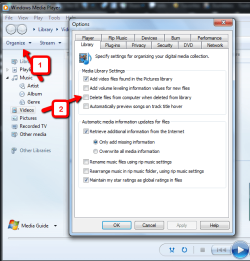
there is a setting in wmp 12 , when you delete from wmp it wont delete from the computer.
click organise then select the library tab and check the box.
2011-09-08_0905.png
 

My Computer My Computer

At a glance

Microsoft Windows 7 Home Premium 64-bit 7600IIx4 amd athelon 635 processor2x2gbati radeon HD 5450
Computer Manufacturer/Model Number
Hewlett packard/p6512uk
OS
Microsoft Windows 7 Home Premium 64-bit 7600
CPU
IIx4 amd athelon 635 processor
Motherboard
FOXCONN 2AA9
Memory
2x2gb
Graphics Card(s)
ati radeon HD 5450
Sound Card
(1) Realtek High Definition Audio (2) AMD High Definition
Monitor(s) Displays
samsung lcd tv 32"
Screen Resolution
1360x 768
Hard Drives
(1) WDC WD10 01FAES-60Z2A0 SATA Disk Device (2) Maxtor OneTouch USB Device (3) ST310003 33AS USB Device (4) WD My Book 1111 USB Device
PSU
?
Cooling
air!
Keyboard
wireless hp
Mouse
wireless Hp,optical
Internet Speed
1.10mb/s
Antivirus
MSE
Browser
Firefox
I've tried all this, and despite high hopes, none of this worked, thanks for all the responses though. my next step is to uninstall and reinstall, which I would've already done, except the fear of paying for wmp12 again. it came on the pc I own, so my question now is, where can I get the .exe for free? or, is the .exe already on my pc, and if so, where might I find it at? again, thanks for the responses, I've seen multiple threads about this problem, and no fixes, seems like microsoft would make a patch for it.
 

My Computer My Computer

At a glance

windows 7 64 bit
OS
windows 7 64 bit
Correct me if I'm wrong but I don't think you can un-install it or download the WMP12 version for windows 7 as it comes on the windows 7 installation disk.The nearest you can get is to turn it off then on again which is suppose to reset it.
Sure someone will correct me if im wrong with this.

Danny
 

My Computer My Computer

At a glance

Windows 7 Home Premium x64 SP1intel(R)core(TM)2 duo CPU T6600 @ 2.20GHz3 gb ddr3ati radeon hd4570/512mb
Computer Manufacturer/Model Number
acer aspire 5935g
OS
Windows 7 Home Premium x64 SP1
CPU
intel(R)core(TM)2 duo CPU T6600 @ 2.20GHz
Motherboard
intel gm45/gm47 revision 07
Memory
3 gb ddr3
Graphics Card(s)
ati radeon hd4570/512mb
Monitor(s) Displays
lop156wh2-tle1 15.3 flat
Screen Resolution
1366x768
Hard Drives
OCZ-Agility3 60gig ssd
320gig external hdd
500gig external hdd
Mouse
Optical
Internet Speed
30Mbps Down/30Mbps Up
I was affraid of that too, and my pc didn't come with a disc. So I can't even reformat if I wanted to, not that I'd do that over wmp. I think I'll just get winamp. I liked it better on my old system anyhow. Thanks for all the responses guys.
 

My Computer My Computer

At a glance

windows 7 64 bit
OS
windows 7 64 bit
Sometimes WMP can get bugged like this if you delete a file from its library directly from the folder.

If the file has been deleted, yet WMP still thinks its there, you can do one of 2 things to get it back on track.
Both involve clearing and resetting the WMP library.

1) Restore the Media Library.
Right click the empty space to the left of the Play,Burn,Sync Tabs.
Navigate to: Tools -- Advanced -- restore Media Libary
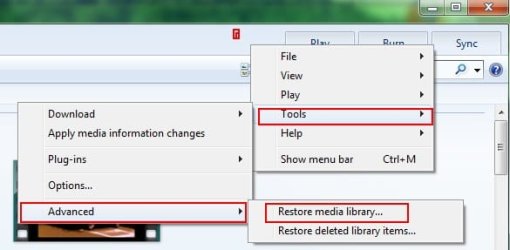
1.JPG

This will remove everything from the libary & close WMP. When you re-open it, it will be empty and begin rebuilding.

This should resolve the issue. However, there are occasions when it does not.


2) If the above method fails to remove the dead links:
Make sure Show Hidden Files/Folders is enabled.
Go to: C: / Users/ [username] / Appdata / Local / Microsoft / Media Player

Inside that folder you'll see something like this:

2.JPG

Delete all of this.
This also deletes and clears the WMP library (but NOT the actual files)

Open WMP and let it rebuild the library.


--For future reference, its usually better to delete a file from within WMP (either from library or library and disc) to prevent this from happening.
Also this does not always happen. It will often correct itself, but sometimes it will not.
If you forget, and it happens again, the 1st method work the majority of the time to reset it.

 

My Computer My Computer

At a glance

Windows 7 Home Premium 64bitIntel Core i7 2700k8GB Mushkin Redline Ridgebacks @1866EVGA GTX570 SC
Computer Manufacturer/Model Number
Custom (Self Build)
OS
Windows 7 Home Premium 64bit
CPU
Intel Core i7 2700k
Motherboard
eVGA P67 SLI
Memory
8GB Mushkin Redline Ridgebacks @1866
Graphics Card(s)
EVGA GTX570 SC
Sound Card
XiFi Titanium HD
Monitor(s) Displays
LG W2453V
Screen Resolution
1920x1080
Hard Drives
Intel 320 80GB -- Intel X25-V 40GB --WD Black 1TB x2 -- WD Blue 640GB
PSU
Seasonic x750
Case
Corsair 600T SE White
Cooling
eVGA Superclocked CPU Cooler
Keyboard
Saitek Cyborg
Antivirus
Kaspersky
Browser
IE
Other Info
LG BD/DVD
If the file you are trying to delete is an MKV, most likely DivX software is locking it while attempting to thumbnail it. If you use the Shark007 codecs, disable the DivX MF splitter on the MKV TAB. If you have installed DivX software, uninstall it all.
 

My Computer My Computer

At a glance

Windows 7 Ultimate 64biti7 2600k16GB (4x4) corsair vengeanceIntel HD3000 iGPU / AMD HD6870 1024MB
Computer Manufacturer/Model Number
Selfbuilt
OS
Windows 7 Ultimate 64bit
CPU
i7 2600k
Motherboard
asus P8Z68-V LE
Memory
16GB (4x4) corsair vengeance
Graphics Card(s)
Intel HD3000 iGPU / AMD HD6870 1024MB
Sound Card
bitstreamed to an Onkyo 609
Monitor(s) Displays
Asus VE278 27" LED / Bravia EX7 60" LED
Screen Resolution
native 1080p x2
Hard Drives
4x 2TB int. + 2x 2TB external and a SSD for the boot drive.
PSU
650w Antec
Case
NZXT tempest evo
Cooling
air/stock
Keyboard
Dell
Mouse
logitech m505
Internet Speed
dual: cable/blackberry tether for travel use
Other Info
BD re-writer //
asus notebook G73Jw
thank you wish master, number 2 worked. I knew better than deleting from the folder, cause I'd done it before. but last time, I just restored the files, then deleted from the library, this time not thinking about it, I emptied the recycling bin before I even noticed what I had done. once again thank you!
 

My Computer My Computer

At a glance

windows 7 64 bit
OS
windows 7 64 bit
Back
Top