WMP 12 won't open on top

arpharazon

New member
Local time
7:47 AM
Messages
21
What I'm saying is, when I double-click on a video file (in any folder) WMP12 opens underneath the explorer window.

The only (current) exception is .flv.

I remember reading where something in the registry can be altered to make the other formats open WMP on top, I just don't remember the specifics. I know it was under one of the >software>microsoft>media player keys.

This one is under HKEY_CURRENT_USER. I added the .mp4 key, but am not sure if this is the right section and it didn't do anything, though .flv is in there and that is the one format that opens properly.
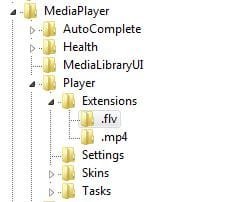
WMP12 reg entry 1a.JPG
 
Last edited:

My Computer My Computer

At a glance

XPx64 Pro & Win7x64 Ultimate
OS
XPx64 Pro & Win7x64 Ultimate
I wouldn't necessarily dig in the registry for that.
Did you try the more common approaches first?
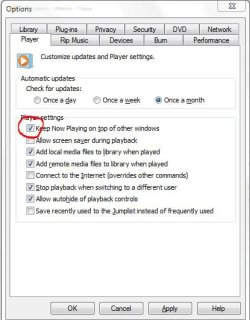
Open wmp, press ALT T and then O to access the options menu
On the PLAYER Tab check the first option and see if that helps
Capture.JPG

-DG
 

My Computer My Computer

At a glance

Windows 7 Ultimate x86DualCore AMD Athlon 64 X2, 2600 MHz 5200+Samsung 2GB DDR2Onboard NVIDIA GeForce 6150SE nForce 430
Computer Manufacturer/Model Number
HP m8000n
OS
Windows 7 Ultimate x86
CPU
DualCore AMD Athlon 64 X2, 2600 MHz 5200+
Motherboard
Asus M2N68-LA (Narra)
Memory
Samsung 2GB DDR2
Graphics Card(s)
Onboard NVIDIA GeForce 6150SE nForce 430
Sound Card
Onboard nVIDIA nForce 6100-430 (MCP61P)
Monitor(s) Displays
Westinghouse 19" LED
Screen Resolution
1280x1024
Hard Drives
SATA II Seagate Barracuda 500GB
USB II WD Elements 500GB
USB II WD My Book 1TB
USB II WD My Book 2TB
PSU
Stock (HP)
Case
Stock (HP)
Cooling
Stock
Keyboard
Logitech Classic KB 200
Mouse
Standard HP opticle USB mouse
Thanks. Y'know the simple solution would have to work once in a while.:o

I do remember something from around a year ago that was similar and fixing some registry keys did the trick then.

Of course the issue now is, it won't go back underneath when you click on the original window.
 
Last edited:

My Computer My Computer

At a glance

XPx64 Pro & Win7x64 Ultimate
OS
XPx64 Pro & Win7x64 Ultimate
Ah well I guess you can't have it both ways unless you don't run WMP full screen that is :D
That's probably why it worked for FLVs (they're rarely bigger than 640x480)

-DG
 

My Computer My Computer

At a glance

Windows 7 Ultimate x86DualCore AMD Athlon 64 X2, 2600 MHz 5200+Samsung 2GB DDR2Onboard NVIDIA GeForce 6150SE nForce 430
Computer Manufacturer/Model Number
HP m8000n
OS
Windows 7 Ultimate x86
CPU
DualCore AMD Athlon 64 X2, 2600 MHz 5200+
Motherboard
Asus M2N68-LA (Narra)
Memory
Samsung 2GB DDR2
Graphics Card(s)
Onboard NVIDIA GeForce 6150SE nForce 430
Sound Card
Onboard nVIDIA nForce 6100-430 (MCP61P)
Monitor(s) Displays
Westinghouse 19" LED
Screen Resolution
1280x1024
Hard Drives
SATA II Seagate Barracuda 500GB
USB II WD Elements 500GB
USB II WD My Book 1TB
USB II WD My Book 2TB
PSU
Stock (HP)
Case
Stock (HP)
Cooling
Stock
Keyboard
Logitech Classic KB 200
Mouse
Standard HP opticle USB mouse
I am certain the .flv's "worked" because that registry entry was there.

I just wish I could find the thread I saw that explained it.

Plus I think something happened to my registry over time, because when I did have that info, I remember all the file types being in there.


Edit:
I did find another way (inadvertently) to fix the problem.

I was also having problems with Win7 not focusing on windows/pop-ups that were just opened.
There is a registry fix that deals with that, but also seems to have fixed the Media Player issue even after I unchecked the "keep on top" option.

[HKEY_CURRENT_USER\Control Panel\Desktop]
Right Click on the empty space and create a new DWORD value, or modify the existing value named ‘ForegroundLockTimeout’, set or modify the value to 0. (this value will cause the application to take the focus instantly.) Mine had some hexidecimal value instead of a zero.
 
Last edited:

My Computer My Computer

At a glance

XPx64 Pro & Win7x64 Ultimate
OS
XPx64 Pro & Win7x64 Ultimate
Well that's certainly good to know.
I'm glad you got it working again.
Thanks for the feedback!

-DG
 

My Computer My Computer

At a glance

Windows 7 Ultimate x86DualCore AMD Athlon 64 X2, 2600 MHz 5200+Samsung 2GB DDR2Onboard NVIDIA GeForce 6150SE nForce 430
Computer Manufacturer/Model Number
HP m8000n
OS
Windows 7 Ultimate x86
CPU
DualCore AMD Athlon 64 X2, 2600 MHz 5200+
Motherboard
Asus M2N68-LA (Narra)
Memory
Samsung 2GB DDR2
Graphics Card(s)
Onboard NVIDIA GeForce 6150SE nForce 430
Sound Card
Onboard nVIDIA nForce 6100-430 (MCP61P)
Monitor(s) Displays
Westinghouse 19" LED
Screen Resolution
1280x1024
Hard Drives
SATA II Seagate Barracuda 500GB
USB II WD Elements 500GB
USB II WD My Book 1TB
USB II WD My Book 2TB
PSU
Stock (HP)
Case
Stock (HP)
Cooling
Stock
Keyboard
Logitech Classic KB 200
Mouse
Standard HP opticle USB mouse
Back
Top