WMP Default Player Size Changed

ezpkns34

New member
Local time
3:05 AM
Messages
5
No clue what happened, but WMP used to automatically open in a small player, but the other day it started opening in a massive window & now I can't get it to change back to opening in a small window by default

Can't find anything online that tells you how to change the default player size for WMP, so no clue how the change happened to me or how to go about changing it back


Thanks
 

My Computer

Computer type
PC/Desktop
Computer Manufacturer/Model Number
dell xps & toshiba tecra a11
OS
Win 7 Home 64
Browser
firefox
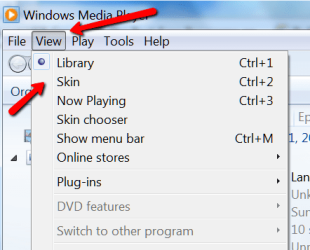
Go to the VIEW tab and check SKIN
 

My Computer

Computer Manufacturer/Model Number
HP, Dell, Gateway, Toshiba - 4 laptops and 2 desktops
OS
Vista, Windows7, Mint Mate, Zorin, Windows 8
CPU
from 1.6GHz Duo to i7
Monitor(s) Displays
2x HP w2207
Hard Drives
5x HDD, 7x SSD, 12x Externals
Keyboard
with trackball - no mices
Mouse
Trackball mice
Internet Speed
DSL 6000
Don't have a VIEW tab

eIwzGHp.jpg
 

My Computer

Computer type
PC/Desktop
Computer Manufacturer/Model Number
dell xps & toshiba tecra a11
OS
Win 7 Home 64
Browser
firefox
see picture - CTL+M toggles the menu bar.
 

Attachments

  • 2014-04-10_1629.png
    2014-04-10_1629.png
    18.6 KB · Views: 8

My Computer

Computer Manufacturer/Model Number
HP, Dell, Gateway, Toshiba - 4 laptops and 2 desktops
OS
Vista, Windows7, Mint Mate, Zorin, Windows 8
CPU
from 1.6GHz Duo to i7
Monitor(s) Displays
2x HP w2207
Hard Drives
5x HDD, 7x SSD, 12x Externals
Keyboard
with trackball - no mices
Mouse
Trackball mice
Internet Speed
DSL 6000
Ah, got it. But I've never had the skin look or menu shown before, so there has to be a way that I was doing it before?
 

My Computer

Computer type
PC/Desktop
Computer Manufacturer/Model Number
dell xps & toshiba tecra a11
OS
Win 7 Home 64
Browser
firefox
That I cannot answer. Probably those gremlins that we all get, LOL.
 

My Computer

Computer Manufacturer/Model Number
HP, Dell, Gateway, Toshiba - 4 laptops and 2 desktops
OS
Vista, Windows7, Mint Mate, Zorin, Windows 8
CPU
from 1.6GHz Duo to i7
Monitor(s) Displays
2x HP w2207
Hard Drives
5x HDD, 7x SSD, 12x Externals
Keyboard
with trackball - no mices
Mouse
Trackball mice
Internet Speed
DSL 6000
Thanks for getting me that far. Tried holding ctrl while closing WMP & it worked (didn't work the first time I tried it though, so who knows)
 

My Computer

Computer type
PC/Desktop
Computer Manufacturer/Model Number
dell xps & toshiba tecra a11
OS
Win 7 Home 64
Browser
firefox
I am glad that you have a workable solution.
 

My Computer

Computer Manufacturer/Model Number
HP, Dell, Gateway, Toshiba - 4 laptops and 2 desktops
OS
Vista, Windows7, Mint Mate, Zorin, Windows 8
CPU
from 1.6GHz Duo to i7
Monitor(s) Displays
2x HP w2207
Hard Drives
5x HDD, 7x SSD, 12x Externals
Keyboard
with trackball - no mices
Mouse
Trackball mice
Internet Speed
DSL 6000
Back
Top