WMP Playlists Screw Up Folders

poketama

New member
Local time
1:33 AM
Messages
63
Can anyone help me? After I made a playlist in Windows Media Player it screwed up all the folders and music (assumably only the ones I used):

fuc27a.png


I don't know what to do, when I delete the excess folders and music the originals disappear aswell. It's been like this for a while now.

Fixes anybody?
 

My Computer My Computer

OS
Windows 7 Ultimate x64
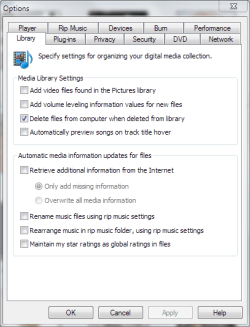
Go to Options, Library tab and uncheck the following: Rename music files using rip music settings

You might also have to uncheck 'rearrange music in rip music folder...' depending how you add your MP3's into the library.
 

Attachments

  • WMP Lib Settings.PNG
    WMP Lib Settings.PNG
    16.3 KB · Views: 28

My Computer My Computer

Computer Manufacturer/Model Number
Dell Dimension E520
OS
Windows 7 Ultimate (x86)
CPU
Intel 2.20 Dual Core
Memory
4 GB
Graphics Card(s)
nVidia 9400 GT (512 MB)
Sound Card
Sigmatel C Major HD
Monitor(s) Displays
22" Samsung 2232 bw
Screen Resolution
1680x1050
Mouse
Microsoft Arc
Other Info
Wacom Graphire 4 (6x8) Tablet
Didn't fix it :( those options were already unchecked.
 

My Computer My Computer

OS
Windows 7 Ultimate x64
Give us a run down of your usage. You create a play list, but where are the source files? Are they on a CD or MP3 player? Local disk? You get the idea I think.
 

My Computer My Computer

Computer Manufacturer/Model Number
Dell Dimension E520
OS
Windows 7 Ultimate (x86)
CPU
Intel 2.20 Dual Core
Memory
4 GB
Graphics Card(s)
nVidia 9400 GT (512 MB)
Sound Card
Sigmatel C Major HD
Monitor(s) Displays
22" Samsung 2232 bw
Screen Resolution
1680x1050
Mouse
Microsoft Arc
Other Info
Wacom Graphire 4 (6x8) Tablet
All the MP3s are in My Music. I turned on WMP and moved all the files into a playlist as far as I can remember.
 

My Computer My Computer

OS
Windows 7 Ultimate x64
Have you tried adding the files into the library, then creating play lists from the library? Unless thats what you meant in your last post.
 

My Computer My Computer

Computer Manufacturer/Model Number
Dell Dimension E520
OS
Windows 7 Ultimate (x86)
CPU
Intel 2.20 Dual Core
Memory
4 GB
Graphics Card(s)
nVidia 9400 GT (512 MB)
Sound Card
Sigmatel C Major HD
Monitor(s) Displays
22" Samsung 2232 bw
Screen Resolution
1680x1050
Mouse
Microsoft Arc
Other Info
Wacom Graphire 4 (6x8) Tablet
That didn't seem to do anything to solve my problem.
 

My Computer My Computer

OS
Windows 7 Ultimate x64
Just a necro to say I solved the problem by copying the folders, deleting my entire music folder and remaking it. Doesn't take too long.
 

My Computer My Computer

OS
Windows 7 Ultimate x64
Back
Top