WMP Sharing not functional

jostth

New member
Local time
11:02 PM
Messages
16
Unsure of exactly what is causing this issue, but here it is.

Only a few days ago I had full media sharing functionality, but now I am completely unable to do make any use of it. I was using WMP to share my media to my 360 and other computers in the home, but for some reason it stopped working completely. I have discovered that the "share my media" under the media streaming options in the network and sharing center is grayed out and I cannot select it, whereas before I remember specifically selecting this option. After searching for a while I have also discovered that this may be caused by the "WMP network sharing service" being disabled, however after considerable time spent searching I have determined that this service either no longer exists on my machine or was removed somehow.

Any help would be greatly appreciated, I cannot seem to locate any solution for this issue elsewhere.
 
Last edited:

My Computer

OS
Windows Seven Professional 64-Bit
CPU
Intel Q6600
Motherboard
Asus P5Q3-Deluxe wifiAP@n
Memory
8GB Crucial DDR3 1333mHz
Graphics Card(s)
Nvidia 8800GT
Monitor(s) Displays
NEC FE2111SB CRT
Hard Drives
500GB Seagate
250GB Seagate
PSU
Antec 600w
Case
Antec 900 something or other ATX
Cooling
A lot of fans (9+)
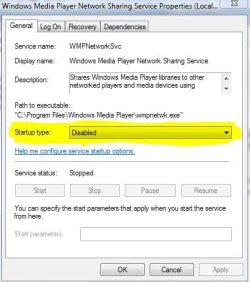
Make sure that this is ENABLED.....
 

Attachments

  • Services Run.JPG
    Services Run.JPG
    20.4 KB · Views: 2
  • Network Sharing.JPG
    Network Sharing.JPG
    15.4 KB · Views: 4
  • Dialog window.JPG
    Dialog window.JPG
    38.1 KB · Views: 2

My Computer

Computer Manufacturer/Model Number
HP Pavilion Elite HPE-410f
OS
Windows 7 Ultimate x64
CPU
AMD Phenom x6 1045t
Motherboard
N/A
Memory
8 GB
Graphics Card(s)
ATI Radeon HD 5570
Sound Card
Realtek Highdefinition Audio / 5.1 Dolby Setup
Monitor(s) Displays
HP w2207h Widescreen
Screen Resolution
1680*1050
Hard Drives
1 TB (fixed), 320 Portable maxtor, Server Hard drives
PSU
350 Watt
Case
HP CASE
Cooling
Bass
Keyboard
Logitech MX 5500
Mouse
Logitech MX 5500
Internet Speed
ROAD RUNNER 16MB D/512 U
I thank you for the reply, but it appears that the service in question (Media player network sharing) is completely absent from my machine. I am unsure of how this could have occurred, but I am more interested in restoring it if possible.
 

My Computer

OS
Windows Seven Professional 64-Bit
CPU
Intel Q6600
Motherboard
Asus P5Q3-Deluxe wifiAP@n
Memory
8GB Crucial DDR3 1333mHz
Graphics Card(s)
Nvidia 8800GT
Monitor(s) Displays
NEC FE2111SB CRT
Hard Drives
500GB Seagate
250GB Seagate
PSU
Antec 600w
Case
Antec 900 something or other ATX
Cooling
A lot of fans (9+)
In that case open the command prompt by typing cmd into the start/search, right click on the small dos icon above and select "run as admin" then type sfc/scannow at the blinking cursor then hit enter. Let the scan complete which will take some time. That should fix any file delation problems you might have had and hopefully get WMP sharing working again.

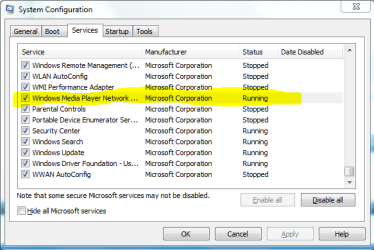
You might also want to check in msconfig and make sure the process is checked off and running. At the start/search window type "msconfig" then enter. Make sure the process is running like in the picture.
 

Attachments

  • msconfig WMP.PNG
    msconfig WMP.PNG
    14.9 KB · Views: 2
Last edited:

My Computer

Computer type
PC/Desktop
Computer Manufacturer/Model Number
Home built
OS
Windows 7 Ult, Windows 8.1 Pro,
CPU
Q9650-4.275GHz, E8600 4.5GHz, E6750-3.8GHz
Motherboard
Evga 780i FTW
Memory
G.Skill PC2 9600 1200Mhz 5 5 5 15 2T
Graphics Card(s)
GTX480
Sound Card
Asus Xonar D2
Monitor(s) Displays
HannsG
Screen Resolution
1680X1050
Hard Drives
GSkill Phoenix Pro 120GB SSD
PSU
ThermalTake Toughpower 1000Watt modular
Case
ThermalTake XaserV
Cooling
Xigmatek S1283
Keyboard
Logitech G15
Mouse
Logitech G9
Internet Speed
T1
yes I have checked MSconfig, but couldn't find the service.

I will try your suggested fix now, and thank you for the reply.
 

My Computer

OS
Windows Seven Professional 64-Bit
CPU
Intel Q6600
Motherboard
Asus P5Q3-Deluxe wifiAP@n
Memory
8GB Crucial DDR3 1333mHz
Graphics Card(s)
Nvidia 8800GT
Monitor(s) Displays
NEC FE2111SB CRT
Hard Drives
500GB Seagate
250GB Seagate
PSU
Antec 600w
Case
Antec 900 something or other ATX
Cooling
A lot of fans (9+)
I appear to be encountering an error when the "verification stage" reaches 58%

Code:
Microsoft Windows [Version 6.1.7600]
Copyright (c) 2009 Microsoft Corporation.  All rights reserved.

C:\Windows\system32>sfc/scannow

Beginning system scan.  This process will take some time.

Beginning verification phase of system scan.
Verification 58% complete.

Windows Resource Protection could not perform the requested operation.

C:\Windows\system32>sfc/scannow

Beginning system scan.  This process will take some time.

Beginning verification phase of system scan.
Verification 58% complete.

Windows Resource Protection could not perform the requested operation.

C:\Windows\system32>

I take it this is not supposed to occur?
 

My Computer

OS
Windows Seven Professional 64-Bit
CPU
Intel Q6600
Motherboard
Asus P5Q3-Deluxe wifiAP@n
Memory
8GB Crucial DDR3 1333mHz
Graphics Card(s)
Nvidia 8800GT
Monitor(s) Displays
NEC FE2111SB CRT
Hard Drives
500GB Seagate
250GB Seagate
PSU
Antec 600w
Case
Antec 900 something or other ATX
Cooling
A lot of fans (9+)

My Computer

Computer type
PC/Desktop
Computer Manufacturer/Model Number
Home built
OS
Windows 7 Ult, Windows 8.1 Pro,
CPU
Q9650-4.275GHz, E8600 4.5GHz, E6750-3.8GHz
Motherboard
Evga 780i FTW
Memory
G.Skill PC2 9600 1200Mhz 5 5 5 15 2T
Graphics Card(s)
GTX480
Sound Card
Asus Xonar D2
Monitor(s) Displays
HannsG
Screen Resolution
1680X1050
Hard Drives
GSkill Phoenix Pro 120GB SSD
PSU
ThermalTake Toughpower 1000Watt modular
Case
ThermalTake XaserV
Cooling
Xigmatek S1283
Keyboard
Logitech G15
Mouse
Logitech G9
Internet Speed
T1
I am trying to avoid that if possible, but it looks as if I may have to make use of the startup repair regardless.

Thank you anyways for the assistance.
 

My Computer

OS
Windows Seven Professional 64-Bit
CPU
Intel Q6600
Motherboard
Asus P5Q3-Deluxe wifiAP@n
Memory
8GB Crucial DDR3 1333mHz
Graphics Card(s)
Nvidia 8800GT
Monitor(s) Displays
NEC FE2111SB CRT
Hard Drives
500GB Seagate
250GB Seagate
PSU
Antec 600w
Case
Antec 900 something or other ATX
Cooling
A lot of fans (9+)
I would avoid it also but at this point the recovery options seem to be all thats left. Somehow your system files got messed up but I'm not sure how. Start up repair might fix the problem also but generally that one is used to fix problems with Windows starting.
 

My Computer

Computer type
PC/Desktop
Computer Manufacturer/Model Number
Home built
OS
Windows 7 Ult, Windows 8.1 Pro,
CPU
Q9650-4.275GHz, E8600 4.5GHz, E6750-3.8GHz
Motherboard
Evga 780i FTW
Memory
G.Skill PC2 9600 1200Mhz 5 5 5 15 2T
Graphics Card(s)
GTX480
Sound Card
Asus Xonar D2
Monitor(s) Displays
HannsG
Screen Resolution
1680X1050
Hard Drives
GSkill Phoenix Pro 120GB SSD
PSU
ThermalTake Toughpower 1000Watt modular
Case
ThermalTake XaserV
Cooling
Xigmatek S1283
Keyboard
Logitech G15
Mouse
Logitech G9
Internet Speed
T1
The only recovery images I have are from a couple of days back, which is after the problem seemed to appear. I'll browse around and try and determine the best method of recovering my core windows files, and see what I can find.
 

My Computer

OS
Windows Seven Professional 64-Bit
CPU
Intel Q6600
Motherboard
Asus P5Q3-Deluxe wifiAP@n
Memory
8GB Crucial DDR3 1333mHz
Graphics Card(s)
Nvidia 8800GT
Monitor(s) Displays
NEC FE2111SB CRT
Hard Drives
500GB Seagate
250GB Seagate
PSU
Antec 600w
Case
Antec 900 something or other ATX
Cooling
A lot of fans (9+)
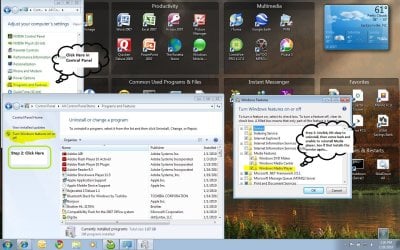
lets see if this works... try uninstalling and reinstalling the media player software
 

Attachments

  • Windows media player.JPG
    Windows media player.JPG
    222.1 KB · Views: 16

My Computer

Computer Manufacturer/Model Number
HP Pavilion Elite HPE-410f
OS
Windows 7 Ultimate x64
CPU
AMD Phenom x6 1045t
Motherboard
N/A
Memory
8 GB
Graphics Card(s)
ATI Radeon HD 5570
Sound Card
Realtek Highdefinition Audio / 5.1 Dolby Setup
Monitor(s) Displays
HP w2207h Widescreen
Screen Resolution
1680*1050
Hard Drives
1 TB (fixed), 320 Portable maxtor, Server Hard drives
PSU
350 Watt
Case
HP CASE
Cooling
Bass
Keyboard
Logitech MX 5500
Mouse
Logitech MX 5500
Internet Speed
ROAD RUNNER 16MB D/512 U
Bravo! That has indeed restored my file sharing functionality.
I am still somewhat perturbed by the fact that a variety of other windows files seem to have issues with them, but I think it may very well have something to do with system mechanics belief that there were 22000 invalid registry keys on my machine.

Anyways, thanks to all who offered their assistance, it was much appreciated
 

My Computer

OS
Windows Seven Professional 64-Bit
CPU
Intel Q6600
Motherboard
Asus P5Q3-Deluxe wifiAP@n
Memory
8GB Crucial DDR3 1333mHz
Graphics Card(s)
Nvidia 8800GT
Monitor(s) Displays
NEC FE2111SB CRT
Hard Drives
500GB Seagate
250GB Seagate
PSU
Antec 600w
Case
Antec 900 something or other ATX
Cooling
A lot of fans (9+)
yeah you really have to be careful about deliting anything int he registry... people don't realize that even thought it may fix some problems, it will cause others... just as yours

but i am very glad that everythingis working normal now.
 

My Computer

Computer Manufacturer/Model Number
HP Pavilion Elite HPE-410f
OS
Windows 7 Ultimate x64
CPU
AMD Phenom x6 1045t
Motherboard
N/A
Memory
8 GB
Graphics Card(s)
ATI Radeon HD 5570
Sound Card
Realtek Highdefinition Audio / 5.1 Dolby Setup
Monitor(s) Displays
HP w2207h Widescreen
Screen Resolution
1680*1050
Hard Drives
1 TB (fixed), 320 Portable maxtor, Server Hard drives
PSU
350 Watt
Case
HP CASE
Cooling
Bass
Keyboard
Logitech MX 5500
Mouse
Logitech MX 5500
Internet Speed
ROAD RUNNER 16MB D/512 U
Yeah I have no idea what compelled me to delete 22k keys, but for some reason I did it anyways. :S

Now of course SM runs into an error about halfway through the restore, which doesn't surprise me one bit. From now on I'll just stick to tune-up.
 

My Computer

OS
Windows Seven Professional 64-Bit
CPU
Intel Q6600
Motherboard
Asus P5Q3-Deluxe wifiAP@n
Memory
8GB Crucial DDR3 1333mHz
Graphics Card(s)
Nvidia 8800GT
Monitor(s) Displays
NEC FE2111SB CRT
Hard Drives
500GB Seagate
250GB Seagate
PSU
Antec 600w
Case
Antec 900 something or other ATX
Cooling
A lot of fans (9+)
You were delating registry keys Oh no. I didn't know that. I wonder if it will actually complete the sfc/scannow command.
 

My Computer

Computer type
PC/Desktop
Computer Manufacturer/Model Number
Home built
OS
Windows 7 Ult, Windows 8.1 Pro,
CPU
Q9650-4.275GHz, E8600 4.5GHz, E6750-3.8GHz
Motherboard
Evga 780i FTW
Memory
G.Skill PC2 9600 1200Mhz 5 5 5 15 2T
Graphics Card(s)
GTX480
Sound Card
Asus Xonar D2
Monitor(s) Displays
HannsG
Screen Resolution
1680X1050
Hard Drives
GSkill Phoenix Pro 120GB SSD
PSU
ThermalTake Toughpower 1000Watt modular
Case
ThermalTake XaserV
Cooling
Xigmatek S1283
Keyboard
Logitech G15
Mouse
Logitech G9
Internet Speed
T1
I know that this sounds like beating a dead horse, but i recommend you that if the program that deleted the registry keys actually made a back up of the registry that you roll it back, i am sure that later on that this won't be your only problem.


if anything don't touch the keys unless yo check one by one and specify, don't trust a program to know what its doing... remember its as only as smart as the ne who programmed it. That programmer does not know what you have on your computer, it is only assumed.

and what does Assume stand for "Make an ASS out of U and ME"

you will just cause alot of issues with your system and if you try to get customer service on it, all they are goign to do is tell you to roll back your registry or reinstall your windows from skratch
 

My Computer

Computer Manufacturer/Model Number
HP Pavilion Elite HPE-410f
OS
Windows 7 Ultimate x64
CPU
AMD Phenom x6 1045t
Motherboard
N/A
Memory
8 GB
Graphics Card(s)
ATI Radeon HD 5570
Sound Card
Realtek Highdefinition Audio / 5.1 Dolby Setup
Monitor(s) Displays
HP w2207h Widescreen
Screen Resolution
1680*1050
Hard Drives
1 TB (fixed), 320 Portable maxtor, Server Hard drives
PSU
350 Watt
Case
HP CASE
Cooling
Bass
Keyboard
Logitech MX 5500
Mouse
Logitech MX 5500
Internet Speed
ROAD RUNNER 16MB D/512 U
yeah, system mechanics now giving me memory errors at about 98% completion on the "rollback" thing, so I'm busy trying to work around that. Funny thing is its using 168k of ram when I've got 8 gb available not counting the swap file.
 

My Computer

OS
Windows Seven Professional 64-Bit
CPU
Intel Q6600
Motherboard
Asus P5Q3-Deluxe wifiAP@n
Memory
8GB Crucial DDR3 1333mHz
Graphics Card(s)
Nvidia 8800GT
Monitor(s) Displays
NEC FE2111SB CRT
Hard Drives
500GB Seagate
250GB Seagate
PSU
Antec 600w
Case
Antec 900 something or other ATX
Cooling
A lot of fans (9+)
You were delating registry keys Oh no. I didn't know that. I wonder if it will actually complete the sfc/scannow command.

It is certainly getting farther with the "verification stage" now that I restored at least some of the reg keys sysmech deleted, hopefully the entire process completes though.

Exactly what does this command do, out of curiosity?
 

My Computer

OS
Windows Seven Professional 64-Bit
CPU
Intel Q6600
Motherboard
Asus P5Q3-Deluxe wifiAP@n
Memory
8GB Crucial DDR3 1333mHz
Graphics Card(s)
Nvidia 8800GT
Monitor(s) Displays
NEC FE2111SB CRT
Hard Drives
500GB Seagate
250GB Seagate
PSU
Antec 600w
Case
Antec 900 something or other ATX
Cooling
A lot of fans (9+)
You were delating registry keys Oh no. I didn't know that. I wonder if it will actually complete the sfc/scannow command.

It is certainly getting farther with the "verification stage" now that I restored at least some of the reg keys sysmech deleted, hopefully the entire process completes though.

Exactly what does this command do, out of curiosity?


You mean the verification stage?
 

My Computer

Computer Manufacturer/Model Number
HP Pavilion Elite HPE-410f
OS
Windows 7 Ultimate x64
CPU
AMD Phenom x6 1045t
Motherboard
N/A
Memory
8 GB
Graphics Card(s)
ATI Radeon HD 5570
Sound Card
Realtek Highdefinition Audio / 5.1 Dolby Setup
Monitor(s) Displays
HP w2207h Widescreen
Screen Resolution
1680*1050
Hard Drives
1 TB (fixed), 320 Portable maxtor, Server Hard drives
PSU
350 Watt
Case
HP CASE
Cooling
Bass
Keyboard
Logitech MX 5500
Mouse
Logitech MX 5500
Internet Speed
ROAD RUNNER 16MB D/512 U
Nevermind, it just completed.
Based on the final message I assume that it checks for "integrity violations" within your windows files, correct?
 

My Computer

OS
Windows Seven Professional 64-Bit
CPU
Intel Q6600
Motherboard
Asus P5Q3-Deluxe wifiAP@n
Memory
8GB Crucial DDR3 1333mHz
Graphics Card(s)
Nvidia 8800GT
Monitor(s) Displays
NEC FE2111SB CRT
Hard Drives
500GB Seagate
250GB Seagate
PSU
Antec 600w
Case
Antec 900 something or other ATX
Cooling
A lot of fans (9+)
Back
Top