WMP Sharing not functional

Nevermind, it just completed.
Based on the final message I assume that it checks for "integrity violations" within your windows files, correct?

yeah tht is what it does... alright once it restores the keys, the best thing to do is restart the computer, make sure you dont get any errors on boot up.

thats the next thing
 

My Computer

Computer Manufacturer/Model Number
HP Pavilion Elite HPE-410f
OS
Windows 7 Ultimate x64
CPU
AMD Phenom x6 1045t
Motherboard
N/A
Memory
8 GB
Graphics Card(s)
ATI Radeon HD 5570
Sound Card
Realtek Highdefinition Audio / 5.1 Dolby Setup
Monitor(s) Displays
HP w2207h Widescreen
Screen Resolution
1680*1050
Hard Drives
1 TB (fixed), 320 Portable maxtor, Server Hard drives
PSU
350 Watt
Case
HP CASE
Cooling
Bass
Keyboard
Logitech MX 5500
Mouse
Logitech MX 5500
Internet Speed
ROAD RUNNER 16MB D/512 U
You were delating registry keys Oh no. I didn't know that. I wonder if it will actually complete the sfc/scannow command.

It is certainly getting farther with the "verification stage" now that I restored at least some of the reg keys sysmech deleted, hopefully the entire process completes though.

Exactly what does this command do, out of curiosity?

It only fixes or replaces lost or missing system files but it can't fix registry problems like you have now. Once the registry is restored it will hopefully be able to complete the scan. If I had known you used a registry cleaner I would have had you restore the registry with the back up file first thing.
 

My Computer

Computer type
PC/Desktop
Computer Manufacturer/Model Number
Home built
OS
Windows 7 Ult, Windows 8.1 Pro,
CPU
Q9650-4.275GHz, E8600 4.5GHz, E6750-3.8GHz
Motherboard
Evga 780i FTW
Memory
G.Skill PC2 9600 1200Mhz 5 5 5 15 2T
Graphics Card(s)
GTX480
Sound Card
Asus Xonar D2
Monitor(s) Displays
HannsG
Screen Resolution
1680X1050
Hard Drives
GSkill Phoenix Pro 120GB SSD
PSU
ThermalTake Toughpower 1000Watt modular
Case
ThermalTake XaserV
Cooling
Xigmatek S1283
Keyboard
Logitech G15
Mouse
Logitech G9
Internet Speed
T1
Ok thanks everybody, will perform a reboot now.
 

My Computer

OS
Windows Seven Professional 64-Bit
CPU
Intel Q6600
Motherboard
Asus P5Q3-Deluxe wifiAP@n
Memory
8GB Crucial DDR3 1333mHz
Graphics Card(s)
Nvidia 8800GT
Monitor(s) Displays
NEC FE2111SB CRT
Hard Drives
500GB Seagate
250GB Seagate
PSU
Antec 600w
Case
Antec 900 something or other ATX
Cooling
A lot of fans (9+)
Successful reboot, no errors whatsoever. It appears things are back to normal.

Thanks again everyone.
 

My Computer

OS
Windows Seven Professional 64-Bit
CPU
Intel Q6600
Motherboard
Asus P5Q3-Deluxe wifiAP@n
Memory
8GB Crucial DDR3 1333mHz
Graphics Card(s)
Nvidia 8800GT
Monitor(s) Displays
NEC FE2111SB CRT
Hard Drives
500GB Seagate
250GB Seagate
PSU
Antec 600w
Case
Antec 900 something or other ATX
Cooling
A lot of fans (9+)
Yeah...
when it comes to those programs that is suppose to optimize your computer

Just stick with the basics.. like

Clear the temp files, optimize the memory....
never touch those registry items unless you are very sure of wht your doing..
and do it manually

another thing that will speed the computer up is shutting services and start ups for your computer.

Umm and doing a defrag on your drive will especially help , it will consolidate all your files to the front of the drive so your access time for the hard drive to read the files are alot faster.
 

My Computer

Computer Manufacturer/Model Number
HP Pavilion Elite HPE-410f
OS
Windows 7 Ultimate x64
CPU
AMD Phenom x6 1045t
Motherboard
N/A
Memory
8 GB
Graphics Card(s)
ATI Radeon HD 5570
Sound Card
Realtek Highdefinition Audio / 5.1 Dolby Setup
Monitor(s) Displays
HP w2207h Widescreen
Screen Resolution
1680*1050
Hard Drives
1 TB (fixed), 320 Portable maxtor, Server Hard drives
PSU
350 Watt
Case
HP CASE
Cooling
Bass
Keyboard
Logitech MX 5500
Mouse
Logitech MX 5500
Internet Speed
ROAD RUNNER 16MB D/512 U
Those registry back ups come in handy. I gave acurasd plenty of Rep. ;)
 

My Computer

Computer type
PC/Desktop
Computer Manufacturer/Model Number
Home built
OS
Windows 7 Ult, Windows 8.1 Pro,
CPU
Q9650-4.275GHz, E8600 4.5GHz, E6750-3.8GHz
Motherboard
Evga 780i FTW
Memory
G.Skill PC2 9600 1200Mhz 5 5 5 15 2T
Graphics Card(s)
GTX480
Sound Card
Asus Xonar D2
Monitor(s) Displays
HannsG
Screen Resolution
1680X1050
Hard Drives
GSkill Phoenix Pro 120GB SSD
PSU
ThermalTake Toughpower 1000Watt modular
Case
ThermalTake XaserV
Cooling
Xigmatek S1283
Keyboard
Logitech G15
Mouse
Logitech G9
Internet Speed
T1
What people dont understand is that you can have alot of crap on the hard drive compared to someone with little crap on the hard drive ands till have it run the same as long as your services are running the same and you define the MBR/NTSF where the important files are stored and most common used files so it does not try to send that needle all over the hard drive trying to find your system files. That is something I enjoyed about Symantec System Utilities. It will find the most commonly used files and your main system fies and force it to the beginning of the drive. Then the rest of the drive can be used for storage.

The hard drive is what is used for storage but what really affects your computer is how fast your hard drive accesses those files and how much junk is loaded into your RAM..
 

My Computer

Computer Manufacturer/Model Number
HP Pavilion Elite HPE-410f
OS
Windows 7 Ultimate x64
CPU
AMD Phenom x6 1045t
Motherboard
N/A
Memory
8 GB
Graphics Card(s)
ATI Radeon HD 5570
Sound Card
Realtek Highdefinition Audio / 5.1 Dolby Setup
Monitor(s) Displays
HP w2207h Widescreen
Screen Resolution
1680*1050
Hard Drives
1 TB (fixed), 320 Portable maxtor, Server Hard drives
PSU
350 Watt
Case
HP CASE
Cooling
Bass
Keyboard
Logitech MX 5500
Mouse
Logitech MX 5500
Internet Speed
ROAD RUNNER 16MB D/512 U
Aye, I already manually optimized various boot services and whatnot, but from now on I'll think I shall avoid any major reg changes unless I really know what it is I'm changing. With any luck I might pick up a SSD in a month or two and wont even have to worry about access times and file location, but in the meantime I'll have to keep things optimized.
 

My Computer

OS
Windows Seven Professional 64-Bit
CPU
Intel Q6600
Motherboard
Asus P5Q3-Deluxe wifiAP@n
Memory
8GB Crucial DDR3 1333mHz
Graphics Card(s)
Nvidia 8800GT
Monitor(s) Displays
NEC FE2111SB CRT
Hard Drives
500GB Seagate
250GB Seagate
PSU
Antec 600w
Case
Antec 900 something or other ATX
Cooling
A lot of fans (9+)
Aye, I already manually optimized various boot services and whatnot, but from now on I'll think I shall avoid any major reg changes unless I really know what it is I'm changing. With any luck I might pick up a SSD in a month or two and wont even have to worry about access times and file location, but in the meantime I'll have to keep things optimized.


with 8 gigs of RAM you shoudln't have any problems.

Here is another things i can suggest.....

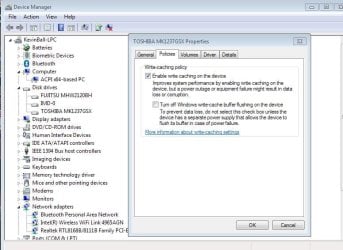
You could go here an if you have a desktop or a dedicated laptop that stays at home... then you coudl always check this to see if you have a little bit more of performance...

another thing that you can do is update your chipset drivers as well...
 

Attachments

  • Device Manager.JPG
    Device Manager.JPG
    68.7 KB · Views: 6

My Computer

Computer Manufacturer/Model Number
HP Pavilion Elite HPE-410f
OS
Windows 7 Ultimate x64
CPU
AMD Phenom x6 1045t
Motherboard
N/A
Memory
8 GB
Graphics Card(s)
ATI Radeon HD 5570
Sound Card
Realtek Highdefinition Audio / 5.1 Dolby Setup
Monitor(s) Displays
HP w2207h Widescreen
Screen Resolution
1680*1050
Hard Drives
1 TB (fixed), 320 Portable maxtor, Server Hard drives
PSU
350 Watt
Case
HP CASE
Cooling
Bass
Keyboard
Logitech MX 5500
Mouse
Logitech MX 5500
Internet Speed
ROAD RUNNER 16MB D/512 U
Thanks, I will be sure to check that.
And I always try and keep my chipset and various drivers up to date, no worries there.

*EDIT*
It appears write caching is already enabled on both my HDD's, so no need to adjust it.
 

My Computer

OS
Windows Seven Professional 64-Bit
CPU
Intel Q6600
Motherboard
Asus P5Q3-Deluxe wifiAP@n
Memory
8GB Crucial DDR3 1333mHz
Graphics Card(s)
Nvidia 8800GT
Monitor(s) Displays
NEC FE2111SB CRT
Hard Drives
500GB Seagate
250GB Seagate
PSU
Antec 600w
Case
Antec 900 something or other ATX
Cooling
A lot of fans (9+)
Back
Top