WMP still shows deleted files

DxxS

New member
Power User
Local time
4:05 PM
Messages
112
I had some tracks in WMP, i re-ripped the tracks at a higher bit rate and deleted the original files from their containing folder, WMP added the new files and still shows the old ones, i tried playing them and recieved an error(i guessed this would happen) then i right clicked, delete and nothing happens, so, i restored the files from the recycle bin and WMP just added them again so i now have the tracks listed 3 times?

Any assistance would be fantastic, i even tried clearing out my whole library but the tracks stayed there.

Cheers,

DxxS.
 

My Computer My Computer

OS
Windows 7 Ultimate 64-bit
CPU
Intel Core 2 Duo E8400 3GHz
Motherboard
ASUS P5Q PRO Turbo
Memory
OCZ Gold DDR2 1066MHz/PC2-8500 8GB (4x2GB)
Graphics Card(s)
BFG GTS250 OC 1GB GDDR3
Monitor(s) Displays
Dual (x2) Samsung SM2033SW 20"TFT
Hard Drives
120GB OCZ Agility 3 SSD (OS Drive)
350GB - Internal (Storage)
500GB - Internal (Storage)
1TB - Internal (Storage)
500GB - External (Storage)
PSU
OCZ Stealth XStream 700W PSU
Case
Casecom KB-5510 Black/Silver Blue LED Mid Tower Case
Cooling
Zalman CNPS7500-ALCU LED
Just a quick question: did you close WMP at all during this process? Perhaps all it needed was a hard refresh.
 

My Computer My Computer

Computer Manufacturer/Model Number
Custom
OS
Windows 7 Professional x64
CPU
Intel i7 2600K OC'd @ 4620 MHz
Motherboard
Asus P8Z68-V Pro
Memory
16GB GSkill Sniper 2133 Mhz (4x4GB)
Graphics Card(s)
EVGA GeForce GTX 480 SuperClocked+
Sound Card
Realtek High Definition Audio
Monitor(s) Displays
2x Acer S273HLbmii 27"
Screen Resolution
2 x 1920x1080
Hard Drives
64GB Crucial M4 SSD

Storage: Hitachi 1TB 5400RPM, Samsung 1.5TB 5400RPM
PSU
Corsair HW Series 750w (modular)
Case
Cooler Master HAF 932 Advanced Blue Edition
Cooling
CM Hyper 212+ CPU cooler, 3x 230mm + 1x 140mm case fans
Keyboard
Logitech MK320 (wireless)
Mouse
Logitech MK320 (wireless)
Internet Speed
30 Mb/s : 2 Mb/s

My Computer My Computer

Computer type
PC/Desktop
Computer Manufacturer/Model Number
Self Built
OS
Win 10 Pro x64
CPU
Intel I5-2500K @3.3GHz
Motherboard
Asrock P67 Extreme4
Memory
16GB G.Skill Ripjaws X (4x4GB)
Graphics Card(s)
EVGA GeForce 750 Ti SC 2GB
Sound Card
ASUS Xonar DG 5.1 Channels 24-bit 96KHz PCI Interface Sound
Monitor(s) Displays
auria eq2367
Screen Resolution
1920 x 1080
Hard Drives
250GB Samsung 850 EVO SSD
1TB WD Blue
1TB Hitachi
PSU
SeaSonic X 650W 80 Plus Gold
Case
Corsair Obsidian 750D
Cooling
Corsair H60, Three 140mm case fans
Keyboard
Logitech Wireless Keyboard K520
Mouse
Logitech Wireless Mouse M310
Internet Speed
Wave Broadband ~ 100 dn 5 up
Antivirus
Windows Defender, Malwarebytes Premium
Browser
Edge, IE11, Chrome
Other Info
Laptop specs: HP g7-1365dx /
CPU: AMD A6-3420M APU with Radeon(tm) HD Graphics /
RAM: Crucial 8Gb (2x4Gb) /
SSD: Crucial M4-CT128M4SSD2 ATA Device/ FW 000F /
GFX: AMD Radeon HD 6520G /
OS: Windows 10 Pro x64
I had some tracks in WMP, i re-ripped the tracks at a higher bit rate and deleted the original files from their containing folder, WMP added the new files and still shows the old ones, i tried playing them and recieved an error(i guessed this would happen) then i right clicked, delete and nothing happens, so, i restored the files from the recycle bin and WMP just added them again so i now have the tracks listed 3 times?

Any assistance would be fantastic, i even tried clearing out my whole library but the tracks stayed there.

Cheers,

DxxS.
What I did to clear the WMP library......
First, copied the music folder onto my external HDD.
Second, selected all in the folder and hit delete.
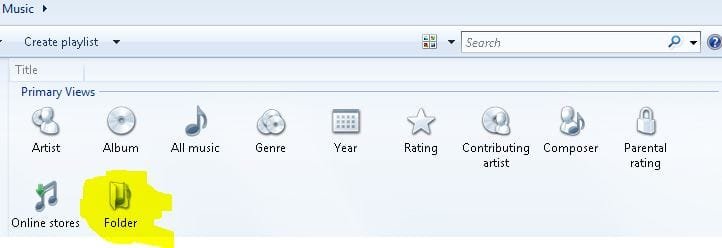
Third....opened up WMP, opened it to where you see the attachment. I double-clicked the highlighted "folders", and deleleted each one. Then I closed WMP, and when I bring it back up now, the library is clear.

After all this, I transferred my tunes back into the internal drive, but I am not using WMP for music. I do think it is getting better, and it's what I use for watching DVD's, but I am sticking with my old standby MediaMonkey for my music, combined with Exact Audio Copy for ripping.

Hopefully this helped you out! :geek:
 

Attachments

  • Capture.JPG
    Capture.JPG
    22.6 KB · Views: 29

My Computer My Computer

Computer type
PC/Desktop
Computer Manufacturer/Model Number
Gigabyte Technology Co., Ltd.
OS
Win 7 Ultimate 64-bit SP1 (desktop)
CPU
Intel Core 2 Duo E8400
Motherboard
Gigabyte GA-EP35-DS3R
Memory
2x 2GB OCZ DDR II SDRAM PC2-6400
Graphics Card(s)
NVIDIA GeForce 9400GT
Monitor(s) Displays
HP 2009m(primary), Acer P191W
Screen Resolution
1600x900, 1440x900
Hard Drives
Internal:WD Caviar Black 640GB 32MB cache 7200RPM
External:Samsung Story Station 1TB HDD desktop drive
500GB Toshiba portable drive
PSU
Antec Earthwatts EA500D
Case
Antec Sonata III
Cooling
4 fans
Keyboard
Logitech Wave
Mouse
Logitech M-SBF90
Internet Speed
Slow due to home Wireless-G router
Antivirus
MSE, Hitman Pro, Malwarebytes
Browser
Chrome and Palemoon
Other Info
Laptop....Acer 5750Z-4835
15.6" HD Widescreen CineCrystal™ LED-backlit LCD Display: (1366x768 resolution, 16:9 aspect ratio)
Intel® Pentium® Processor B940 (2.0GHz, 2MB L3 cache)
Windows® 7 Home Premium,500GB Hard Drive,4GB DDR3 RAM, Intel® HD Graphics,8X DVD-Super Multi Double-Layer Drive
Multi-in-1 Digital Media Card Reader,802.11b/g/n Wi-Fi
Chrome and Palemoon, MSE, Hitman Pro
Delete the files from the folder you no longer want.

then (If you still have invalid refrences of them in the library, a work around that works)

right click the top bar of WMP, just to left of the PLAY/BURN/Sync tabs ..

youll get a menu:

Choose Tools/ Advanced/ Restore Media library


This will complete empty all references (including invalid and valid ones) and empty the library completly.

it does NOT delete any valid files. Simply empties the library, and erases all references to files.

When you restart WMP it will rebuild the library from scratch, as if a first launch.

The invalid entries will be gone, and only good ones shown again.

hope this helps.


Easiest way I have found to get rid of sample Media is delete the source.
by default: C:/Users/Public ... and delete the sample media from each folder -- ((Music,Videos,Recorded TV,Pictures))

And yes, I agree ...
Media Monkey is pretty sweet once you get it all tweaked to your preferences :)
 
Last edited:

My Computer My Computer

Computer Manufacturer/Model Number
Custom (Self Build)
OS
Windows 7 Home Premium 64bit
CPU
Intel Core i7 2700k
Motherboard
eVGA P67 SLI
Memory
8GB Mushkin Redline Ridgebacks @1866
Graphics Card(s)
EVGA GTX570 SC
Sound Card
XiFi Titanium HD
Monitor(s) Displays
LG W2453V
Screen Resolution
1920x1080
Hard Drives
Intel 320 80GB -- Intel X25-V 40GB --WD Black 1TB x2 -- WD Blue 640GB
PSU
Seasonic x750
Case
Corsair 600T SE White
Cooling
eVGA Superclocked CPU Cooler
Keyboard
Saitek Cyborg
Antivirus
Kaspersky
Browser
IE
Other Info
LG BD/DVD
Choose Tools/ Advanced/ Restore Media library

This method does not work in all cases. What works is:

1. go to C:\Users\your name\AppData\Local\Microsoft
2. there you rename the folder Media Player into Media Player.old
3. restart WMP. It will recreate all entries correctly provided you have proper Music folders
4. If it worked (and it should), you can delete the Media Player.old folder
 
Last edited:

My Computer My Computer

Computer Manufacturer/Model Number
HP, Dell, Gateway, Toshiba - 4 laptops and 2 desktops
OS
Vista, Windows7, Mint Mate, Zorin, Windows 8
CPU
from 1.6GHz Duo to i7
Monitor(s) Displays
2x HP w2207
Hard Drives
5x HDD, 7x SSD, 12x Externals
Keyboard
with trackball - no mices
Mouse
Trackball mice
Internet Speed
DSL 6000
try to resync you're music folders in the library menu... and what I mean by that is.

wmp11.jpg

remove then readd the folders. that should sync the music files.
 

My Computer My Computer

OS
Windows 7 32bit RTM
Delete the files from the folder you no longer want.

then (If you still have invalid refrences of them in the library, a work around that works)

right click the top bar of WMP, just to left of the PLAY/BURN/Sync tabs ..

youll get a menu:

Choose Tools/ Advanced/ Restore Media library


This will complete empty all references (including invalid and valid ones) and empty the library completly.

it does NOT delete any valid files. Simply empties the library, and erases all references to files.

When you restart WMP it will rebuild the library from scratch, as if a first launch.
The invalid entries will be gone, and only good ones shown again.

Thanks Wishmaster, worked a treat.
 

My Computer My Computer

OS
Windows 7 Ultimate 64-bit
CPU
Intel Core 2 Duo E8400 3GHz
Motherboard
ASUS P5Q PRO Turbo
Memory
OCZ Gold DDR2 1066MHz/PC2-8500 8GB (4x2GB)
Graphics Card(s)
BFG GTS250 OC 1GB GDDR3
Monitor(s) Displays
Dual (x2) Samsung SM2033SW 20"TFT
Hard Drives
120GB OCZ Agility 3 SSD (OS Drive)
350GB - Internal (Storage)
500GB - Internal (Storage)
1TB - Internal (Storage)
500GB - External (Storage)
PSU
OCZ Stealth XStream 700W PSU
Case
Casecom KB-5510 Black/Silver Blue LED Mid Tower Case
Cooling
Zalman CNPS7500-ALCU LED
In the future, make sure you remove the files from the WMP library FIRST, then re-rip them, delete, move etc. and you won't have these problems again... sheesh
 

My Computer My Computer

Computer type
Laptop
Computer Manufacturer/Model Number
Custom
OS
Windows 7 Home Premium x64
CPU
Intel Core i5 2500K
Motherboard
MSI MS-7750
Memory
8GB DDR3
Graphics Card(s)
nVidia GeForce GTX650 Ti BOOST
Sound Card
Realtek
Monitor(s) Displays
21' Philips
Screen Resolution
Full HD
Hard Drives
1TB
PSU
500W
Remember that Library's are only pointers to the actual files which are contained in your user files or public files. If you want to delate files from the library you need to go into the original file location and delate them. After that you will only see an empty folder left over in the Library which you can then delate. Delating the actual files from the Library isn't the correct way of doing it.
 

My Computer My Computer

Computer type
PC/Desktop
Computer Manufacturer/Model Number
Home built
OS
Windows 7 Ult, Windows 8.1 Pro,
CPU
Q9650-4.275GHz, E8600 4.5GHz, E6750-3.8GHz
Motherboard
Evga 780i FTW
Memory
G.Skill PC2 9600 1200Mhz 5 5 5 15 2T
Graphics Card(s)
GTX480
Sound Card
Asus Xonar D2
Monitor(s) Displays
HannsG
Screen Resolution
1680X1050
Hard Drives
GSkill Phoenix Pro 120GB SSD
PSU
ThermalTake Toughpower 1000Watt modular
Case
ThermalTake XaserV
Cooling
Xigmatek S1283
Keyboard
Logitech G15
Mouse
Logitech G9
Internet Speed
T1
chev65, the strange thing is that I had double and triple entries in WMP, but only single entries in the Music files. I have no clue how it got to that. In that case, I applied the method posted above and that fixed it.
 

My Computer My Computer

Computer Manufacturer/Model Number
HP, Dell, Gateway, Toshiba - 4 laptops and 2 desktops
OS
Vista, Windows7, Mint Mate, Zorin, Windows 8
CPU
from 1.6GHz Duo to i7
Monitor(s) Displays
2x HP w2207
Hard Drives
5x HDD, 7x SSD, 12x Externals
Keyboard
with trackball - no mices
Mouse
Trackball mice
Internet Speed
DSL 6000
Scott_AA

whs has the best fix for those who renamed or deleted from the source folder before removing the files from the WMP video or music library, in fact it is the only sure fire fix.

1. go to C:\Users\your name\AppData\Local\Microsoft
2. there you rename the folder Media Player into Media Player.old
3. restart WMP. It will recreate all entries correctly provided you have proper Music folders
4. If it worked (and it should), you can delete the Media Player.old folder

All credit to whs.
 

My Computer My Computer

OS
Windows 7
salchin1, Thanks for reminding me how smart I must have been nearly a year ago. I forgot all about it. I think I am going downhill - lol.
 

My Computer My Computer

Computer Manufacturer/Model Number
HP, Dell, Gateway, Toshiba - 4 laptops and 2 desktops
OS
Vista, Windows7, Mint Mate, Zorin, Windows 8
CPU
from 1.6GHz Duo to i7
Monitor(s) Displays
2x HP w2207
Hard Drives
5x HDD, 7x SSD, 12x Externals
Keyboard
with trackball - no mices
Mouse
Trackball mice
Internet Speed
DSL 6000
No thank you. It was playing hell on my X-Box and the kids were at me to 'fix it'. It's a simple fix and works a treat.
 

My Computer My Computer

OS
Windows 7
Back
Top