wmpnetwk.exe still causing problems

trevolution11

New member
Local time
8:32 PM
Messages
17
Location
Japan
I set up a connection with windows media center and my xbox 360 on the same network. I saw that it was hogging my system resources so i cut the connection and stopped the process. but microsoft has other plans. no matter how many times i stop the executable file wmpnetwk, it keeps coming back and starting automatically. my cpu is running at like 35% and my 8GB of ram at 50% just from this stupid file. I've stopped the process through resource monitor and through MSCONFIG but yet again it is still there. Can someone please help me out? Thanks

wmpnetwk.jpg
 

My Computer

OS
Windows 7 Ultimate x64
CPU
Intel Core i5 2500k OC'd @4.0GHz
Motherboard
Biostar TZ68a+
Memory
16 GB G.SKILL Ripjaws F3-12800CL9Q-16GBRL
Graphics Card(s)
EVGA NVIDIA GeForce GTX 670
Monitor(s) Displays
Samsung P2770FH 27" Widescreen LCD Monitor
Screen Resolution
1920x1080
Hard Drives
Samsung SSD 830 Series 128GB /
Seagate 750GB @7200.0 rpm /
Samsung SP1213C 120GB
PSU
Corsair Enthusiast Series 750TX V2
Case
Apevia X-Jupiter S-Type
Cooling
CoolerMaster Hyper 101i CPU cooler
Keyboard
Logitech 920-000914R Illuminated Keyboard
Mouse
Logitech MX Performance
Internet Speed
15 Mb/s
I set up a connection with windows media center and my xbox 360 on the same network. I saw that it was hogging my system resources so i cut the connection and stopped the process. but microsoft has other plans. no matter how many times i stop the executable file wmpnetwk, it keeps coming back and starting automatically. my cpu is running at like 35% and my 8GB of ram at 50% just from this stupid file. I've stopped the process through resource monitor and through MSCONFIG but yet again it is still there. Can someone please help me out? Thanks

wmpnetwk.jpg

Hi and welcome

type services.msc in search>goto the servie>right click>disable>gone

If it gives you grief. Do the same from a safe boot (F8)

Ken J+
 

My Computer

Computer Manufacturer/Model Number
HP Pavillion dv-7 1005 Tx
OS
Win 8 Release candidate 8400
CPU
[email protected]
Memory
4 gigs
Graphics Card(s)
Nvidia 9600M
Sound Card
HD built-in
Monitor(s) Displays
17" Wxga
Screen Resolution
1440x900
Cooling
none
Internet Speed
45Mb down 5Mb up
Ok I just did that. Thank you. I'll let my computer run Idle for awhile and see if wmpnetwk decides to start up again
 

My Computer

OS
Windows 7 Ultimate x64
CPU
Intel Core i5 2500k OC'd @4.0GHz
Motherboard
Biostar TZ68a+
Memory
16 GB G.SKILL Ripjaws F3-12800CL9Q-16GBRL
Graphics Card(s)
EVGA NVIDIA GeForce GTX 670
Monitor(s) Displays
Samsung P2770FH 27" Widescreen LCD Monitor
Screen Resolution
1920x1080
Hard Drives
Samsung SSD 830 Series 128GB /
Seagate 750GB @7200.0 rpm /
Samsung SP1213C 120GB
PSU
Corsair Enthusiast Series 750TX V2
Case
Apevia X-Jupiter S-Type
Cooling
CoolerMaster Hyper 101i CPU cooler
Keyboard
Logitech 920-000914R Illuminated Keyboard
Mouse
Logitech MX Performance
Internet Speed
15 Mb/s
Wmpnetwk caused a lot of problems for me too. Disabling the service certainly fixed it for me.
 

My Computer

Computer type
PC/Desktop
Computer Manufacturer/Model Number
Custom Built
OS
Windows 8.1 Pro x64
CPU
Intel Core i7 4790k
Motherboard
MSI Z97S Krait Edition
Memory
8GB Corsair Dominator 1600MHz
Graphics Card(s)
MSI TwinFrozr GeForce GTX770
Sound Card
ASUS Xonar DX/XD 7.1
Monitor(s) Displays
Dell 24" S2409W + Dell 20" E207WFP
Screen Resolution
1920x1080 + 1680x1050
Hard Drives
1x 120GB OCZ Agility 3, 1x 750GB Western Digital Caviar Black, 1x 1TB Western Digital Caviar Blue
PSU
Corsair HX850 modular
Case
Fractal Design Define R4
Cooling
Corsair H60 w/ twin Corsair SP120 fans
Keyboard
Logitech G510S Keyboard
Mouse
Logitech G500S Laser Mouse
Internet Speed
40Mbps
Antivirus
Microsoft Security Essentials
Browser
Google Chrome
Other Info
LG Blu-Ray player
It has a way to turn itself back on. I run a batch file to kill its ability to restart itself on all installs that don't need network WMP streaming.

Since the link is down I dug it out of my archive to upload here. Be sure to rightclick to Run as Admin:
 

Attachments

Last edited:
guide seems wrong, I have no library menu in my wmp. Wmp 12 seems to have no option to disable sharing, however I have killed the service and set it to disabled.

in addition the registry entries mentioned dont exist, is this for an older version of wmp?
 

My Computer

Computer type
PC/Desktop
Computer Manufacturer/Model Number
home built
OS
windows 8.1 Pro x64
CPU
intel i5 4670k @ 4.3ghz
Motherboard
asus z87-plus
Memory
16 gig ram ddr3 @ 1600 corsair vengeance
Graphics Card(s)
evga 970 GTX 4 GIG FTW ACX 2.0
Sound Card
asus xonar D2X
Monitor(s) Displays
benq gw2765ht
Screen Resolution
2560x1440
Hard Drives
Samsung 850 pro SSD 512gig - boot device wooosh
WD black cavalier 640gig WD6401AALS
Seagate 500gig ST3500630AS
WD 2TB Green WDC20EARS
2 x WD Red 3TB WD30EFRX
Samsung 750gig HD753LG - on asmedia controller
PSU
coolermaster silent pro 600watt modular
Case
fractal define R4
Cooling
artic freezer i30, 3 case fans
Keyboard
microsoft business ps2 keyboard
Mouse
microsoft optical black mouse
Internet Speed
80/20 FTTC SkyBB
Antivirus
Nod32 AV v8, HitmanProAlert, SRP, System Hardening
Browser
Chrome x64
Other Info
Intel controller is in AHCI mode currently using IaSTOR 12.8.0.1016 drivers
i just uninstalled windows media player :P
 

My Computer

Computer Manufacturer/Model Number
MSI GT683DXR-427US
OS
Windows 7 Professional
CPU
Intel i7-2630QM
Memory
16GB DDR3
Graphics Card(s)
Nvidia GTX 570M overclocked
Monitor(s) Displays
15.6" HD LCD
Screen Resolution
1920X1080
Hard Drives
60GB OCZ Vertez II SSD
500 GB WD 7200RPM
Mouse
Logitech Anywhere MX
guide seems wrong, I have no library menu in my wmp. Wmp 12 seems to have no option to disable sharing, however I have killed the service and set it to disabled.

in addition the registry entries mentioned dont exist, is this for an older version of wmp?

Yes, should have mentioned I only use the guide for the batch file that turns off the service and stops it from turning itself back on. Never bothered with the first step because I knew it wouldnt' stay off anway without running the bat

How to disable wmpnscfg.exe and wmpnetwk.exe. | Dotnetwizard.net | MyDNW.com

i just uninstalled windows media player :P

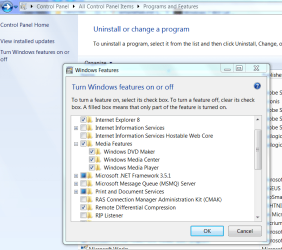
It's still there, just hidden:

Capture.PNG
 
Well turned off :P

but anyways i am pretty sure there are other programs that can stream movies and what not from pc to 360? like winamp? i dunno i just don't bother anymore with my new computer it sits next to the where i play video games so i just have the music come from there :D
 

Attachments

  • Capture.PNG
    Capture.PNG
    14 KB · Views: 88

My Computer

Computer Manufacturer/Model Number
MSI GT683DXR-427US
OS
Windows 7 Professional
CPU
Intel i7-2630QM
Memory
16GB DDR3
Graphics Card(s)
Nvidia GTX 570M overclocked
Monitor(s) Displays
15.6" HD LCD
Screen Resolution
1920X1080
Hard Drives
60GB OCZ Vertez II SSD
500 GB WD 7200RPM
Mouse
Logitech Anywhere MX
Does anyone know if there is an adequate fix for this other than disabling the service? I am having similar issues with wmpnetwk.exe on a box that is only used for Media Center. I would like to use the features of streaming to other machines (including a Xbox).

Problem arises every time I enable "Home" Setting for sharing preferences. Even setting back to Public and manually turning off all sharing settings, this program will continue to run. Only by disabling the service as stated in an earlier post or restoring to a backup point allows trouble free operation. Again, this does no good if I actually want to use the sharing features of the OS.

Thanks in advance.
 

My Computer

Computer Manufacturer/Model Number
Custom Build
OS
Windows 7 64
CPU
AMD Athalon II X2 240 64bit
Motherboard
Asus M4A785-M
Memory
2 GB G.Skill F2-6400CL5D DDR2 800
Graphics Card(s)
Asus ENGT220 Nvidia
Sound Card
On-board 7.1
Monitor(s) Displays
Vizio SV422XVT
Hard Drives
Seagate Barracuda 750GB ST3750528A
PSU
Antec Earthwatts 380W
Case
Antec NSK2480
Cooling
Thermaltake Silent Boost RX K8
OK, to answer my own problem and maybe help a few others.

wmpnetwk.exe was hanging up on a corrupted video file and in turn causing it to eat up system resources. Upon deeper investigation I found that I had a defective hard drive. Replaced the hard drive, dumped the bad video file and so far no issues with wmpnetwk.exe

In short make sure that all your media is good and stable.
 

My Computer

Computer Manufacturer/Model Number
Custom Build
OS
Windows 7 64
CPU
AMD Athalon II X2 240 64bit
Motherboard
Asus M4A785-M
Memory
2 GB G.Skill F2-6400CL5D DDR2 800
Graphics Card(s)
Asus ENGT220 Nvidia
Sound Card
On-board 7.1
Monitor(s) Displays
Vizio SV422XVT
Hard Drives
Seagate Barracuda 750GB ST3750528A
PSU
Antec Earthwatts 380W
Case
Antec NSK2480
Cooling
Thermaltake Silent Boost RX K8
Try these

As strange as these seem (remember we're dealing with M$ here):

-Change the windows indexing, if it doesn't work you can always change it back, so that there are only small directories being indexed. Click the Start orb and type "indexing options", click "Modify" and uncheck everything. Click "OK" and "OK" again.

-Change the Windows Media Player indexing options so that there is nothing as low as one directory above the system drive (normally C:). Open Windows Media Player and click "File", click "Manage Libraries". Click each option to the right and follow the advice in the first sentence of this paragraph.

To check, start Task Manager and click on "Processes" tab, click "Show processess from all users" at the bottom, click the column heading "Memory" twice. Look for "wmpnetwrk.exe" and see if it's using an excessive amount of memory.
 

My Computer

Computer Manufacturer/Model Number
Home built
OS
Windows 7 Pro 64bit
CPU
Intel i5 2400
Motherboard
Z68A-GD65 (G3)
Memory
8GB GSKILL F3-10666CL9D-8GBRL
Graphics Card(s)
EVGA|01G-P3-1556-KR GTX550 TI R
Sound Card
SOUND BLASTER AUDIGY2ZS PLATNUM
Monitor(s) Displays
Samsung SyncMaster 2493HM
Hard Drives
Toshiba DeathStar
WD
Back
Top