WMV playback issue

timeless

New member
Member
VIP
Local time
10:32 PM
Messages
637
for some unknown reason wmv playback is being weird, it affects all WMV files and happens in all video players l have installed.

basically the videos become stuttery for lack of a better word and only rebooting seems to recover non stuttery play until it happens again and l have to reboot, occasionally lve noticed one or two flash files have issues when the WMV issue appears and its only started recently, mainly since l have been copying files from my laptop to my PC via the network. or at least lve noticed it more since lve been copying via the network.

Edit:

l thought l should add that l did edit ffdshow settings to resize to desktop because all video files were showing in a postbox format on mediaplayer classic.
 

My Computer

Computer type
PC/Desktop
Computer Manufacturer/Model Number
Custom build
OS
Windows 7 Professional (64bit)
CPU
Intel i5 4440 3.10ghz
Motherboard
Gigabyte GA-H97M-D3H
Memory
Corsair 32GB (4x8GB) DDR3 1600MHz Vengeance Memory Kit 1.5V
Graphics Card(s)
Intel Graphics 4600 (on board)
Sound Card
External Creative Soundblaster
Monitor(s) Displays
32" TV
Screen Resolution
1360*768
Hard Drives
Kingston SSDNow UV400 240GB 2.5inch SATAIII SSD
1 1TB WD WD10EADS
3 1TB WD WD10EZEX
PSU
Coolermaster GM-Series 550W Semi Modular
Case
Aerocool X-Predator X1 Devil Red
Cooling
5x 120mil (Arctic F12)
Keyboard
Microsoft Curve 2000 v1
Mouse
Trust MaxTrack Mini Mouse - 6 button(s) - wired - USB
Internet Speed
34Meg
Antivirus
Bitdefender 2017
Browser
Firefox
1. Use Window Media Player to playback wmv files.

2. Terminate all other programs and only have WMP running.

Is the problem gone?
 

My Computer

Computer Manufacturer/Model Number
Toshiba Satellite S875D-S7239 laptop
OS
MS Windows 7 Ultimate SP1 64-bit
CPU
AMD A10-4600M
Motherboard
AMD Pumori (Socket FT1)
Memory
6.00 GB Dual-Channel DDR3 @ 798MHz (11-11-12-28)
Graphics Card(s)
AMD Radeon HD 7660G
Sound Card
High Definition Audio Device
Monitor(s) Displays
Generic PnP Monitor (1600x900@60Hz)
Screen Resolution
1600x900@60Hz
Hard Drives
SSD 119GB Corsair CSSD-V128GB2 ATA Device
Keyboard
Standard PS/2 Keyboard
Mouse
HP Wireless Optical Mobile Mouse Model FHA-3410
Internet Speed
What the local pub, local coffee shop offers.
Other Info
Optical Drive:MATSHITA BD-CMB UJ160B ATA Device


Also have an Asus ha1002xp netbook with Win 7 Ultimate installed.
nope it keeps reoccurring. rebooted this morning to resolve the issue until it happens again. but l can tell you this issue specifically affects wmv files as everything else plays completely fine.

one thing l forgot to mention tho was that when the issue affects me and the file starts to stutter the time below the seeking bar disappears with media player classic however the time below the seeking bar is present but you can definitely see that the file time is stopping and starting for extra seconds.
 

My Computer

Computer type
PC/Desktop
Computer Manufacturer/Model Number
Custom build
OS
Windows 7 Professional (64bit)
CPU
Intel i5 4440 3.10ghz
Motherboard
Gigabyte GA-H97M-D3H
Memory
Corsair 32GB (4x8GB) DDR3 1600MHz Vengeance Memory Kit 1.5V
Graphics Card(s)
Intel Graphics 4600 (on board)
Sound Card
External Creative Soundblaster
Monitor(s) Displays
32" TV
Screen Resolution
1360*768
Hard Drives
Kingston SSDNow UV400 240GB 2.5inch SATAIII SSD
1 1TB WD WD10EADS
3 1TB WD WD10EZEX
PSU
Coolermaster GM-Series 550W Semi Modular
Case
Aerocool X-Predator X1 Devil Red
Cooling
5x 120mil (Arctic F12)
Keyboard
Microsoft Curve 2000 v1
Mouse
Trust MaxTrack Mini Mouse - 6 button(s) - wired - USB
Internet Speed
34Meg
Antivirus
Bitdefender 2017
Browser
Firefox
To clarify, you have stuttering issues when playing files stored on a network device?
 

My Computer

Computer Manufacturer/Model Number
Dell XPS 15 L502x
OS
Windows 7 Ultimate x64 SP1
CPU
Core i7-2670QM
Memory
8GB DDR3 PC3-10600
Graphics Card(s)
Intel HD Graphics 3000 + GeForce GT 540M
Screen Resolution
1920x1080
Hard Drives
1TB 5400RPM Seagate
l will admit l notice it more after lve been transferring files over my network however lve never ran wmv files "over" the network lve always ran them directly from my comp.
 

My Computer

Computer type
PC/Desktop
Computer Manufacturer/Model Number
Custom build
OS
Windows 7 Professional (64bit)
CPU
Intel i5 4440 3.10ghz
Motherboard
Gigabyte GA-H97M-D3H
Memory
Corsair 32GB (4x8GB) DDR3 1600MHz Vengeance Memory Kit 1.5V
Graphics Card(s)
Intel Graphics 4600 (on board)
Sound Card
External Creative Soundblaster
Monitor(s) Displays
32" TV
Screen Resolution
1360*768
Hard Drives
Kingston SSDNow UV400 240GB 2.5inch SATAIII SSD
1 1TB WD WD10EADS
3 1TB WD WD10EZEX
PSU
Coolermaster GM-Series 550W Semi Modular
Case
Aerocool X-Predator X1 Devil Red
Cooling
5x 120mil (Arctic F12)
Keyboard
Microsoft Curve 2000 v1
Mouse
Trust MaxTrack Mini Mouse - 6 button(s) - wired - USB
Internet Speed
34Meg
Antivirus
Bitdefender 2017
Browser
Firefox
Then you have network issues, not WMV issues. Are these HD files or SD files? Are you playing back over wifi or ethernet? How is the network computer configured, ie: does it have up-to-date NIC drivers, what speed are the hard drives, etc?

When you play files over your network, there are all kinds of things that can cause playback problems.
 

My Computer

Computer Manufacturer/Model Number
Dell XPS 15 L502x
OS
Windows 7 Ultimate x64 SP1
CPU
Core i7-2670QM
Memory
8GB DDR3 PC3-10600
Graphics Card(s)
Intel HD Graphics 3000 + GeForce GT 540M
Screen Resolution
1920x1080
Hard Drives
1TB 5400RPM Seagate
uh, l said l didnt watch them "over" the network, yes l copy things through my network but always watch files directly from the computer l plan to play them on.

that being said l do notice the issue playing wmvs after copying files over the network (and l say files because its usually compressed rar files l mostly copy), quite honestly lm unsure if the problem is actually related to the network all l know is it seems to happen more after transferring data through my network.

tho to clarify "l dont watch wmv files through the network, they are always watched on the system l intend to play them on tho it might be true to admit l do copy said format over the network, but just copy not watch".
 

My Computer

Computer type
PC/Desktop
Computer Manufacturer/Model Number
Custom build
OS
Windows 7 Professional (64bit)
CPU
Intel i5 4440 3.10ghz
Motherboard
Gigabyte GA-H97M-D3H
Memory
Corsair 32GB (4x8GB) DDR3 1600MHz Vengeance Memory Kit 1.5V
Graphics Card(s)
Intel Graphics 4600 (on board)
Sound Card
External Creative Soundblaster
Monitor(s) Displays
32" TV
Screen Resolution
1360*768
Hard Drives
Kingston SSDNow UV400 240GB 2.5inch SATAIII SSD
1 1TB WD WD10EADS
3 1TB WD WD10EZEX
PSU
Coolermaster GM-Series 550W Semi Modular
Case
Aerocool X-Predator X1 Devil Red
Cooling
5x 120mil (Arctic F12)
Keyboard
Microsoft Curve 2000 v1
Mouse
Trust MaxTrack Mini Mouse - 6 button(s) - wired - USB
Internet Speed
34Meg
Antivirus
Bitdefender 2017
Browser
Firefox
What services are running in the background? Have you tried creating a new user and playing the files?
 

My Computer

Computer Manufacturer/Model Number
Dell XPS 15 L502x
OS
Windows 7 Ultimate x64 SP1
CPU
Core i7-2670QM
Memory
8GB DDR3 PC3-10600
Graphics Card(s)
Intel HD Graphics 3000 + GeForce GT 540M
Screen Resolution
1920x1080
Hard Drives
1TB 5400RPM Seagate
just uploaded what startup list generated. hopefully this might lead to resolution.

l will note my laptop works fine playing the files.. its relatively reasonable spec the only thing that lets it down is memory and cpu. so the files are fine and as for creating a second account.. well lm not exactly sure it would help at least at the moment when the problem hasnt reoccurred yet.

however considering l notice when l copy files between my network (and l note again l dont watch WMV files over the network) l decided to try something a little different today, rather than copy them onto my system with my PC l copied them onto my system with the laptop (basically changed which system initiated the transfer if that makes sense) not that it matters much but l use teracopy as it seems faster moving items between my network etc.
 

Attachments

My Computer

Computer type
PC/Desktop
Computer Manufacturer/Model Number
Custom build
OS
Windows 7 Professional (64bit)
CPU
Intel i5 4440 3.10ghz
Motherboard
Gigabyte GA-H97M-D3H
Memory
Corsair 32GB (4x8GB) DDR3 1600MHz Vengeance Memory Kit 1.5V
Graphics Card(s)
Intel Graphics 4600 (on board)
Sound Card
External Creative Soundblaster
Monitor(s) Displays
32" TV
Screen Resolution
1360*768
Hard Drives
Kingston SSDNow UV400 240GB 2.5inch SATAIII SSD
1 1TB WD WD10EADS
3 1TB WD WD10EZEX
PSU
Coolermaster GM-Series 550W Semi Modular
Case
Aerocool X-Predator X1 Devil Red
Cooling
5x 120mil (Arctic F12)
Keyboard
Microsoft Curve 2000 v1
Mouse
Trust MaxTrack Mini Mouse - 6 button(s) - wired - USB
Internet Speed
34Meg
Antivirus
Bitdefender 2017
Browser
Firefox
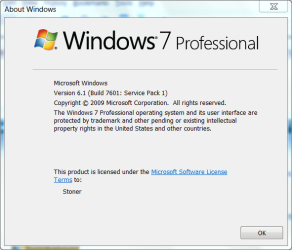
Help me out here, the startup file reflects Vista and your specs say Win 7 Pro.

WIN | type WINVER | ENTER

Using the snipping tool, capture the resulting display and upload in your next post.

thanks,
 

My Computer

Computer Manufacturer/Model Number
Toshiba Satellite S875D-S7239 laptop
OS
MS Windows 7 Ultimate SP1 64-bit
CPU
AMD A10-4600M
Motherboard
AMD Pumori (Socket FT1)
Memory
6.00 GB Dual-Channel DDR3 @ 798MHz (11-11-12-28)
Graphics Card(s)
AMD Radeon HD 7660G
Sound Card
High Definition Audio Device
Monitor(s) Displays
Generic PnP Monitor (1600x900@60Hz)
Screen Resolution
1600x900@60Hz
Hard Drives
SSD 119GB Corsair CSSD-V128GB2 ATA Device
Keyboard
Standard PS/2 Keyboard
Mouse
HP Wireless Optical Mobile Mouse Model FHA-3410
Internet Speed
What the local pub, local coffee shop offers.
Other Info
Optical Drive:MATSHITA BD-CMB UJ160B ATA Device


Also have an Asus ha1002xp netbook with Win 7 Ultimate installed.
as requested.
 

Attachments

  • Capture.PNG
    Capture.PNG
    19.2 KB · Views: 2

My Computer

Computer type
PC/Desktop
Computer Manufacturer/Model Number
Custom build
OS
Windows 7 Professional (64bit)
CPU
Intel i5 4440 3.10ghz
Motherboard
Gigabyte GA-H97M-D3H
Memory
Corsair 32GB (4x8GB) DDR3 1600MHz Vengeance Memory Kit 1.5V
Graphics Card(s)
Intel Graphics 4600 (on board)
Sound Card
External Creative Soundblaster
Monitor(s) Displays
32" TV
Screen Resolution
1360*768
Hard Drives
Kingston SSDNow UV400 240GB 2.5inch SATAIII SSD
1 1TB WD WD10EADS
3 1TB WD WD10EZEX
PSU
Coolermaster GM-Series 550W Semi Modular
Case
Aerocool X-Predator X1 Devil Red
Cooling
5x 120mil (Arctic F12)
Keyboard
Microsoft Curve 2000 v1
Mouse
Trust MaxTrack Mini Mouse - 6 button(s) - wired - USB
Internet Speed
34Meg
Antivirus
Bitdefender 2017
Browser
Firefox
excellent:

The following info will help:

Install CCleaner:
CCleaner - PC Optimization and Cleaning - Free Download

list of STARTUP PROGRAMS

CCleaner | Tools
icon | Startup button | Windows tab |
click on Save to text file button (bottom right side) |
accept Startup.txt as file name | SAVE button

list of SCHEDULED TASKS

CCleaner | Tools
icon | Startup button | Scheduled Tasks tab |
click on Save to text file button (bottom right side) |
enter Scheduled Tasks as File name | Save button

List of INSTALLED PROGRAMS

CCleaner | Tools
icon | Uninstall button |
click on Save to text file button (bottom right side) |
accept install.txt as File name | Save button


UPLOAD the startup.txt file
UPLOAD the Scheduled Tasks.txt file
UPLOAD the install.txt file.

HOW TO UPLOAD
Post a File or Screenshot in Seven Forums
===============================================

thanks,
 

My Computer

Computer Manufacturer/Model Number
Toshiba Satellite S875D-S7239 laptop
OS
MS Windows 7 Ultimate SP1 64-bit
CPU
AMD A10-4600M
Motherboard
AMD Pumori (Socket FT1)
Memory
6.00 GB Dual-Channel DDR3 @ 798MHz (11-11-12-28)
Graphics Card(s)
AMD Radeon HD 7660G
Sound Card
High Definition Audio Device
Monitor(s) Displays
Generic PnP Monitor (1600x900@60Hz)
Screen Resolution
1600x900@60Hz
Hard Drives
SSD 119GB Corsair CSSD-V128GB2 ATA Device
Keyboard
Standard PS/2 Keyboard
Mouse
HP Wireless Optical Mobile Mouse Model FHA-3410
Internet Speed
What the local pub, local coffee shop offers.
Other Info
Optical Drive:MATSHITA BD-CMB UJ160B ATA Device


Also have an Asus ha1002xp netbook with Win 7 Ultimate installed.
done as requested.

nothing in scheduled tasks so skipped listing.
 

Attachments

My Computer

Computer type
PC/Desktop
Computer Manufacturer/Model Number
Custom build
OS
Windows 7 Professional (64bit)
CPU
Intel i5 4440 3.10ghz
Motherboard
Gigabyte GA-H97M-D3H
Memory
Corsair 32GB (4x8GB) DDR3 1600MHz Vengeance Memory Kit 1.5V
Graphics Card(s)
Intel Graphics 4600 (on board)
Sound Card
External Creative Soundblaster
Monitor(s) Displays
32" TV
Screen Resolution
1360*768
Hard Drives
Kingston SSDNow UV400 240GB 2.5inch SATAIII SSD
1 1TB WD WD10EADS
3 1TB WD WD10EZEX
PSU
Coolermaster GM-Series 550W Semi Modular
Case
Aerocool X-Predator X1 Devil Red
Cooling
5x 120mil (Arctic F12)
Keyboard
Microsoft Curve 2000 v1
Mouse
Trust MaxTrack Mini Mouse - 6 button(s) - wired - USB
Internet Speed
34Meg
Antivirus
Bitdefender 2017
Browser
Firefox
Update your CCleaner, the post the Scheduled Tasks.
thanks
 

My Computer

Computer Manufacturer/Model Number
Toshiba Satellite S875D-S7239 laptop
OS
MS Windows 7 Ultimate SP1 64-bit
CPU
AMD A10-4600M
Motherboard
AMD Pumori (Socket FT1)
Memory
6.00 GB Dual-Channel DDR3 @ 798MHz (11-11-12-28)
Graphics Card(s)
AMD Radeon HD 7660G
Sound Card
High Definition Audio Device
Monitor(s) Displays
Generic PnP Monitor (1600x900@60Hz)
Screen Resolution
1600x900@60Hz
Hard Drives
SSD 119GB Corsair CSSD-V128GB2 ATA Device
Keyboard
Standard PS/2 Keyboard
Mouse
HP Wireless Optical Mobile Mouse Model FHA-3410
Internet Speed
What the local pub, local coffee shop offers.
Other Info
Optical Drive:MATSHITA BD-CMB UJ160B ATA Device


Also have an Asus ha1002xp netbook with Win 7 Ultimate installed.
WIN | type MSCONFIG | ENTER | STARTUP tab
uncheck ALL
except for:
Sidebar C:\Program Files\Windows Sidebar\sidebar.exe /autoRun

REBOOT!
 

My Computer

Computer Manufacturer/Model Number
Toshiba Satellite S875D-S7239 laptop
OS
MS Windows 7 Ultimate SP1 64-bit
CPU
AMD A10-4600M
Motherboard
AMD Pumori (Socket FT1)
Memory
6.00 GB Dual-Channel DDR3 @ 798MHz (11-11-12-28)
Graphics Card(s)
AMD Radeon HD 7660G
Sound Card
High Definition Audio Device
Monitor(s) Displays
Generic PnP Monitor (1600x900@60Hz)
Screen Resolution
1600x900@60Hz
Hard Drives
SSD 119GB Corsair CSSD-V128GB2 ATA Device
Keyboard
Standard PS/2 Keyboard
Mouse
HP Wireless Optical Mobile Mouse Model FHA-3410
Internet Speed
What the local pub, local coffee shop offers.
Other Info
Optical Drive:MATSHITA BD-CMB UJ160B ATA Device


Also have an Asus ha1002xp netbook with Win 7 Ultimate installed.
l will note my laptop works fine playing the files.. its relatively reasonable spec the only thing that lets it down is memory and cpu. so the files are fine and as for creating a second account.. well lm not exactly sure it would help at least at the moment when the problem hasnt reoccurred yet.

Waitaminute. Was this a one-off problem? Right now you have no issues with WMV playback?
 

My Computer

Computer Manufacturer/Model Number
Dell XPS 15 L502x
OS
Windows 7 Ultimate x64 SP1
CPU
Core i7-2670QM
Memory
8GB DDR3 PC3-10600
Graphics Card(s)
Intel HD Graphics 3000 + GeForce GT 540M
Screen Resolution
1920x1080
Hard Drives
1TB 5400RPM Seagate
I'll gt to the install list in a few minutes.

I can say right away: uninstall VUZE.

REMOVAL OF P2P PROGRAMS

There are signs of one or more P2P (Peer to Peer) File Sharing Programs on your computer.

As long as you are using any form of P2P networking to download files, you can anticipate malware infestations.

References citing the risk of using P2P programs:
How cyber criminals infect victims via P2P with pirated software on Vimeo
Malware: Help prevent the Infection
Perils of P2P File Sharing
How to Prevent the Online Invasion of Spyware and Adware

I strongly recommend that you uninstall:
µTorrent
Vuze
 

My Computer

Computer Manufacturer/Model Number
Toshiba Satellite S875D-S7239 laptop
OS
MS Windows 7 Ultimate SP1 64-bit
CPU
AMD A10-4600M
Motherboard
AMD Pumori (Socket FT1)
Memory
6.00 GB Dual-Channel DDR3 @ 798MHz (11-11-12-28)
Graphics Card(s)
AMD Radeon HD 7660G
Sound Card
High Definition Audio Device
Monitor(s) Displays
Generic PnP Monitor (1600x900@60Hz)
Screen Resolution
1600x900@60Hz
Hard Drives
SSD 119GB Corsair CSSD-V128GB2 ATA Device
Keyboard
Standard PS/2 Keyboard
Mouse
HP Wireless Optical Mobile Mouse Model FHA-3410
Internet Speed
What the local pub, local coffee shop offers.
Other Info
Optical Drive:MATSHITA BD-CMB UJ160B ATA Device


Also have an Asus ha1002xp netbook with Win 7 Ultimate installed.
the problem is intermittent just sort of happens which has started to be more regular since lve started copying files over the network (bare in mind as lve said l dont watch files over the network) tho l note thats just an observation based on how much more its been happening rebooting seems to sort it out for a little.

CCleaner reports its up to date (l ran the update as soon as it was installed).

whats the purpose of disabling desktop gadgets? sidebar.exe as far as l was aware related to that and l do use a few to keep an eye on things such as drive space, temps and my favourite local weather lol.

as for the torrent client, browsing can be just as dangerous.. but since l dont use torrents for copyright infringement and only on a private tracker there is little chance of your warnings happening, and while l agree if l were to use public trackers (who were not run by ppl l know) then l could expect some of your warnings to happen.. only reason l use torrents now is because filehosts are closing and lm sick and tired of having to sign up for new ones when one takes my money and shuts down. touch wood lve not been infected with something for a good six years apart from the random program forcing me to install the odd toolbar (which is promptly removed.. thankyou flv player for not giving me a choice).
 

My Computer

Computer type
PC/Desktop
Computer Manufacturer/Model Number
Custom build
OS
Windows 7 Professional (64bit)
CPU
Intel i5 4440 3.10ghz
Motherboard
Gigabyte GA-H97M-D3H
Memory
Corsair 32GB (4x8GB) DDR3 1600MHz Vengeance Memory Kit 1.5V
Graphics Card(s)
Intel Graphics 4600 (on board)
Sound Card
External Creative Soundblaster
Monitor(s) Displays
32" TV
Screen Resolution
1360*768
Hard Drives
Kingston SSDNow UV400 240GB 2.5inch SATAIII SSD
1 1TB WD WD10EADS
3 1TB WD WD10EZEX
PSU
Coolermaster GM-Series 550W Semi Modular
Case
Aerocool X-Predator X1 Devil Red
Cooling
5x 120mil (Arctic F12)
Keyboard
Microsoft Curve 2000 v1
Mouse
Trust MaxTrack Mini Mouse - 6 button(s) - wired - USB
Internet Speed
34Meg
Antivirus
Bitdefender 2017
Browser
Firefox
Back
Top