wondering how to set up

so can anyone tell me how much faster it would be to have windows on the first partition of a hard drive rather than on the second partition?

You probably won't notice much of a difference, it's a generally accepted practice and less work for the HD.

Acronis Disk Director can add that partition as the first on the disk easily and with no problems affecting your files that are there, even if you had an OS there it won't affect it's ability to function.

I have done this several times, all files are intact and the OS just keeps on going...
how would i do that? make it active or some other way.
 

My Computer My Computer

At a glance

XPAMD Athlon 3500+ Venice Socket 9393 GB PC3200 DDR SDRAMnVIDIA GeForce 9600GT 512MB
Computer Manufacturer/Model Number
HP
OS
XP
CPU
AMD Athlon 3500+ Venice Socket 939
Motherboard
MSI Albacore RS480
Memory
3 GB PC3200 DDR SDRAM
Graphics Card(s)
nVIDIA GeForce 9600GT 512MB
Sound Card
Realtek AC97
Monitor(s) Displays
HP vs17
Screen Resolution
1280x1024
Hard Drives
Seagate ST3250823AS 250 GB 7200 RPM SATA 8MB Cache
Samsung HD103SJ Spinpoint F3 1 TB 7200 RPM SATA 32MB Cache
PSU
Antec TruePower 500W
Keyboard
Standard HP Keyboard
Mouse
Logitech MX518
How large partition would you guys recommend for the OS to be installed on?
 

My Computer My Computer

At a glance

Windows 7 Professional x64AMD Athlon 64 X2 6000 3.1GHzG.SKILL 4GB (2 x 2GB) 240-Pin DDR2 SDRAM DDR2...ATI Radeon HD4350 512mb
Computer Manufacturer/Model Number
home built
OS
Windows 7 Professional x64
CPU
AMD Athlon 64 X2 6000 3.1GHz
Motherboard
Asus M3A78-EM
Memory
G.SKILL 4GB (2 x 2GB) 240-Pin DDR2 SDRAM DDR2 800 (PC2 6400)
Graphics Card(s)
ATI Radeon HD4350 512mb
Sound Card
on board
Monitor(s) Displays
Samsung SyncMaster 206bw
Screen Resolution
1680x1050
Hard Drives
Seagate 250gb
WD 160gb
WD 250gb USB
Maxtor 40gb (backup)
PSU
Thermaltake PurePower 500watt
Case
Apevia
Cooling
2x120 case fans
Keyboard
wireless Logitech
Mouse
wireless Logitech
Internet Speed
DSL (best I can do in the boonies)
Other Info
Lord make my word sweet, in case I have to eat them later...
I would Allocate about 80GB for the OS have never run out of space with that sort of size.

You can also use the location feature of Windows 7 to point the system to data kept on the other partition which also keeps the system running as Microsoft intended (documents, photos etc), whilst actually storing data away from the system drive.
 

My Computers My Computers

  • At a glance

    Windows 11 Pro x64 [Latest Release and Releas...Ryzen 9 5950X, 3.8 - 5.2 MHz64GB [2 x 32GB] DDR4 3200MHz4GB NVIDIA GEFORCE GTX 1650 Ti
    Computer type
    PC/Desktop
    Computer Manufacturer/Model Number
    ChillBlast - Custom to my design
    OS
    Windows 11 Pro x64 [Latest Release and Release Preview]
    CPU
    Ryzen 9 5950X, 3.8 - 5.2 MHz
    Motherboard
    Asus Prime X570-Pro
    Memory
    64GB [2 x 32GB] DDR4 3200MHz
    Graphics Card(s)
    4GB NVIDIA GEFORCE GTX 1650 Ti
    Sound Card
    On-board SPDIF to 5.1 System + HDMI [5.1 system]
    Monitor(s) Displays
    32" UHD 32 Bit HDR Monitor + 43" UHD 4K 32Bit HDR TV
    Screen Resolution
    2 x 3840 x 2160 @60Hz
    Hard Drives
    1TB M2 SSD OS, 500GB Fast Access SSD, 2 x 8TB Data + Various Externals from 1TB to 4TB, 10TB NAS
    PSU
    NZXT C750 80 PLUS Gold 750W Modular PSU
    Case
    Workstation Case [Matt Black]
    Cooling
    NZXT Kraken X63 280mm CPU Cooler +2x Quiet Case fans
    Keyboard
    Logitech Wireless MX Keys & K400 + others
    Mouse
    Logitech Wireless MX Master 3S
    Internet Speed
    920 MB Down 50 MB Up
    Antivirus
    BitDefender Total Security Pro
    Browser
    Chrome (always run latest Non-Beta)
    Other Info
    Also run ...
    Laptop - Quad 8GB - Windows 10 Pro x64
    Nexus 7 Android tablet x2
    Samsung 10.2" tablet
    Blackview TAB 8 4G Android Tablet c/w Keyboard
    Wacom Intuos Pro Medium Pen Pad
    Wacom Intuos Pro Small Pen Pad
    Wacom Expresskeys Remote
    Loopdeck+ Graphics Controller
    Shuttle Pro v2 Control
  • At a glance

    Windows 11 Pro x64 Latest RPIntel I7 10750H 5.0GHz32GB [2x16GB] DDR4 2933 MHznVidia GTX1650Ti 4 GB GDDR6
    Computer type
    Laptop
    System Manufacturer/Model Number
    Dell XPS 17 10750H
    OS
    Windows 11 Pro x64 Latest RP
    CPU
    Intel I7 10750H 5.0GHz
    Motherboard
    Dell XPS
    Memory
    32GB [2x16GB] DDR4 2933 MHz
    Graphics Card(s)
    nVidia GTX1650Ti 4 GB GDDR6
    Sound Card
    Stock [Realtek] 4 Speaker
    Monitor(s) Displays
    17" IPS UHD+ Infinity Edge Touchscreen
    Screen Resolution
    3840 x 2400
    Hard Drives
    2TB M2 NVMe, 4TB External + various 500GB & 1TB External NVMe (also have access to spinner HDD from
    PSU
    Stock
    Case
    Stock XPS Aluminium & Carbon Fibre
    Cooling
    Stock - Active Fan Control
    Keyboard
    Backlit + Various Logitech
    Mouse
    Stock Track Pad + Logitech MX Trackball
    Internet Speed
    72 MB Down 18MB Up
    Browser
    Chrome
    Other Info
    Also run ...
    Laptop - Quad 8GB - Windows 10 Pro x64
    Nexus 7 Android tablet x2
    10.2" tablet
    Sony Z3 Android Smartphone
    Wacom Intuos Pro Medium Pen Pad
    Wacom Intuos Pro Small Pen Pad
    Wacom Expresskeys Remote
    Loopdeck+ Graphics Controller
    Shuttle Pro v2 Control Pad
    10TB NAS
so i think im going to make a partition on the new 1tb hdd (its the second set of results) and use it for windows 7.

Good advice.

I always use one partition for the OS and another partition for data/files. Makes it easier to re-install.

Your new 1tb hdd with the 32mb cache will be the fastest (which you proved already), as sup3rsprt mentioned, be sure to put it as the first usable partition on the disc.
how do i make sure its the first usuable partition? and can i do that if i already have it formatted with files on it?
Yes, Acronis can do that easily.

edit: okay, im in acronis disk director, do i make the new partition active, primary, or logical? im guessing either active or primary.
Make it Primary.

can i make a second partition on the 1 tb hdd for windows to use? the hdd is already formatted with files on it, can i just make another partition in acronis disk director and use it for windows 7, or does it have to be the first partition on the disk?
Make a new partition and put it first, all the way to the left.
All of your files will be moved (kept in the original partition)
Put Win7 on the new first partition.

how would i do that? make it active or some other way.

Before doing any partition adjustment or operating system installation always backup your existing hard drives, just to be safe.
What backup program do you use?

1st Use Acronis to make a new partition on the new Hard drive.
Put it first on the Disk, all the way to the left.

Make it at least 80GB.


Then read this tutorial: Dual Boot Installation with Windows 7 and XP

(First you will need to make the new partition with Acronis)

Then start with #2:
2. To Use a Separate Hard Disk Drive than the XP Drive -

3. Click on the Install now button.

In step 4. When you get to this point, select the hard drive and partition to install Windows 7 on.

5. Finish installing Windows 7.
NOTE: You would do step 9 on that link to finish installing Windows 7.


Read through these tutorials and reply if you have any questions.
 

My Computer My Computer

At a glance

Windows 7 Ult x64 - SP1/ Windows 8 Pro x64Intel Core i5-3570K 4.6GHz8GB (2X4GB) DDR3 1600 Corsair Vengeance CL8 1.5vSapphire HD 7770 Vapor-X OC 1GB DDR5
Computer type
PC/Desktop
Computer Manufacturer/Model Number
76~2.0
OS
Windows 7 Ult x64 - SP1/ Windows 8 Pro x64
CPU
Intel Core i5-3570K 4.6GHz
Motherboard
Gigabyte GA-Z77X UD3H, f18
Memory
8GB (2X4GB) DDR3 1600 Corsair Vengeance CL8 1.5v
Graphics Card(s)
Sapphire HD 7770 Vapor-X OC 1GB DDR5
Sound Card
Onboard VIA VT2021
Monitor(s) Displays
22" LCD Dell
Screen Resolution
1680x1050
Hard Drives
Samsung 840Pro 128GB SSD,
Seagate Barracuda 500GB SATA2 7200rpm 32MB cache, Seagate Barracuda 1TB SATA2 7200rpm 32MB cache,
PSU
Corsair HX650W
Case
Cooler Master Storm Scout
Cooling
Corsair H80 2x12cm Noctua NF P12 , 2x14cm case fans
Keyboard
Logitech Wave
Mouse
CM Sentinel
Internet Speed
Dismal
Antivirus
Avast
Browser
Opera Next
Other Info
Haswell laptop: HP Envy 17t-j, i7-4700MQ, GeForce 740M 2GB DDR3, 17.3" Full HD 1920x1080, 16GB RAM, Samsung 840 Pro 128GB, 1TB Hitachi 7200 HDD,
Desktop: eSATA ports,
External eSATA Seagate 500GB SATA2 7200rpm,
External WD USB 500GB
it wont let me drag the new partition to the left.
 

My Computer My Computer

At a glance

XPAMD Athlon 3500+ Venice Socket 9393 GB PC3200 DDR SDRAMnVIDIA GeForce 9600GT 512MB
Computer Manufacturer/Model Number
HP
OS
XP
CPU
AMD Athlon 3500+ Venice Socket 939
Motherboard
MSI Albacore RS480
Memory
3 GB PC3200 DDR SDRAM
Graphics Card(s)
nVIDIA GeForce 9600GT 512MB
Sound Card
Realtek AC97
Monitor(s) Displays
HP vs17
Screen Resolution
1280x1024
Hard Drives
Seagate ST3250823AS 250 GB 7200 RPM SATA 8MB Cache
Samsung HD103SJ Spinpoint F3 1 TB 7200 RPM SATA 32MB Cache
PSU
Antec TruePower 500W
Keyboard
Standard HP Keyboard
Mouse
Logitech MX518
Is the partition you are trying to bump over marked active, system? That may be why you can't move it over.
 

My Computer My Computer

At a glance

Windows 7 Ulti. x64AMD Phenom 8450 triple-core 2.10 ghz4GBATI Radion HD 3200
Computer Manufacturer/Model Number
Gateway GT5692
OS
Windows 7 Ulti. x64
CPU
AMD Phenom 8450 triple-core 2.10 ghz
Memory
4GB
Graphics Card(s)
ATI Radion HD 3200
Monitor(s) Displays
Gateway FPD1775W
Screen Resolution
1280x720
Hard Drives
465.6613 Gibibytes
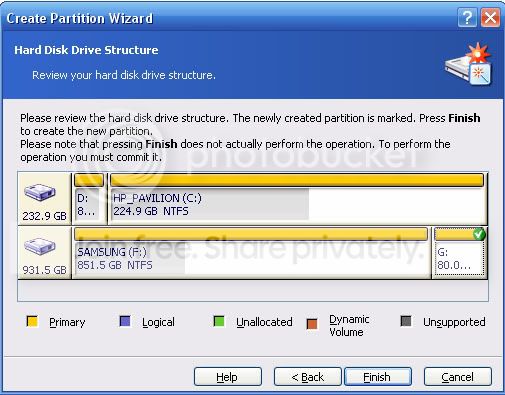
i choose primary for the type of partition, then when it asks me to review the disk structure, it wont let me place the partition on the left.

diskdirector.jpg
 

My Computer My Computer

At a glance

XPAMD Athlon 3500+ Venice Socket 9393 GB PC3200 DDR SDRAMnVIDIA GeForce 9600GT 512MB
Computer Manufacturer/Model Number
HP
OS
XP
CPU
AMD Athlon 3500+ Venice Socket 939
Motherboard
MSI Albacore RS480
Memory
3 GB PC3200 DDR SDRAM
Graphics Card(s)
nVIDIA GeForce 9600GT 512MB
Sound Card
Realtek AC97
Monitor(s) Displays
HP vs17
Screen Resolution
1280x1024
Hard Drives
Seagate ST3250823AS 250 GB 7200 RPM SATA 8MB Cache
Samsung HD103SJ Spinpoint F3 1 TB 7200 RPM SATA 32MB Cache
PSU
Antec TruePower 500W
Keyboard
Standard HP Keyboard
Mouse
Logitech MX518
i choose primary for the type of partition, then when it asks me to review the disk structure, it wont let me place the partition on the left.

I don't use Acronis Disk Director but, the basic operations should be similar.

In the window you posted, move your cursor over the left side of the F drive 851GB partition, you should see the cursor change to two parallel lines with two opposing arrows, this will let you drag the left side of this partition to the right.
Move it enough to make 80GB of unallocated space.
Click this unallocated space and create your new partition, NTFS and Primary.

When this is successful, delete the 80GB partition on the right side (end), then drag the right side of the large partition to take the space left there.

Let us know if this works.
The functions should be similar to what I've suggested, for you in Acronis.
 

My Computer My Computer

At a glance

Windows 7 Ult x64 - SP1/ Windows 8 Pro x64Intel Core i5-3570K 4.6GHz8GB (2X4GB) DDR3 1600 Corsair Vengeance CL8 1.5vSapphire HD 7770 Vapor-X OC 1GB DDR5
Computer type
PC/Desktop
Computer Manufacturer/Model Number
76~2.0
OS
Windows 7 Ult x64 - SP1/ Windows 8 Pro x64
CPU
Intel Core i5-3570K 4.6GHz
Motherboard
Gigabyte GA-Z77X UD3H, f18
Memory
8GB (2X4GB) DDR3 1600 Corsair Vengeance CL8 1.5v
Graphics Card(s)
Sapphire HD 7770 Vapor-X OC 1GB DDR5
Sound Card
Onboard VIA VT2021
Monitor(s) Displays
22" LCD Dell
Screen Resolution
1680x1050
Hard Drives
Samsung 840Pro 128GB SSD,
Seagate Barracuda 500GB SATA2 7200rpm 32MB cache, Seagate Barracuda 1TB SATA2 7200rpm 32MB cache,
PSU
Corsair HX650W
Case
Cooler Master Storm Scout
Cooling
Corsair H80 2x12cm Noctua NF P12 , 2x14cm case fans
Keyboard
Logitech Wave
Mouse
CM Sentinel
Internet Speed
Dismal
Antivirus
Avast
Browser
Opera Next
Other Info
Haswell laptop: HP Envy 17t-j, i7-4700MQ, GeForce 740M 2GB DDR3, 17.3" Full HD 1920x1080, 16GB RAM, Samsung 840 Pro 128GB, 1TB Hitachi 7200 HDD,
Desktop: eSATA ports,
External eSATA Seagate 500GB SATA2 7200rpm,
External WD USB 500GB
i choose primary for the type of partition, then when it asks me to review the disk structure, it wont let me place the partition on the left.

I don't use Acronis Disk Director but, the basic operations should be similar.

In the window you posted, move your cursor over the left side of the F drive 851GB partition, you should see the cursor change to two parallel lines with two opposing arrows, this will let you drag the left side of this partition to the right.
Move it enough to make 80GB of unallocated space.
Click this unallocated space and create your new partition, NTFS and Primary.

When this is successful, delete the 80GB partition on the right side (end), then drag the right side of the large partition to take the space left there.

Let us know if this works.
The functions should be similar to what I've suggested, for you in Acronis.
no, it wont let me do that in acronis. what app do you use?

edit: for anyone with acronis disk director suite, change the mode to manual mode in the view submenu, and choose resize partition. thats what i did and it works. now the partition is in front.
 

My Computer My Computer

At a glance

XPAMD Athlon 3500+ Venice Socket 9393 GB PC3200 DDR SDRAMnVIDIA GeForce 9600GT 512MB
Computer Manufacturer/Model Number
HP
OS
XP
CPU
AMD Athlon 3500+ Venice Socket 939
Motherboard
MSI Albacore RS480
Memory
3 GB PC3200 DDR SDRAM
Graphics Card(s)
nVIDIA GeForce 9600GT 512MB
Sound Card
Realtek AC97
Monitor(s) Displays
HP vs17
Screen Resolution
1280x1024
Hard Drives
Seagate ST3250823AS 250 GB 7200 RPM SATA 8MB Cache
Samsung HD103SJ Spinpoint F3 1 TB 7200 RPM SATA 32MB Cache
PSU
Antec TruePower 500W
Keyboard
Standard HP Keyboard
Mouse
Logitech MX518
no, it wont let me do that in acronis. what app do you use?

edit: for anyone with acronis disk director suite, change the mode to manual mode in the view submenu, and choose resize partition. thats what i did and it works. now the partition is in front.

Glad to hear you got your partition setup.

Let us know how the Win7 install goes.

Check this for tutorials on installation: Tutorial quick reference list for Installing Windows 7
 

My Computer My Computer

At a glance

Windows 7 Ult x64 - SP1/ Windows 8 Pro x64Intel Core i5-3570K 4.6GHz8GB (2X4GB) DDR3 1600 Corsair Vengeance CL8 1.5vSapphire HD 7770 Vapor-X OC 1GB DDR5
Computer type
PC/Desktop
Computer Manufacturer/Model Number
76~2.0
OS
Windows 7 Ult x64 - SP1/ Windows 8 Pro x64
CPU
Intel Core i5-3570K 4.6GHz
Motherboard
Gigabyte GA-Z77X UD3H, f18
Memory
8GB (2X4GB) DDR3 1600 Corsair Vengeance CL8 1.5v
Graphics Card(s)
Sapphire HD 7770 Vapor-X OC 1GB DDR5
Sound Card
Onboard VIA VT2021
Monitor(s) Displays
22" LCD Dell
Screen Resolution
1680x1050
Hard Drives
Samsung 840Pro 128GB SSD,
Seagate Barracuda 500GB SATA2 7200rpm 32MB cache, Seagate Barracuda 1TB SATA2 7200rpm 32MB cache,
PSU
Corsair HX650W
Case
Cooler Master Storm Scout
Cooling
Corsair H80 2x12cm Noctua NF P12 , 2x14cm case fans
Keyboard
Logitech Wave
Mouse
CM Sentinel
Internet Speed
Dismal
Antivirus
Avast
Browser
Opera Next
Other Info
Haswell laptop: HP Envy 17t-j, i7-4700MQ, GeForce 740M 2GB DDR3, 17.3" Full HD 1920x1080, 16GB RAM, Samsung 840 Pro 128GB, 1TB Hitachi 7200 HDD,
Desktop: eSATA ports,
External eSATA Seagate 500GB SATA2 7200rpm,
External WD USB 500GB
Back
Top