Wondering...

Zyrandiel

New member
Local time
2:37 AM
Messages
175
Location
K.S.A.
If I update my firmwares for like: chipset, touchpad driver, Intel turbo boost, etc.

when I restore to a previously made image (like a 3 months ago Image) will the firmwares be reverted back to the old state too?
 

My Computer

Computer Manufacturer/Model Number
Samsung Electronics - NP-R580-JS01SA
OS
Windows 7 Home Premium 32bit
CPU
Intel(R) Core(TM) i5 M 520 @ 2.40Ghz
Motherboard
SAMSUNG ELECTRONICS CO. R580
Memory
4GB DDR3 RAM
Graphics Card(s)
1 GB NVidia Geforce GT 330M
Sound Card
Realtek High Definition V. 6.6
Monitor(s) Displays
Generic PnP monitor
Screen Resolution
1366 x 768
Hard Drives
500 GB IDE/SATA
Welcome
Software will revert back to the system restore date. Hardware, of course will not change.
You may consider a system restore, which will not touch your personal documents, but all else will change as above.
 

My Computer

Computer type
PC/Desktop
Computer Manufacturer/Model Number
Dell XPS 420
OS
Windows 10, Home Clean Install
CPU
Intel Core2 processsor Q8200(2.33Ghz 1333FSB) Quad Core Tech
Motherboard
Dell
Memory
6 gb
Graphics Card(s)
ATI Radeon 256MB HD3650
Sound Card
Intergrated 7.1 Channel Audio
Monitor(s) Displays
Dell SP2009W 20"
Hard Drives
640 GB Serial ATA Hard drive
Cooling
Fan
Keyboard
Dell USB Keyboard
Mouse
Dell Premium Optical USB
Internet Speed
DSL 2.85
If you mean updating the hardware firmware and not the drivers used by Windows. Restoring from an image will not affect hardware.
 

My Computer

Computer type
PC/Desktop
Computer Manufacturer/Model Number
Alienware Aurora ALX R4
OS
Windows 10 Pro (x64)
CPU
Intel Core i7-3930K (3.2GHz - 4.5GHz)
Motherboard
Alienware Aurora-R4 x79
Memory
4x Samsung 4GB PC3-12800 DDR3 (16GB 1600MHz)
Graphics Card(s)
Nvidia Geforce GTX 690
Sound Card
SteelSeries Siberia Elite
Monitor(s) Displays
Dell UltraSharp U3011
Screen Resolution
2560x1600
Hard Drives
Samsung 850 Pro 256 GB, Seagate 1TB Desktop Hybrid HDD, 2x Western Digital 4TB Green HDD
PSU
875W Some Dell PSU <.<
Case
Alienware Aurora ALX
Cooling
Custom Liquid Cooling (EK CPU & GPU blocks) dual EK 480RAD
Keyboard
Logitech G710+ Mechanical
Mouse
Logitech G700s
Internet Speed
Verizon Fios (50 mbps average)
Other Info
Server: Intel NUC D54250WYK: i5-4250U, 16GB, 256 GB mSATA, Windows Server 2012 R2
Yes, what you are listing are drivers, and those will not be part of an image that you made previously. Images have their advantages, but they also have some disadvantages as well, such as reverting back to old software and driver versions.
 

My Computer

OS
Windows 7 Ultimate x64 SP1
CPU
Intel Core i7-2600
Motherboard
Gigabyte GA-P67A-UD3P-B3
Memory
12 GB Patriot Extreme DDR3-1333
Graphics Card(s)
Nvidia GTX 470
Monitor(s) Displays
Dell UltraSharp 2209WA
Hard Drives
OCZ Agility3 240 GB, WD5001AALS, WD7501AALS
PSU
OCZ ModStream 700W
Case
CoolerMaster HAF 912 Advanced
Cooling
CoolerMaster Hyper 212 Plus
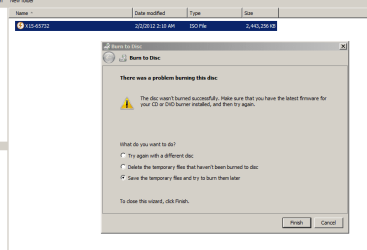
I see. So I was mentioning drivers not firmwares. How about DVD-ROM and BIOS firmware? I'm asking these question because I've downloaded a firmware update for my BIOS and also want to update my DVD-ROM's firmware due to the error message I received while burning an ISO file:


Error Windows Burning.PNG


I'm looking for a site to download the firmware update for my SLIMTYPE DVD A DS8A4S DVD writer.

And I was thinking that If I found an update and later on if I have trouble with my unit and want to do a system restore then will the firmware update be also reverted?

Then I guess that's a NO (revert) to firmware updates and YES (revert) to drivers then.
 

My Computer

Computer Manufacturer/Model Number
Samsung Electronics - NP-R580-JS01SA
OS
Windows 7 Home Premium 32bit
CPU
Intel(R) Core(TM) i5 M 520 @ 2.40Ghz
Motherboard
SAMSUNG ELECTRONICS CO. R580
Memory
4GB DDR3 RAM
Graphics Card(s)
1 GB NVidia Geforce GT 330M
Sound Card
Realtek High Definition V. 6.6
Monitor(s) Displays
Generic PnP monitor
Screen Resolution
1366 x 768
Hard Drives
500 GB IDE/SATA
Firmware is not software, its code stored/written to chips on the device and independent of the OS. Firmware updates are not part of the OS and system restore will have no effect on them. If you flash your BIOS the only way to go back is to flash it again with the original BIOS file. It's not the same thing as writing data to a hard drive either, its a totally different process. If you get it wrong you could brick the device.
 

My Computer

Computer type
PC/Desktop
Computer Manufacturer/Model Number
Home Built
OS
Windows 10 Education 64 bit
CPU
AMD Phenom II X4 980 Black Edition Deneb 3.7GHz
Motherboard
Asus M4N68T-M V2 µATX Motherboard
Memory
8GB 4GBx2 Kingston PC10600 DDR3 1333 Memory
Graphics Card(s)
Zotac NVIDIA Geforce GT640 2 Gig DDR3 PCIe
Sound Card
VIA VT1708s High Definition Audio 8-channel Onboard
Monitor(s) Displays
22" LG E2242 1080p and 2 19" I-INC AG191D
Screen Resolution
1280x1024 - 1920x1080 - 1280x1024
Hard Drives
Crucial M100 256 GB SSD and 500 GB WD Blue SATA
PSU
Thermaltake TR 620
Case
Power Up Black ATX Mid-Tower Case
Cooling
Stock heatsink and fan
Keyboard
Logitech Wireless K350 Wave
Mouse
Logitech Wireless M570 Trackman Wheel
Internet Speed
80 Mbps Down 30 Mbps Up
Antivirus
Windows Defender
Browser
Internet Explorer 11
Other Info
HP DVD1040e Lightscribe - External USB2
Thanks alpha, but what do you mean by BRICK THE DEVICE?
 

My Computer

Computer Manufacturer/Model Number
Samsung Electronics - NP-R580-JS01SA
OS
Windows 7 Home Premium 32bit
CPU
Intel(R) Core(TM) i5 M 520 @ 2.40Ghz
Motherboard
SAMSUNG ELECTRONICS CO. R580
Memory
4GB DDR3 RAM
Graphics Card(s)
1 GB NVidia Geforce GT 330M
Sound Card
Realtek High Definition V. 6.6
Monitor(s) Displays
Generic PnP monitor
Screen Resolution
1366 x 768
Hard Drives
500 GB IDE/SATA
Brick the Device=Destroy
 

My Computer

Computer type
PC/Desktop
Computer Manufacturer/Model Number
Dell XPS 420
OS
Windows 10, Home Clean Install
CPU
Intel Core2 processsor Q8200(2.33Ghz 1333FSB) Quad Core Tech
Motherboard
Dell
Memory
6 gb
Graphics Card(s)
ATI Radeon 256MB HD3650
Sound Card
Intergrated 7.1 Channel Audio
Monitor(s) Displays
Dell SP2009W 20"
Hard Drives
640 GB Serial ATA Hard drive
Cooling
Fan
Keyboard
Dell USB Keyboard
Mouse
Dell Premium Optical USB
Internet Speed
DSL 2.85
Yes Zirandiel.
Error in updating drivers is someway fixable.
But Firmware, need you to thoroughly follow the provided guideline. ;)
 

My Computers

System One System Two

  • Computer type
    PC/Desktop
    Computer Manufacturer/Model Number
    MSI
    OS
    Windows 11 Prerelease
    CPU
    CORE i5 10400
    Motherboard
    MSI H510M Pro
    Memory
    16GB
    Graphics Card(s)
    GTX 750Ti
    Sound Card
    Realtek HD Integrated
    Monitor(s) Displays
    Samsung Curved 24"; Samsung TV 50"
    Screen Resolution
    1920 x 1080
    Hard Drives
    Vi-Gen NVMe 256GB
    WD 3 TB
    Seagate 2 TB
    Seagate 4TB
    PSU
    Power Striker
    Case
    VBR
    Cooling
    Conventional
    Keyboard
    Logitech Wireless
    Mouse
    Logitech Wireless
    Internet Speed
    2MBPs
  • Computer type
    Laptop
    System Manufacturer/Model Number
    Apple MacBook
    OS
    BigSur
    CPU
    Core i5
    Memory
    8 GB
    Monitor(s) Displays
    13 "
    Screen Resolution
    1366 x 768
    Hard Drives
    SSD 256 GB
Thanks alpha, but what do you mean by BRICK THE DEVICE?

Brick the device also refereed to as turning it into a paper weight, door stop or some other useless device. Basically you render it totally non functional and useless.
 

My Computer

Computer type
PC/Desktop
Computer Manufacturer/Model Number
Home Built
OS
Windows 10 Education 64 bit
CPU
AMD Phenom II X4 980 Black Edition Deneb 3.7GHz
Motherboard
Asus M4N68T-M V2 µATX Motherboard
Memory
8GB 4GBx2 Kingston PC10600 DDR3 1333 Memory
Graphics Card(s)
Zotac NVIDIA Geforce GT640 2 Gig DDR3 PCIe
Sound Card
VIA VT1708s High Definition Audio 8-channel Onboard
Monitor(s) Displays
22" LG E2242 1080p and 2 19" I-INC AG191D
Screen Resolution
1280x1024 - 1920x1080 - 1280x1024
Hard Drives
Crucial M100 256 GB SSD and 500 GB WD Blue SATA
PSU
Thermaltake TR 620
Case
Power Up Black ATX Mid-Tower Case
Cooling
Stock heatsink and fan
Keyboard
Logitech Wireless K350 Wave
Mouse
Logitech Wireless M570 Trackman Wheel
Internet Speed
80 Mbps Down 30 Mbps Up
Antivirus
Windows Defender
Browser
Internet Explorer 11
Other Info
HP DVD1040e Lightscribe - External USB2
Brick as in ... brick.
 

Attachments

  • Brick-a-router.png
    Brick-a-router.png
    33.7 KB · Views: 4

My Computer

Computer Manufacturer/Model Number
Dell and Custom
OS
Systems 1 and 2: Windows 7 Enterprise x64, Win 8 Developer
CPU
System 1: i7 [email protected], System 2: AMD FX-4100 Zambezi 3.6G
Motherboard
System 1:Dell 06NWYK System 2: ASUS M5A97 AM3+
Memory
System 1: 8GB System 2: 8GB
Graphics Card(s)
System 1: ATI FirePro V4800 System 2: Radeon HD 6850
Sound Card
System 1: onboard System 2: onboard
Monitor(s) Displays
System1: Viewsonic HDMI 24"
Screen Resolution
System 1: 1920x1080 System 2: 1920x1080
Hard Drives
System 1: Mirrored .5B drives System 2: Seagate Barracuda ST1000DM003 1TB 7200 RPM 64MB Cache SATA 6.0Gb/s
Case
System 1: Dell System 2: Cooler Master
Internet Speed
10 MBPS
lol, yes.
 

My Computer

Computer type
PC/Desktop
Computer Manufacturer/Model Number
Home Built
OS
Windows 10 Education 64 bit
CPU
AMD Phenom II X4 980 Black Edition Deneb 3.7GHz
Motherboard
Asus M4N68T-M V2 µATX Motherboard
Memory
8GB 4GBx2 Kingston PC10600 DDR3 1333 Memory
Graphics Card(s)
Zotac NVIDIA Geforce GT640 2 Gig DDR3 PCIe
Sound Card
VIA VT1708s High Definition Audio 8-channel Onboard
Monitor(s) Displays
22" LG E2242 1080p and 2 19" I-INC AG191D
Screen Resolution
1280x1024 - 1920x1080 - 1280x1024
Hard Drives
Crucial M100 256 GB SSD and 500 GB WD Blue SATA
PSU
Thermaltake TR 620
Case
Power Up Black ATX Mid-Tower Case
Cooling
Stock heatsink and fan
Keyboard
Logitech Wireless K350 Wave
Mouse
Logitech Wireless M570 Trackman Wheel
Internet Speed
80 Mbps Down 30 Mbps Up
Antivirus
Windows Defender
Browser
Internet Explorer 11
Other Info
HP DVD1040e Lightscribe - External USB2
okay, thank you for all the info you guys. I just repair installed my OS lastnight with the retail ISO that I burned. But instead of fixing the SP1 update which was the only error (error code 80004005) it got me to 29 download update failures. dang! Also after repair Installing I noticed that my Windows is not activated even though I used my product key, why is that?
 

My Computer

Computer Manufacturer/Model Number
Samsung Electronics - NP-R580-JS01SA
OS
Windows 7 Home Premium 32bit
CPU
Intel(R) Core(TM) i5 M 520 @ 2.40Ghz
Motherboard
SAMSUNG ELECTRONICS CO. R580
Memory
4GB DDR3 RAM
Graphics Card(s)
1 GB NVidia Geforce GT 330M
Sound Card
Realtek High Definition V. 6.6
Monitor(s) Displays
Generic PnP monitor
Screen Resolution
1366 x 768
Hard Drives
500 GB IDE/SATA
What happens when you try to activate on line?
 

My Computer

Computer type
PC/Desktop
Computer Manufacturer/Model Number
Home Built
OS
Windows 10 Education 64 bit
CPU
AMD Phenom II X4 980 Black Edition Deneb 3.7GHz
Motherboard
Asus M4N68T-M V2 µATX Motherboard
Memory
8GB 4GBx2 Kingston PC10600 DDR3 1333 Memory
Graphics Card(s)
Zotac NVIDIA Geforce GT640 2 Gig DDR3 PCIe
Sound Card
VIA VT1708s High Definition Audio 8-channel Onboard
Monitor(s) Displays
22" LG E2242 1080p and 2 19" I-INC AG191D
Screen Resolution
1280x1024 - 1920x1080 - 1280x1024
Hard Drives
Crucial M100 256 GB SSD and 500 GB WD Blue SATA
PSU
Thermaltake TR 620
Case
Power Up Black ATX Mid-Tower Case
Cooling
Stock heatsink and fan
Keyboard
Logitech Wireless K350 Wave
Mouse
Logitech Wireless M570 Trackman Wheel
Internet Speed
80 Mbps Down 30 Mbps Up
Antivirus
Windows Defender
Browser
Internet Explorer 11
Other Info
HP DVD1040e Lightscribe - External USB2
I didn't activate it. I clicked the option below that said to activate and then it provided me with a couple of landline numbers but I can't call coz there's no phone with me. Also there was too much failure from the updates so I decided to do an Image restore. The initial image that I made from the time I first turned on this laptop.
 

My Computer

Computer Manufacturer/Model Number
Samsung Electronics - NP-R580-JS01SA
OS
Windows 7 Home Premium 32bit
CPU
Intel(R) Core(TM) i5 M 520 @ 2.40Ghz
Motherboard
SAMSUNG ELECTRONICS CO. R580
Memory
4GB DDR3 RAM
Graphics Card(s)
1 GB NVidia Geforce GT 330M
Sound Card
Realtek High Definition V. 6.6
Monitor(s) Displays
Generic PnP monitor
Screen Resolution
1366 x 768
Hard Drives
500 GB IDE/SATA
OK so whats the status after this last image restore, any better or worse?
 

My Computer

Computer type
PC/Desktop
Computer Manufacturer/Model Number
Home Built
OS
Windows 10 Education 64 bit
CPU
AMD Phenom II X4 980 Black Edition Deneb 3.7GHz
Motherboard
Asus M4N68T-M V2 µATX Motherboard
Memory
8GB 4GBx2 Kingston PC10600 DDR3 1333 Memory
Graphics Card(s)
Zotac NVIDIA Geforce GT640 2 Gig DDR3 PCIe
Sound Card
VIA VT1708s High Definition Audio 8-channel Onboard
Monitor(s) Displays
22" LG E2242 1080p and 2 19" I-INC AG191D
Screen Resolution
1280x1024 - 1920x1080 - 1280x1024
Hard Drives
Crucial M100 256 GB SSD and 500 GB WD Blue SATA
PSU
Thermaltake TR 620
Case
Power Up Black ATX Mid-Tower Case
Cooling
Stock heatsink and fan
Keyboard
Logitech Wireless K350 Wave
Mouse
Logitech Wireless M570 Trackman Wheel
Internet Speed
80 Mbps Down 30 Mbps Up
Antivirus
Windows Defender
Browser
Internet Explorer 11
Other Info
HP DVD1040e Lightscribe - External USB2
Oh crap!!! Now I'm trying to update and I got 61 failed updates with the error code 80004005! I already installed the Update Readiness Tool and did a SFC /SCANNOW on an elevated CMD (which turned out clean) and yet I got 61 failures. It's getting worse.. What should I do?
 

My Computer

Computer Manufacturer/Model Number
Samsung Electronics - NP-R580-JS01SA
OS
Windows 7 Home Premium 32bit
CPU
Intel(R) Core(TM) i5 M 520 @ 2.40Ghz
Motherboard
SAMSUNG ELECTRONICS CO. R580
Memory
4GB DDR3 RAM
Graphics Card(s)
1 GB NVidia Geforce GT 330M
Sound Card
Realtek High Definition V. 6.6
Monitor(s) Displays
Generic PnP monitor
Screen Resolution
1366 x 768
Hard Drives
500 GB IDE/SATA
I'll do a repair install again. Hopefully it'll work this time. What I'm wondering is when it comes to activating the OS, I remember there was a note saying "Automatic activation after 3 days". What does that mean? It will activate itself after 3 days plain and simple? or Would it still require me to call those numbers provided before?
 

My Computer

Computer Manufacturer/Model Number
Samsung Electronics - NP-R580-JS01SA
OS
Windows 7 Home Premium 32bit
CPU
Intel(R) Core(TM) i5 M 520 @ 2.40Ghz
Motherboard
SAMSUNG ELECTRONICS CO. R580
Memory
4GB DDR3 RAM
Graphics Card(s)
1 GB NVidia Geforce GT 330M
Sound Card
Realtek High Definition V. 6.6
Monitor(s) Displays
Generic PnP monitor
Screen Resolution
1366 x 768
Hard Drives
500 GB IDE/SATA
You have 30 days to activate MS Windows by phone or online.
 

My Computer

Computer Manufacturer/Model Number
Dell and Custom
OS
Systems 1 and 2: Windows 7 Enterprise x64, Win 8 Developer
CPU
System 1: i7 [email protected], System 2: AMD FX-4100 Zambezi 3.6G
Motherboard
System 1:Dell 06NWYK System 2: ASUS M5A97 AM3+
Memory
System 1: 8GB System 2: 8GB
Graphics Card(s)
System 1: ATI FirePro V4800 System 2: Radeon HD 6850
Sound Card
System 1: onboard System 2: onboard
Monitor(s) Displays
System1: Viewsonic HDMI 24"
Screen Resolution
System 1: 1920x1080 System 2: 1920x1080
Hard Drives
System 1: Mirrored .5B drives System 2: Seagate Barracuda ST1000DM003 1TB 7200 RPM 64MB Cache SATA 6.0Gb/s
Case
System 1: Dell System 2: Cooler Master
Internet Speed
10 MBPS
I have also got the Auto Activate in 3 days after doing a reinstall. Rearming got an additonal 3 days.:confused:
 

My Computer

Computer type
PC/Desktop
Computer Manufacturer/Model Number
Home Built Desktop By DataTech
OS
Windows 7 Ultimate X64 SP1
CPU
Intel i5-2550K, Differing ~4.4-4.8GHz No built in GPU
Motherboard
ASUS P8Z68-V PRO/GEN3
Memory
16GB G.Skill Sniper 1866MHz @ 2133MHz 2x8GB
Graphics Card(s)
ASUS GTX650TIB-DC2OC-2GD5, (650TI Boost)
Sound Card
Onboard Realtek 5-1
Monitor(s) Displays
Samsung P2570HD
Screen Resolution
1920x1080
Hard Drives
Samsung 840 Pro 256GB SSD for OS, 500GB Seagate Constellation (Enterprise drive) for Data
PSU
Corsair HX650W
Case
Inwin Dragon Rider
Cooling
Hyper 212 EVO w/two Noctua fans, push-pull, @1300 RPM
Keyboard
E-Z Eyes, bright yellow keys with large characters
Mouse
steelseries SENSEI Laser Pro Gaming
Internet Speed
48-51Mbs Mbs down, 11 Mbs up Xfinity Cable
Antivirus
Norton Internet Security 2013
Browser
IE 10, Opera, Pale Moon if needed
Other Info
4 case fans, LG BluRay-RE, ASUS DVD-RW, Mr. Fusion power supply, 1.21 gigawatts.
Back
Top