Wondering...

If memory serves me, during the install process there is a prompt asking you if you want to automatically activate online. If you say yes I believe thats when you may get the "Automatic activation after 3 days" prompt. That doesn't mean activation will run out in three days. If you say no to the automatically activate online prompt you will get a prompt telling you you have X days to activate windows do you want to do it now. Something like that, I don't remember the exact wording.
 

My Computer

Computer type
PC/Desktop
Computer Manufacturer/Model Number
Home Built
OS
Windows 10 Education 64 bit
CPU
AMD Phenom II X4 980 Black Edition Deneb 3.7GHz
Motherboard
Asus M4N68T-M V2 µATX Motherboard
Memory
8GB 4GBx2 Kingston PC10600 DDR3 1333 Memory
Graphics Card(s)
Zotac NVIDIA Geforce GT640 2 Gig DDR3 PCIe
Sound Card
VIA VT1708s High Definition Audio 8-channel Onboard
Monitor(s) Displays
22" LG E2242 1080p and 2 19" I-INC AG191D
Screen Resolution
1280x1024 - 1920x1080 - 1280x1024
Hard Drives
Crucial M100 256 GB SSD and 500 GB WD Blue SATA
PSU
Thermaltake TR 620
Case
Power Up Black ATX Mid-Tower Case
Cooling
Stock heatsink and fan
Keyboard
Logitech Wireless K350 Wave
Mouse
Logitech Wireless M570 Trackman Wheel
Internet Speed
80 Mbps Down 30 Mbps Up
Antivirus
Windows Defender
Browser
Internet Explorer 11
Other Info
HP DVD1040e Lightscribe - External USB2
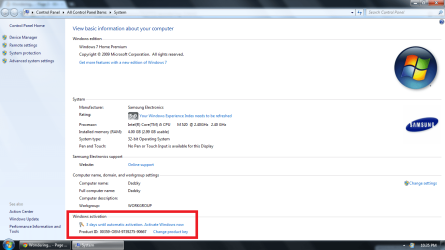
I just finished repair install. And here's what I was talking about.

activate.png

What do I need to do for it to activate?
 

My Computer

Computer Manufacturer/Model Number
Samsung Electronics - NP-R580-JS01SA
OS
Windows 7 Home Premium 32bit
CPU
Intel(R) Core(TM) i5 M 520 @ 2.40Ghz
Motherboard
SAMSUNG ELECTRONICS CO. R580
Memory
4GB DDR3 RAM
Graphics Card(s)
1 GB NVidia Geforce GT 330M
Sound Card
Realtek High Definition V. 6.6
Monitor(s) Displays
Generic PnP monitor
Screen Resolution
1366 x 768
Hard Drives
500 GB IDE/SATA
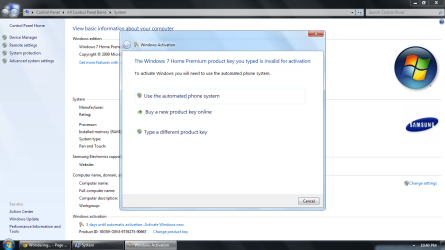
Why does it say INVALID FOR ACTIVATION when I clicked the Activate now:


Invalid.png


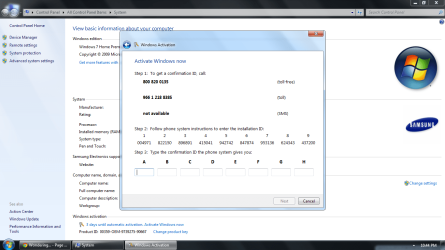
So I clicked the USE AUTOMATED PHONE SYSTEM and it made me choose the nearest country I am in. So I choose Saudi Arabia. And then this is the next dialog box:


Confirmation ID needed.png
 

My Computer

Computer Manufacturer/Model Number
Samsung Electronics - NP-R580-JS01SA
OS
Windows 7 Home Premium 32bit
CPU
Intel(R) Core(TM) i5 M 520 @ 2.40Ghz
Motherboard
SAMSUNG ELECTRONICS CO. R580
Memory
4GB DDR3 RAM
Graphics Card(s)
1 GB NVidia Geforce GT 330M
Sound Card
Realtek High Definition V. 6.6
Monitor(s) Displays
Generic PnP monitor
Screen Resolution
1366 x 768
Hard Drives
500 GB IDE/SATA
So this is what I was asking about "Automatic Activation". So I guess even If I let 3 days pass and let the system do the automatic activation then it would still detect that my product key in INVALID. Why is it invalid in the first place????? I have a genuine activated OS before the repair install and I used the product key (during repair install) located at the bottom of my laptop. can someone please help....
 

My Computer

Computer Manufacturer/Model Number
Samsung Electronics - NP-R580-JS01SA
OS
Windows 7 Home Premium 32bit
CPU
Intel(R) Core(TM) i5 M 520 @ 2.40Ghz
Motherboard
SAMSUNG ELECTRONICS CO. R580
Memory
4GB DDR3 RAM
Graphics Card(s)
1 GB NVidia Geforce GT 330M
Sound Card
Realtek High Definition V. 6.6
Monitor(s) Displays
Generic PnP monitor
Screen Resolution
1366 x 768
Hard Drives
500 GB IDE/SATA
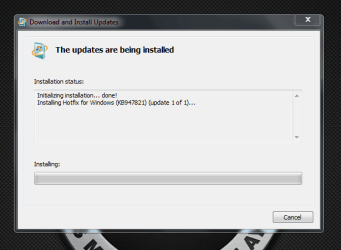
and after the first run of updating this is the result:

1st update.png


The NOTORIOUS 80004005 error code is still there!!!!


I'm gonna do a reboot and try again... :mad:
 

My Computer

Computer Manufacturer/Model Number
Samsung Electronics - NP-R580-JS01SA
OS
Windows 7 Home Premium 32bit
CPU
Intel(R) Core(TM) i5 M 520 @ 2.40Ghz
Motherboard
SAMSUNG ELECTRONICS CO. R580
Memory
4GB DDR3 RAM
Graphics Card(s)
1 GB NVidia Geforce GT 330M
Sound Card
Realtek High Definition V. 6.6
Monitor(s) Displays
Generic PnP monitor
Screen Resolution
1366 x 768
Hard Drives
500 GB IDE/SATA
After reboot I tried updating again and the same error persists. I'm installing Update readiness tool right now and then will update again.


Update Readiness.PNG
 

My Computer

Computer Manufacturer/Model Number
Samsung Electronics - NP-R580-JS01SA
OS
Windows 7 Home Premium 32bit
CPU
Intel(R) Core(TM) i5 M 520 @ 2.40Ghz
Motherboard
SAMSUNG ELECTRONICS CO. R580
Memory
4GB DDR3 RAM
Graphics Card(s)
1 GB NVidia Geforce GT 330M
Sound Card
Realtek High Definition V. 6.6
Monitor(s) Displays
Generic PnP monitor
Screen Resolution
1366 x 768
Hard Drives
500 GB IDE/SATA
If your original install was a factory OEM install using SLP activation then the product code on your COA sticker was never used. The Major OEM's like Dell, HP, Acer etc, have a master product code that they use on all of their SLP installs. They have to provide a COA sticker but the product code on it isn't used. To prevent you from using it on another PC it's blocked from automatic activation. You should still be able to activate by phone.

http://www.sevenforums.com/tutorials/174907-clean-install-factory-coa-activation-key.html?filter

EDIT: At this point I think you might want to consider doing a clean install.
 

My Computer

Computer type
PC/Desktop
Computer Manufacturer/Model Number
Home Built
OS
Windows 10 Education 64 bit
CPU
AMD Phenom II X4 980 Black Edition Deneb 3.7GHz
Motherboard
Asus M4N68T-M V2 µATX Motherboard
Memory
8GB 4GBx2 Kingston PC10600 DDR3 1333 Memory
Graphics Card(s)
Zotac NVIDIA Geforce GT640 2 Gig DDR3 PCIe
Sound Card
VIA VT1708s High Definition Audio 8-channel Onboard
Monitor(s) Displays
22" LG E2242 1080p and 2 19" I-INC AG191D
Screen Resolution
1280x1024 - 1920x1080 - 1280x1024
Hard Drives
Crucial M100 256 GB SSD and 500 GB WD Blue SATA
PSU
Thermaltake TR 620
Case
Power Up Black ATX Mid-Tower Case
Cooling
Stock heatsink and fan
Keyboard
Logitech Wireless K350 Wave
Mouse
Logitech Wireless M570 Trackman Wheel
Internet Speed
80 Mbps Down 30 Mbps Up
Antivirus
Windows Defender
Browser
Internet Explorer 11
Other Info
HP DVD1040e Lightscribe - External USB2
Thanks alpha, but a CLEAN INSTALL is a big no for me. After reading this thread:

http://www.sevenforums.com/installation-setup/200607-new-laptop-changing-partition-disks.html


Can I use a SP1 retail ISO to repair install my Windows 7?

I'm thinking to restore to the initial image again and then do a repair install using a windows SP1 retail ISO.

Would that work?


About the activation I read from here about a link for restore your windows keys? or something, that you wouldn't need to keep re-activating your windows online. And it led me to this site:


Paymyrent Token restore for mak keys and retail


How does this work? Please help. I downloaded this file but I don't know how this works. almost 12 midnight now. gotta hit the sack and continue this tomorrow after work.
 

My Computer

Computer Manufacturer/Model Number
Samsung Electronics - NP-R580-JS01SA
OS
Windows 7 Home Premium 32bit
CPU
Intel(R) Core(TM) i5 M 520 @ 2.40Ghz
Motherboard
SAMSUNG ELECTRONICS CO. R580
Memory
4GB DDR3 RAM
Graphics Card(s)
1 GB NVidia Geforce GT 330M
Sound Card
Realtek High Definition V. 6.6
Monitor(s) Displays
Generic PnP monitor
Screen Resolution
1366 x 768
Hard Drives
500 GB IDE/SATA
Last question for tonight:

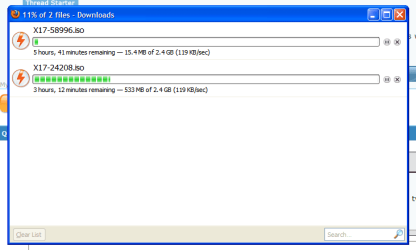
Im downloading 2 windows 7 sp1 ISO's at the moment. I'm wondering which is much newer of the two.

Win 7 SP1 ISO's.PNG

I'll use whichever is the latest one. Please provide some info folks... :sleepy:
 

My Computer

Computer Manufacturer/Model Number
Samsung Electronics - NP-R580-JS01SA
OS
Windows 7 Home Premium 32bit
CPU
Intel(R) Core(TM) i5 M 520 @ 2.40Ghz
Motherboard
SAMSUNG ELECTRONICS CO. R580
Memory
4GB DDR3 RAM
Graphics Card(s)
1 GB NVidia Geforce GT 330M
Sound Card
Realtek High Definition V. 6.6
Monitor(s) Displays
Generic PnP monitor
Screen Resolution
1366 x 768
Hard Drives
500 GB IDE/SATA
When you say "restore to the initial image" are you talking about restoring your laptop to factory condition using the built in factory restore utility? If yes activation should be automatic and you shouldn't have to enter a product code. You shouldn't have to do a repair either there shouldn't be anything wrong with it. I think you are just digging yourself into a deeper hole with all these repeated repair attempts.
 

My Computer

Computer type
PC/Desktop
Computer Manufacturer/Model Number
Home Built
OS
Windows 10 Education 64 bit
CPU
AMD Phenom II X4 980 Black Edition Deneb 3.7GHz
Motherboard
Asus M4N68T-M V2 µATX Motherboard
Memory
8GB 4GBx2 Kingston PC10600 DDR3 1333 Memory
Graphics Card(s)
Zotac NVIDIA Geforce GT640 2 Gig DDR3 PCIe
Sound Card
VIA VT1708s High Definition Audio 8-channel Onboard
Monitor(s) Displays
22" LG E2242 1080p and 2 19" I-INC AG191D
Screen Resolution
1280x1024 - 1920x1080 - 1280x1024
Hard Drives
Crucial M100 256 GB SSD and 500 GB WD Blue SATA
PSU
Thermaltake TR 620
Case
Power Up Black ATX Mid-Tower Case
Cooling
Stock heatsink and fan
Keyboard
Logitech Wireless K350 Wave
Mouse
Logitech Wireless M570 Trackman Wheel
Internet Speed
80 Mbps Down 30 Mbps Up
Antivirus
Windows Defender
Browser
Internet Explorer 11
Other Info
HP DVD1040e Lightscribe - External USB2
The shortest possible answer is "Yes".


If I update my firmwares for like: chipset, touchpad driver, Intel turbo boost, etc.

when I restore to a previously made image (like a 3 months ago Image) will the firmwares be reverted back to the old state too?
 

My Computer

Computer Manufacturer/Model Number
Custom Built
OS
Windows 7 Pro with SP1 32bit
Motherboard
Intel D845GVS1 X86-based PC
Memory
2 gigs of RAM
Graphics Card(s)
Intel(R) 82845G/GL/GE/PE/GV Graphics Controller
Sound Card
Realtek AC'97 Audio
Monitor(s) Displays
Samsung SyncMaster 931BF Black 19" LCD Monitor
Screen Resolution
1280X960
Hard Drives
1. SAMSUNG SP0822N ATA Device ~ 80 GigaBytes

2. Seagate FreeAgent Go USB Device ~ 500 GigaBytes
Keyboard
COMPAQ Standard PS/2 Keyboard
Mouse
iBall Laser Precise Speedster
Internet Speed
4 mb/sec
Yes, laptop factory settings with all the bloatware minus the restore option and minus the update for service pack 1. Yes the image is already activated. I'm using the built-in recovery software by samsung the RECOVERY SOLUTION 4.

Several times I restored to that initial image and I've found out that the SYSTEM RESTORE option doesn't work. Last night I restored to that initial image but it left me with 60+ failed updates all with the error code 80004005. So I did a repair Install again even though I had a bad repair Install the other night (which made me use the initial image restore). So after that 60+ failed updates using the Initial Image restore I decided to go at the REPAIR INSTALL again this time with a lighter load on my system but again it left me with 19 failed updates after using the UPDATE READINESS TOOL.


So that made me think that "what if I repair Installed using Windows SP1 right away?" therefore hopefully bypassing that error code 80004005.

Then the last problem remains is about the activation so I dug from this site and found that TOKEN RESTORE utility.


What do you think guys? Am I making sense?
 

My Computer

Computer Manufacturer/Model Number
Samsung Electronics - NP-R580-JS01SA
OS
Windows 7 Home Premium 32bit
CPU
Intel(R) Core(TM) i5 M 520 @ 2.40Ghz
Motherboard
SAMSUNG ELECTRONICS CO. R580
Memory
4GB DDR3 RAM
Graphics Card(s)
1 GB NVidia Geforce GT 330M
Sound Card
Realtek High Definition V. 6.6
Monitor(s) Displays
Generic PnP monitor
Screen Resolution
1366 x 768
Hard Drives
500 GB IDE/SATA
OK, it looks like there is something in your original factory install the SP1 doesn't like. It looks like doing repair installs isn't fixing it either, so I wouldn't bother trying any more. Others may disagree with that. Also I don't think you can do a repair with media that includes SP1 if your system doesn't have it already applied/installed. If that was my PC or one that some one said fix it, I don't care what you do just fix it. I'd do a clean install with install media obtained from a reliable source and be done with it. Install windows, install SP1, install the rest of the windows updates, create restore point, install drivers, etc......
 

My Computer

Computer type
PC/Desktop
Computer Manufacturer/Model Number
Home Built
OS
Windows 10 Education 64 bit
CPU
AMD Phenom II X4 980 Black Edition Deneb 3.7GHz
Motherboard
Asus M4N68T-M V2 µATX Motherboard
Memory
8GB 4GBx2 Kingston PC10600 DDR3 1333 Memory
Graphics Card(s)
Zotac NVIDIA Geforce GT640 2 Gig DDR3 PCIe
Sound Card
VIA VT1708s High Definition Audio 8-channel Onboard
Monitor(s) Displays
22" LG E2242 1080p and 2 19" I-INC AG191D
Screen Resolution
1280x1024 - 1920x1080 - 1280x1024
Hard Drives
Crucial M100 256 GB SSD and 500 GB WD Blue SATA
PSU
Thermaltake TR 620
Case
Power Up Black ATX Mid-Tower Case
Cooling
Stock heatsink and fan
Keyboard
Logitech Wireless K350 Wave
Mouse
Logitech Wireless M570 Trackman Wheel
Internet Speed
80 Mbps Down 30 Mbps Up
Antivirus
Windows Defender
Browser
Internet Explorer 11
Other Info
HP DVD1040e Lightscribe - External USB2
Okay. Thanks alpha. I guess I'll go back to my last image backup which has only 1 failed update: the SP1.

I am just curious, what is Microsoft doing about this error code 80004005? Clearly that Readiness Update Utility is not a reliable fix for this problem.
 

My Computer

Computer Manufacturer/Model Number
Samsung Electronics - NP-R580-JS01SA
OS
Windows 7 Home Premium 32bit
CPU
Intel(R) Core(TM) i5 M 520 @ 2.40Ghz
Motherboard
SAMSUNG ELECTRONICS CO. R580
Memory
4GB DDR3 RAM
Graphics Card(s)
1 GB NVidia Geforce GT 330M
Sound Card
Realtek High Definition V. 6.6
Monitor(s) Displays
Generic PnP monitor
Screen Resolution
1366 x 768
Hard Drives
500 GB IDE/SATA
I don't know what to tell you about that? I personally don't remember ever having any problems installing SP1. My current install media includes it so its installed with windows. Its just one less thing to do after a clean install.
 

My Computer

Computer type
PC/Desktop
Computer Manufacturer/Model Number
Home Built
OS
Windows 10 Education 64 bit
CPU
AMD Phenom II X4 980 Black Edition Deneb 3.7GHz
Motherboard
Asus M4N68T-M V2 µATX Motherboard
Memory
8GB 4GBx2 Kingston PC10600 DDR3 1333 Memory
Graphics Card(s)
Zotac NVIDIA Geforce GT640 2 Gig DDR3 PCIe
Sound Card
VIA VT1708s High Definition Audio 8-channel Onboard
Monitor(s) Displays
22" LG E2242 1080p and 2 19" I-INC AG191D
Screen Resolution
1280x1024 - 1920x1080 - 1280x1024
Hard Drives
Crucial M100 256 GB SSD and 500 GB WD Blue SATA
PSU
Thermaltake TR 620
Case
Power Up Black ATX Mid-Tower Case
Cooling
Stock heatsink and fan
Keyboard
Logitech Wireless K350 Wave
Mouse
Logitech Wireless M570 Trackman Wheel
Internet Speed
80 Mbps Down 30 Mbps Up
Antivirus
Windows Defender
Browser
Internet Explorer 11
Other Info
HP DVD1040e Lightscribe - External USB2
Back
Top