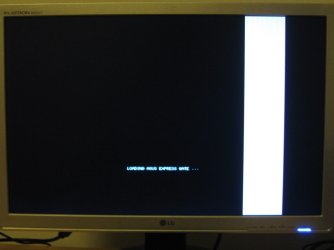
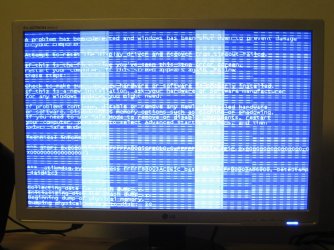
Wonky Screen Corruption Problem

I tried the beta and got this issue so I left it at that, but got myself the proffesional RTM from MSDN-AA yesterday. And still same irritating problem. Can't even complete the last part of the installation without getting this strange artifacts. Now I get it at login screen and when UAC prompts me for installations etc. Everything else works like a charm so guess there is a driver issue here somewhere, hope we'll get a fix soon! Tried both 32-bit and 64-bit same issue.

I got the ASRock 4CoreDual-VSTA with Nvidia 6800GT AGP.

Chipset is VIA PT880 Pro.
 
Last edited:

My Computer

Computer Manufacturer/Model Number
built by me
OS
Windows 7
CPU
Intel Core 2 Duo E6300
Motherboard
4CoreDual-VSTA
Memory
2* 1024MBytes DDR2 dual
Graphics Card(s)
NVIDIA GeForce 6800 GT AGP
Sound Card
Creative Audigy 2 ZS
Monitor(s) Displays
Samsung SyncMaster 226cw and NEC MultiSync LCD1770NX
Screen Resolution
1680 * 1050 and 1280 * 1024
Hard Drives
almost 3TB
I also having problems with my screen. I ordered new computer and installed Windows 7 Professional 64bit to it. After installing my graphic card seemed to fuzz the screen right after starting the computer. I attach couple of pictures what happens when I start computer by using my graphics card.

If I use my motherboards integrated graphic card, windows starts up fine and everything is ok. This happens only when I remove my real graphic card from computer. Otherwise the screen won't start up at all.

My graphics card is Ati radeon Club 3D HD 4870 PCI-E 1GB GDDR-5 OC, motherboard is Asus M4A785TD-V EVO with AMD Phenom II X2 550 BE as a processor. I installed latest (these: Drivers & Tools | GAME.AMD.COM) drivers but the problem won't seem to disappear.

I wonder if my graphics card is broken because problem comes right after starting the computer, not after windows is being loaded. To make this even crazier, sometimes the card lets the computer to start up to windows, but on the desktop it's all same fuzz as in the other pictures.

Is there any solution for this or do I have to send graphics card to being fixed? :(
 

Attachments

  • IMG_0346.JPG
    IMG_0346.JPG
    75.8 KB · Views: 29
  • IMG_0347.JPG
    IMG_0347.JPG
    337.2 KB · Views: 21
  • IMG_0350.JPG
    IMG_0350.JPG
    344.4 KB · Views: 180

My Computer

OS
Windows 7
CPU
AMD Phenom II X2 550 Black Edition
Motherboard
ASUS M4A785TD-V EVO
Memory
A-DATA DDR3 1333 2X2GB 128*8 CL9
Graphics Card(s)
Club 3D HD 4870 PCI-E 1GB GDDR-5 OC
Monitor(s) Displays
LG FLATRON W2242T
Hard Drives
WD Caviar GP 500GB SATA2
PSU
Chieftec PSU 500W
Case
Nexus Breeze
Olbert

Try booting into safe mode with the graphics card in. safe mode doesn't use the driver (800x600) so if it is the card thats fried you should still have the problem. If its just the driver (which is what I suspect) in safe mode it should be fine.

Let us know

Ken
 

My Computer

Computer Manufacturer/Model Number
HP Pavillion dv-7 1005 Tx
OS
Win 8 Release candidate 8400
CPU
[email protected]
Memory
4 gigs
Graphics Card(s)
Nvidia 9600M
Sound Card
HD built-in
Monitor(s) Displays
17" Wxga
Screen Resolution
1440x900
Cooling
none
Internet Speed
45Mb down 5Mb up
Olbert

If the problem occurs before windows is loaded it has nothing to do with OS or drivers. It's definitely hardware that's broken.

So you should try with another graphic card and see if it's the same, if it's not you know that the problem is the graphic card and you should send it in for repair or replacement.
 

My Computer

Computer Manufacturer/Model Number
built by me
OS
Windows 7
CPU
Intel Core 2 Duo E6300
Motherboard
4CoreDual-VSTA
Memory
2* 1024MBytes DDR2 dual
Graphics Card(s)
NVIDIA GeForce 6800 GT AGP
Sound Card
Creative Audigy 2 ZS
Monitor(s) Displays
Samsung SyncMaster 226cw and NEC MultiSync LCD1770NX
Screen Resolution
1680 * 1050 and 1280 * 1024
Hard Drives
almost 3TB
zigzag3143:
I've tried that one, problem was still the same.

Vighi:

I'll try the card at my friend's computer at weekend. Then I'll see if it's the card or motherboard that is broken.

Thank you for your answers. Really sucks that I get broken components when I order a new computer. :S
 

My Computer

OS
Windows 7
CPU
AMD Phenom II X2 550 Black Edition
Motherboard
ASUS M4A785TD-V EVO
Memory
A-DATA DDR3 1333 2X2GB 128*8 CL9
Graphics Card(s)
Club 3D HD 4870 PCI-E 1GB GDDR-5 OC
Monitor(s) Displays
LG FLATRON W2242T
Hard Drives
WD Caviar GP 500GB SATA2
PSU
Chieftec PSU 500W
Case
Nexus Breeze
Looks like there is no fix in the mix or am I wrong?

I really want to use windows 7 on my PC so I might as well go ahead and buy me a new Graphic card. Any PCI-E card won't have this problem?
 

My Computer

Computer Manufacturer/Model Number
built by me
OS
Windows 7
CPU
Intel Core 2 Duo E6300
Motherboard
4CoreDual-VSTA
Memory
2* 1024MBytes DDR2 dual
Graphics Card(s)
NVIDIA GeForce 6800 GT AGP
Sound Card
Creative Audigy 2 ZS
Monitor(s) Displays
Samsung SyncMaster 226cw and NEC MultiSync LCD1770NX
Screen Resolution
1680 * 1050 and 1280 * 1024
Hard Drives
almost 3TB
...i tried the OEM Windows7 today and the latest nvidia driver (190.89 beta); there are no changes: the same black lines, the same messy screen; it is sad that nobody cares about our problem; long life microsoft and nividia...
 

My Computer

Computer Manufacturer/Model Number
self made
OS
WinXp Pro SP3
CPU
DualCore Intel Core 2 Duo E7400
Motherboard
ASRock 775Dual-VSTA Bios 3.19a
Memory
2x 512 MB DDR2-667
Graphics Card(s)
Leadtek NVIDIA GeForce 6600GT AGP (128 MB)
Sound Card
Hercules DigiFire 7.1 Audio
Monitor(s) Displays
Samsung SyncMaster 931BF
Screen Resolution
1280x1024 60Hz
Hard Drives
WDC WD3000JB

My Computer

Computer Manufacturer/Model Number
built by me
OS
Windows 7
CPU
Intel Core 2 Duo E6300
Motherboard
4CoreDual-VSTA
Memory
2* 1024MBytes DDR2 dual
Graphics Card(s)
NVIDIA GeForce 6800 GT AGP
Sound Card
Creative Audigy 2 ZS
Monitor(s) Displays
Samsung SyncMaster 226cw and NEC MultiSync LCD1770NX
Screen Resolution
1680 * 1050 and 1280 * 1024
Hard Drives
almost 3TB
to the top
 

My Computer

Computer Manufacturer/Model Number
self made
OS
WinXp Pro SP3
CPU
DualCore Intel Core 2 Duo E7400
Motherboard
ASRock 775Dual-VSTA Bios 3.19a
Memory
2x 512 MB DDR2-667
Graphics Card(s)
Leadtek NVIDIA GeForce 6600GT AGP (128 MB)
Sound Card
Hercules DigiFire 7.1 Audio
Monitor(s) Displays
Samsung SyncMaster 931BF
Screen Resolution
1280x1024 60Hz
Hard Drives
WDC WD3000JB
all of you that haven't filled in your system specs realy should do so in your user cp. this way everyone will know all your hardware and can better understand what might be at fault. Has anyone tried to update their bios? or chipset drivers? Thanks and welcome top seven forums. Fabe
 

My Computer

Computer Manufacturer/Model Number
Self Built
OS
Windows 7 ultimate 64 bit / XP Home sp3
CPU
intel Core 2 Duo E8400 3.0ghz
Motherboard
Asus P5ND bios 1401
Memory
8 gigs 1066 OCZ Fata1ty
Graphics Card(s)
EVGA GTX 580 Call of Duty Black Ops Edition
Sound Card
Creative Soundblaster Audigy 2zs
Monitor(s) Displays
Asus 24in LCD's 2MS X2
Screen Resolution
1920x1080p @60Hz
Hard Drives
WD Caviar 500 Black/ WD Caviar 200 Blue
PSU
OCZ 700W GameXtreme
Case
NZXT Apollo
Cooling
Corsair H50 CPU/120mm x3 /60mm x2 /Corsair Dominator Ram
Keyboard
Logitech Bluetooth Wireless MX5000
Mouse
Logitech Bluetooth Wireless MX1000
Internet Speed
Download 19.83 Upload 0.97
Other Info
Logitech Z2300 Speakers/ Bose Noise Cancelling Headphones/Avermedia PCI-e Hybrid TV Bravo/Epson NX415 all in one/ 4 Port Powered USB Hub/ LG 10x Bluray Burner /TSST Corp DVDRW External
Will do.

And also I tried newest bios @ PcTreiber.Net | Filebase and @ ASRock Inc..

Newest chipset driver VIA HyperionPro ver:5.10A and 5.24a.

Nothing fixed the problem. Tried lots of diffrent Nvidia drivers as well.
 

My Computer

Computer Manufacturer/Model Number
built by me
OS
Windows 7
CPU
Intel Core 2 Duo E6300
Motherboard
4CoreDual-VSTA
Memory
2* 1024MBytes DDR2 dual
Graphics Card(s)
NVIDIA GeForce 6800 GT AGP
Sound Card
Creative Audigy 2 ZS
Monitor(s) Displays
Samsung SyncMaster 226cw and NEC MultiSync LCD1770NX
Screen Resolution
1680 * 1050 and 1280 * 1024
Hard Drives
almost 3TB
the same here; i have the latest bios, i invested a lot of time on this with no result; the interesting thing is that my mainboard is different than Vighi's but my PC still suffers from the same problem;
 

My Computer

Computer Manufacturer/Model Number
self made
OS
WinXp Pro SP3
CPU
DualCore Intel Core 2 Duo E7400
Motherboard
ASRock 775Dual-VSTA Bios 3.19a
Memory
2x 512 MB DDR2-667
Graphics Card(s)
Leadtek NVIDIA GeForce 6600GT AGP (128 MB)
Sound Card
Hercules DigiFire 7.1 Audio
Monitor(s) Displays
Samsung SyncMaster 931BF
Screen Resolution
1280x1024 60Hz
Hard Drives
WDC WD3000JB
to the top
 

My Computer

Computer Manufacturer/Model Number
self made
OS
WinXp Pro SP3
CPU
DualCore Intel Core 2 Duo E7400
Motherboard
ASRock 775Dual-VSTA Bios 3.19a
Memory
2x 512 MB DDR2-667
Graphics Card(s)
Leadtek NVIDIA GeForce 6600GT AGP (128 MB)
Sound Card
Hercules DigiFire 7.1 Audio
Monitor(s) Displays
Samsung SyncMaster 931BF
Screen Resolution
1280x1024 60Hz
Hard Drives
WDC WD3000JB
Formatted and installed latest 191.07 WHQL drivers from NVIDIA today, stil the same wonky screen corruption.
 

My Computer

Computer Manufacturer/Model Number
built by me
OS
Windows 7
CPU
Intel Core 2 Duo E6300
Motherboard
4CoreDual-VSTA
Memory
2* 1024MBytes DDR2 dual
Graphics Card(s)
NVIDIA GeForce 6800 GT AGP
Sound Card
Creative Audigy 2 ZS
Monitor(s) Displays
Samsung SyncMaster 226cw and NEC MultiSync LCD1770NX
Screen Resolution
1680 * 1050 and 1280 * 1024
Hard Drives
almost 3TB
to the bottom
 

My Computer

Computer Manufacturer/Model Number
self made
OS
WinXp Pro SP3
CPU
DualCore Intel Core 2 Duo E7400
Motherboard
ASRock 775Dual-VSTA Bios 3.19a
Memory
2x 512 MB DDR2-667
Graphics Card(s)
Leadtek NVIDIA GeForce 6600GT AGP (128 MB)
Sound Card
Hercules DigiFire 7.1 Audio
Monitor(s) Displays
Samsung SyncMaster 931BF
Screen Resolution
1280x1024 60Hz
Hard Drives
WDC WD3000JB

My Computer

Computer Manufacturer/Model Number
built by me
OS
Windows 7
CPU
Intel Core 2 Duo E6300
Motherboard
4CoreDual-VSTA
Memory
2* 1024MBytes DDR2 dual
Graphics Card(s)
NVIDIA GeForce 6800 GT AGP
Sound Card
Creative Audigy 2 ZS
Monitor(s) Displays
Samsung SyncMaster 226cw and NEC MultiSync LCD1770NX
Screen Resolution
1680 * 1050 and 1280 * 1024
Hard Drives
almost 3TB
Hey brainwashed did you try what this guy did? I know it's Windows Vista, but is's the exact same problem, and maybe a fix? Screen Corruption / Horizontal Lines - Vista - 780 - NVIDIA Forums

Finally i solved my problem! :party:
1. I installed windows7
2. I removed the generic nvidia driver that came with the windows7 (usind DH Driver Cleaner)
3. I installed the mentioned Forceware Vista 97.52 (x86) nvidia driver from here:
Forceware Vista 97.52 (x86) download from Guru3D.com
4. Job done; It works, even if is a 3years old vista driver!

Thx Vighi and to all the people who helped;
 

My Computer

Computer Manufacturer/Model Number
self made
OS
WinXp Pro SP3
CPU
DualCore Intel Core 2 Duo E7400
Motherboard
ASRock 775Dual-VSTA Bios 3.19a
Memory
2x 512 MB DDR2-667
Graphics Card(s)
Leadtek NVIDIA GeForce 6600GT AGP (128 MB)
Sound Card
Hercules DigiFire 7.1 Audio
Monitor(s) Displays
Samsung SyncMaster 931BF
Screen Resolution
1280x1024 60Hz
Hard Drives
WDC WD3000JB
Yes solved the problem for me too. Installed the Nvidia drivers(97.52 64bit)! :)
Too bad we need to use a 3 year old driver to get windows 7 working.
 

My Computer

Computer Manufacturer/Model Number
built by me
OS
Windows 7
CPU
Intel Core 2 Duo E6300
Motherboard
4CoreDual-VSTA
Memory
2* 1024MBytes DDR2 dual
Graphics Card(s)
NVIDIA GeForce 6800 GT AGP
Sound Card
Creative Audigy 2 ZS
Monitor(s) Displays
Samsung SyncMaster 226cw and NEC MultiSync LCD1770NX
Screen Resolution
1680 * 1050 and 1280 * 1024
Hard Drives
almost 3TB
Solved here too. I didn't try any other suggestion here, this one seemed simple.
 

My Computer

OS
Win7 64 bits FR
CPU
2500K @ 4.5 GHz
Motherboard
Asrock Z68 Gen3 Extreme3
Memory
4x4GB 1600MHz GSkill CL9.
Graphics Card(s)
HD6850 Powercolor stock
Sound Card
Integrated
Monitor(s) Displays
Samsung 2343 + Dell 20in 4/3
Screen Resolution
2048x1152, 1600x1200
Hard Drives
OCZ Vertex LE SSD, 50GB
OCZ Solid 3 120GB
OCZ Vertex 2 240GB
Western Digital Scorpio 320GB 5400 rpm
PSU
KingWin Lazer Platinum (90+) 550Watts
Case
HAF912
Cooling
CPU: OCZ Vendetta 2
Keyboard
MX5500 revolution bluetooth
Mouse
MX5500 revolution bluetooth
Internet Speed
Cable 7 Mbps
Just out of curiosity..Any of you guys tested any of the newer drivers with windows 7 and had any luck? I really would want some newer driver working with a little more power then the 97.52 driver. I need to have windows XP installed to play any games at all, even old ones.
 

My Computer

Computer Manufacturer/Model Number
built by me
OS
Windows 7
CPU
Intel Core 2 Duo E6300
Motherboard
4CoreDual-VSTA
Memory
2* 1024MBytes DDR2 dual
Graphics Card(s)
NVIDIA GeForce 6800 GT AGP
Sound Card
Creative Audigy 2 ZS
Monitor(s) Displays
Samsung SyncMaster 226cw and NEC MultiSync LCD1770NX
Screen Resolution
1680 * 1050 and 1280 * 1024
Hard Drives
almost 3TB
Back
Top