Won't discover other computers

brossyg

New member
Local time
11:49 AM
Messages
5
I have a problem many people seem to have and I have spent many hours/days trying to fix it unsuccessfully. I have one Win-7 SP1 64-bit computer and several other Win-XP SP-3 32-bit computers on a gigabit home network with a Linksys RVS 4000 router.
  • All computers have the same workgroup.
  • All computers have internet access.
  • All XP computers CAN ping the other XP computers and the XP computers CAN browse to the other XP computers by entering the IP address: \\192.168.blah.blah.
  • The Win-7 computer CAN ping the XP computers and CAN browse to the XP computers by entering the IP address: \\192.168.blah.blah.
  • The XP computers CANNOT ping the Win-7 computer and CANNOT browse to the Win-7 computer by entering the IP address: \\192.168.blah.blah.
  • IP6 is DISABLED on the Win-7 machine.
  • Netbios is ENABLED on all machines.
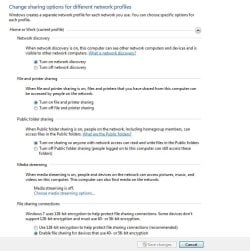
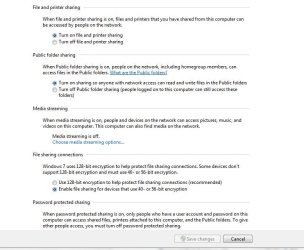
  • Win-7 computer is set to Home Network and all Advanced Sharing Settings permissions are ON; Network Discovery, ON; File and Printer Sharing, ON; Public Folder Sharing, ON.
  • Win-7 computer shows HomeGroup as Joined and will not let me leave the HomeGroup.
  • Windows firewall on XP computers is disabled. Norton firewall is up, but it has always been up and I have tried disabling it with no change. Win-7 computer does not have Norton yet and I have not fooled with Security Essentials.
I don't know exactly when it started happening, but:
  • The computers do not show each other on the Windows Explorer Network page, In the Win-XP computers, only the folders that were added manually do show up. But there is no AUTOMATIC discovery.
  • The XP computers all get an error if I try to access the workgroup from Network Neighborhood by exploring for computers, saying the Workgroup server is not available or I don't have access.
  • The Win-7 network screen only shows the Win-7 computer itself and none of the XP computers. It also shows other network devices as it should, however.
  • At times, although I can't replicate it right now, the XP computers will show the others, but won't show the Win-7 computer, if I go through the network connection set up wizard in IE8. If i reboot, the access seems to go away...but I cannot make them show up now.
  • At times, but not now, I have been able to see all network computers on the Win-7 computer.
I have tried everything I can find, including changing one networking key in the registry on the XP machines from an 8 to a 1. This worked for other people, but didn't change anything for me.

Any suggestions would be appreciated.
 
Last edited:

My Computer

OS
Win-7 64-bit
CPU
I7
Motherboard
Asus Rampage Extr III
Memory
6 Gig
Graphics Card(s)
3-Gigabyte GTX460
Monitor(s) Displays
Quad monitors
Hard Drives
RAID 1 500 Gig
PSU
850 Watt
Welcome brossyg :D


You are using a Business type network (WorkGroup) right ? Not the new win7 Homegroup ? Have you gone over the settings in the win7 computer. Here is mine:
 

Attachments

  • network_options.JPG
    network_options.JPG
    73.4 KB · Views: 641
  • Network_Options2.JPG
    Network_Options2.JPG
    60.1 KB · Views: 487
  • Network_computers_13.JPG
    Network_computers_13.JPG
    70.3 KB · Views: 389

My Computer

Computer type
PC/Desktop
Computer Manufacturer/Model Number
Built them myself, Science Experiments !
OS
Win7 Enterprise, Win7 x86 (Ult 7600), Win7 x64 Ult 7600, TechNet RTM on AMD x64 (2.8Ghz)
CPU
AMD fx8350 4ghz, AMD-32 2400mhz, AMD-64 3200mhz, AMDx64 2.8G
Motherboard
SIS 755, ECS-K8M890M-M (Ult 7600), GigaByte & others
Memory
2gb, 4gb on the Ult 7600, 4gb on Technet RTM, 32gb on FX8350
Graphics Card(s)
Draw my own Graphics, several nVidia cards
Sound Card
on motherboard
Monitor(s) Displays
19" flat scr, 28" I-Inc widescr,22" Emprex Widescr, 23" Acer
Screen Resolution
1280 x 1024, 1440 x 900, 1920 x 1080
Hard Drives
6 pata Ide HD's & 2 Sata HD's
added 80gb external on Ult 7600 computer,
numerous extra 1tb, 2TB, 3Tb SATA HD's
A collection of ext HD Docks w/ HDs
PSU
430w, 550w, 600w, 700, 800, etc
Case
All Generic Full Towers
Cooling
Open Air & a few fans, some w/ colored LEDs
Keyboard
Compaq & Dell recycled from GoodWill
Mouse
Made in China Optical Wired Mouse
Internet Speed
Fast Cable InterNet
Antivirus
AVG Free on 24 different Desktops, NO Problems!
Browser
IE 8 is preferred, but use FireFox sometimes
Other Info
Linksys Routers, switches, & Hubs
Too Many USB Flash Drives to count, Biggest is 64GB !
Eight computers in my home network.
Sixteen computers at my business network.
Linked via TeamViewer !
Lots of old used spare computer parts everywhere!
My Network is set to Home network and my Advanced Sharing Settings are all the same as yours, except for media streaming (mine is on). I tried changing it to a Work Network and refreshed the computer list (also rebooted) and nothing changed. Also, this wouldn't account for the lack of discovery on the XP machines.
 

My Computer

OS
Win-7 64-bit
CPU
I7
Motherboard
Asus Rampage Extr III
Memory
6 Gig
Graphics Card(s)
3-Gigabyte GTX460
Monitor(s) Displays
Quad monitors
Hard Drives
RAID 1 500 Gig
PSU
850 Watt
8 of the above computers are XP, 5 are win7. On the win7 computers I have to set sharing on the individual folders I want shared. Share with Specific people, then Add Everyone , then save with the Share button at the bottom.
 

My Computer

Computer type
PC/Desktop
Computer Manufacturer/Model Number
Built them myself, Science Experiments !
OS
Win7 Enterprise, Win7 x86 (Ult 7600), Win7 x64 Ult 7600, TechNet RTM on AMD x64 (2.8Ghz)
CPU
AMD fx8350 4ghz, AMD-32 2400mhz, AMD-64 3200mhz, AMDx64 2.8G
Motherboard
SIS 755, ECS-K8M890M-M (Ult 7600), GigaByte & others
Memory
2gb, 4gb on the Ult 7600, 4gb on Technet RTM, 32gb on FX8350
Graphics Card(s)
Draw my own Graphics, several nVidia cards
Sound Card
on motherboard
Monitor(s) Displays
19" flat scr, 28" I-Inc widescr,22" Emprex Widescr, 23" Acer
Screen Resolution
1280 x 1024, 1440 x 900, 1920 x 1080
Hard Drives
6 pata Ide HD's & 2 Sata HD's
added 80gb external on Ult 7600 computer,
numerous extra 1tb, 2TB, 3Tb SATA HD's
A collection of ext HD Docks w/ HDs
PSU
430w, 550w, 600w, 700, 800, etc
Case
All Generic Full Towers
Cooling
Open Air & a few fans, some w/ colored LEDs
Keyboard
Compaq & Dell recycled from GoodWill
Mouse
Made in China Optical Wired Mouse
Internet Speed
Fast Cable InterNet
Antivirus
AVG Free on 24 different Desktops, NO Problems!
Browser
IE 8 is preferred, but use FireFox sometimes
Other Info
Linksys Routers, switches, & Hubs
Too Many USB Flash Drives to count, Biggest is 64GB !
Eight computers in my home network.
Sixteen computers at my business network.
Linked via TeamViewer !
Lots of old used spare computer parts everywhere!
DocBrown,

Yes...this is how I did it as well. Howver, this is folder specific and shouldn't effect how the Network discovery works....should it? My problem is that Network discovery is being blocked somehow. I have no problem sharing files once I navigate to another computer via the IP, but in the Network Neighbor hood, the computers are not displayed automatically as they should be.
 

My Computer

OS
Win-7 64-bit
CPU
I7
Motherboard
Asus Rampage Extr III
Memory
6 Gig
Graphics Card(s)
3-Gigabyte GTX460
Monitor(s) Displays
Quad monitors
Hard Drives
RAID 1 500 Gig
PSU
850 Watt
Instead of disabling Norton, remove it and reboot. Configure the XP (and Windows 7) firewall to default settings. See what happens.

Also, on the Windows 7 computer, hit the Windows key and type "homegroup", then press enter. Do you get a message saying there is currently no homegroup on the network, or do you get a different message?
 

My Computer

Computer Manufacturer/Model Number
Dell XPS 15 L502x
OS
Windows 7 Ultimate x64 SP1
CPU
Core i7-2670QM
Memory
8GB DDR3 PC3-10600
Graphics Card(s)
Intel HD Graphics 3000 + GeForce GT 540M
Screen Resolution
1920x1080
Hard Drives
1TB 5400RPM Seagate
Will try uninstalling Norton, but when I type homegroup in, it says "This Computer belongs to a homegroup." and then goes on to say that i haven't shared any libraries with your home group."
 

My Computer

OS
Win-7 64-bit
CPU
I7
Motherboard
Asus Rampage Extr III
Memory
6 Gig
Graphics Card(s)
3-Gigabyte GTX460
Monitor(s) Displays
Quad monitors
Hard Drives
RAID 1 500 Gig
PSU
850 Watt

My Computer

Computer type
PC/Desktop
Computer Manufacturer/Model Number
Built them myself, Science Experiments !
OS
Win7 Enterprise, Win7 x86 (Ult 7600), Win7 x64 Ult 7600, TechNet RTM on AMD x64 (2.8Ghz)
CPU
AMD fx8350 4ghz, AMD-32 2400mhz, AMD-64 3200mhz, AMDx64 2.8G
Motherboard
SIS 755, ECS-K8M890M-M (Ult 7600), GigaByte & others
Memory
2gb, 4gb on the Ult 7600, 4gb on Technet RTM, 32gb on FX8350
Graphics Card(s)
Draw my own Graphics, several nVidia cards
Sound Card
on motherboard
Monitor(s) Displays
19" flat scr, 28" I-Inc widescr,22" Emprex Widescr, 23" Acer
Screen Resolution
1280 x 1024, 1440 x 900, 1920 x 1080
Hard Drives
6 pata Ide HD's & 2 Sata HD's
added 80gb external on Ult 7600 computer,
numerous extra 1tb, 2TB, 3Tb SATA HD's
A collection of ext HD Docks w/ HDs
PSU
430w, 550w, 600w, 700, 800, etc
Case
All Generic Full Towers
Cooling
Open Air & a few fans, some w/ colored LEDs
Keyboard
Compaq & Dell recycled from GoodWill
Mouse
Made in China Optical Wired Mouse
Internet Speed
Fast Cable InterNet
Antivirus
AVG Free on 24 different Desktops, NO Problems!
Browser
IE 8 is preferred, but use FireFox sometimes
Other Info
Linksys Routers, switches, & Hubs
Too Many USB Flash Drives to count, Biggest is 64GB !
Eight computers in my home network.
Sixteen computers at my business network.
Linked via TeamViewer !
Lots of old used spare computer parts everywhere!
OK...

I completely uninstalled Norton on one of the XP computers. I can now ping the Win-7 computer using the IP address from the XP computer, but if I try to view the workgroup in the network part of in Windows Explorer, it still tells me I don't have access and that "A list of servers for this workgroup is not currently available."

Also, I have tried and tried to leave the homegroup on the Win-7 conmputer and I get "Windows couldn't remove your computer from the homegroup." no matter what I try.
 

My Computer

OS
Win-7 64-bit
CPU
I7
Motherboard
Asus Rampage Extr III
Memory
6 Gig
Graphics Card(s)
3-Gigabyte GTX460
Monitor(s) Displays
Quad monitors
Hard Drives
RAID 1 500 Gig
PSU
850 Watt
Some people have had success fixing this problem by running the home group troubleshooter. Some have had a firewall config problem that, when corrected, allowed the Windows 7 computer to leave the home group. Give that a shot.
 

My Computer

Computer Manufacturer/Model Number
Dell XPS 15 L502x
OS
Windows 7 Ultimate x64 SP1
CPU
Core i7-2670QM
Memory
8GB DDR3 PC3-10600
Graphics Card(s)
Intel HD Graphics 3000 + GeForce GT 540M
Screen Resolution
1920x1080
Hard Drives
1TB 5400RPM Seagate
Back
Top