Solved Word 2000 Menu Bar

tommakawao

New member
Member
Local time
7:11 PM
Messages
45
Location
Maui, Hawaii
I'v been using Word 2000 with Windows 7 for years. All of a sudden a "Menu Bar" has popped up on the screen. I can't get rid of it. I find it very annoying.

How do I turn it off ?
 

My Computer

Computer type
PC/Desktop
OS
Windows Home Premiun, 64 bit
I'v been using Word 2000 with Windows 7 for years. All of a sudden a "Menu Bar" has popped up on the screen....
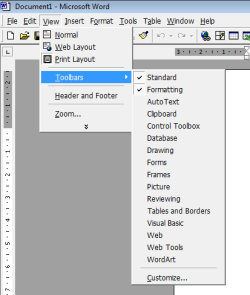
Sounds like you may be talking about a toolbar. These can be turned on or off from the View menu.

Word 2000 toolbars.png

If that's not what you mean, can you post a screenshot?
 

My Computers

System One System Two

  • Computer type
    Laptop
    Computer Manufacturer/Model Number
    Toshiba satellite C650D
    OS
    Windows 7 Home Premium x64
    CPU
    AMD V120
    Memory
    4GB
    Internet Speed
    150 Mbps
    Antivirus
    MSE
    Browser
    IE11, Edge, Firefox
    Other Info
    I also have W7 Pro on my System Two, and several W7 Hyper-V VMs. My other machines run Windows 10/11. Their specs are in my Ten Forums & Eleven Forum profiles.
  • Computer type
    Laptop
    System Manufacturer/Model Number
    Lenovo Thinkpad T430
    OS
    Windows 7 Pro x64
    CPU
    Intel i5-3320M
    Memory
    8 GB
    Hard Drives
    250GB Samsung SSD 860 EVO
    Other Info
    Antivirus: MSE
No, I'm not confusing it with toolbars. When I go to View and click Toolbars, I get a drop down menu like the one you show. One difference, my drop down menu has "menu bar" as one of the choices. The problem is I can't unclick it. I click but nothing happens.
 

My Computer

Computer type
PC/Desktop
OS
Windows Home Premiun, 64 bit
No, I'm not confusing it with toolbars...

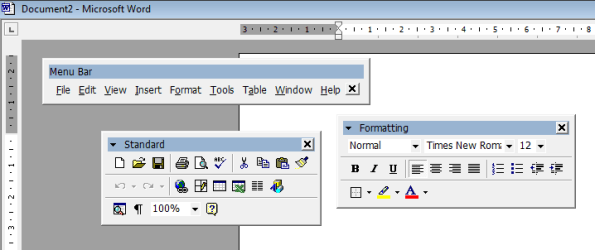
Without a screenshot of what you are seeing I'm having to guess. My next guess is that you may have detached the Menu Bar and it's now floating as a separate window. All the toolbars, including the Menu bar itself can be clicked on and dragged down to separate them from the top bar.

Word 2000 detached toolbars.PNG

If this is what you mean, then click and drag the Menu bar back up to the top to dock it there.
 

My Computers

System One System Two

  • Computer type
    Laptop
    Computer Manufacturer/Model Number
    Toshiba satellite C650D
    OS
    Windows 7 Home Premium x64
    CPU
    AMD V120
    Memory
    4GB
    Internet Speed
    150 Mbps
    Antivirus
    MSE
    Browser
    IE11, Edge, Firefox
    Other Info
    I also have W7 Pro on my System Two, and several W7 Hyper-V VMs. My other machines run Windows 10/11. Their specs are in my Ten Forums & Eleven Forum profiles.
  • Computer type
    Laptop
    System Manufacturer/Model Number
    Lenovo Thinkpad T430
    OS
    Windows 7 Pro x64
    CPU
    Intel i5-3320M
    Memory
    8 GB
    Hard Drives
    250GB Samsung SSD 860 EVO
    Other Info
    Antivirus: MSE
Holy Menus, Batman ! You are totally right ! I dragged it to the top left corner and it stayed put. Thanks a bunch.
 

My Computer

Computer type
PC/Desktop
OS
Windows Home Premiun, 64 bit
Glad we got there in the end :thumbsup:
 

My Computers

System One System Two

  • Computer type
    Laptop
    Computer Manufacturer/Model Number
    Toshiba satellite C650D
    OS
    Windows 7 Home Premium x64
    CPU
    AMD V120
    Memory
    4GB
    Internet Speed
    150 Mbps
    Antivirus
    MSE
    Browser
    IE11, Edge, Firefox
    Other Info
    I also have W7 Pro on my System Two, and several W7 Hyper-V VMs. My other machines run Windows 10/11. Their specs are in my Ten Forums & Eleven Forum profiles.
  • Computer type
    Laptop
    System Manufacturer/Model Number
    Lenovo Thinkpad T430
    OS
    Windows 7 Pro x64
    CPU
    Intel i5-3320M
    Memory
    8 GB
    Hard Drives
    250GB Samsung SSD 860 EVO
    Other Info
    Antivirus: MSE
Back
Top