Word 2003 default settings

Uitlander

New member
Member
Local time
11:31 AM
Messages
36
Is there any way to permanently change the default settings? Registry hack maybe? As an example, every time I use it I have to set and reset the page margins. I'd also want to end the cruddy 'segoe' as default choice for pretty much everything I copy/paste, and have 'clear formatting' as the default. Any way(s) to do this?
 

My Computers

System One System Two

  • Computer type
    PC/Desktop
    Computer Manufacturer/Model Number
    Dell OptiPlex 7010 Tower
    OS
    Windows 7 Pro 64-bit
    CPU
    i7-3770
    Memory
    16GB
    Graphics Card(s)
    onboard
    Monitor(s) Displays
    Dell
    Hard Drives
    1TB.
    Keyboard
    Wyse ku8933
    Mouse
    Microsoft optical
    Antivirus
    none
    Browser
    ComodoDragon, Basilisk, WaterFox, Brave, Chrome, Iridium
  • Computer type
    PC/Desktop
In Word there are a normal of settings that have a Default button. You click on it to change the default settings.

For example, in Word 2003 to change the default page margins:

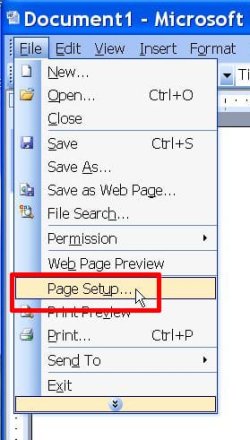
1. Select File > Page Setup

Word1.jpg

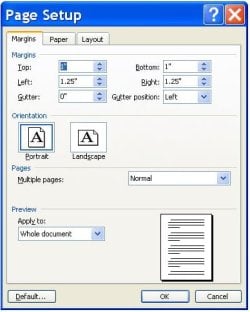
2. You will see the default page margins

Word2.jpg

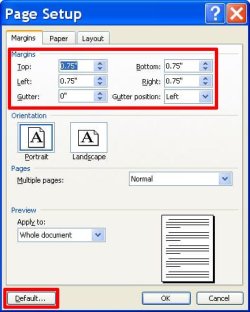
3. Change these margins to what you want the new default to be and click on Default

Word3.jpg

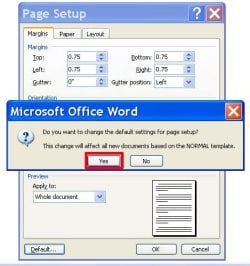
4. Click on Yes to confirm the change

Word4.jpg

In Word 2003 the default settings are saved in a file called Normal.dot. It is located here:
C:\Users\<your user name>\AppData\Roaming\Microsoft\Templates\Normal.dot
Note it is in a hidden folder called AppData so you have to unhide it to see it.

Normally you don't care about it or where is. However, if you want to set everything back to the original defaults then just delete Normal.dot. Word will then recreate Normal.dot with the original default settings.
 

My Computers

System One System Two

  • Computer type
    PC/Desktop
    Computer Manufacturer/Model Number
    Custom build
    OS
    Windows 7 Home Premium 64-bits
    CPU
    AMD FX-8350
    Motherboard
    Gigabyte GA-990FXA-UD3 (AM3+)
    Memory
    GSKILL Ripjaw-X PC3 12800 8GB (2x4GB)
    Graphics Card(s)
    ASUS ROG STRIX GTX 1060 6GB
    Sound Card
    Integrated
    Monitor(s) Displays
    Asus VE228H (21.5-in)
    Screen Resolution
    1920x1080 60Hz
    Hard Drives
    SAMSUNG 870 EVO 2.5 Inch SATA SSD (1TB)
    SAMSUNG 870 EVO 2.5 Inch SATA SSD (1TB)
    SAMSUNG 870 EVO 2.5 Inch SATA SSD (1TB)
    PSU
    Corsair RM750x (750 watts)
    Case
    Corsair Carbide Series 200R
    Cooling
    Corsair Hydro Series H60 (CWCH60)
    Keyboard
    Logitech Elite
    Mouse
    Logitech M510 Wireless Mouse
    Internet Speed
    Comcast Gigabit Extra (1200Mbps down / 35Mbps up)
    Antivirus
    Malwarebytes
    Browser
    Firefox, Edge, Chrome
    Other Info
    ASUS DRW-24B1ST DVD-RW (24X) optical drive
    Seagate Expansion Desk (5TB) external SATA/USB HDD
    Comcast XB8 Internet Gateway
  • Computer type
    PC/Desktop
    System Manufacturer/Model Number
    Custom
    OS
    Windows 7 Pro (64-bit)
    CPU
    AMD Phenom II 960T X4
    Motherboard
    ASUS M4N82 Deluxe
    Memory
    Corsair XMS2 DDR2-800 8GB (4x2GB)
    Graphics Card(s)
    ASUS ENGTX560 DCII OC/2DI/1GD5 1GB
    Monitor(s) Displays
    Samsung 930B 19-inch LCD
    Screen Resolution
    1280x1024
    Hard Drives
    Samsung SSD 870 EVO 1000 GB (Windows 10)
    Seagate ST1000DM003 1000 GB (Windows 7)
    PSU
    Antec TruePower (new) TP-650
    Case
    Antec Three Hundred
    Cooling
    AMD stock cooler from FX8350
    Mouse
    Logitech M100
    Internet Speed
    Xfinity Gigabit Extra 1200/35 Mbps
Back
Top