Word 2007 - saving as PDF - letters messed up

Bellzemos

New member
Member
VIP
Local time
12:38 AM
Messages
183
Hello!

I'm still using MS Word 2007 and when I save a document as a PDF file all the letters get a bit dislocated, messy, ugly to see and hard to read. I don't save any pictures, text only, and it's still messy.

Anyone else ever experienced anything like that?

Is it fixable? I don't want to use an external DOC to PDF program, I'd like Word to properly save into PDF format.

Thank you!
 

My Computer My Computer

At a glance

Windows 7 Ultimate x64 SP1
OS
Windows 7 Ultimate x64 SP1
Anyone, please? :)
 

My Computer My Computer

At a glance

Windows 7 Ultimate x64 SP1
OS
Windows 7 Ultimate x64 SP1
Have you tried using a different font in your word document?.
 

My Computer My Computer

At a glance

Windows 7 Home Premium 64 bit sp1Intel i5 3570 3.4Ghz Ivy Bridge SKT 1155 quad...G-Skill Rip Jaws 16Gb (8x2) DDR3 -1600 PC3 12...Gigabyte NVIDIA GT610 1Gb DDR3 810/1200 PCI-E...
Computer type
PC/Desktop
Computer Manufacturer/Model Number
Self built using existing case
OS
Windows 7 Home Premium 64 bit sp1
CPU
Intel i5 3570 3.4Ghz Ivy Bridge SKT 1155 quad core
Motherboard
Gigabyte Z77-HD3 SKT 1155 2xSata 3, 4x USB 3.0
Memory
G-Skill Rip Jaws 16Gb (8x2) DDR3 -1600 PC3 12800 CL 10 red
Graphics Card(s)
Gigabyte NVIDIA GT610 1Gb DDR3 810/1200 PCI-E 2.0 Silent
Sound Card
NVIDIA High Definition & Realtech High Definition Audio
Monitor(s) Displays
2 x Philips 226V4L 16:9 aspect ratio
Screen Resolution
1920 x 1080 HD
Hard Drives
Samsung 840 Pro 256gb SSD, SATA 3.
Hitachi Touro Portable 1tb, USB 3.0 HDD used for image b/ups.
PSU
Corsair VS450
Case
Codeng
Cooling
PSU fan & CPU fan
Keyboard
Logitech
Mouse
Logitech Wireless trackball M570
Internet Speed
Wireless 3G. 3mg down & 550kb up.
Antivirus
Bitdefender Internet Security 2020
Browser
Opera (Current Version) & Firefox
Other Info
MS Office 2013 Pro. Davis weather station software. MGE Nova 600 avr UPS.
I tried it just now, after you mentioned it - I changed the font from Times New Roman to Arial and saved as PDF. Maybe text is a little bit less deformed but it's still messy - unusable.
 

My Computer My Computer

At a glance

Windows 7 Ultimate x64 SP1
OS
Windows 7 Ultimate x64 SP1
Any other idea, anyone? :)
 

My Computer My Computer

At a glance

Windows 7 Ultimate x64 SP1
OS
Windows 7 Ultimate x64 SP1
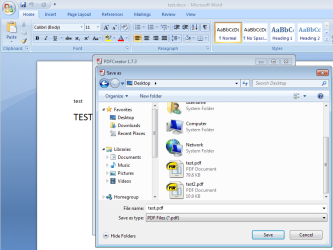
You can use PDFCreator:
pdfforge | PDFCreator - Download for free, download pdf printer, pdf writer, pdf maker

I would suggest using the old version 1.7.3.

Starting with the website linked to above, scroll down until you see this:
Code:
If you should encounter problems with PDFCreator 2.0, you can still...
Version 1.7.3 is faster than the new version and 1.7.3 produces a slightly smaller PDF.

The PDF created by Microsoft's add-on to Office 2007 is many times larger than the PDF created by PDFCreator.

PDF.PNG

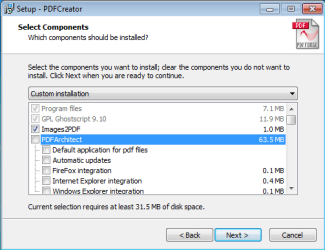
If you opt to install PDFCreator, be sure to uncheck the extra software offers during the install.

Make this screen look like this:
PDF2.PNG

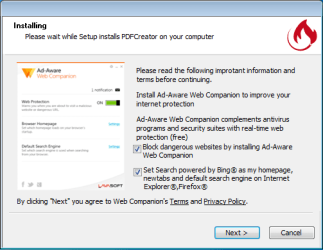
You can select Cancel on this screen:
PDF3.PNG
That screen is an overlay that hides the real installer in the background. Selecting Cancel does not cancel the installation of PDFCreator. If you prefer, you can uncheck the top offer (which should automatically uncheck the bottom offer) and then click Next.

If you decide to use PDFCreator version 2.1.1, install .NET 4.5.2 first (if you do not already have it).
https://www.microsoft.com/en-us/download/details.aspx?id=42642
 

My Computer My Computer

At a glance

W7 Pro SP1 64biti78GBIntel HD Graphics
Computer type
Laptop
Computer Manufacturer/Model Number
Employer provided Dell Latitude
OS
W7 Pro SP1 64bit
CPU
i7
Memory
8GB
Graphics Card(s)
Intel HD Graphics
Hard Drives
crappy SSD
Antivirus
Employer mandated Symantec Endpoint Protection
Browser
Pale Moon 64bit, IE11 64bit & Chrome 64bit
Thank you very much for the extensive post on the PDFCreator but I don't want to use a third party software, I would like to fix Word's own save-as-PDF feature.
 

My Computer My Computer

At a glance

Windows 7 Ultimate x64 SP1
OS
Windows 7 Ultimate x64 SP1

My Computer My Computer

At a glance

Windows 7 x64 Ultimate and numerous virtual m...AMD FX-8350 Vishera 32nm Technology @ 4.2 GHz...G Skill 32.0GB Dual-Channel DDR3 @ 1204MHz (1...EVGA GeForce GTX 960 4GB Super SC ACX 2.0+ wi...
Computer type
PC/Desktop
Computer Manufacturer/Model Number
Bluethunder II
OS
Windows 7 x64 Ultimate and numerous virtual machines
CPU
AMD FX-8350 Vishera 32nm Technology @ 4.2 GHz default
Motherboard
ASUSTeK COMPUTER INC. SABERTOOTH 990FX R2.0 (Socket 942)
Memory
G Skill 32.0GB Dual-Channel DDR3 @ 1204MHz (11-13-13-31)
Graphics Card(s)
EVGA GeForce GTX 960 4GB Super SC ACX 2.0+ with Back Plate
Sound Card
Creative X-Fi Titanium HD Audiophile PCIe
Monitor(s) Displays
LG L227WTG x 3
Screen Resolution
1680 x 1050 16:10
Hard Drives
238GB Samsung850 PRO SATA Disk Device (SSD)
1863GB Seagate ST2000DM 001-1CH164 (SATA)
1397GB Seagate ST1500DL 003-9VT16L(SATA)
466GB Western Digital WDC WD50 03AZEX-00K1GA0 (SATA) x 2
932GB Seagate ST310005 28AS SATA Disk Device (SATA)
PSU
Enermax Revolution87+ 1000 Watts Gold Certified Power Supply
Case
Rocketfish Full Tower
Cooling
Cooler Master Hyper 212 EVO Push Pull 120mm Fans
Keyboard
Logitech K740
Mouse
Logitech G100S Laser LED + Logitech Gamepad F310
Internet Speed
500 mbs down and 30mbs up
Antivirus
Malwarebytes Pro & Avast and MSE on certain Virtual Machines
Browser
Firefox (Main) Chrome, Internet Explorer (Back Up)
Other Info
Logitech X 230 2.1 Stereo System and 5.1 Yamaha RX V2090
B&W DM6 Monitor Speakers + Center and Surround Speakers
Using Mouse Without Borders (Google it)
Thank you very much for the extensive post on the PDFCreator but I don't want to use a third party software, I would like to fix Word's own save-as-PDF feature.
I doubt that you will find too many forum members that can help you troubleshoot Microsoft's PDF add-on to Word 2007. I installed MS Word 2007 into a virtual machine - then installed the add-on - just to see if I could replicate your problem. I could not. You might try uninstalling Microsoft's PDF add-on to Word - then installing it again.

Using a 3rd party app let's you create a PDF from any app that can print. I use it mostly with web browsers. But I have also used it to convert hundreds of Word documents to PDF all in one batch operation. If you ever do need to convert a Word doc that has pictures in it, I think that you will notice a huge file size difference between PDFs created by Microsoft's add-on and PDFs created by PDFCreator.
 

My Computer My Computer

At a glance

W7 Pro SP1 64biti78GBIntel HD Graphics
Computer type
Laptop
Computer Manufacturer/Model Number
Employer provided Dell Latitude
OS
W7 Pro SP1 64bit
CPU
i7
Memory
8GB
Graphics Card(s)
Intel HD Graphics
Hard Drives
crappy SSD
Antivirus
Employer mandated Symantec Endpoint Protection
Browser
Pale Moon 64bit, IE11 64bit & Chrome 64bit

My Computer My Computer

At a glance

Windows 7 Ultimate x64 SP1
OS
Windows 7 Ultimate x64 SP1
Back
Top