
Word 2010: paste from website into word, retaining website font

nantucketbob

New member
Local time
12:19 AM
Messages
15
Location
Nantucket, Massachusetts
I wanted to determine the color and font of text from a website. I cut and pasted a paragraph into Word 2010, but Word 2010 pasted using my default font. Is there a way to disable this, temporarily?
 

My Computer My Computer

At a glance

Win7 64 bitAMD/PHII x4 960T 3.0g8GMSI N550GTXZ-Ti cylone Gforce GTX 550Ti
Computer type
PC/Desktop
Computer Manufacturer/Model Number
custom build
OS
Win7 64 bit
CPU
AMD/PHII x4 960T 3.0g
Motherboard
Asusm M4A85=M
Memory
8G
Graphics Card(s)
MSI N550GTXZ-Ti cylone Gforce GTX 550Ti
Keep font color when pasting.

Thanks! I feel dumb, but I did not see that past option before now!

I noticed that when I pasted "keeping the source formatting," the color of the pasted text was NOT the same as the source. The source was a shade of gray, the pasted copy was black.

I discovered the link in the lower right corner of the Font section of the Home ribbon. It displays the color of a highlighted font. The copied text, originally a shade of gray, was indeed black when pasted into Word 2010.

How do I keep the text/font colors the same as the source text?
 

My Computer My Computer

At a glance

Win7 64 bitAMD/PHII x4 960T 3.0g8GMSI N550GTXZ-Ti cylone Gforce GTX 550Ti
Computer type
PC/Desktop
Computer Manufacturer/Model Number
custom build
OS
Win7 64 bit
CPU
AMD/PHII x4 960T 3.0g
Motherboard
Asusm M4A85=M
Memory
8G
Graphics Card(s)
MSI N550GTXZ-Ti cylone Gforce GTX 550Ti
My Computer My Computer

At a glance

windows 7 home 64bitINTEL-CORE I716GB
Computer Manufacturer/Model Number
W530-3630QM1
OS
windows 7 home 64bit
CPU
INTEL-CORE I7
Memory
16GB
Hard Drives
750GB
Browser
Chrome
You are using two different formats - the Website is HTML but Word doesn't "do" HTML very well. The site may use a CSS or other "formatting" system and it may serve up the desired font - more likely your browser assigns a font if your computer doesn't have the called-for font.

You need to read the Website as HTML and figure out what is called, how it is called and how it is formatted.

Regards,
GEWB
 

My Computer My Computer

At a glance

Linux Mint / XP / Win7 Home, Pro, Ultimate / ...
Computer type
PC/Desktop
Computer Manufacturer/Model Number
(7 different computers booting up to 10 systems)
OS
Linux Mint / XP / Win7 Home, Pro, Ultimate / Win8.1 / Win10
Other Info
Four desktops, two laptops, one notebook and one tablet
Thank you. It has been so long since I did any of that I forgot the process exists. Much appreciated.
 

My Computer My Computer

At a glance

Win7 64 bitAMD/PHII x4 960T 3.0g8GMSI N550GTXZ-Ti cylone Gforce GTX 550Ti
Computer type
PC/Desktop
Computer Manufacturer/Model Number
custom build
OS
Win7 64 bit
CPU
AMD/PHII x4 960T 3.0g
Motherboard
Asusm M4A85=M
Memory
8G
Graphics Card(s)
MSI N550GTXZ-Ti cylone Gforce GTX 550Ti
Hi there

I'm not an expert in these matters so if this method is BS then excuses in advance.

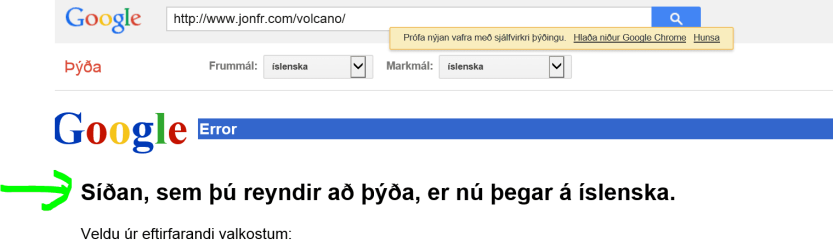
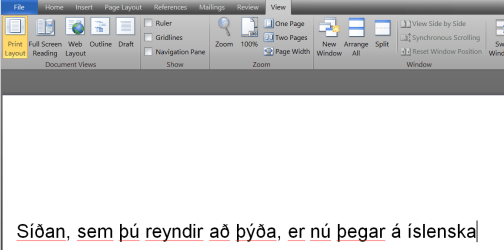
I just for example cut the text from the GOOGLE and pasted into Word -- Font stays the same -- so not sure what the problem is.

Cheers
jimbo
 

Attachments

  • w1.png
    w1.png
    18.2 KB · Views: 2
  • w2.png
    w2.png
    26.2 KB · Views: 3

My Computer My Computer

At a glance

Linux CENTOS 7 / various Windows OS'es and se...Intel i7 Intel i58GB, 16GBOn Motherboard
Computer type
PC/Desktop
Computer Manufacturer/Model Number
Custom built, several laptops HP/ASUS
OS
Linux CENTOS 7 / various Windows OS'es and servers
CPU
Intel i7 Intel i5
Memory
8GB, 16GB
Graphics Card(s)
On Motherboard
Sound Card
Realtek HD audio
Monitor(s) Displays
Apple Cinema display, Samsung LCD
Screen Resolution
1920 X 1080
Hard Drives
4 X 1TB SATA
Mouse
Toshiba wireless laser
Internet Speed
> 20MB up
Back
Top