WordPad Workaround
The problem is that WordPad doesn't let you choose a default font, it's always Calibri 11, line spacing 1.15, and 10pt spacing after paragraphs. You can't change WordPad, but you can easily open new .rtf documents with default settings of your choice.
Create an .rtf template file
(Note: For now, this is called "template.rtf", but you can name it anything you want.)1. Open a WordPad document. Type a space with the space bar. Click Ctrl+A to select the space.
(Note: If there is no "space" to select, your changes will not persist.)
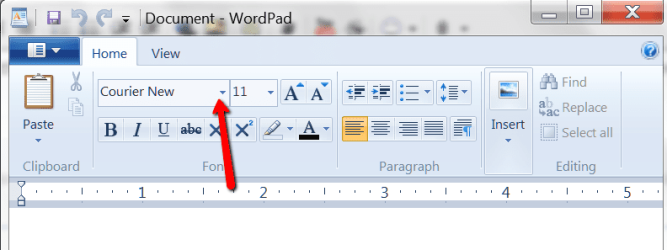
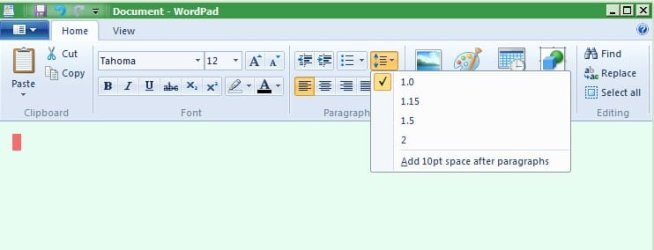
2. Make your changes to font, size, line spacing, etc.
3. Click on the WordPad dropdown (top left corner).
4. Select "Save as" > "Rich Text Document" to your Desktop, naming it template.rtf.
5. Right-click the saved template.rtf file and select Properties.
Tick the Read-only box and click OK. This protects the file from accidental changes.
Create a right click > New > Rich Text Document menu item with your customized defaults:
(Note: It is called Rich Text Document if you have not installed Microsoft Word; with Word installed, it is Rich Text Format)1. Copy template.rtf to this directory: C:\Windows\ShellNew
(Note: If ShellNew folder is not there, create it.)
2. In Regedit, Export this key as a backup:HKEY_CLASSES_ROOT\.rtf
3. Registry Changes - Select the appropriate subkey:
Go to: HKEY_CLASSES_ROOT\.rtf\ShellNew
Go to Default Programs > "Associate a file type.....".
Select .rtf, click the Change program button and change to WordPad
Now open Regedit and go to:
HKEY_CLASSES_ROOT\.rtf\Word.RTF.8\ShellNew
4. Right-click on right-hand pane > New > String value

5. Name it: FileName
6. Double-click on the string "FileName" and in the "Edit string" box:
Type: template.rtf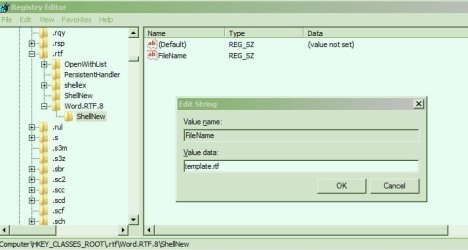
Double-click on the string "FileName" and in the box, give it the value: the full path to template.rtf
For example: K:\Documents\Computers\Wordpad tweaks\template.rtf
(Note: Do not enclose the path in quotes)
7. OK and exit Regedit.
Now when you right-click and select New > Rich Text Document/Format you get an .rtf document that has your preferred settings. A new file can be easily created in any directory, you can immediately rename it after it is created, and you can simply close and save changes without going through the Save-as dialog.
(Note: if you don't immediately see Rich Text Document/Format in the Right-click > New menu, open any .rtf document and close it, just to wake up Windows and WordPad!)
Shortcuts:
1. Place a shortcut to your template .rtf file on the Desktop or in Quicklaunch.
NOTE: The drawback is that you must rename and choose a location with the Save As dialog whenever you change content and close the file.
2. Customize the Wordpad shortcut that comes with Windows:Start > All programs > Accessories > WordPad:
Right click > Properties. Select the Shortcut tab, click the Target box.
At the end of the existing target, type a space, followed by the path to your template file.
For example:
(Note: You need quotation marks here if there are spaces between words in the path.)
Then click OK.
rtf default.zip
The problem is that WordPad doesn't let you choose a default font, it's always Calibri 11, line spacing 1.15, and 10pt spacing after paragraphs. You can't change WordPad, but you can easily open new .rtf documents with default settings of your choice.
Create an .rtf template file
(Note: For now, this is called "template.rtf", but you can name it anything you want.)1. Open a WordPad document. Type a space with the space bar. Click Ctrl+A to select the space.
(Note: If there is no "space" to select, your changes will not persist.)
2. Make your changes to font, size, line spacing, etc.
3. Click on the WordPad dropdown (top left corner).
4. Select "Save as" > "Rich Text Document" to your Desktop, naming it template.rtf.
5. Right-click the saved template.rtf file and select Properties.
Tick the Read-only box and click OK. This protects the file from accidental changes.
Create a right click > New > Rich Text Document menu item with your customized defaults:
(Note: It is called Rich Text Document if you have not installed Microsoft Word; with Word installed, it is Rich Text Format)1. Copy template.rtf to this directory: C:\Windows\ShellNew
(Note: If ShellNew folder is not there, create it.)
2. In Regedit, Export this key as a backup:HKEY_CLASSES_ROOT\.rtf
3. Registry Changes - Select the appropriate subkey:
Option One:
If you have not installed Microsoft Office
Go to: HKEY_CLASSES_ROOT\.rtf\ShellNew
Option Two:
If you have installed Microsoft Office
Go to Default Programs > "Associate a file type.....".
Select .rtf, click the Change program button and change to WordPad
Now open Regedit and go to:
HKEY_CLASSES_ROOT\.rtf\Word.RTF.8\ShellNew
4. Right-click on right-hand pane > New > String value
5. Name it: FileName
6. Double-click on the string "FileName" and in the "Edit string" box:
Option One:
If you place template.rtf in C:\Windows\ShellNew
Type: template.rtf
Option Two:
If you want WordPad to target the template.rtf file in any other directory:
Double-click on the string "FileName" and in the box, give it the value: the full path to template.rtf
For example: K:\Documents\Computers\Wordpad tweaks\template.rtf
(Note: Do not enclose the path in quotes)
7. OK and exit Regedit.
Now when you right-click and select New > Rich Text Document/Format you get an .rtf document that has your preferred settings. A new file can be easily created in any directory, you can immediately rename it after it is created, and you can simply close and save changes without going through the Save-as dialog.
(Note: if you don't immediately see Rich Text Document/Format in the Right-click > New menu, open any .rtf document and close it, just to wake up Windows and WordPad!)
Shortcuts:
1. Place a shortcut to your template .rtf file on the Desktop or in Quicklaunch.
NOTE: The drawback is that you must rename and choose a location with the Save As dialog whenever you change content and close the file.
2. Customize the Wordpad shortcut that comes with Windows:Start > All programs > Accessories > WordPad:
Right click > Properties. Select the Shortcut tab, click the Target box.
At the end of the existing target, type a space, followed by the path to your template file.
For example:
(Note: You need quotation marks here if there are spaces between words in the path.)
"C:\Program Files\Windows NT\Accessories\wordpad.exe" "K:\Documents\Computers\Wordpad tweaks\template.rtf"
Then click OK.
Information
Modifying your template .rtf file in the future:
Untick the Read-only box temporarily. Then follow the same procedure as you did when creating the template.rtf file.
If you ever uninstall Microsoft Word:
It sometimes rips out the .rtf registry key with it. Attached is a zipped reg file to restore the default HKEY_CLASSES_ROOT\.rtf key (without the subkeys put in by Word).
Untick the Read-only box temporarily. Then follow the same procedure as you did when creating the template.rtf file.
If you ever uninstall Microsoft Word:
It sometimes rips out the .rtf registry key with it. Attached is a zipped reg file to restore the default HKEY_CLASSES_ROOT\.rtf key (without the subkeys put in by Word).
rtf default.zip
Attachments
Last edited by a moderator: