wordpad printing problems

Rose1

New member
Member
VIP
Local time
10:05 PM
Messages
416
I just addon a extention shooter and I like it. The only problem is I can't print the whole page on wordpad. I go to the preview of the page and it cuts off. I try the page and the paint prints to small.
 

My Computer

Computer type
Laptop
Computer Manufacturer/Model Number
compaq
OS
windows Ultimate
try highlighting (rather, selecting) all of it and then hit Ctrl+p (Control and p), and select the option in print range that says "selection" to print only what you have selected, and click print again.
 

My Computer

Computer type
PC/Desktop
Computer Manufacturer/Model Number
Custom Asus Build
OS
Microsoft Windows 8.1 Pro 64-bit
CPU
Intel(R) Core(TM) i3-4130 CPU @ 3.40GHz
Motherboard
B85M-E
Memory
8.00 GB
Graphics Card(s)
None
Sound Card
Realtek High Definition Audio
Monitor(s) Displays
Asus 23.6" Monitor
Screen Resolution
1920 x 1080 x 32 bits (4294967296 colors) @ 60 Hz
Hard Drives
INTEL SSDSC2BW180A4
Samsung SSD 840 PRO Series
PSU
Seasonic S12II-380Bronze
Case
Lian Li
Cooling
Fan, Passive
Keyboard
Logitech K120
Mouse
Microsoft Touch Mouse
Internet Speed
4ms Ping, 19.0 Mbps Download, 19.0 Mbps Upload
Antivirus
Eset Endpoint
Browser
Internet Explorer, Chrome
try highlighting (rather, selecting) all of it and then hit Ctrl+p (Control and p), and select the option in print range that says "selection" to print only what you have selected, and click print again.
I need to have the part of the images on it too in order to print it.
 

My Computer

Computer type
Laptop
Computer Manufacturer/Model Number
compaq
OS
windows Ultimate
highlight the image too. Click page setup and select what it is you want. It may very well be you have too much on a single sheet of paper.
 

My Computer

Computer type
PC/Desktop
Computer Manufacturer/Model Number
Custom Asus Build
OS
Microsoft Windows 8.1 Pro 64-bit
CPU
Intel(R) Core(TM) i3-4130 CPU @ 3.40GHz
Motherboard
B85M-E
Memory
8.00 GB
Graphics Card(s)
None
Sound Card
Realtek High Definition Audio
Monitor(s) Displays
Asus 23.6" Monitor
Screen Resolution
1920 x 1080 x 32 bits (4294967296 colors) @ 60 Hz
Hard Drives
INTEL SSDSC2BW180A4
Samsung SSD 840 PRO Series
PSU
Seasonic S12II-380Bronze
Case
Lian Li
Cooling
Fan, Passive
Keyboard
Logitech K120
Mouse
Microsoft Touch Mouse
Internet Speed
4ms Ping, 19.0 Mbps Download, 19.0 Mbps Upload
Antivirus
Eset Endpoint
Browser
Internet Explorer, Chrome
Also, on wordpad I want the font size bigger. I can't highlight on wordpad I get lines like a crop. How do I fix that? Also, when I try to change the font on print preview its small. I print it the print was small. I can't change the default print.
I forgot to add, I paste something from a web. That's the problem I'm having as highlighting.
 
Last edited:

My Computer

Computer type
Laptop
Computer Manufacturer/Model Number
compaq
OS
windows Ultimate
I don't mean use the highlighter, I mean left (make sure its actually left) click near what you want to print and hold down, dragging it over everything you want to print. Besides that;

If the thing you are downloading is just an image, try saving it to your computer first, and then clicking "picture" to load it to wordpad. To make the font bigger, change the font size to a much more noticeable font like 14 after selecting which words you want to change. If the font is in the picture, you cannot change it, but you may be able to make the picture itself bigger by clicking the middle of it, grabbing on to one of the sides, and pulling it outto your desired size. if it looks distorted, pull it out the other way as well.

This must be a serious project if you are still worried about it even now ;)

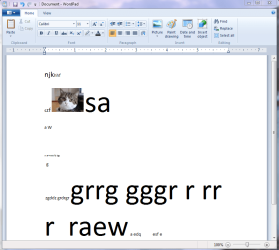
I may not entirely be sure what is going on, perhaps the image from the web is not a good one? Because I just pulled your image of your cat off of this site and put it on word pad just fine, with words of different font all over the place. I uploaded what I did so you can see it. Try a different picture maybe?
 

Attachments

  • Capturedel.PNG
    Capturedel.PNG
    37.2 KB · Views: 7

My Computer

Computer type
PC/Desktop
Computer Manufacturer/Model Number
Custom Asus Build
OS
Microsoft Windows 8.1 Pro 64-bit
CPU
Intel(R) Core(TM) i3-4130 CPU @ 3.40GHz
Motherboard
B85M-E
Memory
8.00 GB
Graphics Card(s)
None
Sound Card
Realtek High Definition Audio
Monitor(s) Displays
Asus 23.6" Monitor
Screen Resolution
1920 x 1080 x 32 bits (4294967296 colors) @ 60 Hz
Hard Drives
INTEL SSDSC2BW180A4
Samsung SSD 840 PRO Series
PSU
Seasonic S12II-380Bronze
Case
Lian Li
Cooling
Fan, Passive
Keyboard
Logitech K120
Mouse
Microsoft Touch Mouse
Internet Speed
4ms Ping, 19.0 Mbps Download, 19.0 Mbps Upload
Antivirus
Eset Endpoint
Browser
Internet Explorer, Chrome
Back
Top