Solved Would appreciate some help identifying this problem please.

Makalu

New member
Local time
2:43 AM
Messages
19
Location
Leicestershire
Hi,
I have recently tried to upgrade my son's PC by adding a new CPU, additional memory and a new graphics card.

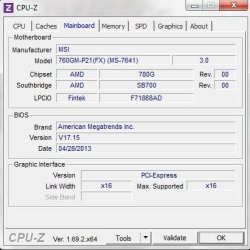
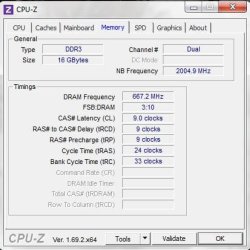
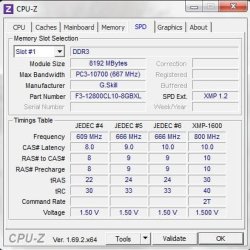
The machine is running a 500w power supply into an MSI 760GM-P21 (FX) motherboard. To this I have swapped out the old AMD CPU and installed a new AMD FX6300 with the stock cooler. At the same time I removed the old unbranded 4gb RAM stick with 2 G.Skill 1600Mhz 8gb sticks giving 16gb total. Updated the bios (now on 17.15). All seemed ok but I didn't run any benchmarks at this time since I was about to add a new GPU too. The old GPU was a 2Gb ATI - cant see a model number on it. The replacement is an NVidia GTX750Ti. After removing the old card I simply went about downloading the new NVidia drivers - I didn't remove the old ATI ones before doing this - wondering if this was a mistake now.

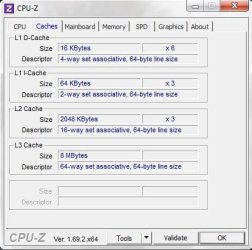
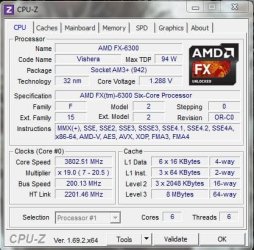
Anyway, the system runs just fine when it's not doing anything too taxing graphics. It will run through Cinebench ok and scores 420CPU / 80fps. Despite this, when I try to run 3DMark it BSOD's in the first test. I don't see any clues from looking at event logs other than the fairly broad Kernel-Power Event ID 41 critical error. Can anyone shed some light on what's going on here? I have attached a few screenies of CPU-Z tabs for background info.

Thanks in advance.
Mak.
 

Attachments
  • CPU1.JPG
    CPU1.JPG
    48.5 KB · Views: 71
  • Mainboard1.JPG
    Mainboard1.JPG
    33.6 KB · Views: 71
  • Memory1.JPG
    Memory1.JPG
    34.3 KB · Views: 71
  • SPD1.JPG
    SPD1.JPG
    42.7 KB · Views: 71
  • Caches1.JPG
    Caches1.JPG
    35.1 KB · Views: 71

My Computer

Computer type
PC/Desktop
Computer Manufacturer/Model Number
custom build
OS
Windows 7 Professional 64bit
CPU
Intel i7 4770K
Motherboard
ASUS ROG Maximus Hero VI
Memory
32Gb Corsair Vengeance Pro 2133
Graphics Card(s)
Gigabyte nVidia GTX 660 OC SLi
Hard Drives
Samsung 840 Pro 120Gb SSD (OS)
Samsung 840 Pro 250Gb SSD
WD Black 1Tb
PSU
Corsair RM850
Case
Corsair 500r Black
Cooling
Corsair H100i
Keyboard
Logitech G19
Mouse
Logitech G9x Laser
Internet Speed
Yes Please!
Antivirus
MS
Browser
MS IE v11
You really should have uninstalled the AMD card through Device Manager befor removing it and installing the 750ti. Which nVidia drivers are you running?
 

My Computer

Computer type
PC/Desktop
Computer Manufacturer/Model Number
Custom Build
OS
W7 Pro x64 SP1 | W10 Pro IP x64 | W8.1 Pro x64 VM | Linux Mint VM
CPU
i7-4790k @ 4GHz (4.4GHz Boost)
Motherboard
ASUS Sabertooth Z87 (BIOS Rev 2004)
Memory
16GB DDR3 Kingston HyperX Fury @ 1600MHz CL 9-9-9-27
Graphics Card(s)
EVGA GTX 980 Classified
Sound Card
Realtek Onboard
Monitor(s) Displays
Samsung S27D390
Screen Resolution
1920 x 1080
Hard Drives
240GB Intel 520 Series SSD |
Samsung 850 EVO 120GB SSD |
2TB WD Caviar Black |
2TB WD Caviar Green
PSU
Corsair HX850-80 Gold Modular
Case
Cooler Master Silencio 650
Cooling
Corsair H80i w/2 x Corsair SP120 | 2 x 120mm Noctua NF-S12B
Keyboard
Microsoft Sidewinder X4
Mouse
Gigabyte M6900 optical
Internet Speed
152mb
Antivirus
F-Secure
Browser
Firefox 38.0
Other Info
Backup Rig: Win 7 Pro 64-bit | AMD A10-5800k | ASUS F2A85-V Pro | 8GB Samsung DDR3 @1600MHz | 120GB Toshiba SDD | 2TB Seagate HDD | Cooler Master Silencio 550
Latest version - 335.23
 

My Computer

Computer type
PC/Desktop
Computer Manufacturer/Model Number
custom build
OS
Windows 7 Professional 64bit
CPU
Intel i7 4770K
Motherboard
ASUS ROG Maximus Hero VI
Memory
32Gb Corsair Vengeance Pro 2133
Graphics Card(s)
Gigabyte nVidia GTX 660 OC SLi
Hard Drives
Samsung 840 Pro 120Gb SSD (OS)
Samsung 840 Pro 250Gb SSD
WD Black 1Tb
PSU
Corsair RM850
Case
Corsair 500r Black
Cooling
Corsair H100i
Keyboard
Logitech G19
Mouse
Logitech G9x Laser
Internet Speed
Yes Please!
Antivirus
MS
Browser
MS IE v11

My Computer

Computer type
Laptop
Computer Manufacturer/Model Number
ACER ASPIRE 5742G
OS
Microsoft Windows 7 Home Premium 64-bits 7601 Multiprocessor Free Service Pack 1
CPU
Intel(R) Core(TM) i3 CPU M 370 @ 2.40GHz
Motherboard
Acer Aspire 5742G
Memory
4,00 GB
Graphics Card(s)
ATI Mobility Radeon HD 5400 Series
Sound Card
(1) AMD High Definition Audio Device (2) Realtek High Defi
Screen Resolution
1366 x 768 x 32 bits (4294967296 colors) @ 60 Hz
Hard Drives
WDC WD5000BEVT-22ZAT0
Indeed. I was also going to suggest running 3DMark with the iGPU running (with both discreet GPUs uninstalled) to rule out any other hardware.
 

My Computer

Computer type
PC/Desktop
Computer Manufacturer/Model Number
Custom Build
OS
W7 Pro x64 SP1 | W10 Pro IP x64 | W8.1 Pro x64 VM | Linux Mint VM
CPU
i7-4790k @ 4GHz (4.4GHz Boost)
Motherboard
ASUS Sabertooth Z87 (BIOS Rev 2004)
Memory
16GB DDR3 Kingston HyperX Fury @ 1600MHz CL 9-9-9-27
Graphics Card(s)
EVGA GTX 980 Classified
Sound Card
Realtek Onboard
Monitor(s) Displays
Samsung S27D390
Screen Resolution
1920 x 1080
Hard Drives
240GB Intel 520 Series SSD |
Samsung 850 EVO 120GB SSD |
2TB WD Caviar Black |
2TB WD Caviar Green
PSU
Corsair HX850-80 Gold Modular
Case
Cooler Master Silencio 650
Cooling
Corsair H80i w/2 x Corsair SP120 | 2 x 120mm Noctua NF-S12B
Keyboard
Microsoft Sidewinder X4
Mouse
Gigabyte M6900 optical
Internet Speed
152mb
Antivirus
F-Secure
Browser
Firefox 38.0
Other Info
Backup Rig: Win 7 Pro 64-bit | AMD A10-5800k | ASUS F2A85-V Pro | 8GB Samsung DDR3 @1600MHz | 120GB Toshiba SDD | 2TB Seagate HDD | Cooler Master Silencio 550
If I use the AMD uninstall utility is that going to remove the motherboard / cpu drivers too?
 

My Computer

Computer type
PC/Desktop
Computer Manufacturer/Model Number
custom build
OS
Windows 7 Professional 64bit
CPU
Intel i7 4770K
Motherboard
ASUS ROG Maximus Hero VI
Memory
32Gb Corsair Vengeance Pro 2133
Graphics Card(s)
Gigabyte nVidia GTX 660 OC SLi
Hard Drives
Samsung 840 Pro 120Gb SSD (OS)
Samsung 840 Pro 250Gb SSD
WD Black 1Tb
PSU
Corsair RM850
Case
Corsair 500r Black
Cooling
Corsair H100i
Keyboard
Logitech G19
Mouse
Logitech G9x Laser
Internet Speed
Yes Please!
Antivirus
MS
Browser
MS IE v11
If I use the AMD uninstall utility is that going to remove the motherboard / cpu drivers too?
NO. It only uninstalls GPU stuff
 

My Computer

Computer type
Laptop
Computer Manufacturer/Model Number
ACER ASPIRE 5742G
OS
Microsoft Windows 7 Home Premium 64-bits 7601 Multiprocessor Free Service Pack 1
CPU
Intel(R) Core(TM) i3 CPU M 370 @ 2.40GHz
Motherboard
Acer Aspire 5742G
Memory
4,00 GB
Graphics Card(s)
ATI Mobility Radeon HD 5400 Series
Sound Card
(1) AMD High Definition Audio Device (2) Realtek High Defi
Screen Resolution
1366 x 768 x 32 bits (4294967296 colors) @ 60 Hz
Hard Drives
WDC WD5000BEVT-22ZAT0
OK so I did the AMD uninstall utility, then manually purged remaining AMD Graphics adapter oemxx.inf files as per the link. No change. I am still getting a BSOD in the first test of 3DMark. Any suggestions what to look at next?

Mak.
 

My Computer

Computer type
PC/Desktop
Computer Manufacturer/Model Number
custom build
OS
Windows 7 Professional 64bit
CPU
Intel i7 4770K
Motherboard
ASUS ROG Maximus Hero VI
Memory
32Gb Corsair Vengeance Pro 2133
Graphics Card(s)
Gigabyte nVidia GTX 660 OC SLi
Hard Drives
Samsung 840 Pro 120Gb SSD (OS)
Samsung 840 Pro 250Gb SSD
WD Black 1Tb
PSU
Corsair RM850
Case
Corsair 500r Black
Cooling
Corsair H100i
Keyboard
Logitech G19
Mouse
Logitech G9x Laser
Internet Speed
Yes Please!
Antivirus
MS
Browser
MS IE v11
Did you uninstall the nVidia card and reinstall it? Try running 3dMark with both cards uninstalled using the iGPU.
 

My Computer

Computer type
PC/Desktop
Computer Manufacturer/Model Number
Custom Build
OS
W7 Pro x64 SP1 | W10 Pro IP x64 | W8.1 Pro x64 VM | Linux Mint VM
CPU
i7-4790k @ 4GHz (4.4GHz Boost)
Motherboard
ASUS Sabertooth Z87 (BIOS Rev 2004)
Memory
16GB DDR3 Kingston HyperX Fury @ 1600MHz CL 9-9-9-27
Graphics Card(s)
EVGA GTX 980 Classified
Sound Card
Realtek Onboard
Monitor(s) Displays
Samsung S27D390
Screen Resolution
1920 x 1080
Hard Drives
240GB Intel 520 Series SSD |
Samsung 850 EVO 120GB SSD |
2TB WD Caviar Black |
2TB WD Caviar Green
PSU
Corsair HX850-80 Gold Modular
Case
Cooler Master Silencio 650
Cooling
Corsair H80i w/2 x Corsair SP120 | 2 x 120mm Noctua NF-S12B
Keyboard
Microsoft Sidewinder X4
Mouse
Gigabyte M6900 optical
Internet Speed
152mb
Antivirus
F-Secure
Browser
Firefox 38.0
Other Info
Backup Rig: Win 7 Pro 64-bit | AMD A10-5800k | ASUS F2A85-V Pro | 8GB Samsung DDR3 @1600MHz | 120GB Toshiba SDD | 2TB Seagate HDD | Cooler Master Silencio 550
Just unload the NVidia drivers or remove card as well?
 

My Computer

Computer type
PC/Desktop
Computer Manufacturer/Model Number
custom build
OS
Windows 7 Professional 64bit
CPU
Intel i7 4770K
Motherboard
ASUS ROG Maximus Hero VI
Memory
32Gb Corsair Vengeance Pro 2133
Graphics Card(s)
Gigabyte nVidia GTX 660 OC SLi
Hard Drives
Samsung 840 Pro 120Gb SSD (OS)
Samsung 840 Pro 250Gb SSD
WD Black 1Tb
PSU
Corsair RM850
Case
Corsair 500r Black
Cooling
Corsair H100i
Keyboard
Logitech G19
Mouse
Logitech G9x Laser
Internet Speed
Yes Please!
Antivirus
MS
Browser
MS IE v11
Mak, lets reinstall the Nvidia drivers in this fashion. It will give you the cleanest install http://www.sevenforums.com/tutorials/327414-nvidia-drivers-avoid-problems.html

Next, please go into BIOS and tell me the value of the +12V, +5V and +3.3V also tell me the temp readings of the Motherboard and the CPU.

When you had the BSOD did it tell you the display driver stopped working first?

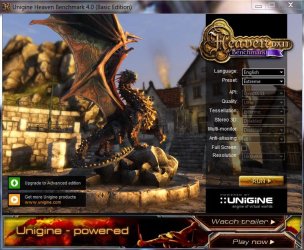
Also please download Ungine Heaven 4.0 and install it. After the driver install, run the benchmark using the preset extreme. It should look like this.
heaven.JPG

Once it starts you can click the benchmark button to start the benchmark. Save the results and uoload a screenshot of the results. This will tell you how. http://www.sevenforums.com/tutorials/9733-screenshots-files-upload-post-seven-forums.html
 

My Computers

System One System Two

  • Computer type
    PC/Desktop
    Computer Manufacturer/Model Number
    ALWAYS UNDER CONSTRUCTION
    OS
    Windows 11 Pro
    CPU
    Ryzen 9 5900X
    Motherboard
    Asus X570 Crosshair Viii Hero
    Memory
    32GB G Skill DDR4-3600
    Graphics Card(s)
    EVGA RTX 3080 FTW 3 Ultra
    Sound Card
    On Board/Sennheiser PC37X Headset
    Monitor(s) Displays
    3 X Asus 27"
    Screen Resolution
    2560x1440
    Hard Drives
    2 X 1 TB NVME drives
    PSU
    EVGA 850
    Case
    Phanteks Eclipse P400A
    Cooling
    EVGA 280 AIO
    Keyboard
    Logitech G510s/ Logitech G13
    Mouse
    Logitech G502
    Internet Speed
    24/1
    Antivirus
    ESET/MBAM Pro/SAS Pro
    Browser
    Chrome/ Firefox/ Edge
  • Computer type
    Laptop
    System Manufacturer/Model Number
    Dell 16 Plus
    OS
    Windows 11 Pro
    CPU
    Intel Ultra 9 288V
    Memory
    32 GB LPDDR5X 8533
    Monitor(s) Displays
    16" Mini-LED HDR600 Touch 90 Hz
    Screen Resolution
    2560X1600
    Hard Drives
    1 TB NVME
OK - following the instructions above and will get back with results shortly. The BSOD disappears so fast I don't get chance to read any of it so I don't know the answer to whether the display driver stopped first. Back with info shortly.

Mak.
 

My Computer

Computer type
PC/Desktop
Computer Manufacturer/Model Number
custom build
OS
Windows 7 Professional 64bit
CPU
Intel i7 4770K
Motherboard
ASUS ROG Maximus Hero VI
Memory
32Gb Corsair Vengeance Pro 2133
Graphics Card(s)
Gigabyte nVidia GTX 660 OC SLi
Hard Drives
Samsung 840 Pro 120Gb SSD (OS)
Samsung 840 Pro 250Gb SSD
WD Black 1Tb
PSU
Corsair RM850
Case
Corsair 500r Black
Cooling
Corsair H100i
Keyboard
Logitech G19
Mouse
Logitech G9x Laser
Internet Speed
Yes Please!
Antivirus
MS
Browser
MS IE v11
"Next, please go into BIOS and tell me the value of the +12V, +5V and +3.3V also tell me the temp readings of the Motherboard and the CPU. "

Sorry for being a noob but what is this stuff and where will I find it in the BIOS?

Mak.

UPDATE - (Found it)

12v = 11.880v
5v = 5.024v
3.3v = 3.328v
CPU Temp = 39c
System Temp (Motherboard?) = 39c
CPU VCore = 1.280v

CPU Fan = 0rpm (which is odd because I can see it spinning)
System Fan = 4225rpm

Maybe I connected fans wrong way round since the temp seem ok considering its in a warm room and has been running all day.

Off to run Unigine - back in a bit with results.

Mak.
 

My Computer

Computer type
PC/Desktop
Computer Manufacturer/Model Number
custom build
OS
Windows 7 Professional 64bit
CPU
Intel i7 4770K
Motherboard
ASUS ROG Maximus Hero VI
Memory
32Gb Corsair Vengeance Pro 2133
Graphics Card(s)
Gigabyte nVidia GTX 660 OC SLi
Hard Drives
Samsung 840 Pro 120Gb SSD (OS)
Samsung 840 Pro 250Gb SSD
WD Black 1Tb
PSU
Corsair RM850
Case
Corsair 500r Black
Cooling
Corsair H100i
Keyboard
Logitech G19
Mouse
Logitech G9x Laser
Internet Speed
Yes Please!
Antivirus
MS
Browser
MS IE v11
The voltages and temps look good. The CPU fan is a strange reading though.
 

My Computer

Computer type
PC/Desktop
Computer Manufacturer/Model Number
Custom Build
OS
W7 Pro x64 SP1 | W10 Pro IP x64 | W8.1 Pro x64 VM | Linux Mint VM
CPU
i7-4790k @ 4GHz (4.4GHz Boost)
Motherboard
ASUS Sabertooth Z87 (BIOS Rev 2004)
Memory
16GB DDR3 Kingston HyperX Fury @ 1600MHz CL 9-9-9-27
Graphics Card(s)
EVGA GTX 980 Classified
Sound Card
Realtek Onboard
Monitor(s) Displays
Samsung S27D390
Screen Resolution
1920 x 1080
Hard Drives
240GB Intel 520 Series SSD |
Samsung 850 EVO 120GB SSD |
2TB WD Caviar Black |
2TB WD Caviar Green
PSU
Corsair HX850-80 Gold Modular
Case
Cooler Master Silencio 650
Cooling
Corsair H80i w/2 x Corsair SP120 | 2 x 120mm Noctua NF-S12B
Keyboard
Microsoft Sidewinder X4
Mouse
Gigabyte M6900 optical
Internet Speed
152mb
Antivirus
F-Secure
Browser
Firefox 38.0
Other Info
Backup Rig: Win 7 Pro 64-bit | AMD A10-5800k | ASUS F2A85-V Pro | 8GB Samsung DDR3 @1600MHz | 120GB Toshiba SDD | 2TB Seagate HDD | Cooler Master Silencio 550
System BSOD'd on Unigine before Benchmark could finish. Tried rebooting - wouldn't reboot. Couldn't find a bootable device. I noticed while it was going through Unigine it was making a noise like one of the HDD's skipping across. I'm thinking the drives or the MB are kaput...

I took it all carefully apart and put it back together methodically but still the same - the bios is not seeing the drives and it will not boot.

Thoughts or comments?
:(
Mak.
 

My Computer

Computer type
PC/Desktop
Computer Manufacturer/Model Number
custom build
OS
Windows 7 Professional 64bit
CPU
Intel i7 4770K
Motherboard
ASUS ROG Maximus Hero VI
Memory
32Gb Corsair Vengeance Pro 2133
Graphics Card(s)
Gigabyte nVidia GTX 660 OC SLi
Hard Drives
Samsung 840 Pro 120Gb SSD (OS)
Samsung 840 Pro 250Gb SSD
WD Black 1Tb
PSU
Corsair RM850
Case
Corsair 500r Black
Cooling
Corsair H100i
Keyboard
Logitech G19
Mouse
Logitech G9x Laser
Internet Speed
Yes Please!
Antivirus
MS
Browser
MS IE v11
The BIOS isn't seeing any of your hard drives at all?
 

My Computer

Computer type
PC/Desktop
Computer Manufacturer/Model Number
Custom Build
OS
W7 Pro x64 SP1 | W10 Pro IP x64 | W8.1 Pro x64 VM | Linux Mint VM
CPU
i7-4790k @ 4GHz (4.4GHz Boost)
Motherboard
ASUS Sabertooth Z87 (BIOS Rev 2004)
Memory
16GB DDR3 Kingston HyperX Fury @ 1600MHz CL 9-9-9-27
Graphics Card(s)
EVGA GTX 980 Classified
Sound Card
Realtek Onboard
Monitor(s) Displays
Samsung S27D390
Screen Resolution
1920 x 1080
Hard Drives
240GB Intel 520 Series SSD |
Samsung 850 EVO 120GB SSD |
2TB WD Caviar Black |
2TB WD Caviar Green
PSU
Corsair HX850-80 Gold Modular
Case
Cooler Master Silencio 650
Cooling
Corsair H80i w/2 x Corsair SP120 | 2 x 120mm Noctua NF-S12B
Keyboard
Microsoft Sidewinder X4
Mouse
Gigabyte M6900 optical
Internet Speed
152mb
Antivirus
F-Secure
Browser
Firefox 38.0
Other Info
Backup Rig: Win 7 Pro 64-bit | AMD A10-5800k | ASUS F2A85-V Pro | 8GB Samsung DDR3 @1600MHz | 120GB Toshiba SDD | 2TB Seagate HDD | Cooler Master Silencio 550
Nup - only thing it is picking up is the DVD ROM. I will try and boot from the windows disc tomorrow but I'm starting to think it will be easier in the long run just to replace the MB and CPU (with Intel) and try and rescue what I can from the HDD's. There are 2 HDD's - the op sys is on a 120Gb drive and all data is on a secondary 2Tb WD drive - I'm praying its the 120Gb that's the issue...

Will look again tomorrow.

Mak.
 

My Computer

Computer type
PC/Desktop
Computer Manufacturer/Model Number
custom build
OS
Windows 7 Professional 64bit
CPU
Intel i7 4770K
Motherboard
ASUS ROG Maximus Hero VI
Memory
32Gb Corsair Vengeance Pro 2133
Graphics Card(s)
Gigabyte nVidia GTX 660 OC SLi
Hard Drives
Samsung 840 Pro 120Gb SSD (OS)
Samsung 840 Pro 250Gb SSD
WD Black 1Tb
PSU
Corsair RM850
Case
Corsair 500r Black
Cooling
Corsair H100i
Keyboard
Logitech G19
Mouse
Logitech G9x Laser
Internet Speed
Yes Please!
Antivirus
MS
Browser
MS IE v11
I find the odds of both drives going out at the same time astronomical. Baring some other event I would think it is highly unlikely that could happen. Do you have another computer you could connect the drives to, or an external enclosure that you could put the drives in to test them? I think I would try that before making any decisions. The possibility exists that you may have some problems elsewhere.

Everyone has been concentrating on the graphics card so far, when the problem could have been somewhere else.
 

My Computers

System One System Two

  • Computer type
    PC/Desktop
    Computer Manufacturer/Model Number
    ALWAYS UNDER CONSTRUCTION
    OS
    Windows 11 Pro
    CPU
    Ryzen 9 5900X
    Motherboard
    Asus X570 Crosshair Viii Hero
    Memory
    32GB G Skill DDR4-3600
    Graphics Card(s)
    EVGA RTX 3080 FTW 3 Ultra
    Sound Card
    On Board/Sennheiser PC37X Headset
    Monitor(s) Displays
    3 X Asus 27"
    Screen Resolution
    2560x1440
    Hard Drives
    2 X 1 TB NVME drives
    PSU
    EVGA 850
    Case
    Phanteks Eclipse P400A
    Cooling
    EVGA 280 AIO
    Keyboard
    Logitech G510s/ Logitech G13
    Mouse
    Logitech G502
    Internet Speed
    24/1
    Antivirus
    ESET/MBAM Pro/SAS Pro
    Browser
    Chrome/ Firefox/ Edge
  • Computer type
    Laptop
    System Manufacturer/Model Number
    Dell 16 Plus
    OS
    Windows 11 Pro
    CPU
    Intel Ultra 9 288V
    Memory
    32 GB LPDDR5X 8533
    Monitor(s) Displays
    16" Mini-LED HDR600 Touch 90 Hz
    Screen Resolution
    2560X1600
    Hard Drives
    1 TB NVME
The common denominator of the BSOD events so far has been intensive graphics - but are 'intensive graphics' also intensive on the hard drive at the same time? The pretty pictures have to come from somewhere I guess?
 

My Computer

Computer type
PC/Desktop
Computer Manufacturer/Model Number
custom build
OS
Windows 7 Professional 64bit
CPU
Intel i7 4770K
Motherboard
ASUS ROG Maximus Hero VI
Memory
32Gb Corsair Vengeance Pro 2133
Graphics Card(s)
Gigabyte nVidia GTX 660 OC SLi
Hard Drives
Samsung 840 Pro 120Gb SSD (OS)
Samsung 840 Pro 250Gb SSD
WD Black 1Tb
PSU
Corsair RM850
Case
Corsair 500r Black
Cooling
Corsair H100i
Keyboard
Logitech G19
Mouse
Logitech G9x Laser
Internet Speed
Yes Please!
Antivirus
MS
Browser
MS IE v11
Mark 3D 11 is testing the Graphics card, the CPU and the ram at the same time. It is pretty much of a system test. That is why I got you to run Ungine Heaven. Heaven is pretty much a graphics only test. It does not involve anything else. But, it does put a lot of strain on the graphics card and should, and normally does, show up any deficiencies in the graphics. I don't believe either of the tests are particularly hard on the hard drives other than they are reading the information and feeding it to the testing program. But, that's what hard drives do with any program.

However, with any stress test of any kind, it also puts a lot of stress on the Power Supply to put out the necessary power. During the test, your GPU was operating at it's max and therefore asking your PSU to supply the max power in order to render the program.

Mark 3D is more stressful on the PSU because it is having to provide more power to several components at the same time. The fact that you didn't uninstall the AMD drivers made the graphics card the more likely suspect, but, in my opinion, that should have affected other normal programs as well. That is why in my first post I asked for the power supply readings. But, that will tell you the readings at idle, but it will not tell us how it responds under increased stress. It is also why I asked for you to run a test for only the Graphics card. It would tell us if the card was the problem or if we needed to look elsewhere. But, I see no circumstances where it could have caused both hard drives to go bad at the same time. In the worse case scenario it would have only been the drive with Heaven installed on it, although I seriously doubt it.
 
Last edited:

My Computers

System One System Two

  • Computer type
    PC/Desktop
    Computer Manufacturer/Model Number
    ALWAYS UNDER CONSTRUCTION
    OS
    Windows 11 Pro
    CPU
    Ryzen 9 5900X
    Motherboard
    Asus X570 Crosshair Viii Hero
    Memory
    32GB G Skill DDR4-3600
    Graphics Card(s)
    EVGA RTX 3080 FTW 3 Ultra
    Sound Card
    On Board/Sennheiser PC37X Headset
    Monitor(s) Displays
    3 X Asus 27"
    Screen Resolution
    2560x1440
    Hard Drives
    2 X 1 TB NVME drives
    PSU
    EVGA 850
    Case
    Phanteks Eclipse P400A
    Cooling
    EVGA 280 AIO
    Keyboard
    Logitech G510s/ Logitech G13
    Mouse
    Logitech G502
    Internet Speed
    24/1
    Antivirus
    ESET/MBAM Pro/SAS Pro
    Browser
    Chrome/ Firefox/ Edge
  • Computer type
    Laptop
    System Manufacturer/Model Number
    Dell 16 Plus
    OS
    Windows 11 Pro
    CPU
    Intel Ultra 9 288V
    Memory
    32 GB LPDDR5X 8533
    Monitor(s) Displays
    16" Mini-LED HDR600 Touch 90 Hz
    Screen Resolution
    2560X1600
    Hard Drives
    1 TB NVME
Back
Top