
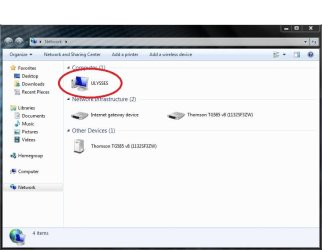
Would like too change my computers Network Icon

ps1000

New member
Local time
11:20 AM
Messages
10
Hi all,

I have been trying to change my computers network icon so that when discovered
by other computers on the same network, it does not have the boring default one.
I am not sure if this is even possible as many Google searches and my own attempts
all failed.
If you could help or just say that it isn't possible, it would be much appreciated.
Thanks.
 

Attachments
  • Network.JPG
    Network.JPG
    46.4 KB · Views: 14

My Computer My Computer

Computer Manufacturer/Model Number
Acer Aspire 5750g
OS
Windows 7 Ultimate x64
CPU
i5 2430m Sandy Bridge 2.4ghz
Memory
8gb Kingston
Graphics Card(s)
Nvidia Geforce GT 520m
Hard Drives
Seagate 500gb
if you do succeed in changing the network icon, it will only show on your computer.changing the icon will not show that icon on other computers they would need the same icon .
i know this as i have all my icons changed on my desktop pc and when i connect to it via the homegroup on the laptop, the desktop icons showing on the laptop are generic to the laptop,

however you can change it, here is a link ,

http://www.9zap.com/forums/showthread.php?t=1487
 
Last edited:

My Computer My Computer

Computer Manufacturer/Model Number
Hewlett packard/p6512uk
OS
Microsoft Windows 7 Home Premium 64-bit 7600
CPU
IIx4 amd athelon 635 processor
Motherboard
FOXCONN 2AA9
Memory
2x2gb
Graphics Card(s)
ati radeon HD 5450
Sound Card
(1) Realtek High Definition Audio (2) AMD High Definition
Monitor(s) Displays
samsung lcd tv 32"
Screen Resolution
1360x 768
Hard Drives
(1) WDC WD10 01FAES-60Z2A0 SATA Disk Device (2) Maxtor OneTouch USB Device (3) ST310003 33AS USB Device (4) WD My Book 1111 USB Device
PSU
?
Cooling
air!
Keyboard
wireless hp
Mouse
wireless Hp,optical
Internet Speed
1.10mb/s
Antivirus
MSE
Browser
Firefox
Welcome to the Seven Forums

As what boohbah said you would need to change the icon on both computers. The icon is #109.ico(Windows 7) in the icon folder in imageres.dll in C:\Windows\System32 and if you are using 64 bit it is also in C:\Windows\SysWOW64
This tutorial will show how to change a icon http://www.sevenforums.com/tutorials/73191-icons-change-using-resource-hacker.html

To properly change a system file you need to take ownership give yourself permission and rename the old file and then copy in the new one look at Post #6 of this thread will tell you how to do it http://www.sevenforums.com/customization/179502-basic-networking-information.html#post1525656

Then http://www.sevenforums.com/tutorials/49819-icon-cache-rebuild.html when done.

Jerry
 

My Computer My Computer

Computer type
Laptop
Computer Manufacturer/Model Number
Sager NP9170
OS
Win 7 Pro x64 / Win 10 Pro
CPU
Intel(R) Core(TM) i7-3630QM CPU @ 2.40GHz
Motherboard
CLEVO P170EM
Memory
12 GB
Graphics Card(s)
(1) Intel(R) HD Graphics 4000 (2) NVIDIA GeForce GTX 675M
Sound Card
(1) Realtek High Definition Audio (2) Intel(R) Display Aud
Monitor(s) Displays
17.3
Screen Resolution
1920x1080
Hard Drives
(1) Samsung 860 EVO 500GB(OS) (1) Samsung 860 EVO 500GB(Data)
Keyboard
Backlite
Antivirus
MSE, Malwarebytes Pro
Browser
Firefox
Other Info
DESKTOP: Custom-built.
OS: Win 10 Pro x64.
CASE: Rosewill R5.
CPU: Intel I5 4670K CPU @ 3.40GHz.
CPU COOLER: Cool Master Hyper 212 EVO.
MOTHERBOARD: Asus Z87-A.
MEMORY: Kingston HyperX 2x4 GB.
GPU: Nvidia Geforce 650 TI.
PSU: Corsair TX750.
DRIVES: (1) Samsung 840 120 GB SSD (2) Western Digital blue 500 GB 7200 RPM.
Thank you for the replies,
I do not think that I will bother changing the icon if other network users will
be unable to see the custom icon. I don't have access to the other computers
so i would be unable to change anything on them.
Thank you again for your help!
 

My Computer My Computer

Computer Manufacturer/Model Number
Acer Aspire 5750g
OS
Windows 7 Ultimate x64
CPU
i5 2430m Sandy Bridge 2.4ghz
Memory
8gb Kingston
Graphics Card(s)
Nvidia Geforce GT 520m
Hard Drives
Seagate 500gb
You're welcome, come back anytime you have any more questions.
 

My Computer My Computer

Computer type
Laptop
Computer Manufacturer/Model Number
Sager NP9170
OS
Win 7 Pro x64 / Win 10 Pro
CPU
Intel(R) Core(TM) i7-3630QM CPU @ 2.40GHz
Motherboard
CLEVO P170EM
Memory
12 GB
Graphics Card(s)
(1) Intel(R) HD Graphics 4000 (2) NVIDIA GeForce GTX 675M
Sound Card
(1) Realtek High Definition Audio (2) Intel(R) Display Aud
Monitor(s) Displays
17.3
Screen Resolution
1920x1080
Hard Drives
(1) Samsung 860 EVO 500GB(OS) (1) Samsung 860 EVO 500GB(Data)
Keyboard
Backlite
Antivirus
MSE, Malwarebytes Pro
Browser
Firefox
Other Info
DESKTOP: Custom-built.
OS: Win 10 Pro x64.
CASE: Rosewill R5.
CPU: Intel I5 4670K CPU @ 3.40GHz.
CPU COOLER: Cool Master Hyper 212 EVO.
MOTHERBOARD: Asus Z87-A.
MEMORY: Kingston HyperX 2x4 GB.
GPU: Nvidia Geforce 650 TI.
PSU: Corsair TX750.
DRIVES: (1) Samsung 840 120 GB SSD (2) Western Digital blue 500 GB 7200 RPM.
Back
Top