
WoWLAN - Allow this device to wake up the computer is grayed out

matejdro

New member
Member
Local time
2:36 PM
Messages
55
Hello!

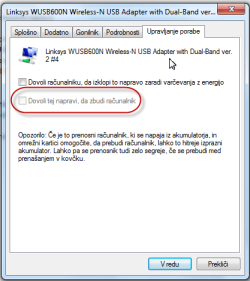
I'm trying to setup WoWLAN (Wake on WLAN), but I'm stuck at part where i have to enable waking in device manager.

I have to enable "Allow this device to wake up the computer" on my WLAN adapter, but It's grayed out.

Adapter is Linksys WUSB600N with latest driver from their website.

I have also tried to use powercfg method, but it will tell me that i do not have permissions. UAC is turned off and cmd is running as admin.

Any ideas?
 

Attachments
  • 26-7-2011 20-49-22.png
    26-7-2011 20-49-22.png
    15.2 KB · Views: 56
  • 26-7-2011 21-03-36.png
    26-7-2011 21-03-36.png
    2.9 KB · Views: 60

My Computer My Computer

At a glance

Windows 7 64bitCore i7 2600KAPACER DDR3 8GB (2x4GB) 1333 CL9 (DL.08GAJ.H9...Gigabyte NVIDIA GTX 570
OS
Windows 7 64bit
CPU
Core i7 2600K
Motherboard
Asus P8P67
Memory
APACER DDR3 8GB (2x4GB) 1333 CL9 (DL.08GAJ.H9EK2)
Graphics Card(s)
Gigabyte NVIDIA GTX 570
Sound Card
Integrated
Screen Resolution
1680x1050
Hard Drives
System: KINGSTON SSD HYPERX SH100S3120G
Data: HDD SAMSUNG 1TB SATA2 32MB/7200 (HD103SJ)
PSU
750W (I think)
hi :)
mine is the same ? have you had a look in the bios settings?
 

Attachments

  • Brys snap ?26 ?July ?2011 20h01m18s 01.png
    Brys snap ?26 ?July ?2011 20h01m18s 01.png
    39 KB · Views: 1,271

My Computer My Computer

At a glance

Operating System : Windows 7 Home Premium Edi...Processor : Intel Core 2 Quad Q8300 @ 2500 MHzPhysical Memory :8GB Corsair4x 2GB 800MHz C5 ...Video Card : XFX 6700 AMD
Computer Manufacturer/Model Number
packard bell IXTREME M5722
OS
Operating System : Windows 7 Home Premium Edition 6.01.7600 SP1 (x64)
CPU
Processor : Intel Core 2 Quad Q8300 @ 2500 MHz
Motherboard
Mainboard : Packard Bell (Acer EG43M )
Memory
Physical Memory :8GB Corsair4x 2GB 800MHz C5 DDR2
Graphics Card(s)
Video Card : XFX 6700 AMD
Monitor(s) Displays
Maestro 234DL - BenQ V2220 - BenQ VW2420H
Screen Resolution
Current Display :1920x1080p pixels at 60 Hz in HD LED
Hard Drives
Hard Disks : WDC (1000 GB)
Drive C: (Hard Disk) : 428 GB available on 491 GB
Drive D: (Hard Disk) : 426 GB available on 492 GB
SAMSUNG spinpoint HD103SJ 1000.2 GB
(X 2) KINGSTON SSD NOW V 30GB
PSU
XFX ProSeries 550W PSU
Case
PACKARD BELL IXTREME
Cooling
System Blower Current: 150mA Air Flow16CFM ;Akasa 90mm rear
Keyboard
Gigabyte Aivia K8100
Mouse
TRUST-Wireless Laser Mouse - Carbon edition MI-7770C
Internet Speed
TP-LINK > TL-WN951N / AV500 Gigabit Powerline Adapters
Browser
chrome dev
Other Info
EXTRA COOLING>(FAN CONTROLLER) PC Bay Cooler 3 x 40mm fans; Akasa AK-HD-BL Blue hard drive cooler 2 x 40 mm fan 4500 rpm 29.7 dBA
Bios> American Megatrends Inc.
Version : P01-A1
Date : 08/31/2009
ah found this for you it may help Configure Wake on Wireless LAN (WoWLAN) >>> Configure Wake on Wireless LAN (WoWLAN)


In Windows® 7, to enable support for Wake on Wireless LAN (WoWLAN) Group Temporal Key (GTK) Rekey, and Extensible Authentication Protocol (EAP) power-management scenarios, you must modify a registry key. GTK is used to encrypt and decrypt network traffic. EAP is an authentication framework that can be used over wired and wireless networks.

GTK Rekey and EAP wakeup are disabled by default, because not all devices support these options. A computer that is currently sleeping will not wake up on GTK or EAP actions, even if the network adapter supports them.

To enable WoWLAN support for GTK and EAP scenarios

To enable WoWLAN support for GTK and EAP scenarios, create or modify the following registry key:

Key Name: EnableWoWLAN

Type: DWORD

Path: HKEY_LOCAL_MACHINE\SYSTEM\CurrentControlSet\Services\NativeWifiP\Parameters

Value: 1

In addition to modifying this registry key, you must also configure the network device in the Device Manager.

Open Device Manager.

Right-click the network card you want to configure and select Device Properties.

In the Power Management tab, select the Allow this device to wake up the computer check box.

After configuring this registry key, the computer will respond to requests on GTK rekeying and to an EAP request-identity p
 

My Computer My Computer

At a glance

Operating System : Windows 7 Home Premium Edi...Processor : Intel Core 2 Quad Q8300 @ 2500 MHzPhysical Memory :8GB Corsair4x 2GB 800MHz C5 ...Video Card : XFX 6700 AMD
Computer Manufacturer/Model Number
packard bell IXTREME M5722
OS
Operating System : Windows 7 Home Premium Edition 6.01.7600 SP1 (x64)
CPU
Processor : Intel Core 2 Quad Q8300 @ 2500 MHz
Motherboard
Mainboard : Packard Bell (Acer EG43M )
Memory
Physical Memory :8GB Corsair4x 2GB 800MHz C5 DDR2
Graphics Card(s)
Video Card : XFX 6700 AMD
Monitor(s) Displays
Maestro 234DL - BenQ V2220 - BenQ VW2420H
Screen Resolution
Current Display :1920x1080p pixels at 60 Hz in HD LED
Hard Drives
Hard Disks : WDC (1000 GB)
Drive C: (Hard Disk) : 428 GB available on 491 GB
Drive D: (Hard Disk) : 426 GB available on 492 GB
SAMSUNG spinpoint HD103SJ 1000.2 GB
(X 2) KINGSTON SSD NOW V 30GB
PSU
XFX ProSeries 550W PSU
Case
PACKARD BELL IXTREME
Cooling
System Blower Current: 150mA Air Flow16CFM ;Akasa 90mm rear
Keyboard
Gigabyte Aivia K8100
Mouse
TRUST-Wireless Laser Mouse - Carbon edition MI-7770C
Internet Speed
TP-LINK > TL-WN951N / AV500 Gigabit Powerline Adapters
Browser
chrome dev
Other Info
EXTRA COOLING>(FAN CONTROLLER) PC Bay Cooler 3 x 40mm fans; Akasa AK-HD-BL Blue hard drive cooler 2 x 40 mm fan 4500 rpm 29.7 dBA
Bios> American Megatrends Inc.
Version : P01-A1
Date : 08/31/2009

My Computer My Computer

At a glance

Windows 7 64bitCore i7 2600KAPACER DDR3 8GB (2x4GB) 1333 CL9 (DL.08GAJ.H9...Gigabyte NVIDIA GTX 570
OS
Windows 7 64bit
CPU
Core i7 2600K
Motherboard
Asus P8P67
Memory
APACER DDR3 8GB (2x4GB) 1333 CL9 (DL.08GAJ.H9EK2)
Graphics Card(s)
Gigabyte NVIDIA GTX 570
Sound Card
Integrated
Screen Resolution
1680x1050
Hard Drives
System: KINGSTON SSD HYPERX SH100S3120G
Data: HDD SAMSUNG 1TB SATA2 32MB/7200 (HD103SJ)
PSU
750W (I think)
GTK Rekey and EAP wakeup are disabled by default, because not all devices support these options. A computer that is currently sleeping will not wake up on GTK or EAP actions, even if the network adapter supports them
 

My Computer My Computer

At a glance

Operating System : Windows 7 Home Premium Edi...Processor : Intel Core 2 Quad Q8300 @ 2500 MHzPhysical Memory :8GB Corsair4x 2GB 800MHz C5 ...Video Card : XFX 6700 AMD
Computer Manufacturer/Model Number
packard bell IXTREME M5722
OS
Operating System : Windows 7 Home Premium Edition 6.01.7600 SP1 (x64)
CPU
Processor : Intel Core 2 Quad Q8300 @ 2500 MHz
Motherboard
Mainboard : Packard Bell (Acer EG43M )
Memory
Physical Memory :8GB Corsair4x 2GB 800MHz C5 DDR2
Graphics Card(s)
Video Card : XFX 6700 AMD
Monitor(s) Displays
Maestro 234DL - BenQ V2220 - BenQ VW2420H
Screen Resolution
Current Display :1920x1080p pixels at 60 Hz in HD LED
Hard Drives
Hard Disks : WDC (1000 GB)
Drive C: (Hard Disk) : 428 GB available on 491 GB
Drive D: (Hard Disk) : 426 GB available on 492 GB
SAMSUNG spinpoint HD103SJ 1000.2 GB
(X 2) KINGSTON SSD NOW V 30GB
PSU
XFX ProSeries 550W PSU
Case
PACKARD BELL IXTREME
Cooling
System Blower Current: 150mA Air Flow16CFM ;Akasa 90mm rear
Keyboard
Gigabyte Aivia K8100
Mouse
TRUST-Wireless Laser Mouse - Carbon edition MI-7770C
Internet Speed
TP-LINK > TL-WN951N / AV500 Gigabit Powerline Adapters
Browser
chrome dev
Other Info
EXTRA COOLING>(FAN CONTROLLER) PC Bay Cooler 3 x 40mm fans; Akasa AK-HD-BL Blue hard drive cooler 2 x 40 mm fan 4500 rpm 29.7 dBA
Bios> American Megatrends Inc.
Version : P01-A1
Date : 08/31/2009
have a look here and look for a setting in the adapter for waking pc Guide Me
 

My Computer My Computer

At a glance

Operating System : Windows 7 Home Premium Edi...Processor : Intel Core 2 Quad Q8300 @ 2500 MHzPhysical Memory :8GB Corsair4x 2GB 800MHz C5 ...Video Card : XFX 6700 AMD
Computer Manufacturer/Model Number
packard bell IXTREME M5722
OS
Operating System : Windows 7 Home Premium Edition 6.01.7600 SP1 (x64)
CPU
Processor : Intel Core 2 Quad Q8300 @ 2500 MHz
Motherboard
Mainboard : Packard Bell (Acer EG43M )
Memory
Physical Memory :8GB Corsair4x 2GB 800MHz C5 DDR2
Graphics Card(s)
Video Card : XFX 6700 AMD
Monitor(s) Displays
Maestro 234DL - BenQ V2220 - BenQ VW2420H
Screen Resolution
Current Display :1920x1080p pixels at 60 Hz in HD LED
Hard Drives
Hard Disks : WDC (1000 GB)
Drive C: (Hard Disk) : 428 GB available on 491 GB
Drive D: (Hard Disk) : 426 GB available on 492 GB
SAMSUNG spinpoint HD103SJ 1000.2 GB
(X 2) KINGSTON SSD NOW V 30GB
PSU
XFX ProSeries 550W PSU
Case
PACKARD BELL IXTREME
Cooling
System Blower Current: 150mA Air Flow16CFM ;Akasa 90mm rear
Keyboard
Gigabyte Aivia K8100
Mouse
TRUST-Wireless Laser Mouse - Carbon edition MI-7770C
Internet Speed
TP-LINK > TL-WN951N / AV500 Gigabit Powerline Adapters
Browser
chrome dev
Other Info
EXTRA COOLING>(FAN CONTROLLER) PC Bay Cooler 3 x 40mm fans; Akasa AK-HD-BL Blue hard drive cooler 2 x 40 mm fan 4500 rpm 29.7 dBA
Bios> American Megatrends Inc.
Version : P01-A1
Date : 08/31/2009
GTK Rekey and EAP wakeup are disabled by default, because not all devices support these options. A computer that is currently sleeping will not wake up on GTK or EAP actions, even if the network adapter supports them

So this network card or machine does not support WoWLAN? I thought support for this this is normal just like regular WOL. I guess not then :(.

have a look here and look for a setting in the adapter for waking pc Guide Me

There is nothing related to power in advanced section of my adapter.
 

My Computer My Computer

At a glance

Windows 7 64bitCore i7 2600KAPACER DDR3 8GB (2x4GB) 1333 CL9 (DL.08GAJ.H9...Gigabyte NVIDIA GTX 570
OS
Windows 7 64bit
CPU
Core i7 2600K
Motherboard
Asus P8P67
Memory
APACER DDR3 8GB (2x4GB) 1333 CL9 (DL.08GAJ.H9EK2)
Graphics Card(s)
Gigabyte NVIDIA GTX 570
Sound Card
Integrated
Screen Resolution
1680x1050
Hard Drives
System: KINGSTON SSD HYPERX SH100S3120G
Data: HDD SAMSUNG 1TB SATA2 32MB/7200 (HD103SJ)
PSU
750W (I think)

My Computer My Computer

At a glance

Operating System : Windows 7 Home Premium Edi...Processor : Intel Core 2 Quad Q8300 @ 2500 MHzPhysical Memory :8GB Corsair4x 2GB 800MHz C5 ...Video Card : XFX 6700 AMD
Computer Manufacturer/Model Number
packard bell IXTREME M5722
OS
Operating System : Windows 7 Home Premium Edition 6.01.7600 SP1 (x64)
CPU
Processor : Intel Core 2 Quad Q8300 @ 2500 MHz
Motherboard
Mainboard : Packard Bell (Acer EG43M )
Memory
Physical Memory :8GB Corsair4x 2GB 800MHz C5 DDR2
Graphics Card(s)
Video Card : XFX 6700 AMD
Monitor(s) Displays
Maestro 234DL - BenQ V2220 - BenQ VW2420H
Screen Resolution
Current Display :1920x1080p pixels at 60 Hz in HD LED
Hard Drives
Hard Disks : WDC (1000 GB)
Drive C: (Hard Disk) : 428 GB available on 491 GB
Drive D: (Hard Disk) : 426 GB available on 492 GB
SAMSUNG spinpoint HD103SJ 1000.2 GB
(X 2) KINGSTON SSD NOW V 30GB
PSU
XFX ProSeries 550W PSU
Case
PACKARD BELL IXTREME
Cooling
System Blower Current: 150mA Air Flow16CFM ;Akasa 90mm rear
Keyboard
Gigabyte Aivia K8100
Mouse
TRUST-Wireless Laser Mouse - Carbon edition MI-7770C
Internet Speed
TP-LINK > TL-WN951N / AV500 Gigabit Powerline Adapters
Browser
chrome dev
Other Info
EXTRA COOLING>(FAN CONTROLLER) PC Bay Cooler 3 x 40mm fans; Akasa AK-HD-BL Blue hard drive cooler 2 x 40 mm fan 4500 rpm 29.7 dBA
Bios> American Megatrends Inc.
Version : P01-A1
Date : 08/31/2009
i know in my bios settings im sure i have a setting wake on wlan?
 

My Computer My Computer

At a glance

Operating System : Windows 7 Home Premium Edi...Processor : Intel Core 2 Quad Q8300 @ 2500 MHzPhysical Memory :8GB Corsair4x 2GB 800MHz C5 ...Video Card : XFX 6700 AMD
Computer Manufacturer/Model Number
packard bell IXTREME M5722
OS
Operating System : Windows 7 Home Premium Edition 6.01.7600 SP1 (x64)
CPU
Processor : Intel Core 2 Quad Q8300 @ 2500 MHz
Motherboard
Mainboard : Packard Bell (Acer EG43M )
Memory
Physical Memory :8GB Corsair4x 2GB 800MHz C5 DDR2
Graphics Card(s)
Video Card : XFX 6700 AMD
Monitor(s) Displays
Maestro 234DL - BenQ V2220 - BenQ VW2420H
Screen Resolution
Current Display :1920x1080p pixels at 60 Hz in HD LED
Hard Drives
Hard Disks : WDC (1000 GB)
Drive C: (Hard Disk) : 428 GB available on 491 GB
Drive D: (Hard Disk) : 426 GB available on 492 GB
SAMSUNG spinpoint HD103SJ 1000.2 GB
(X 2) KINGSTON SSD NOW V 30GB
PSU
XFX ProSeries 550W PSU
Case
PACKARD BELL IXTREME
Cooling
System Blower Current: 150mA Air Flow16CFM ;Akasa 90mm rear
Keyboard
Gigabyte Aivia K8100
Mouse
TRUST-Wireless Laser Mouse - Carbon edition MI-7770C
Internet Speed
TP-LINK > TL-WN951N / AV500 Gigabit Powerline Adapters
Browser
chrome dev
Other Info
EXTRA COOLING>(FAN CONTROLLER) PC Bay Cooler 3 x 40mm fans; Akasa AK-HD-BL Blue hard drive cooler 2 x 40 mm fan 4500 rpm 29.7 dBA
Bios> American Megatrends Inc.
Version : P01-A1
Date : 08/31/2009
Already doing that. Thanks anyway :)

In BIOS i only have "Onboard LAN turn on" (or something like that) setting, which is enabled.
 

My Computer My Computer

At a glance

Windows 7 64bitCore i7 2600KAPACER DDR3 8GB (2x4GB) 1333 CL9 (DL.08GAJ.H9...Gigabyte NVIDIA GTX 570
OS
Windows 7 64bit
CPU
Core i7 2600K
Motherboard
Asus P8P67
Memory
APACER DDR3 8GB (2x4GB) 1333 CL9 (DL.08GAJ.H9EK2)
Graphics Card(s)
Gigabyte NVIDIA GTX 570
Sound Card
Integrated
Screen Resolution
1680x1050
Hard Drives
System: KINGSTON SSD HYPERX SH100S3120G
Data: HDD SAMSUNG 1TB SATA2 32MB/7200 (HD103SJ)
PSU
750W (I think)
ive come to a dead end with ideas for you sorry but someone may come along and have more knowledge this thread has not been that live long :)
 

My Computer My Computer

At a glance

Operating System : Windows 7 Home Premium Edi...Processor : Intel Core 2 Quad Q8300 @ 2500 MHzPhysical Memory :8GB Corsair4x 2GB 800MHz C5 ...Video Card : XFX 6700 AMD
Computer Manufacturer/Model Number
packard bell IXTREME M5722
OS
Operating System : Windows 7 Home Premium Edition 6.01.7600 SP1 (x64)
CPU
Processor : Intel Core 2 Quad Q8300 @ 2500 MHz
Motherboard
Mainboard : Packard Bell (Acer EG43M )
Memory
Physical Memory :8GB Corsair4x 2GB 800MHz C5 DDR2
Graphics Card(s)
Video Card : XFX 6700 AMD
Monitor(s) Displays
Maestro 234DL - BenQ V2220 - BenQ VW2420H
Screen Resolution
Current Display :1920x1080p pixels at 60 Hz in HD LED
Hard Drives
Hard Disks : WDC (1000 GB)
Drive C: (Hard Disk) : 428 GB available on 491 GB
Drive D: (Hard Disk) : 426 GB available on 492 GB
SAMSUNG spinpoint HD103SJ 1000.2 GB
(X 2) KINGSTON SSD NOW V 30GB
PSU
XFX ProSeries 550W PSU
Case
PACKARD BELL IXTREME
Cooling
System Blower Current: 150mA Air Flow16CFM ;Akasa 90mm rear
Keyboard
Gigabyte Aivia K8100
Mouse
TRUST-Wireless Laser Mouse - Carbon edition MI-7770C
Internet Speed
TP-LINK > TL-WN951N / AV500 Gigabit Powerline Adapters
Browser
chrome dev
Other Info
EXTRA COOLING>(FAN CONTROLLER) PC Bay Cooler 3 x 40mm fans; Akasa AK-HD-BL Blue hard drive cooler 2 x 40 mm fan 4500 rpm 29.7 dBA
Bios> American Megatrends Inc.
Version : P01-A1
Date : 08/31/2009
Alright, thanks for your help anyway.
 

My Computer My Computer

At a glance

Windows 7 64bitCore i7 2600KAPACER DDR3 8GB (2x4GB) 1333 CL9 (DL.08GAJ.H9...Gigabyte NVIDIA GTX 570
OS
Windows 7 64bit
CPU
Core i7 2600K
Motherboard
Asus P8P67
Memory
APACER DDR3 8GB (2x4GB) 1333 CL9 (DL.08GAJ.H9EK2)
Graphics Card(s)
Gigabyte NVIDIA GTX 570
Sound Card
Integrated
Screen Resolution
1680x1050
Hard Drives
System: KINGSTON SSD HYPERX SH100S3120G
Data: HDD SAMSUNG 1TB SATA2 32MB/7200 (HD103SJ)
PSU
750W (I think)
I had this same issue with the adapter being greyed out. It was a very simple issue. I'm assuming when you went to try to edit your NIC, you probably picked the one that said Wireless Intel N-2200....(or whatever it was)

That's wrong. Find the correct NIC which will be something along the lines of Linksys NIC or (Any company and maybe a model number)....NIC. Look for the NIC word or the Network Internet Card words. Then when you look at the same options under power management.....As long as you checked it was enabled in your Registry, and it is....Then the option will not be greyed out. You will then have everything set up. I'm excited, I just accomplished this myself, I have a Android app that's supposed to be able to remotely turn on my computer. I'll test it out now and report back. I hope this helps others! I'm gonna post some tags at the bottom so other people are more likely to find this post. It was very simple you guys. We picked the wrong "Network adapter" and of course if it wasnt a Network adapter, the option would not be there! Took me a while also. Ill let you guys know if I get it working on my end! I got the darn thing to not be greyed out though, and I'm very excited for others who have the same issue.


tags: magic packet WOL Wake up on LAN WLAN WOWL WOW Sleep Hibernate Greyed out button power management Allow device wake java .jar shut down motherboard supported

Post more if you think of more. maybe Ill ask Google and add more, lol

Gonna go try asnd Ill get back to you!
 

My Computer My Computer

At a glance

California16 GBGTX 780M
Computer type
Laptop
Computer Manufacturer/Model Number
Alienware M17x R4
OS
California
Memory
16 GB
Graphics Card(s)
GTX 780M
Antivirus
Hitman Pro, Malware Bytes, CCleaner
Back
Top
