Wrapping text in Outlook 2007

Judesman

New member
Member
VIP
Local time
3:18 PM
Messages
217
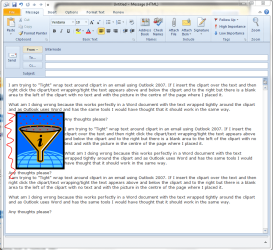
I am trying to "Tight" wrap text around clipart in an email using Outlook 2007. If I insert the clipart over the text and then right click the clipart/text wrapping/tight the text appears above and below the clipart and to the right but there is a blank area to the left of the clipart with no text and with the picture in the centre of the page where I placed it.

What am I doing wrong because this works perfectly in a Word document with the text wrapped tightly around the clipart and as Outlook uses Word and has the same tools I would have thought that it should work in the same way.

Any thoughts please?
 

My Computer My Computer

Computer type
PC/Desktop
Computer Manufacturer/Model Number
Dell OptiPlex 960
OS
Windows 7 64 bit
Memory
8 GB
Graphics Card(s)
Redeon HD 4670
Monitor(s) Displays
Dell
Antivirus
Norton
Browser
IE 10
Hi,

Can you post an image of the problem please Judesman?

Thanks,
Golden
 

My Computer My Computer

Computer type
PC/Desktop
Computer Manufacturer/Model Number
Golden Mk. I.4
OS
Windows 10 Pro x64 ; Xubuntu x64
CPU
Intel i7 860 @ 2.80 GHz O/C'ed to 4.0GHz
Motherboard
Gigabyte P55A-UD3R Rev.1. Award BIOS F13
Memory
16GB Corsair Vengance DDR3 @ 661 MHz Dual Channel (9-9-9-24)
Graphics Card(s)
EVGA NVidia GTX 560 1024MB
Sound Card
Realtek Integrated
Monitor(s) Displays
Dual Samsung SyncMaster 2494HS
Screen Resolution
1920*1080 and 1920*1080
Hard Drives
1*Samsung 840 EVO 120GB SSD;
1*OCZ Vertex 2 60GB SSD;
2*Samsung F3 SpinPoint 1TB in RAID0;
1*Samsung F1 SpinPoint 1TB;
2*Western Digital 1TB External USB 3.0
1*Western Digital 500GB External USB 3.0
1*Seagate 500GB External USB 2.0
PSU
Thermaltake ToughPower QFan 750W
Case
Thermaltake Element S VK60001W2Z
Cooling
Corsair H60 Water Cooling, 2*230mm and 2*80mm case fans
Keyboard
Logitech G110
Mouse
Logitech MX518
OK - I see what you mean = the red squiggle in this image, right? I can replicate your problem.......Im working on it now.
 

Attachments

  • browse.PNG
    browse.PNG
    52 KB · Views: 28

My Computer My Computer

Computer type
PC/Desktop
Computer Manufacturer/Model Number
Golden Mk. I.4
OS
Windows 10 Pro x64 ; Xubuntu x64
CPU
Intel i7 860 @ 2.80 GHz O/C'ed to 4.0GHz
Motherboard
Gigabyte P55A-UD3R Rev.1. Award BIOS F13
Memory
16GB Corsair Vengance DDR3 @ 661 MHz Dual Channel (9-9-9-24)
Graphics Card(s)
EVGA NVidia GTX 560 1024MB
Sound Card
Realtek Integrated
Monitor(s) Displays
Dual Samsung SyncMaster 2494HS
Screen Resolution
1920*1080 and 1920*1080
Hard Drives
1*Samsung 840 EVO 120GB SSD;
1*OCZ Vertex 2 60GB SSD;
2*Samsung F3 SpinPoint 1TB in RAID0;
1*Samsung F1 SpinPoint 1TB;
2*Western Digital 1TB External USB 3.0
1*Western Digital 500GB External USB 3.0
1*Seagate 500GB External USB 2.0
PSU
Thermaltake ToughPower QFan 750W
Case
Thermaltake Element S VK60001W2Z
Cooling
Corsair H60 Water Cooling, 2*230mm and 2*80mm case fans
Keyboard
Logitech G110
Mouse
Logitech MX518
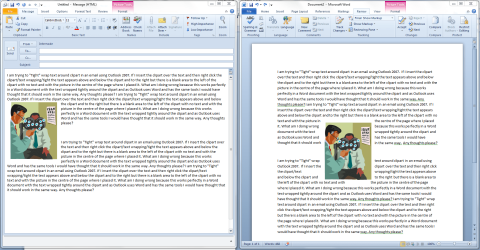
Mmmm...this problem is also in Outlook 2010..........Outlook on left, Word on right. Sorry Judesman, no matter what I do, I cannot get Outlook to display the same way as Word. A bug perhaps? Lets see if others know of a way around this...
 

Attachments

  • browse.PNG
    browse.PNG
    132.2 KB · Views: 15

My Computer My Computer

Computer type
PC/Desktop
Computer Manufacturer/Model Number
Golden Mk. I.4
OS
Windows 10 Pro x64 ; Xubuntu x64
CPU
Intel i7 860 @ 2.80 GHz O/C'ed to 4.0GHz
Motherboard
Gigabyte P55A-UD3R Rev.1. Award BIOS F13
Memory
16GB Corsair Vengance DDR3 @ 661 MHz Dual Channel (9-9-9-24)
Graphics Card(s)
EVGA NVidia GTX 560 1024MB
Sound Card
Realtek Integrated
Monitor(s) Displays
Dual Samsung SyncMaster 2494HS
Screen Resolution
1920*1080 and 1920*1080
Hard Drives
1*Samsung 840 EVO 120GB SSD;
1*OCZ Vertex 2 60GB SSD;
2*Samsung F3 SpinPoint 1TB in RAID0;
1*Samsung F1 SpinPoint 1TB;
2*Western Digital 1TB External USB 3.0
1*Western Digital 500GB External USB 3.0
1*Seagate 500GB External USB 2.0
PSU
Thermaltake ToughPower QFan 750W
Case
Thermaltake Element S VK60001W2Z
Cooling
Corsair H60 Water Cooling, 2*230mm and 2*80mm case fans
Keyboard
Logitech G110
Mouse
Logitech MX518
Is perhaps that you need to use "Square" not "Tight"? :


Insert/paste pictures as This option displays how Outlook inserts pictures relative to the text in your e-mail. You can insert images inline with text, allow images to move with text, or wrap text around, in front of, or behind an image. In the drop-down list, select one of the following:
  • In line with text This option inserts the graphic in a paragraph as if it were text. This option is used by default. The graphic moves as you add or delete text. You can drag the graphic to reposition it the same way that you drag text.
  • Square This option wraps the text around all sides of a square around the graphic. The graphic does not move as you add or delete text, but you can drag the graphic to reposition it.
  • Tight This option wraps the text around the graphic in an irregular shape around the actual image. The graphic does not move as you add or delete text, but you can drag the graphic to reposition it.
  • Behind text This option inserts the graphic so that the graphic floats on its own layer behind the text. There is no border around the graphic. The graphic does not move as you add or delete text, but you can drag the graphic to reposition it.
  • In front of text This option inserts the graphic so that the graphic floats on its own layer in front of the text. There is no border around the graphic. The graphic does not move as you add or delete text, but you can drag the graphic to reposition it.
  • Through This option wraps the text around the graphic, including filling the space created by a concave shape, such as a crescent moon. The graphic does not move as you add or delete text, but you can drag the graphic to reposition it.
  • Top and bottom This option prevents text from wrapping on the sides of the graphic. The graphic does not move as you add or delete text, but you can drag the graphic to reposition it.
 

My Computer My Computer

Computer type
PC/Desktop
Computer Manufacturer/Model Number
Packard Bell
OS
Windows 7 Home Premium 64bit
CPU
Intel(R) Core(TM) i3-2120 CPU @ 3.30GHz
Motherboard
Packard Bell IPISB-AG
Memory
3.00 GB
Graphics Card(s)
(1) Intel(R) HD Graphics (2) VNC Mirror Driver
Sound Card
Realtek High Definition Audio
Monitor(s) Displays
AIO LCD
Screen Resolution
1920 x 1080
Hard Drives
WDC WD10EADX-22TDHB0 ATA Device
Fixed hard disk media
4 partitions
931.51 GB
Keyboard
Wireless
Mouse
Wireless
Antivirus
Microsoft Security Essentials
Browser
IE; Firefox
Other Info
Also:
Samsung N220 Plus Netbook - Windows 7 Home
HP laptop
iPad 5
Thank you Golden and Irene.

The problem is exactly as appears in Golden's first image except the picture is in the middle of the page and the area to the left is blank as depicted.

Irene; square or tight the problem is the same.

I have to say that I don't usually need to wrap text in an email but I don't understand why it doesn't work whilst all seems to be OK with Word.

Thanks for your input. Perhaps someone else will come up with a solution.
 

My Computer My Computer

Computer type
PC/Desktop
Computer Manufacturer/Model Number
Dell OptiPlex 960
OS
Windows 7 64 bit
Memory
8 GB
Graphics Card(s)
Redeon HD 4670
Monitor(s) Displays
Dell
Antivirus
Norton
Browser
IE 10
This is a shot in the dark, but you could try:
From the Help menu on the top right, choose Office Diagnostics.

Who knows, just might do the trick. :)
 

My Computer My Computer

Computer type
PC/Desktop
Computer Manufacturer/Model Number
Packard Bell
OS
Windows 7 Home Premium 64bit
CPU
Intel(R) Core(TM) i3-2120 CPU @ 3.30GHz
Motherboard
Packard Bell IPISB-AG
Memory
3.00 GB
Graphics Card(s)
(1) Intel(R) HD Graphics (2) VNC Mirror Driver
Sound Card
Realtek High Definition Audio
Monitor(s) Displays
AIO LCD
Screen Resolution
1920 x 1080
Hard Drives
WDC WD10EADX-22TDHB0 ATA Device
Fixed hard disk media
4 partitions
931.51 GB
Keyboard
Wireless
Mouse
Wireless
Antivirus
Microsoft Security Essentials
Browser
IE; Firefox
Other Info
Also:
Samsung N220 Plus Netbook - Windows 7 Home
HP laptop
iPad 5
Thank you Irene. I have looked at Office Help in Outlook and trawled through Google but can't find any help anywhere.

It seems odd that it works in Word but not in Outlook when Word is the email editor.
 

My Computer My Computer

Computer type
PC/Desktop
Computer Manufacturer/Model Number
Dell OptiPlex 960
OS
Windows 7 64 bit
Memory
8 GB
Graphics Card(s)
Redeon HD 4670
Monitor(s) Displays
Dell
Antivirus
Norton
Browser
IE 10
Sorry I have not been able to help -I'll continue to look though. :)
 

My Computer My Computer

Computer type
PC/Desktop
Computer Manufacturer/Model Number
Packard Bell
OS
Windows 7 Home Premium 64bit
CPU
Intel(R) Core(TM) i3-2120 CPU @ 3.30GHz
Motherboard
Packard Bell IPISB-AG
Memory
3.00 GB
Graphics Card(s)
(1) Intel(R) HD Graphics (2) VNC Mirror Driver
Sound Card
Realtek High Definition Audio
Monitor(s) Displays
AIO LCD
Screen Resolution
1920 x 1080
Hard Drives
WDC WD10EADX-22TDHB0 ATA Device
Fixed hard disk media
4 partitions
931.51 GB
Keyboard
Wireless
Mouse
Wireless
Antivirus
Microsoft Security Essentials
Browser
IE; Firefox
Other Info
Also:
Samsung N220 Plus Netbook - Windows 7 Home
HP laptop
iPad 5
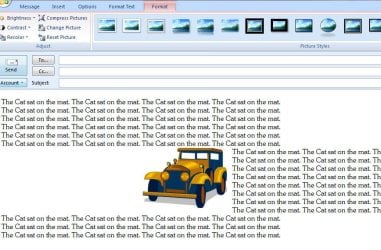
This is the problem with text wrapped "Tight" and to "Both Sides"
 

Attachments

  • Outlook 2007 Text Wrap.JPG
    Outlook 2007 Text Wrap.JPG
    102.7 KB · Views: 3

My Computer My Computer

Computer type
PC/Desktop
Computer Manufacturer/Model Number
Dell OptiPlex 960
OS
Windows 7 64 bit
Memory
8 GB
Graphics Card(s)
Redeon HD 4670
Monitor(s) Displays
Dell
Antivirus
Norton
Browser
IE 10
Yep. I think it could be a bug Judesman : no matter how you change the position of the image, it never wraps text to the left of the image.

I wonder if Outlook is really using Word as the email editor, or a "variant" of Word, if that makes sense.
 

My Computer My Computer

Computer type
PC/Desktop
Computer Manufacturer/Model Number
Golden Mk. I.4
OS
Windows 10 Pro x64 ; Xubuntu x64
CPU
Intel i7 860 @ 2.80 GHz O/C'ed to 4.0GHz
Motherboard
Gigabyte P55A-UD3R Rev.1. Award BIOS F13
Memory
16GB Corsair Vengance DDR3 @ 661 MHz Dual Channel (9-9-9-24)
Graphics Card(s)
EVGA NVidia GTX 560 1024MB
Sound Card
Realtek Integrated
Monitor(s) Displays
Dual Samsung SyncMaster 2494HS
Screen Resolution
1920*1080 and 1920*1080
Hard Drives
1*Samsung 840 EVO 120GB SSD;
1*OCZ Vertex 2 60GB SSD;
2*Samsung F3 SpinPoint 1TB in RAID0;
1*Samsung F1 SpinPoint 1TB;
2*Western Digital 1TB External USB 3.0
1*Western Digital 500GB External USB 3.0
1*Seagate 500GB External USB 2.0
PSU
Thermaltake ToughPower QFan 750W
Case
Thermaltake Element S VK60001W2Z
Cooling
Corsair H60 Water Cooling, 2*230mm and 2*80mm case fans
Keyboard
Logitech G110
Mouse
Logitech MX518
Thank you Golden for your help, that is appreciated.

It seems odd that this problem hasn't been discussed before.
 

My Computer My Computer

Computer type
PC/Desktop
Computer Manufacturer/Model Number
Dell OptiPlex 960
OS
Windows 7 64 bit
Memory
8 GB
Graphics Card(s)
Redeon HD 4670
Monitor(s) Displays
Dell
Antivirus
Norton
Browser
IE 10
I'll do a buit more digging around here in the office this morning..........there are loads of email sending off email with images in them, so I'll see if anyone can help.
 

My Computer My Computer

Computer type
PC/Desktop
Computer Manufacturer/Model Number
Golden Mk. I.4
OS
Windows 10 Pro x64 ; Xubuntu x64
CPU
Intel i7 860 @ 2.80 GHz O/C'ed to 4.0GHz
Motherboard
Gigabyte P55A-UD3R Rev.1. Award BIOS F13
Memory
16GB Corsair Vengance DDR3 @ 661 MHz Dual Channel (9-9-9-24)
Graphics Card(s)
EVGA NVidia GTX 560 1024MB
Sound Card
Realtek Integrated
Monitor(s) Displays
Dual Samsung SyncMaster 2494HS
Screen Resolution
1920*1080 and 1920*1080
Hard Drives
1*Samsung 840 EVO 120GB SSD;
1*OCZ Vertex 2 60GB SSD;
2*Samsung F3 SpinPoint 1TB in RAID0;
1*Samsung F1 SpinPoint 1TB;
2*Western Digital 1TB External USB 3.0
1*Western Digital 500GB External USB 3.0
1*Seagate 500GB External USB 2.0
PSU
Thermaltake ToughPower QFan 750W
Case
Thermaltake Element S VK60001W2Z
Cooling
Corsair H60 Water Cooling, 2*230mm and 2*80mm case fans
Keyboard
Logitech G110
Mouse
Logitech MX518
Thank you very much, Golden.
 

My Computer My Computer

Computer type
PC/Desktop
Computer Manufacturer/Model Number
Dell OptiPlex 960
OS
Windows 7 64 bit
Memory
8 GB
Graphics Card(s)
Redeon HD 4670
Monitor(s) Displays
Dell
Antivirus
Norton
Browser
IE 10
Hi Judesman,

Did a poll here in the office and no-one has ever tight wrapped left+right, but when they try they get the same issue as you. This is predominantly Outlook 2007. The only thing I can suggest is to get in touch with Microsoft with the query.

Sorry I couldn't come back here with a solution.

Regards,
Golden
 

My Computer My Computer

Computer type
PC/Desktop
Computer Manufacturer/Model Number
Golden Mk. I.4
OS
Windows 10 Pro x64 ; Xubuntu x64
CPU
Intel i7 860 @ 2.80 GHz O/C'ed to 4.0GHz
Motherboard
Gigabyte P55A-UD3R Rev.1. Award BIOS F13
Memory
16GB Corsair Vengance DDR3 @ 661 MHz Dual Channel (9-9-9-24)
Graphics Card(s)
EVGA NVidia GTX 560 1024MB
Sound Card
Realtek Integrated
Monitor(s) Displays
Dual Samsung SyncMaster 2494HS
Screen Resolution
1920*1080 and 1920*1080
Hard Drives
1*Samsung 840 EVO 120GB SSD;
1*OCZ Vertex 2 60GB SSD;
2*Samsung F3 SpinPoint 1TB in RAID0;
1*Samsung F1 SpinPoint 1TB;
2*Western Digital 1TB External USB 3.0
1*Western Digital 500GB External USB 3.0
1*Seagate 500GB External USB 2.0
PSU
Thermaltake ToughPower QFan 750W
Case
Thermaltake Element S VK60001W2Z
Cooling
Corsair H60 Water Cooling, 2*230mm and 2*80mm case fans
Keyboard
Logitech G110
Mouse
Logitech MX518
Hi Golden,

Sorry about the delay in getting back to you. I have been away for a few days.

Thanks for researching this for me. The main thing here is that this is not my computer but probably an Outlook bug. My experiences with Microsoft support are not good but when I have a bit of time I might look into this. All seems to work as it should in Word so at least my skills are up to it.

Your help is appreciated and if I find out anymore I will post again here.

Judesman.
 

My Computer My Computer

Computer type
PC/Desktop
Computer Manufacturer/Model Number
Dell OptiPlex 960
OS
Windows 7 64 bit
Memory
8 GB
Graphics Card(s)
Redeon HD 4670
Monitor(s) Displays
Dell
Antivirus
Norton
Browser
IE 10
The main thing here is that this is not my computer but probably an Outlook bug.

I agree - it seems to be a bug, and also present in Outlook 2010 based on my experiments here at home.

Let us know if you find anything further.

Regards,
Golden
 

My Computer My Computer

Computer type
PC/Desktop
Computer Manufacturer/Model Number
Golden Mk. I.4
OS
Windows 10 Pro x64 ; Xubuntu x64
CPU
Intel i7 860 @ 2.80 GHz O/C'ed to 4.0GHz
Motherboard
Gigabyte P55A-UD3R Rev.1. Award BIOS F13
Memory
16GB Corsair Vengance DDR3 @ 661 MHz Dual Channel (9-9-9-24)
Graphics Card(s)
EVGA NVidia GTX 560 1024MB
Sound Card
Realtek Integrated
Monitor(s) Displays
Dual Samsung SyncMaster 2494HS
Screen Resolution
1920*1080 and 1920*1080
Hard Drives
1*Samsung 840 EVO 120GB SSD;
1*OCZ Vertex 2 60GB SSD;
2*Samsung F3 SpinPoint 1TB in RAID0;
1*Samsung F1 SpinPoint 1TB;
2*Western Digital 1TB External USB 3.0
1*Western Digital 500GB External USB 3.0
1*Seagate 500GB External USB 2.0
PSU
Thermaltake ToughPower QFan 750W
Case
Thermaltake Element S VK60001W2Z
Cooling
Corsair H60 Water Cooling, 2*230mm and 2*80mm case fans
Keyboard
Logitech G110
Mouse
Logitech MX518
Back
Top