write permission for a specific network computer

huiol09

New member
Local time
5:23 PM
Messages
53
I have many computers into my network. I share my movies folder with the whole network but i would like to give write permission only to my HTPC (permission to create and delete files)

Where can i find a tutorial explaining me how to do that ? Or could someone just post me the steps to do it ?

thanks
 

My Computer

OS
win7
anarchoi, are these machines which require special sharing both Windows 7 machines?

Per machine permissions aren't really possible although there may be a way to accomplish what you want using the Homegroup permission settings.
 

My Computer

Computer type
PC/Desktop
Computer Manufacturer/Model Number
Home built
OS
Windows 7 Ult, Windows 8.1 Pro,
CPU
Q9650-4.275GHz, E8600 4.5GHz, E6750-3.8GHz
Motherboard
Evga 780i FTW
Memory
G.Skill PC2 9600 1200Mhz 5 5 5 15 2T
Graphics Card(s)
GTX480
Sound Card
Asus Xonar D2
Monitor(s) Displays
HannsG
Screen Resolution
1680X1050
Hard Drives
GSkill Phoenix Pro 120GB SSD
PSU
ThermalTake Toughpower 1000Watt modular
Case
ThermalTake XaserV
Cooling
Xigmatek S1283
Keyboard
Logitech G15
Mouse
Logitech G9
Internet Speed
T1
No, the machine with the shared movies is under Windows 7 but the HTPC is under Windows 8

The HTPC (win8) needs to have write access to the shared folders of the PC (win7)
 

My Computer

OS
win7
No, the machine with the shared movies is under Windows 7 but the HTPC is under Windows 8

The HTPC (win8) needs to have write access to the shared folders of the PC (win7)

You can just set up a Homegroup between those two machines but don't allow the other machines in the network to join the Homegroup.

This will give both Homegroup machines exclusive access to each other shared folders.

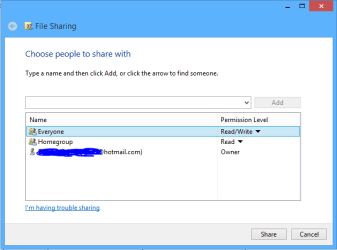
The other machines in the Workgroup won't have access to the Homegroup machines unless you share a folder using the Homegroup style sharing options "Share With" "Specific people" Add> "Everyone" read/write as required.

Only one problem is that Windows 8 does not retain the Write permission on Library's when you reboot, it's either a glitch or a safety feature so you have to redo them each time you require write access.
 

Attachments

  • share with Everyone.PNG
    share with Everyone.PNG
    15.5 KB · Views: 1

My Computer

Computer type
PC/Desktop
Computer Manufacturer/Model Number
Home built
OS
Windows 7 Ult, Windows 8.1 Pro,
CPU
Q9650-4.275GHz, E8600 4.5GHz, E6750-3.8GHz
Motherboard
Evga 780i FTW
Memory
G.Skill PC2 9600 1200Mhz 5 5 5 15 2T
Graphics Card(s)
GTX480
Sound Card
Asus Xonar D2
Monitor(s) Displays
HannsG
Screen Resolution
1680X1050
Hard Drives
GSkill Phoenix Pro 120GB SSD
PSU
ThermalTake Toughpower 1000Watt modular
Case
ThermalTake XaserV
Cooling
Xigmatek S1283
Keyboard
Logitech G15
Mouse
Logitech G9
Internet Speed
T1
thank you !!

This type of sharing was built into Windows yet hardly anyone seems to knows about it.

I'm glad it worked for you. :)
 

My Computer

Computer type
PC/Desktop
Computer Manufacturer/Model Number
Home built
OS
Windows 7 Ult, Windows 8.1 Pro,
CPU
Q9650-4.275GHz, E8600 4.5GHz, E6750-3.8GHz
Motherboard
Evga 780i FTW
Memory
G.Skill PC2 9600 1200Mhz 5 5 5 15 2T
Graphics Card(s)
GTX480
Sound Card
Asus Xonar D2
Monitor(s) Displays
HannsG
Screen Resolution
1680X1050
Hard Drives
GSkill Phoenix Pro 120GB SSD
PSU
ThermalTake Toughpower 1000Watt modular
Case
ThermalTake XaserV
Cooling
Xigmatek S1283
Keyboard
Logitech G15
Mouse
Logitech G9
Internet Speed
T1
Back
Top